Display and edit feature attributes using feature forms.
Use case
Feature forms help enhance the accuracy, efficiency, and user experience of attribute editing in your application. Forms can be authored as part of the web map using Field Maps Designer or using Map Viewer. This allows a simplified user experience to edit feature attribute data on the web map.
How to use the sample
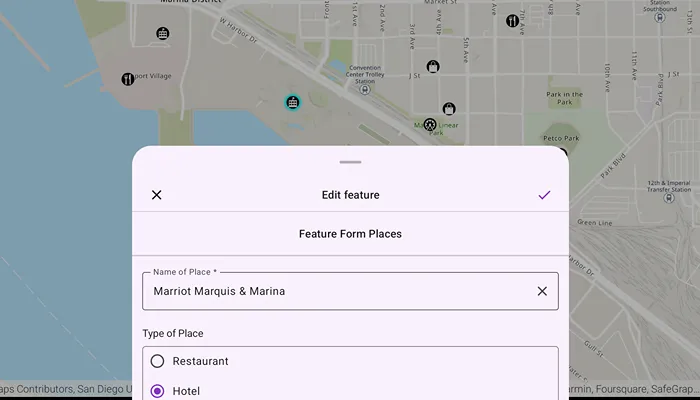
Tap a feature on the map to open a sheet displaying the feature form. Select form elements in the list and perform edits to update the field values. Tap the submit icon to commit the changes on the web map.
How it works
- Add a
Mapto theMapViewusingPortalURL and item ID. - When the map is tapped, perform an identify operation to check if the tapped location is an
ArcGISFeature. - Create a
FeatureFormobject using the identifiedArcGISFeature.
- Note: If the feature’s
FeatureLayer,ArcGISFeatureTable, or theSubtypeSublayerhas an authoredFeatureFormDefinition, then this definition will be used to create theFeatureForm. If such a definition is not found, a default definition is generated.
- Use the
FeatureFormtoolkit component to display the feature form configuration by providing the createdfeatureFormobject. - Optionally, you can add a
validationErrorVisibilityoption to theFeatureFormtoolkit component that determines the visibility of validation errors. - Once edits are added to the form fields, check if the validation errors list are empty using
featureForm.validationErrorsto verify that there are no errors. - To commit edits on the service geodatabase:
- Call
featureForm.finishEditing()to save edits to the database. - Retrieve the backing service feature table’s geodatabase using
serviceFeatureTable?.serviceGeodatabase. - Verify the service geodatabase can commit changes back to the service using
serviceGeodatabase.serviceInfo?.canUseServiceGeodatabaseApplyEdits - If apply edits are allowed, call
serviceGeodatabase.applyEdits()to apply local edits to the online service. - If edits are not allowed on the
ServiceGeodatabase, then apply edits to theServiceFeatureTableusingServiceFeatureTable.applyEdits()
- Call
Relevant API
- ArcGISFeature
- FeatureForm
- FeatureLayer
- FieldFormElement
- GroupFormElement
- ServiceFeatureTable
- ServiceGeodatabase
About the data
This sample uses a feature forms enabled Feature Form Places web map, which contains fictional places in San Diego of various hotels, restaurants, and shopping centers, with relevant reviews and ratings.
Additional information
Follow the tutorial to create your own form using the Map Viewer. This sample uses the FeatureForm and GeoView-Compose Toolkit modules to be able to implement a composable MapView which displays a composable FeatureForm UI.
This sample uses the FeatureForm toolkit component. For information about setting up the toolkit, as well as code for the underlying component, visit the toolkit docs.
Tags
compose, edits, feature, featureforms, form, geoview-compose, jetpack, toolkit
Sample code
/* Copyright 2024 Esri * * Licensed under the Apache License, Version 2.0 (the "License"); * you may not use this file except in compliance with the License. * You may obtain a copy of the License at * *    http://www.apache.org/licenses/LICENSE-2.0 * * Unless required by applicable law or agreed to in writing, software * distributed under the License is distributed on an "AS IS" BASIS, * WITHOUT WARRANTIES OR CONDITIONS OF ANY KIND, either express or implied. * See the License for the specific language governing permissions and * limitations under the License. * */
package com.esri.arcgismaps.sample.editfeaturesusingfeatureforms.components
import android.app.Applicationimport androidx.compose.ui.unit.dpimport androidx.lifecycle.AndroidViewModelimport androidx.lifecycle.viewModelScopeimport com.arcgismaps.data.ArcGISFeatureimport com.arcgismaps.data.ServiceFeatureTableimport com.arcgismaps.exceptions.FeatureFormValidationExceptionimport com.arcgismaps.mapping.ArcGISMapimport com.arcgismaps.mapping.PortalItemimport com.arcgismaps.mapping.featureforms.FeatureFormimport com.arcgismaps.mapping.featureforms.FeatureFormDefinitionimport com.arcgismaps.mapping.featureforms.FieldFormElementimport com.arcgismaps.mapping.featureforms.FormElementimport com.arcgismaps.mapping.featureforms.GroupFormElementimport com.arcgismaps.mapping.layers.FeatureLayerimport com.arcgismaps.mapping.view.SingleTapConfirmedEventimport com.arcgismaps.toolkit.geoviewcompose.MapViewProxyimport com.esri.arcgismaps.sample.editfeaturesusingfeatureforms.Rimport com.esri.arcgismaps.sample.sampleslib.components.MessageDialogViewModelimport kotlinx.coroutines.flow.MutableStateFlowimport kotlinx.coroutines.flow.StateFlowimport kotlinx.coroutines.flow.asStateFlowimport kotlinx.coroutines.launch
/** * A view model for the MainScreen UI */class MapViewModel(application: Application) : AndroidViewModel(application) {
    val mapViewProxy = MapViewProxy()
    // feature forms enabled web-map showcasing places of interest with form fields    private var portalItem = PortalItem(application.getString(R.string.feature_form_web_map))
    val map = ArcGISMap(portalItem)
    // keep track of the selected feature form    private val _featureForm = MutableStateFlow<FeatureForm?>(null)    val featureForm: StateFlow<FeatureForm?> = _featureForm.asStateFlow()
    // keep track of the list of validation errors    private val _errors = MutableStateFlow<List<ErrorInfo>>(listOf())    val errors: StateFlow<List<ErrorInfo>> = _errors.asStateFlow()
    // create a ViewModel to handle dialog interactions    val messageDialogVM: MessageDialogViewModel = MessageDialogViewModel()
    init {        viewModelScope.launch {            // load a map that has a FeatureFormDefinition on any of its layers            map.load()        }    }
    /**     * Apply attribute edits to the Geodatabase backing the ServiceFeatureTable     * and refresh the local feature. Persisting changes to attributes is     * not part of the FeatureForm API.     *     * @param onEditsCompleted Invoked when edits are applied successfully     */    fun applyEdits(onEditsCompleted: () -> Unit) {        val featureForm = _featureForm.value            ?: return messageDialogVM.showMessageDialog("Feature form state is not configured")
        // update the state flow with the list of validation errors found        _errors.value = validateFormInputEdits(featureForm)        // if there are no errors then update the feature        if (_errors.value.isEmpty()) {            val serviceFeatureTable = featureForm.feature.featureTable as? ServiceFeatureTable                ?: return messageDialogVM.showMessageDialog("Cannot save feature edit without a ServiceFeatureTable")
            viewModelScope.launch {                // commits changes of the edited feature to the database                featureForm.finishEditing().onSuccess {                    serviceFeatureTable.serviceGeodatabase?.let { database ->                        if (database.serviceInfo?.canUseServiceGeodatabaseApplyEdits == true) {                            // applies all local edits in the tables to the service                            database.applyEdits().onFailure {                                return@onFailure messageDialogVM.showMessageDialog(                                    title = it.message.toString(),                                    description = it.cause.toString()                                )                            }                        } else {                            // uploads any changes to the local table to the feature service                            serviceFeatureTable.applyEdits().onFailure {                                return@onFailure messageDialogVM.showMessageDialog(                                    title = it.message.toString(),                                    description = it.cause.toString()                                )                            }                        }                    }                    // resets the attributes and geometry to the values in the data source                    featureForm.feature.refresh()                    // unselect the feature after the edits have been saved                    (featureForm.feature.featureTable?.layer as FeatureLayer).clearSelection()                    // dismiss dialog when edits are completed                    onEditsCompleted()                }.onFailure {                    return@onFailure messageDialogVM.showMessageDialog(                        title = it.message.toString(),                        description = it.cause.toString()                    )                }            }        }    }
    /**     * Performs validation checks on the given [featureForm] with local edits.     * Return a list of [ErrorInfo] if errors are found, if not, empty list is returned.     */    private fun validateFormInputEdits(featureForm: FeatureForm): List<ErrorInfo> {        val errors = mutableListOf<ErrorInfo>()        // If an element is editable or derives its value from an arcade expression,        // its errors must be corrected before submitting the form        featureForm.validationErrors.value.forEach { entry ->            entry.value.forEach { error ->                featureForm.elements.getFormElement(entry.key)?.let { formElement ->                    // Ignore validation on non-editable and non-visible elements                    if (formElement.isEditable.value || formElement.hasValueExpression) {                        errors.add(                            ErrorInfo(                                fieldName = formElement.label,                                error = error as FeatureFormValidationException                            )                        )                    }                }            }        }        return errors    }
    /**     * Cancels the commit by resetting the validation errors.     */    fun cancelCommit() {        // reset the validation errors        _errors.value = listOf()    }
    /**     * Discard edits and unselects feature from the layer     */    fun rollbackEdits() {        // discard local edits to the feature form        _featureForm.value?.discardEdits()        // unselect the feature        (_featureForm.value?.feature?.featureTable?.layer as FeatureLayer).clearSelection()        // reset the validation errors        _errors.value = listOf()    }
    /**     * Perform an identify the tapped [ArcGISFeature] and retrieve the     * layer's [FeatureFormDefinition] to create the respective [FeatureForm]     */    fun onSingleTapConfirmed(singleTapEvent: SingleTapConfirmedEvent) {        viewModelScope.launch {            mapViewProxy.identifyLayers(                screenCoordinate = singleTapEvent.screenCoordinate,                tolerance = 22.dp,                returnPopupsOnly = false            ).onSuccess { results ->                try {                    results.forEach { result ->                        result.geoElements.firstOrNull {                            it is ArcGISFeature && (it.featureTable?.layer as? FeatureLayer)?.featureFormDefinition != null                        }?.let {                            val feature = it as ArcGISFeature                            val layer = feature.featureTable!!.layer as FeatureLayer                            val featureForm = FeatureForm(feature)                            // select the feature                            layer.selectFeature(feature)                            // set the UI to an editing state with the FeatureForm                            _featureForm.value = featureForm                        }                    }                } catch (e: Exception) {                    messageDialogVM.showMessageDialog(                        title = "Failed to create feature form for the feature",                        description = e.message.toString()                    )                }            }        }    }}
/** * Returns the [FieldFormElement] with the given [fieldName] in the [FeatureForm]. If none exists * null is returned. */fun List<FormElement>.getFormElement(fieldName: String): FieldFormElement? {    val fieldElements = filterIsInstance<FieldFormElement>()    val element = if (fieldElements.isNotEmpty()) {        fieldElements.firstNotNullOfOrNull {            if (it.fieldName == fieldName) it else null        }    } else {        null    }
    return element ?: run {        val groupElements = filterIsInstance<GroupFormElement>()        if (groupElements.isNotEmpty()) {            groupElements.firstNotNullOfOrNull {                it.elements.getFormElement(fieldName)            }        } else {            null        }    }}
/** * Class that provides a validation error [error] for the field with name [fieldName]. */data class ErrorInfo(val fieldName: String, val error: FeatureFormValidationException)
/* Copyright 2024 Esri * * Licensed under the Apache License, Version 2.0 (the "License"); * you may not use this file except in compliance with the License. * You may obtain a copy of the License at * * http://www.apache.org/licenses/LICENSE-2.0 * * Unless required by applicable law or agreed to in writing, software * distributed under the License is distributed on an "AS IS" BASIS, * WITHOUT WARRANTIES OR CONDITIONS OF ANY KIND, either express or implied. * See the License for the specific language governing permissions and * limitations under the License. * */
package com.esri.arcgismaps.sample.editfeaturesusingfeatureforms
import android.os.Bundleimport androidx.activity.ComponentActivityimport androidx.activity.compose.setContentimport androidx.activity.enableEdgeToEdgeimport androidx.lifecycle.viewmodel.compose.viewModelimport com.arcgismaps.ArcGISEnvironmentimport com.esri.arcgismaps.sample.editfeaturesusingfeatureforms.components.MapViewModelimport com.esri.arcgismaps.sample.editfeaturesusingfeatureforms.screens.MainScreenimport com.esri.arcgismaps.sample.sampleslib.theme.SampleAppTheme
class MainActivity : ComponentActivity() {
override fun onCreate(savedInstanceState: Bundle?) { super.onCreate(savedInstanceState) ArcGISEnvironment.applicationContext = this enableEdgeToEdge() setContent { SampleAppTheme { val mapViewModel: MapViewModel = viewModel() MainScreen(mapViewModel) } } }}/* Copyright 2024 Esri * * Licensed under the Apache License, Version 2.0 (the "License"); * you may not use this file except in compliance with the License. * You may obtain a copy of the License at * * http://www.apache.org/licenses/LICENSE-2.0 * * Unless required by applicable law or agreed to in writing, software * distributed under the License is distributed on an "AS IS" BASIS, * WITHOUT WARRANTIES OR CONDITIONS OF ANY KIND, either express or implied. * See the License for the specific language governing permissions and * limitations under the License. * */
package com.esri.arcgismaps.sample.editfeaturesusingfeatureforms.screens
import android.content.res.Configurationimport androidx.compose.foundation.layout.Arrangementimport androidx.compose.foundation.layout.Columnimport androidx.compose.foundation.layout.Rowimport androidx.compose.foundation.layout.Spacerimport androidx.compose.foundation.layout.fillMaxSizeimport androidx.compose.foundation.layout.fillMaxWidthimport androidx.compose.foundation.layout.heightimport androidx.compose.foundation.layout.heightInimport androidx.compose.foundation.layout.navigationBarsPaddingimport androidx.compose.foundation.layout.paddingimport androidx.compose.foundation.layout.wrapContentSizeimport androidx.compose.foundation.lazy.LazyColumnimport androidx.compose.material.icons.Iconsimport androidx.compose.material.icons.filled.Checkimport androidx.compose.material.icons.filled.Closeimport androidx.compose.material3.AlertDialogimport androidx.compose.material3.Buttonimport androidx.compose.material3.Cardimport androidx.compose.material3.CircularProgressIndicatorimport androidx.compose.material3.ExperimentalMaterial3Apiimport androidx.compose.material3.HorizontalDividerimport androidx.compose.material3.Iconimport androidx.compose.material3.IconButtonimport androidx.compose.material3.MaterialThemeimport androidx.compose.material3.ModalBottomSheetimport androidx.compose.material3.OutlinedButtonimport androidx.compose.material3.Scaffoldimport androidx.compose.material3.Textimport androidx.compose.material3.rememberModalBottomSheetStateimport androidx.compose.runtime.Composableimport androidx.compose.runtime.LaunchedEffectimport androidx.compose.runtime.collectAsStateimport androidx.compose.runtime.getValueimport androidx.compose.runtime.mutableStateOfimport androidx.compose.runtime.rememberimport androidx.compose.runtime.rememberCoroutineScopeimport androidx.compose.runtime.setValueimport androidx.compose.ui.Alignmentimport androidx.compose.ui.Modifierimport androidx.compose.ui.res.stringResourceimport androidx.compose.ui.text.style.TextAlignimport androidx.compose.ui.tooling.preview.Previewimport androidx.compose.ui.unit.dpimport androidx.compose.ui.window.Dialogimport com.arcgismaps.toolkit.featureforms.FeatureFormimport com.arcgismaps.toolkit.featureforms.ValidationErrorVisibilityimport com.arcgismaps.toolkit.featureforms.theme.FeatureFormDefaultsimport com.arcgismaps.toolkit.geoviewcompose.MapViewimport com.esri.arcgismaps.sample.editfeaturesusingfeatureforms.Rimport com.esri.arcgismaps.sample.editfeaturesusingfeatureforms.components.ErrorInfoimport com.esri.arcgismaps.sample.editfeaturesusingfeatureforms.components.MapViewModelimport com.esri.arcgismaps.sample.sampleslib.components.MessageDialogimport com.esri.arcgismaps.sample.sampleslib.components.SampleTopAppBarimport com.esri.arcgismaps.sample.sampleslib.theme.SampleAppThemeimport kotlinx.coroutines.launch
@OptIn(ExperimentalMaterial3Api::class)@Composablefun MainScreen(mapViewModel: MapViewModel) {
val scope = rememberCoroutineScope() var showBottomSheet by remember { mutableStateOf(false) } val sheetState = rememberModalBottomSheetState()
// the feature form the currently selected feature val featureForm by mapViewModel.featureForm.collectAsState() // the validation errors found when the edits are applied val formValidationErrors by mapViewModel.errors.collectAsState()
// boolean trackers for save and discard edits dialogs var showSaveEditsDialog by remember { mutableStateOf(false) } var showDiscardEditsDialog by remember { mutableStateOf(false) }
Scaffold( modifier = Modifier.fillMaxSize(), topBar = { SampleTopAppBar(title = stringResource(R.string.edit_features_using_feature_forms_app_name)) } ) { padding -> // display the composable map using the mapViewModel MapView( arcGISMap = mapViewModel.map, mapViewProxy = mapViewModel.mapViewProxy, modifier = Modifier .padding(padding) .fillMaxSize(), onSingleTapConfirmed = { mapViewModel.onSingleTapConfirmed(it) } )
// update bottom sheet visibility when a feature is selected LaunchedEffect(featureForm) { showBottomSheet = featureForm != null }
if (showBottomSheet && featureForm != null) { // display feature form bottom sheet ModalBottomSheet( onDismissRequest = { showBottomSheet = false showDiscardEditsDialog = true }, sheetState = sheetState ) { // top bar to manage save or discard edits TopFormBar( onClose = { showDiscardEditsDialog = true }, onSave = { showSaveEditsDialog = true mapViewModel.applyEdits { scope.launch { sheetState.hide() showBottomSheet = false showSaveEditsDialog = false } } }) // display the selected feature form using the Toolkit component FeatureForm( featureForm = featureForm!!, modifier = Modifier .fillMaxSize() .padding(top = 20.dp) .navigationBarsPadding(), validationErrorVisibility = ValidationErrorVisibility.Automatic, colorScheme = FeatureFormDefaults.colorScheme( groupElementColors = FeatureFormDefaults.groupElementColors( outlineColor = MaterialTheme.colorScheme.secondary, labelColor = MaterialTheme.colorScheme.onSurface, supportingTextColor = MaterialTheme.colorScheme.onSurfaceVariant, containerColor = MaterialTheme.colorScheme.surfaceContainer ) ), typography = FeatureFormDefaults.typography( readOnlyFieldTypography = FeatureFormDefaults.readOnlyFieldTypography( labelStyle = MaterialTheme.typography.headlineSmall, textStyle = MaterialTheme.typography.bodyMedium, supportingTextStyle = MaterialTheme.typography.labelLarge ) ) ) } } }
if (showSaveEditsDialog && formValidationErrors.isNotEmpty() && showBottomSheet) { // validation errors found, cancel the commit and show validation errors ValidationErrorsDialog(errors = formValidationErrors) { showSaveEditsDialog = false mapViewModel.cancelCommit() } } else if (showSaveEditsDialog && showBottomSheet) { // no validation errors found, show dialog when committing edits SaveFormDialog() }
if (showDiscardEditsDialog) { DiscardEditsDialog( onConfirm = { mapViewModel.rollbackEdits() scope.launch { sheetState.hide() showDiscardEditsDialog = false showBottomSheet = false } }, onCancel = { showDiscardEditsDialog = false showBottomSheet = true } ) }
// Display a MessageDialog with any error information mapViewModel.messageDialogVM.apply { if (dialogStatus) { MessageDialog( title = messageTitle, description = messageDescription, onDismissRequest = ::dismissDialog ) } }}
@Composablefun DiscardEditsDialog(onConfirm: () -> Unit, onCancel: () -> Unit) { AlertDialog( onDismissRequest = onCancel, confirmButton = { Button(onClick = onConfirm) { Text(text = stringResource(R.string.discard)) } }, dismissButton = { OutlinedButton(onClick = onCancel) { Text(text = stringResource(R.string.cancel)) } }, title = { Text(text = stringResource(R.string.discard_edits)) }, text = { Text(text = stringResource(R.string.all_changes_will_be_lost)) } )}
@Composablefun TopFormBar( onClose: () -> Unit = {}, onSave: () -> Unit = {},) { Column { Row( modifier = Modifier .fillMaxWidth() .padding(horizontal = 12.dp), horizontalArrangement = Arrangement.Absolute.SpaceBetween, verticalAlignment = Alignment.CenterVertically ) { IconButton(onClick = onClose) { Icon( imageVector = Icons.Default.Close, contentDescription = "Close Feature Editor" ) } Text( text = "Edit feature", style = MaterialTheme.typography.titleMedium, textAlign = TextAlign.Center ) IconButton(onClick = onSave) { Icon( imageVector = Icons.Default.Check, contentDescription = "Save Feature", tint = MaterialTheme.colorScheme.primary ) } } HorizontalDivider() }}
@Composableprivate fun SaveFormDialog() { // show a progress dialog when no errors are present Dialog(onDismissRequest = { /* cannot be dismissed */ }) { Card(modifier = Modifier.wrapContentSize()) { Column( modifier = Modifier.padding(25.dp), horizontalAlignment = Alignment.CenterHorizontally, verticalArrangement = Arrangement.Center, ) { CircularProgressIndicator() Spacer(modifier = Modifier.height(10.dp)) Text(text = "Saving..") } } }}
@Composableprivate fun ValidationErrorsDialog(errors: List<ErrorInfo>, onDismissRequest: () -> Unit) { // show all the validation errors in a dialog AlertDialog( onDismissRequest = onDismissRequest, modifier = Modifier.heightIn(max = 600.dp), confirmButton = { Row( modifier = Modifier.fillMaxWidth(), horizontalArrangement = Arrangement.Center ) { Button(onClick = onDismissRequest) { Text(text = stringResource(R.string.view)) } } }, title = { Column { Text( modifier = Modifier.fillMaxWidth(), text = "Form Validation Errors", style = MaterialTheme.typography.titleLarge, textAlign = TextAlign.Center ) } }, text = { Card(modifier = Modifier.fillMaxWidth()) { Column(modifier = Modifier.padding(15.dp)) { Text( text = stringResource(R.string.attributes_failed, errors.count()), color = MaterialTheme.colorScheme.error ) Spacer(modifier = Modifier.height(10.dp)) LazyColumn(verticalArrangement = Arrangement.spacedBy(10.dp)) { items(errors.count()) { index -> Text( text = "${errors[index].fieldName}: ${errors[index].error::class.simpleName.toString()}", color = MaterialTheme.colorScheme.error ) } } } } } )}
@Preview@Preview(uiMode = Configuration.UI_MODE_NIGHT_YES)@Composablefun SavePreview() { SampleAppTheme { SaveFormDialog() }}
@Preview(showBackground = true)@Preview(uiMode = Configuration.UI_MODE_NIGHT_YES)@Composablefun ValidationErrorsPreview() { SampleAppTheme { ValidationErrorsDialog(listOf()) { } }}
@Preview(showBackground = true)@Preview(uiMode = Configuration.UI_MODE_NIGHT_YES)@Composablefun DiscardEditsDialogPreview() { SampleAppTheme { DiscardEditsDialog(onConfirm = {}) {} }}
@Preview(showBackground = true)@Composablefun TopFormBarPreview() { SampleAppTheme { TopFormBar() }}