Show an exploratory line of sight between two moving objects.
Use case
An exploratory line of sight between GeoElements (i.e. observer and target) will not remain constant whilst one or both are on the move.
An ExploratoryGeoElementLineOfSight is therefore useful in cases where visibility between two GeoElements requires monitoring over a period of time in a partially obstructed field of view
(such as buildings in a city).
Note: This analysis is a form of “exploratory analysis”, which means the results are calculated on the current scale of the data, and the results are generated very quickly but not persisted.
How to use the sample
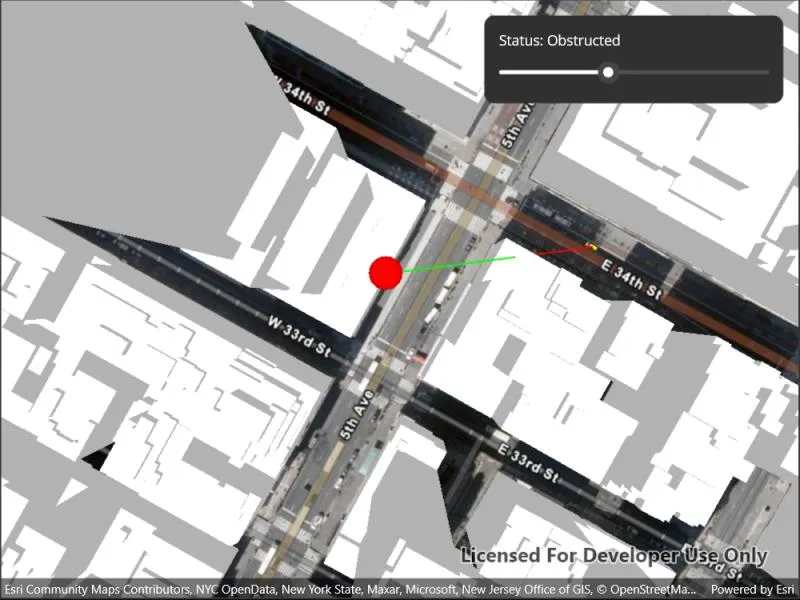
An exploratory line of sight will display between a point on the Empire State Building (observer) and a taxi (target). The taxi will drive around a block and the exploratory line of sight should automatically update. The taxi will be highlighted when it is visible. You can change the observer height with the slider to see how it affects the target’s visibility.
How it works
- Instantiate an
AnalysisOverlayand add it to theSceneView’s analysis overlays collection. - Instantiate an
ExploratoryGeoElementLineOfSight, passing in observer and targetGeoElements (features or graphics). Add the exploratory line of sight to the analysis overlay’s analyses collection. - To get the target visibility when it changes, react to the target visibility changing on the
ExploratoryGeoElementLineOfSightinstance.
Relevant API
- AnalysisOverlay
- ExploratoryGeoElementLineOfSight
- ExploratoryLineOfSight.TargetVisibility
Offline data
This sample downloads the following items from ArcGIS Online automatically:
Tags
3D, exploratory line of sight, visibility, visibility analysis
Sample code
// Copyright 2022 Esri.//// Licensed under the Apache License, Version 2.0 (the "License"); you may not use this file except in compliance with the License.// You may obtain a copy of the License at: http://www.apache.org/licenses/LICENSE-2.0//// Unless required by applicable law or agreed to in writing, software distributed under the License is distributed on an// "AS IS" BASIS, WITHOUT WARRANTIES OR CONDITIONS OF ANY KIND, either express or implied. See the License for the specific// language governing permissions and limitations under the License.
using ArcGIS.Samples.Managers;using Esri.ArcGISRuntime.Geometry;using Esri.ArcGISRuntime.Mapping;using Esri.ArcGISRuntime.Symbology;using Esri.ArcGISRuntime.UI;using Esri.ArcGISRuntime.UI.GeoAnalysis;
using Colors = System.Drawing.Color;
namespace ArcGIS.Samples.ShowExploratoryLineOfSightBetweenGeoelements{    [ArcGIS.Samples.Shared.Attributes.Sample(        name: "Show exploratory line of sight between geoelements",        category: "Analysis",        description: "Show an exploratory line of sight between two moving objects.",        instructions: "An exploratory line of sight will display between a point on the Empire State Building (observer) and a taxi (target).",        tags: new[] { "3D", "exploratory line of sight", "visibility", "visibility analysis" })]    [ArcGIS.Samples.Shared.Attributes.OfflineData("3af5cfec0fd24dac8d88aea679027cb9")]    public partial class ShowExploratoryLineOfSightBetweenGeoelements : ContentPage    {        // URL of the elevation service - provides elevation component of the scene        private readonly Uri _elevationUri = new Uri("https://elevation3d.arcgis.com/arcgis/rest/services/WorldElevation3D/Terrain3D/ImageServer");
        // URL of the building service - provides builidng models        private readonly Uri _buildingsUri = new Uri("https://tiles.arcgis.com/tiles/z2tnIkrLQ2BRzr6P/arcgis/rest/services/Buildings_NewYork_v18/SceneServer/layers/0");
        // Starting point of the observation point        private readonly MapPoint _observerPoint = new MapPoint(-73.984988, 40.748131, 20, SpatialReferences.Wgs84);
        // Graphic to represent the observation point        private Graphic _observerGraphic;
        // Graphic to represent the observed target        private Graphic _taxiGraphic;
        // Line of Sight Analysis        private ExploratoryGeoElementLineOfSight _geoLine;
        // For taxi animation - four points in a loop        private readonly MapPoint[] _points = {            new MapPoint(-73.984513, 40.748469, SpatialReferences.Wgs84),            new MapPoint(-73.985068, 40.747786, SpatialReferences.Wgs84),            new MapPoint(-73.983452, 40.747091, SpatialReferences.Wgs84),            new MapPoint(-73.982961, 40.747762, SpatialReferences.Wgs84)        };
        // For taxi animation - tracks animation state        private int _pointIndex = 0;        private int _frameIndex = 0;        private readonly int _frameMax = 150;
        public ShowExploratoryLineOfSightBetweenGeoelements()        {            InitializeComponent();
            // Create the UI, setup the control references and execute initialization            _ = Initialize();        }
        private async Task Initialize()        {            // Create scene            Scene myScene = new Scene(BasemapStyle.ArcGISImagery)            {                // Set initial viewpoint                InitialViewpoint = new Viewpoint(_observerPoint, 1600)            };            // Create the elevation source            ElevationSource myElevationSource = new ArcGISTiledElevationSource(_elevationUri);            // Add the elevation source to the scene            myScene.BaseSurface.ElevationSources.Add(myElevationSource);            // Create the building scene layer            ArcGISSceneLayer mySceneLayer = new ArcGISSceneLayer(_buildingsUri);            // Add the building layer to the scene            myScene.OperationalLayers.Add(mySceneLayer);
            // Add the observer to the scene            // Create a graphics overlay with relative surface placement; relative surface placement allows the Z position of the observation point to be adjusted            GraphicsOverlay overlay = new GraphicsOverlay() { SceneProperties = new LayerSceneProperties(SurfacePlacement.Relative) };            // Create the symbol that will symbolize the observation point            SimpleMarkerSceneSymbol symbol = new SimpleMarkerSceneSymbol(SimpleMarkerSceneSymbolStyle.Sphere, Colors.Red, 10, 10, 10, SceneSymbolAnchorPosition.Bottom);            // Create the observation point graphic from the point and symbol            _observerGraphic = new Graphic(_observerPoint, symbol);            // Add the observer to the overlay            overlay.Graphics.Add(_observerGraphic);            // Add the overlay to the scene            MySceneView.GraphicsOverlays.Add(overlay);
            try            {                // Add the taxi to the scene                // Create the model symbol for the taxi                ModelSceneSymbol taxiSymbol = await ModelSceneSymbol.CreateAsync(new Uri(GetModelUri()));                // Set the anchor position for the mode; ensures that the model appears above the ground                taxiSymbol.AnchorPosition = SceneSymbolAnchorPosition.Bottom;                // Create the graphic from the taxi starting point and the symbol                _taxiGraphic = new Graphic(_points[0], taxiSymbol);                // Add the taxi graphic to the overlay                overlay.Graphics.Add(_taxiGraphic);
                // Create GeoElement Line of sight analysis (taxi to building)                // Create the analysis                _geoLine = new ExploratoryGeoElementLineOfSight(_observerGraphic, _taxiGraphic)                {                    // Apply an offset to the target. This helps avoid some false negatives                    TargetOffsetZ = 2                };                // Create the analysis overlay                AnalysisOverlay myAnalysisOverlay = new AnalysisOverlay();                // Add the analysis to the overlay                myAnalysisOverlay.Analyses.Add(_geoLine);                // Add the analysis overlay to the scene                MySceneView.AnalysisOverlays.Add(myAnalysisOverlay);
                // Create a timer; this will enable animating the taxi                Dispatcher.StartTimer(new TimeSpan(0, 0, 0, 0, 60), () =>                {                    // Move the taxi every time the timer elapses                    AnimationTimer_Elapsed(this, null);                    // Keep the timer running                    return true;                });
                // Subscribe to TargetVisible events; allows for updating the UI and selecting the taxi when it is visible                _geoLine.TargetVisibilityChanged += Geoline_TargetVisibilityChanged;
                // Add the scene to the view                MySceneView.Scene = myScene;            }            catch (Exception e)            {                await Application.Current.Windows[0].Page.DisplayAlertAsync("Error", e.ToString(), "OK");            }        }
        private void AnimationTimer_Elapsed(object sender, EventArgs e)        {            // Note: the contents of this function are solely related to animating the taxi
            // Increment the frame counter            _frameIndex++;
            // Reset the frame counter once one segment of the path has been travelled            if (_frameIndex == _frameMax)            {                _frameIndex = 0;
                // Start navigating toward the next point                _pointIndex++;
                // Restart if finished circuit                if (_pointIndex == _points.Length)                {                    _pointIndex = 0;                }            }
            // Get the point the taxi is travelling from            MapPoint starting = _points[_pointIndex];            // Get the point the taxi is travelling to            MapPoint ending = _points[(_pointIndex + 1) % _points.Length];            // Calculate the progress based on the current frame            double progress = _frameIndex / (double)_frameMax;            // Calculate the position of the taxi when it is {progress}% of the way through            MapPoint intermediatePoint = InterpolatedPoint(starting, ending, progress);            // Update the taxi geometry            _taxiGraphic.Geometry = intermediatePoint;
            // Update the taxi rotation.            GeodeticDistanceResult distance = starting.DistanceGeodetic(ending, LinearUnits.Meters, AngularUnits.Degrees, GeodeticCurveType.Geodesic);            ((ModelSceneSymbol)_taxiGraphic.Symbol).Heading = distance.Azimuth1;        }
        private MapPoint InterpolatedPoint(MapPoint firstPoint, MapPoint secondPoint, double progress)        {            // This function returns a MapPoint that is the result of travelling {progress}% of the way from {firstPoint} to {secondPoint}
            // Get the difference between the two points            MapPoint difference = new MapPoint(secondPoint.X - firstPoint.X, secondPoint.Y - firstPoint.Y, secondPoint.Z - firstPoint.Z, SpatialReferences.Wgs84);            // Scale the difference by the progress towards the destination            MapPoint scaled = new MapPoint(difference.X * progress, difference.Y * progress, difference.Z * progress);            // Add the scaled progress to the starting point            return new MapPoint(firstPoint.X + scaled.X, firstPoint.Y + scaled.Y, firstPoint.Z + scaled.Z);        }
        private void Geoline_TargetVisibilityChanged(object sender, EventArgs e)        {            // This is needed because Runtime delivers notifications from a different thread that doesn't have access to UI controls            Microsoft.Maui.ApplicationModel.MainThread.BeginInvokeOnMainThread(UpdateUiAndSelection);        }
        private void UpdateUiAndSelection()        {            switch (_geoLine.TargetVisibility)            {                case ExploratoryLineOfSightTargetVisibility.Obstructed:                    MyStatusLabel.Text = "Status: Obstructed";                    _taxiGraphic.IsSelected = false;                    break;
                case ExploratoryLineOfSightTargetVisibility.Visible:                    MyStatusLabel.Text = "Status: Visible";                    _taxiGraphic.IsSelected = true;                    break;
                default:                case ExploratoryLineOfSightTargetVisibility.Unknown:                    MyStatusLabel.Text = "Status: Unknown";                    _taxiGraphic.IsSelected = false;                    break;            }        }
        private static string GetModelUri()        {            // Returns the taxi model
            return DataManager.GetDataFolder("3af5cfec0fd24dac8d88aea679027cb9", "dolmus.3ds");        }
        private void MyHeightSlider_ValueChanged(object sender, EventArgs e)        {            // Update the height of the observer based on the slider value
            // Constrain the min and max to 20 and 150 units            double minHeight = 20;            double maxHeight = 150;
            // Scale the slider value; its default range is 0-10            double value = MyHeightSlider.Value;
            // Get the current point            MapPoint oldPoint = (MapPoint)_observerGraphic.Geometry;
            // Create a new point with the same (x,y) but updated z            MapPoint newPoint = new MapPoint(oldPoint.X, oldPoint.Y, (maxHeight - minHeight) * value + minHeight);
// Apply the updated geometry to the observer point _observerGraphic.Geometry = newPoint; } }}<?xml version="1.0" encoding="utf-8" ?><ContentPage x:Class="ArcGIS.Samples.ShowExploratoryLineOfSightBetweenGeoelements.ShowExploratoryLineOfSightBetweenGeoelements" xmlns="http://schemas.microsoft.com/dotnet/2021/maui" xmlns:x="http://schemas.microsoft.com/winfx/2009/xaml" xmlns:esriUI="clr-namespace:Esri.ArcGISRuntime.Maui;assembly=Esri.ArcGISRuntime.Maui" xmlns:sampleViewer="clr-namespace:ArcGIS.Resources"> <Grid Style="{DynamicResource EsriSampleContainer}"> <esriUI:SceneView x:Name="MySceneView" Style="{DynamicResource EsriSampleGeoView}" /> <Border Style="{DynamicResource EsriSampleControlPanel}"> <VerticalStackLayout Padding="5" Spacing="5"> <Label x:Name="MyStatusLabel" Text="Status: " /> <Slider x:Name="MyHeightSlider" ValueChanged="MyHeightSlider_ValueChanged" /> </VerticalStackLayout> </Border> </Grid></ContentPage>