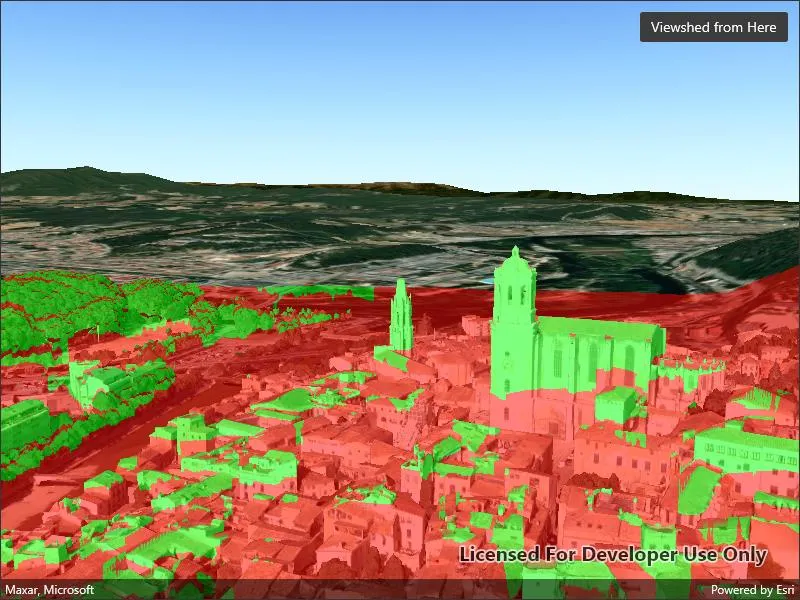
Analyze the exploratory viewshed for a camera showing the visible and obstructed areas from an observer’s vantage point.
Use case
An exploratory viewshed analysis is a type of visual analysis you can perform at the current rendered resolution of a scene. The exploratory viewshed aims to answer the question ‘What can I see from a given location?’. The output is an overlay with two different colors - one representing the visible areas (green) and the other representing the obstructed areas (red).
Note: This analysis is a form of “exploratory analysis”, which means the results are calculated on the current scale of the data, and the results are generated very quickly but not persisted. If persisted analysis performed at the full resolution of the data is required, consider using a ViewshedFunction to perform a viewshed calculation instead.
How to use the sample
The sample will start with an exploratory viewshed created from the initial camera location, so only the visible (green) portion of the exploratory viewshed will be visible. Move around the scene to see the obstructed (red) portions. Tap the ‘Update from Camera’ button to update the exploratory viewshed to the current camera position.
How it works
- Create an
ExploratoryLocationViewshed, passing in the initialCameraand a min/max distance. - Update the viewshed using
ExploratoryLocationViewshed.UpdateFromCamera().
Relevant API
- AnalysisOverlay
- ArcGISScene
- ArcGISTiledElevationSource
- Camera
- ExploratoryLocationViewshed
- IntegratedMeshLayer
- SceneView
About the data
The scene shows an integrated mesh layer of Girona, Spain with the World Elevation source image service both hosted on ArcGIS Online.
Tags
3D, exploratory viewshed, integrated mesh, scene, visibility analysis
Sample code
// Copyright 2022 Esri.//// Licensed under the Apache License, Version 2.0 (the "License"); you may not use this file except in compliance with the License.// You may obtain a copy of the License at: http://www.apache.org/licenses/LICENSE-2.0//// Unless required by applicable law or agreed to in writing, software distributed under the License is distributed on an// "AS IS" BASIS, WITHOUT WARRANTIES OR CONDITIONS OF ANY KIND, either express or implied. See the License for the specific// language governing permissions and limitations under the License.
using Esri.ArcGISRuntime.Geometry;using Esri.ArcGISRuntime.Mapping;using Esri.ArcGISRuntime.UI.GeoAnalysis;
namespace ArcGIS.Samples.ShowExploratoryViewshedFromCameraInScene{    [ArcGIS.Samples.Shared.Attributes.Sample(        name: "Show exploratory viewshed from camera in scene",        category: "Analysis",        description: "Analyze the exploratory viewshed for a camera showing the visible and obstructed areas from an observer's vantage point.",        instructions: "The sample will start with an exploratory viewshed created from the initial camera location, so only the visible (green) portion of the exploratory viewshed will be visible. Move around the scene to see the obstructed (red) portions. Tap the 'Update from Camera' button to update the exploratory viewshed to the current camera position.",        tags: new[] { "3D", "exploratory viewshed", "integrated mesh", "scene", "visibility analysis" })]    public partial class ShowExploratoryViewshedFromCameraInScene : ContentPage    {        // URL for a scene service of buildings in Girona.        private string _gironaMeshUrl = "https://tiles.arcgis.com/tiles/z2tnIkrLQ2BRzr6P/arcgis/rest/services/Girona_Spain/SceneServer";
        // URL for an image service to use as an elevation source.        private string _elevationSourceUrl = "https://elevation3d.arcgis.com/arcgis/rest/services/WorldElevation3D/Terrain3D/ImageServer";
        // Location viewshed analysis to show visible and obstructed areas from the camera        private ExploratoryLocationViewshed _viewshedForCamera;
        public ShowExploratoryViewshedFromCameraInScene()        {            InitializeComponent();
            // Create the Scene, basemap, camera, and location viewshed analysis            Initialize();        }
        private void Initialize()        {            // Create a new Scene with an imagery basemap            Scene myScene = new Scene(BasemapStyle.ArcGISImageryStandard);
            // Create a scene layer to show buildings in the Scene            IntegratedMeshLayer meshLayer = new IntegratedMeshLayer(new Uri(_gironaMeshUrl));            myScene.OperationalLayers.Add(meshLayer);
            // Create an elevation source for the Scene            ArcGISTiledElevationSource elevationSrc = new ArcGISTiledElevationSource(new Uri(_elevationSourceUrl));            myScene.BaseSurface.ElevationSources.Add(elevationSrc);
            // Add the Scene to the SceneView            MySceneView.Scene = myScene;
            // Set the viewpoint with a new camera focused on the cathedral in Girona.            Camera observerCamera = new Camera(new MapPoint(2.82691, 41.985, 124.987, SpatialReferences.Wgs84), 332.131, 82.4732, 0.0);            MySceneView.SetViewpointCameraAsync(observerCamera);
            // Create an ExploratoryLocationViewshed analysis using the camera as the observer            _viewshedForCamera = new ExploratoryLocationViewshed(observerCamera, 1, 1000);
            // Create an analysis overlay to contain the viewshed analysis results            AnalysisOverlay viewshedOverlay = new AnalysisOverlay();
            // Add the location viewshed analysis to the analysis overlay, then add the overlay to the scene view            viewshedOverlay.Analyses.Add(_viewshedForCamera);            MySceneView.AnalysisOverlays.Add(viewshedOverlay);        }
private void UpdateObserverWithCamera(object sender, EventArgs e) { // Use the current camera to update the observer for the location viewshed analysis _viewshedForCamera.UpdateFromCamera(MySceneView.Camera); } }}<?xml version="1.0" encoding="utf-8" ?><ContentPage x:Class="ArcGIS.Samples.ShowExploratoryViewshedFromCameraInScene.ShowExploratoryViewshedFromCameraInScene" xmlns="http://schemas.microsoft.com/dotnet/2021/maui" xmlns:x="http://schemas.microsoft.com/winfx/2009/xaml" xmlns:esriUI="clr-namespace:Esri.ArcGISRuntime.Maui;assembly=Esri.ArcGISRuntime.Maui"> <Grid> <esriUI:SceneView x:Name="MySceneView" /> <Button x:Name="UpdateObserverButton" Margin="10" Clicked="UpdateObserverWithCamera" HorizontalOptions="End" Text="Viewshed from Here" VerticalOptions="Start" /> </Grid></ContentPage>