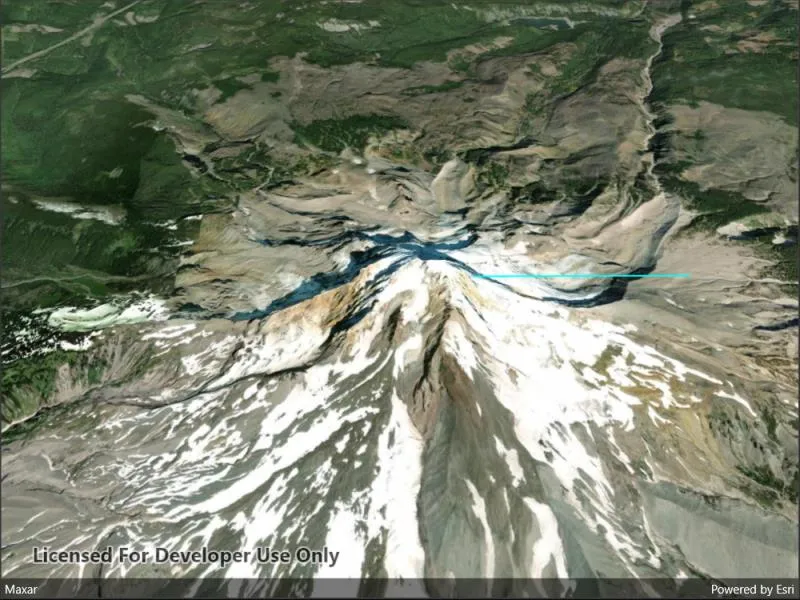
Perform an exploratory line of sight analysis between two points in real time.
Use case
An exploratory line of sight analysis can be used to assess whether a view is obstructed between an observer and a target. Obstructing features could either be natural, like topography, or man-made, like buildings. Consider an events planning company wanting to commemorate a national event by lighting sequential beacons across hill summits or roof tops. To guarantee a successful event, ensuring an unobstructed line of sight between neighboring beacons would allow each beacon to be activated as intended.
Note: This analysis is a form of “exploratory analysis”, which means the results are calculated on the current scale of the data, and the results are generated very quickly but not persisted. If persisted analysis performed at the full resolution of the data is required, consider using a LineOfSightFunction to perform a line of sight calculation instead.
How to use the sample
The sample loads with a preset observer and target location, linked by a colored line. A red segment on the line means the view between observer and target is obstructed, whereas green means the view is unobstructed.
Tap to place the starting (observer) point for the line. Tap again to place the end (target) point.
How it works
- Create an
AnalysisOverlayand add it to the scene view. - Create an
ExploratoryLocationLineOfSightwith initial observer and target locations and add it to the analysis overlay. - Listen for taps on the scene.
- Update the target and observer positions by updating
ExploratoryLocationLineOfSight.ObserverLocationandExploratoryLocationLineOfSight.TargetLocation.
Relevant API
- AnalysisOverlay
- ExploratoryLocationLineOfSight
- SceneView
Tags
3D, exploratory line of sight, visibility, visibility analysis
Sample code
// Copyright 2022 Esri.//// Licensed under the Apache License, Version 2.0 (the "License"); you may not use this file except in compliance with the License.// You may obtain a copy of the License at: http://www.apache.org/licenses/LICENSE-2.0//// Unless required by applicable law or agreed to in writing, software distributed under the License is distributed on an// "AS IS" BASIS, WITHOUT WARRANTIES OR CONDITIONS OF ANY KIND, either express or implied. See the License for the specific// language governing permissions and limitations under the License.
using Esri.ArcGISRuntime.Geometry;using Esri.ArcGISRuntime.Mapping;using Esri.ArcGISRuntime.UI.GeoAnalysis;
using Colors = System.Drawing.Color;
namespace ArcGIS.Samples.ShowExploratoryLineOfSightBetweenPoints{    [ArcGIS.Samples.Shared.Attributes.Sample(        name: "Show exploratory line of sight between points",        category: "Analysis",        description: "Perform an exploratory line of sight analysis between two points in real time.",        instructions: "The sample loads with a preset observer and target location, linked by a colored line. A red segment on the line means the view between observer and target is obstructed, whereas green means the view is unobstructed.",        tags: new[] { "3D", "exploratory line of sight", "visibility", "visibility analysis" })]    public partial class ShowExploratoryLineOfSightBetweenPoints : ContentPage    {        // URL for an image service to use as an elevation source        private string _elevationSourceUrl = @"https://elevation3d.arcgis.com/arcgis/rest/services/WorldElevation3D/Terrain3D/ImageServer";
        // Location line of sight analysis        private ExploratoryLocationLineOfSight _lineOfSightAnalysis;
        // Observer location for line of sight        private MapPoint _observerLocation;
        // Target location for line of sight        private MapPoint _targetLocation;
        // Offset (meters) to use for the observer/target height (z-value for the points)        private double _zOffset = 2.0;
        public ShowExploratoryLineOfSightBetweenPoints()        {            InitializeComponent();
            // Create the Scene, basemap, line of sight analysis, and analysis overlay            Initialize();
            // Handle taps on the scene view to define the observer or target point for the line of sight            MySceneView.GeoViewTapped += SceneViewTapped;        }
        private void Initialize()        {            // Create a new Scene with an imagery basemap            Scene myScene = new Scene(BasemapStyle.ArcGISImageryStandard);
            // Create an elevation source for the Scene            ArcGISTiledElevationSource elevationSrc = new ArcGISTiledElevationSource(new Uri(_elevationSourceUrl));            myScene.BaseSurface.ElevationSources.Add(elevationSrc);
            // Add the Scene to the SceneView            MySceneView.Scene = myScene;
            // Set the viewpoint with a new camera            Camera newCamera = new Camera(new MapPoint(-121.7, 45.4, SpatialReferences.Wgs84), 10000, 0, 45, 0);            MySceneView.SetViewpointCameraAsync(newCamera);
            // Create a new line of sight analysis with arbitrary points (observer and target will be defined by the user)            _lineOfSightAnalysis = new ExploratoryLocationLineOfSight(new MapPoint(0.0, 0.0, SpatialReferences.Wgs84), new MapPoint(0.0, 0.0, SpatialReferences.Wgs84));
            // Set the visible and obstructed colors (default would be green/red)            // These are static properties that apply to all line of sight analyses in the scene view            ExploratoryLineOfSight.VisibleColor = Colors.Cyan;            ExploratoryLineOfSight.ObstructedColor = Colors.Magenta;
            // Create an analysis overlay to contain the analysis and add it to the scene view            AnalysisOverlay lineOfSightOverlay = new AnalysisOverlay();            lineOfSightOverlay.Analyses.Add(_lineOfSightAnalysis);            MySceneView.AnalysisOverlays.Add(lineOfSightOverlay);        }
        private void SceneViewTapped(object sender, Esri.ArcGISRuntime.Maui.GeoViewInputEventArgs e)        {            // Ignore if tapped out of bounds (e.g. the sky).            if (e.Location == null)            {                return;            }
            // When the view is tapped, define the observer or target location with the tap point as appropriate            if (_observerLocation == null)            {                // Define the observer location (plus an offset for observer height) and set the target to the same point                _observerLocation = new MapPoint(e.Location.X, e.Location.Y, e.Location.Z + _zOffset);                _lineOfSightAnalysis.ObserverLocation = _observerLocation;                _lineOfSightAnalysis.TargetLocation = _observerLocation;
                // Clear the target location (if any) so the next click will define the target                _targetLocation = null;            }            else if (_targetLocation == null)            {                // Define the target                _targetLocation = new MapPoint(e.Location.X, e.Location.Y, e.Location.Z + _zOffset);                _lineOfSightAnalysis.TargetLocation = _targetLocation;
// Clear the observer location so it can be defined again _observerLocation = null; } } }}<?xml version="1.0" encoding="utf-8" ?><ContentPage x:Class="ArcGIS.Samples.ShowExploratoryLineOfSightBetweenPoints.ShowExploratoryLineOfSightBetweenPoints" xmlns="http://schemas.microsoft.com/dotnet/2021/maui" xmlns:x="http://schemas.microsoft.com/winfx/2009/xaml" xmlns:esriUI="clr-namespace:Esri.ArcGISRuntime.Maui;assembly=Esri.ArcGISRuntime.Maui"> <esriUI:SceneView x:Name="MySceneView" /></ContentPage>