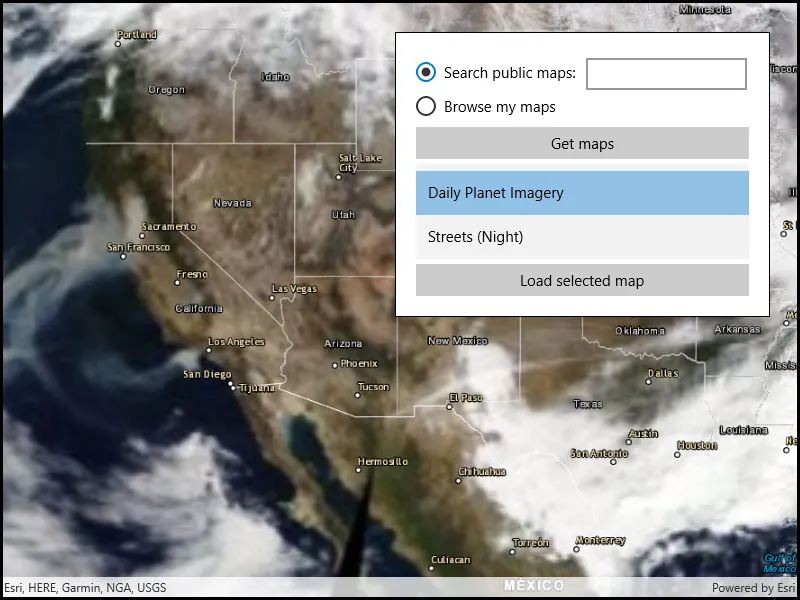
Find webmap portal items by using a search term.
Use case
Portals can contain many portal items and at times you may wish to query the portal to find what you’re looking for. In this example, we search for webmap portal items using a text search.
How to use the sample
Enter search terms into the search bar. Once the search is complete, a list is populated with the resultant webmaps. Tap on a webmap to set it to the map view. Scrolling to the bottom of the webmap recycler view will get more results.
How it works
- Create a new
Portaland load it. - Create new
PortalItemQueryParameters. Set the type toPortalItem.Type.WebMapand add the text you want to search for. - Use
portal.FindItemsAsync(params)to find matching items.
Relevant API
- Portal
- PortalItem
- PortalQueryParameters
- PortalQueryResultSet
Tags
keyword, query, search, webmap
Sample code
// Copyright 2021 Esri.//// Licensed under the Apache License, Version 2.0 (the "License"); you may not use this file except in compliance with the License.// You may obtain a copy of the License at: http://www.apache.org/licenses/LICENSE-2.0//// Unless required by applicable law or agreed to in writing, software distributed under the License is distributed on an// "AS IS" BASIS, WITHOUT WARRANTIES OR CONDITIONS OF ANY KIND, either express or implied. See the License for the specific// language governing permissions and limitations under the License.
using ArcGIS.Helpers;using Esri.ArcGISRuntime;using Esri.ArcGISRuntime.Mapping;using Esri.ArcGISRuntime.Portal;using Microsoft.UI.Xaml;using System;using System.Collections.Generic;using System.Linq;using System.Threading.Tasks;
namespace ArcGIS.WinUI.Samples.SearchPortalMaps{    [ArcGIS.Samples.Shared.Attributes.Sample(        name: "Search for webmap",        category: "Map",        description: "Find webmap portal items by using a search term.",        instructions: "Enter search terms into the search bar. Once the search is complete, a list is populated with the resultant webmaps. Tap on a webmap to set it to the map view. Scrolling to the bottom of the webmap recycler view will get more results.",        tags: new[] { "keyword", "query", "search", "webmap" })]    [ArcGIS.Samples.Shared.Attributes.ClassFile("Helpers\\ArcGISLoginPrompt.cs")]    public partial class SearchPortalMaps    {        // URL of the server to authenticate with (ArcGIS Online)        private const string ArcGISOnlineUrl = "https://www.arcgis.com/sharing/rest";
        // Constructor for sample class        public SearchPortalMaps()        {            InitializeComponent();
            _ = Initialize();        }
        private async Task Initialize()        {            ArcGISLoginPrompt.SetChallengeHandler(this);
            bool loggedIn = await ArcGISLoginPrompt.EnsureAGOLCredentialAsync();
            // Display a default map            if (loggedIn) DisplayDefaultMap();        }
        private void DisplayDefaultMap() => MyMapView.Map = new Map(BasemapStyle.ArcGISLightGray);
        private async void SearchButton_Click(object sender, RoutedEventArgs e)        {            try            {                // Get web map portal items in the current user's folder or from a keyword search                IEnumerable<PortalItem> mapItems;                ArcGISPortal portal;
                // See if the user wants to search public web map items                if (SearchPublicMaps.IsChecked == true)                {                    // Connect to the portal (anonymously)                    portal = await ArcGISPortal.CreateAsync();
                    // Create a query expression that will get public items of type 'web map' with the keyword(s) in the items tags                    string queryExpression = string.Format("tags:\"{0}\" access:public type: (\"web map\" NOT \"web mapping application\")", SearchText.Text);
                    // Create a query parameters object with the expression and a limit of 10 results                    PortalQueryParameters queryParams = new PortalQueryParameters(queryExpression, 10);
                    // Search the portal using the query parameters and await the results                    PortalQueryResultSet<PortalItem> findResult = await portal.FindItemsAsync(queryParams);
                    // Get the items from the query results                    mapItems = findResult.Results;                }                else                {                    // Call a sub that will force the user to log in to ArcGIS Online (if they haven't already)                    bool loggedIn = await ArcGISLoginPrompt.EnsureAGOLCredentialAsync();                    if (!loggedIn) { return; }
                    // Connect to the portal (will connect using the provided credentials)                    portal = await ArcGISPortal.CreateAsync(new Uri(ArcGISOnlineUrl));
                    // Get the user's content (items in the root folder and a collection of sub-folders)                    PortalUserContent myContent = await portal.User.GetContentAsync();
                    // Get the web map items in the root folder                    mapItems = from item in myContent.Items where item.Type == PortalItemType.WebMap select item;
                    // Loop through all sub-folders and get web map items, add them to the mapItems collection                    foreach (PortalFolder folder in myContent.Folders)                    {                        IEnumerable<PortalItem> folderItems = await portal.User.GetContentAsync(folder.FolderId);                        mapItems = mapItems.Concat(from item in folderItems where item.Type == PortalItemType.WebMap select item);                    }                }
                // Show the web map portal items in the list box                MapListBox.ItemsSource = mapItems;            }            catch (Exception ex)            {                await new MessageDialog2(ex.ToString(), "Error").ShowAsync();            }        }
        private void LoadMapButtonClick(object sender, RoutedEventArgs e)        {            // Get the selected web map item in the list box            PortalItem selectedMap = MapListBox.SelectedItem as PortalItem;            if (selectedMap == null)            {                return;            }
            // Create a new map, pass the web map portal item to the constructor            Map webMap = new Map(selectedMap);
            // Handle change in the load status (to report load errors)            webMap.LoadStatusChanged += WebMapLoadStatusChanged;
            // Show the web map in the map view            MyMapView.Map = webMap;        }
private void WebMapLoadStatusChanged(object sender, LoadStatusEventArgs e) { DispatcherQueue.TryEnqueue(Microsoft.UI.Dispatching.DispatcherQueuePriority.Normal, async () => { // Report errors if map failed to load if (e.Status == LoadStatus.FailedToLoad) { Map map = (Map)sender; Exception err = map.LoadError; if (err != null) { await new MessageDialog2(err.Message, "Map load error").ShowAsync(); } } }); } }}<UserControl x:Class="ArcGIS.WinUI.Samples.SearchPortalMaps.SearchPortalMaps" xmlns="http://schemas.microsoft.com/winfx/2006/xaml/presentation" xmlns:x="http://schemas.microsoft.com/winfx/2006/xaml" xmlns:esriUI="using:Esri.ArcGISRuntime.UI.Controls"> <UserControl.Resources> <Style TargetType="TextBlock"> <Setter Property="FontWeight" Value="SemiBold" /> <Setter Property="VerticalAlignment" Value="Center" /> <Setter Property="Margin" Value="2.5,5,2.5,0" /> <Setter Property="HorizontalAlignment" Value="Right" /> </Style> <Style TargetType="TextBox"> <Setter Property="HorizontalAlignment" Value="Stretch" /> <Setter Property="Margin" Value="2.5,5,2.5,0" /> </Style> <Style TargetType="Button"> <Setter Property="HorizontalAlignment" Value="Stretch" /> <Setter Property="Margin" Value="2.5,5,2.5,0" /> </Style> </UserControl.Resources> <Grid> <esriUI:MapView x:Name="MyMapView" /> <Border Style="{StaticResource BorderStyle}"> <Grid x:Name="SearchUI"> <Grid.ColumnDefinitions> <ColumnDefinition /> <ColumnDefinition /> </Grid.ColumnDefinitions> <Grid.RowDefinitions> <RowDefinition /> <RowDefinition /> <RowDefinition /> <RowDefinition Height="200" /> <RowDefinition /> </Grid.RowDefinitions> <RadioButton x:Name="SearchPublicMaps" Grid.Row="0" Grid.Column="0" HorizontalAlignment="Left" Content="Search public maps:" IsChecked="True" /> <TextBox x:Name="SearchText" Grid.Row="0" Grid.Column="1" IsEnabled="{Binding ElementName=SearchPublicMaps, Path=IsChecked}" /> <RadioButton x:Name="BrowseMyMaps" Grid.Row="1" Grid.Column="0" HorizontalAlignment="Left" Content="Browse my maps" /> <Button x:Name="SearchButton" Grid.Row="2" Grid.Column="0" Grid.ColumnSpan="2" Margin="0,5,0,0" Click="SearchButton_Click" Content="Get maps" /> <ListBox x:Name="MapListBox" Grid.Row="3" Grid.Column="0" Grid.ColumnSpan="2" Margin="0,5,0,0" DisplayMemberPath="Title" ScrollViewer.HorizontalScrollBarVisibility="Disabled" SelectionMode="Single" /> <Button x:Name="LoadMapButton" Grid.Row="4" Grid.Column="0" Grid.ColumnSpan="2" Margin="0,5,0,0" Click="LoadMapButtonClick" Content="Load selected map" /> </Grid> </Border> </Grid></UserControl>// Copyright 2021 Esri.//// Licensed under the Apache License, Version 2.0 (the "License"); you may not use this file except in compliance with the License.// You may obtain a copy of the License at: http://www.apache.org/licenses/LICENSE-2.0//// Unless required by applicable law or agreed to in writing, software distributed under the License is distributed on an// "AS IS" BASIS, WITHOUT WARRANTIES OR CONDITIONS OF ANY KIND, either express or implied. See the License for the specific// language governing permissions and limitations under the License.
using ArcGIS.WinUI;using Esri.ArcGISRuntime.Security;using Microsoft.UI.Dispatching;using Microsoft.UI.Xaml.Controls;using Microsoft.Web.WebView2.Core;using System;using System.Collections.Generic;using System.Diagnostics;using System.Threading.Tasks;
namespace ArcGIS.Helpers{ internal static class ArcGISLoginPrompt { private const string ArcGISOnlineUrl = "https://www.arcgis.com/sharing/rest";
// - The Client ID for an app registered with the server (the ID below is for a public app created by the ArcGIS Maps SDK for Native Apps team). private const string AppClientId = "lgAdHkYZYlwwfAhC";
// - An optional client secret for the app (only needed for the OAuthClientCredentials authorization type). private const string ClientSecret = "";
// - A URL for redirecting after a successful authorization (this must be a URL configured with the app). private const string OAuthRedirectUrl = "my-ags-app://auth";
public static async Task<bool> EnsureAGOLCredentialAsync() { Credential currentCredential = AuthenticationManager.Current.FindCredential(new Uri(ArcGISOnlineUrl), AuthenticationType.Token); if (currentCredential != null) { return true; // already logged in }
try { var userConfig = new OAuthUserConfiguration(new Uri(ArcGISOnlineUrl), AppClientId, new Uri(OAuthRedirectUrl)); Credential cred = await OAuthUserCredential.CreateAsync(userConfig); AuthenticationManager.Current.AddCredential(cred); } catch (OperationCanceledException) { // OAuth login was canceled, no need to display error to user. } catch (Exception ex) { // Login failure await new MessageDialog2(ex.Message, "Login failed").ShowAsync(); } return false; }
public static void SetChallengeHandler(UserControl sample) { var userConfig = new OAuthUserConfiguration(new Uri(ArcGISOnlineUrl), AppClientId, new Uri(OAuthRedirectUrl)); AuthenticationManager.Current.OAuthUserConfigurations.Add(userConfig); AuthenticationManager.Current.OAuthHandler = new OAuthAuthorize(sample); } }
#region OAuth handler
public class OAuthAuthorize : IOAuthHandler { // Window to contain the OAuth UI. private ContentDialog _authWindow;
// Use a TaskCompletionSource to track the completion of the authorization. private TaskCompletionSource<IDictionary<string, string>> _tcs;
// URL for the authorization callback result (the redirect URI configured for your application). private Uri _redirectUrl;
// URL that handles the OAuth request. private Uri _authorizeUrl; private UserControl sample;
public OAuthAuthorize(UserControl sample) { this.sample = sample; }
// Function to handle authorization requests, takes the URIs for the secured service, the authorization endpoint, and the redirect URI. public Task<IDictionary<string, string>> LoginAsync(OAuthLoginParameters parameters) { if (_tcs != null && !_tcs.Task.IsCompleted) throw new Exception("Task in progress");
_tcs = new TaskCompletionSource<IDictionary<string, string>>();
// Store the authorization and redirect URLs. _authorizeUrl = parameters.AuthorizeUri; _redirectUrl = parameters.RedirectUri;
// Call a function to show the login controls, make sure it runs on the UI thread for this app. sample.DispatcherQueue.TryEnqueue(DispatcherQueuePriority.Normal, () => { _ = AuthorizeOnUIThread(parameters.AuthorizeUri); });
// Return the task associated with the TaskCompletionSource. return _tcs.Task; }
// Challenge for OAuth credentials on the UI thread. private async Task AuthorizeOnUIThread(Uri authorizeUri) { // Create a WebBrowser control to display the authorize page. WebView2 webBrowser = new WebView2 { Width = 500, Height = 500, RequestedTheme = Microsoft.UI.Xaml.ElementTheme.Light };
// Handle the navigation event for the browser to check for a response to the redirect URL. webBrowser.NavigationStarting += NavigationStarted;
// Display the web browser in a new window. _authWindow = new ContentDialog { Content = webBrowser, XamlRoot = sample.XamlRoot, CloseButtonText = "Close", };
// Handle the window closed event then navigate to the authorize url. _authWindow.Closed += OnWindowClosed2;
try { // Load the web view and navigate to the Uri. await webBrowser.EnsureCoreWebView2Async(); webBrowser.Source = authorizeUri;
// Display the window. await _authWindow.ShowAsync(); } catch (Exception ex) { Debug.WriteLine(ex.Message); _tcs.SetCanceled(); } }
// Handle browser navigation (content changing). private void NavigationStarted(WebView2 sender, CoreWebView2NavigationStartingEventArgs args) { // Check for a response to the callback url. const string portalApprovalMarker = "/oauth2/approval";
Uri uri = new Uri(args.Uri);
// If no browser, uri, or an empty url, return. if (sender == null || uri == null || string.IsNullOrEmpty(uri.AbsoluteUri)) return;
// Check for redirect. bool isRedirected = _redirectUrl.IsBaseOf(uri) || _redirectUrl.AbsoluteUri.Contains(portalApprovalMarker) && uri.AbsoluteUri.Contains(portalApprovalMarker);
// Check if browser was redirected to the callback URL. (This indicates succesful authentication.) if (isRedirected) { args.Cancel = true;
// Call a helper function to decode the response parameters. IDictionary<string, string> authResponse = DecodeParameters(uri);
// Set the result for the task completion source. _tcs.SetResult(authResponse);
// Close the window. if (_authWindow != null) { _authWindow.Hide(); } } }
// Handle the browser window closing. private void OnWindowClosed2(ContentDialog sender, ContentDialogClosedEventArgs args) { // If the task wasn't completed, the user must have closed the window without logging in. if (!_tcs.Task.IsCompleted) { // Set the task completion source exception to indicate a canceled operation. _tcs.SetCanceled(); }
_authWindow = null; }
private static IDictionary<string, string> DecodeParameters(Uri uri) { // Create a dictionary of key value pairs returned in an OAuth authorization response URI query string. string answer = "";
// Get the values from the URI fragment or query string. if (!string.IsNullOrEmpty(uri.Fragment)) { answer = uri.Fragment.Substring(1); } else { if (!string.IsNullOrEmpty(uri.Query)) { answer = uri.Query.Substring(1); } }
// Parse parameters into key / value pairs. Dictionary<string, string> keyValueDictionary = new Dictionary<string, string>(); string[] keysAndValues = answer.Split(new[] { '&' }, StringSplitOptions.RemoveEmptyEntries); foreach (string kvString in keysAndValues) { string[] pair = kvString.Split('='); string key = pair[0]; string value = string.Empty; if (key.Length > 1) { value = Uri.UnescapeDataString(pair[1]); }
keyValueDictionary.Add(key, value); }
// Return the dictionary of string keys/values. return keyValueDictionary; } }
#endregion OAuth handler}