Specify a map’s spatial reference.
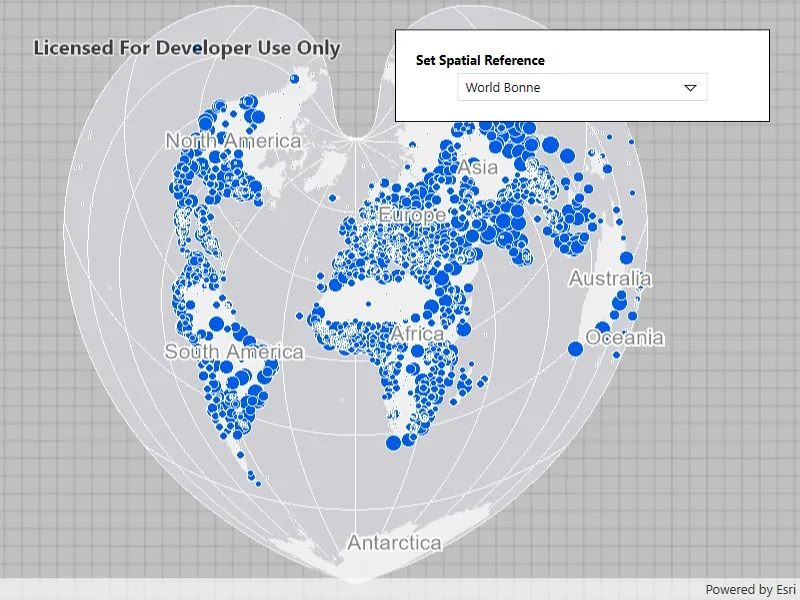
Use case
Choosing the correct spatial reference is important for ensuring accurate projection of data points to a map.
How to use the sample
Pan and zoom around the map. Observe how the map is displayed in the World Bonne spatial reference. Pick a different spatial reference and see the map reproject.
How it works
- Instantiate a
Mapobject using a spatial reference. - Instantiate a
Basemapobject using anArcGISMapImageLayerobject. - Set the basemap to the map.
- Set the map to a
MapViewobject. - Change the map’s spatial reference using
SetSpatialReferencemethod.
The ArcGIS map image layer will reproject into the spatial reference set to the map (such as World Bonne (WKID: 54024)), and not the map service’s default spatial reference.
Relevant API
- ArcGISMapImageLayer
- Basemap
- Map
- MapView
- SpatialReference
About the data
This sample uses a World Cities Population map service that displays world cities symbolized based on population.
Additional information
Operational layers will automatically project to this spatial reference when possible. There are 3 kinds of layer reprojection behaviors:
- Reprojected on device (on-the-fly reprojection), such as a
FeatureLayercreated from a mobile geodatabase - Reprojected from the service, such as an
ArcGISMapImageLayer - Not able to reproject, such as an
ArcGISTiledLayerwith defined spatial reference in its tile cache. These layer might be able to reproject in a future update
For more information, check out the API reference doc for SetSpatialReference method.
Tags
coordinate system, project, projection, spatial reference, Web Mercator, WGS84, WKID
Sample code
// Copyright 2016 Esri.//// Licensed under the Apache License, Version 2.0 (the "License"); you may not use this file except in compliance with the License.// You may obtain a copy of the License at: http://www.apache.org/licenses/LICENSE-2.0//// Unless required by applicable law or agreed to in writing, software distributed under the License is distributed on an// "AS IS" BASIS, WITHOUT WARRANTIES OR CONDITIONS OF ANY KIND, either express or implied. See the License for the specific// language governing permissions and limitations under the License.
using Esri.ArcGISRuntime.Geometry;using Esri.ArcGISRuntime.Mapping;using System;using System.Collections.Generic;using System.Windows.Controls;
namespace ArcGIS.WPF.Samples.SetSpatialReference{    [ArcGIS.Samples.Shared.Attributes.Sample(        name: "Set spatial reference",        category: "Map",        description: "Specify a map's spatial reference.",        instructions: "Pan and zoom around the map. Observe how the map is displayed in the World Bonne spatial reference. Pick a different spatial reference and see the map reproject.",        tags: new[] { "WGS84", "WKID", "Web Mercator", "coordinate system", "project", "projection", "spatial reference" })]    public partial class SetSpatialReference    {        // List of available spatial references for selection.        private readonly List<SpatialReferenceOption> _spatialReferenceOptions = new List<SpatialReferenceOption>        {            new SpatialReferenceOption("Berghaus Star AAG", 102299),            new SpatialReferenceOption("Fuller", 54050),            new SpatialReferenceOption("New Zealand Map Grid", 27200),            new SpatialReferenceOption("North Pole Stereographic", 102018),            new SpatialReferenceOption("Peirce Quincuncial", 54090),            new SpatialReferenceOption("UTM Zone 10 N", 32610),            new SpatialReferenceOption("World Bonne", 54024),            new SpatialReferenceOption("World Goode Homolosine", 54052),            new SpatialReferenceOption("World Orthographic", 102038),            new SpatialReferenceOption("Web Mercator", 3857),            new SpatialReferenceOption("WGS 84", 4326)        };        public SetSpatialReference()        {            InitializeComponent();            Initialize();        }
        private void Initialize()        {            // Create new Map using spatial reference as World Bonne (54024).            Map myMap = new Map(SpatialReference.Create(54024));
            // Adding a map image layer which can reproject itself to the map's spatial reference.            // Note: Some layers such as tiled layers cannot reproject and will fail to draw if their spatial            // reference is not the same as the map's spatial reference.            ArcGISMapImageLayer operationalLayer = new ArcGISMapImageLayer(new Uri(                "https://sampleserver6.arcgisonline.com/arcgis/rest/services/SampleWorldCities/MapServer"));
            // Add operational layer to the Map.            myMap.OperationalLayers.Add(operationalLayer);
            // Assign the map to the MapView.            MyMapView.Map = myMap;
            // Populate the combo box with spatial reference options.            SpatialReferenceComboBox.ItemsSource = _spatialReferenceOptions;
            // Set the default selection to World Bonne.            SpatialReferenceComboBox.SelectedIndex = _spatialReferenceOptions.FindIndex(sr => sr.Wkid == 54024);        }
        private void SpatialReferenceComboBox_SelectionChanged(object sender, SelectionChangedEventArgs e)        {            if (SpatialReferenceComboBox.SelectedItem is SpatialReferenceOption selectedOption)            {                // Set the map's spatial reference to the selected option.                MyMapView.Map.SetSpatialReference(SpatialReference.Create(selectedOption.Wkid));            }        }    }

    // Represents a spatial reference option for display in the combo box.    internal class SpatialReferenceOption    {        public string Name { get; }        public int Wkid { get; }
public SpatialReferenceOption(string name, int wkid) { Name = name; Wkid = wkid; } }}<UserControl x:Class="ArcGIS.WPF.Samples.SetSpatialReference.SetSpatialReference" xmlns="http://schemas.microsoft.com/winfx/2006/xaml/presentation" xmlns:x="http://schemas.microsoft.com/winfx/2006/xaml" xmlns:esriUI="clr-namespace:Esri.ArcGISRuntime.UI.Controls;assembly=Esri.ArcGISRuntime.WPF"> <Grid> <esriUI:MapView x:Name="MyMapView" /> <Border Style="{StaticResource BorderStyle}"> <StackPanel> <TextBlock Margin="0,0,0,5" FontWeight="Bold" Text="Set Spatial Reference" /> <ComboBox x:Name="SpatialReferenceComboBox" Width="250" DisplayMemberPath="Name" SelectionChanged="SpatialReferenceComboBox_SelectionChanged" /> </StackPanel> </Border> </Grid></UserControl>