Associations.png file) or a document, that is associated with individual features in a geodatabase or feature layer.
| Association | Description | Geometry supported |
|---|---|---|
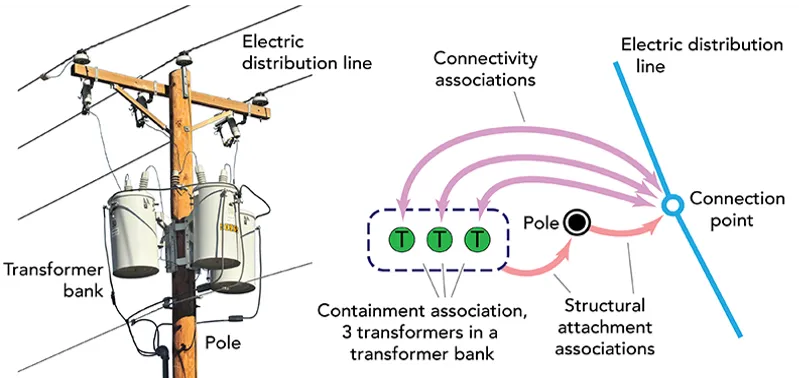
| Connectivity | Models the connectivity between two junctions that don’t have geometric coincidence (are not in the same x, y and z location). A transformer may be connected to a fuse, for example. | Yes |
| Structural attachment | Models equipment attached to structures. A transformer bank may be attached to a pole, for example. | Yes |
| Containment | Models assets that contain other assets. A vault may contain valves and pipes, for example. | No |
    // Get the QList of utility association  objects from the utility network via    // the associations async method (uses QFuture).    utilityNetwork->associationsAsync(utilityElement, UtilityAssociationType::Containment).then        (this, [] (const QList<UtilityAssociation*>& associations)    {        // Test if we have some utility associations.        if (associations.isEmpty())            return;
        // Loop thru the utility associations.        for (UtilityAssociation* association : associations)        {            // Get the first ("from") and second ("to") elements in the association.            UtilityElement* fromElement = association->fromElement();            UtilityElement* toElement = association->toElement();
            // Provide some feedback.            qDebug() << fromElement->assetType()->name() << " " << toElement->assetType()->name();        }    });
You can also provide an envelope to find all valid associations within the specified extent.
The following example creates a new graphics overlay to display all associations within the map extent using a unique symbol
    // Create symbols for the structural attachment and connectivity associations.    SimpleLineSymbol* attachmentSymbol = new SimpleLineSymbol        (            SimpleLineSymbolStyle::Dot, // style            QColor("green"), // color            5, // width            this // parent        );
    SimpleLineSymbol* connectivitySymbol = new SimpleLineSymbol        (            SimpleLineSymbolStyle::Dot, // style            QColor("red"), // color            5, // width            this // parent        );
    // Create a unique value renderer for the attachment value associations.    UniqueValue* attachmentValue = new UniqueValue        (            "Attachment", // label            "", // description            QVariantList{static_cast<int>(UtilityAssociationType::Attachment)}, // values            attachmentSymbol, // symbol            this // parent        );
    // Create a unique value renderer for the connectivity value associations.    UniqueValue* connectivityValue = new UniqueValue        (            "Connectivity", // label            "",  // description            QVariantList{static_cast<int>(UtilityAssociationType::Connectivity)}, // values            connectivitySymbol,  // symbol            this // parent        );
    // Create a unique value renderer for the associations.    UniqueValueRenderer* uniqueValueRenderer = new UniqueValueRenderer        (            "", // default label            nullptr, // default symbol            QStringList{"AssociationType"}, // field names            QList<UniqueValue*>{attachmentValue, connectivityValue}, // unique values            this // parent        );
    // Create a graphics overlay for the associations.    GraphicsOverlay* associationsOverlay = new GraphicsOverlay(this);
    // Get the graphics overlay list model from the map view.    GraphicsOverlayListModel* graphicsOverlayListModel = m_mapView->graphicsOverlays();
    // Append the graphics overlay to the graphics overlay list model.    graphicsOverlayListModel->append(associationsOverlay);
    // Set the unique value renderer for the graphics overlay.    associationsOverlay->setRenderer(uniqueValueRenderer);
    // Get the current viewpoint from the map view.    const Viewpoint viewpoint = m_mapView->currentViewpoint(ViewpointType::BoundingGeometry);
    // Get the geometry fomr the viewpoint.    const Geometry geometry = viewpoint.targetGeometry();
    // Get the envelope from the view point's geometry.    const Envelope envelope = geometry.extent();
    // Get the QList of utility association  objects from the utility network via    // the associations async method (uses QFuture).    utilityNetwork->associationsAsync(envelope).then(this, [this, associationsOverlay]        (const QList<UtilityAssociation*>& associations)    {        // Loop thru the utility associations.        for (UtilityAssociation* association : associations)        {            // Test the association type and make sure it's not a containment relationship.            if (association->associationType() != UtilityAssociationType::Containment)            {                // Create a new graphic using the geometry from the association.                Graphic* graphic = new Graphic(association->geometry(), this);
                // Get the attribute list model from the graphic.                AttributeListModel* attributeListModel = graphic->attributes();
                // Add an attribute to the graphic.                attributeListModel->insertAttribute                    (                        "GlobalId", // attribute name - QString                        association->globalId() // attribute value - QVariant                    );
                // Add another attribute to the graphic.                attributeListModel->insertAttribute                    (                        "AssociationType", // attribute name - QString                        (int)association->associationType() // attribute value - QVariant                    );
                // Add a graphic for the association.                associationsOverlay->graphics()->append(graphic);            }        }    });
Specifying a utility element
Specifying an extent will return all its connectivity or structural attachment associations with geometry. The geometry value (polyline) represents the connection relationship between a from element and a to element. You can use the geometry to visualize the association as a graphic

