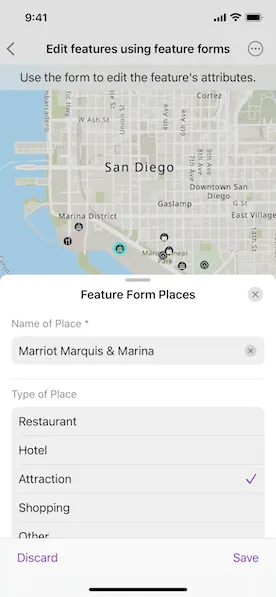
Display and edit feature attributes using feature forms.
Use case
Feature forms help enhance the accuracy, efficiency, and user experience of attribute editing in your application. Forms can be authored as part of the web map using Field Maps Designer or using Map Viewer. This allows a simplified user experience to edit feature attribute data on the web map.
How to use the sample
Tap a feature on the map to open a sheet displaying the feature form. Select form elements in the list and perform edits to update the field values. Tap the submit icon to commit the changes on the web map.
How it works
- Create a
Mapusing aPortalURL and item ID and pass it to aMapView. - When the map is tapped, perform an identify operation to check if the tapped location is an
ArcGISFeature. - Create a
FeatureFormobject using the identifiedArcGISFeature.- Note: If the feature’s
FeatureLayer,ArcGISFeatureTable, or theSubtypeSublayerhas an authoredFeatureFormDefinition, then this definition will be used to create theFeatureForm. If such a definition is not found, a default definition is generated.
- Note: If the feature’s
- Use the
FeatureFormViewtoolkit component to display the feature form configuration by providing the created feature form object. - Optionally, you can add the
validationErrors(_:)modifier to theFeatureFormViewto determine the visibility of validation errors. - Use the
onFormEditingEvent(perform:)modifier on theFeatureFormViewto determine when the user saves their edits. - To commit edits on the service geodatabase:
- Retrieve the backing service feature table’s geodatabase using
serviceFeatureTable.serviceGeodatabase. - Verify the service geodatabase can commit changes back to the service using
serviceGeodatabase.serviceInfo.canUseServiceGeodatabaseApplyEdits. - If apply edits are allowed, call
serviceGeodatabase.applyEdits()to apply local edits to the online service. - If edits are not allowed on the
ServiceGeodatabase, then apply edits to theServiceFeatureTableusingServiceFeatureTable.applyEdits().
- Retrieve the backing service feature table’s geodatabase using
Relevant API
- ArcGISFeature
- FeatureForm
- FeatureLayer
- FieldFormElement
- GroupFormElement
- ServiceFeatureTable
- ServiceGeodatabase
About the data
This sample uses a feature form enabled Feature Form Places web map, which contains fictional places in San Diego of various hotels, restaurants, and shopping centers, with relevant reviews and ratings.
Additional information
Follow the tutorial to create your own form using the Map Viewer. This sample uses the FeatureFormView Toolkit component. For information about setting up the toolkit, as well as code for the underlying component, visit ArcGIS Maps SDK for Swift Toolkit.
Tags
edits, feature, feature forms, form, toolkit
Sample code
// Copyright 2024 Esri//// Licensed under the Apache License, Version 2.0 (the "License");// you may not use this file except in compliance with the License.// You may obtain a copy of the License at////   https://www.apache.org/licenses/LICENSE-2.0//// Unless required by applicable law or agreed to in writing, software// distributed under the License is distributed on an "AS IS" BASIS,// WITHOUT WARRANTIES OR CONDITIONS OF ANY KIND, either express or implied.// See the License for the specific language governing permissions and// limitations under the License.
import ArcGISimport ArcGISToolkitimport SwiftUI
struct EditFeaturesUsingFeatureFormsView: View {    /// The map that contains the features for editing.    @State private var map = Map(        item: PortalItem(            portal: .arcGISOnline(connection: .anonymous),            id: .featureFormPlacesWebMap        )    )
    /// The feature form for the selected feature.    @State private var featureForm: FeatureForm?
    /// The point on the screen where the user tapped.    @State private var tapPoint: CGPoint?
    /// A Boolean value indicating whether the feature form panel is presented.    @State private var isShowingFeatureForm = false
    /// A Boolean value indicating whether the feature form edits are being applied.    @State private var isApplyingEdits = false
    /// The error shown in the error alert.    @State private var error: (any Error)?
    /// The text explaining the next step in the sample's workflow.    private var instructionText: String {        if !isShowingFeatureForm {            "Tap on a feature to edit."        } else if isApplyingEdits {            "Applying edits..."        } else {            "Use the form to edit the feature's attributes."        }    }
    /// The feature layer on the map.    private var featureLayer: FeatureLayer {        map.operationalLayers.first as! FeatureLayer    }
    var body: some View {        MapViewReader { mapViewProxy in            MapView(map: map)                .onSingleTapGesture { screenPoint, _ in                    if isShowingFeatureForm {                        isShowingFeatureForm = false                    } else {                        tapPoint = screenPoint                    }                }                .task(id: tapPoint) {                    // Identifies the feature at the tapped point and creates a feature form from it.                    guard let tapPoint else { return }
                    do {                        let identifyLayerResult = try await mapViewProxy.identify(                            on: featureLayer,                            screenPoint: tapPoint,                            tolerance: 10                        )                        if let feature = identifyLayerResult.geoElements.first as? ArcGISFeature {                            featureLayer.selectFeature(feature)                            featureForm = FeatureForm(feature: feature)                            isShowingFeatureForm = true                        }                    } catch {                        self.error = error                    }                }                .overlay(alignment: .top) {                    Text(instructionText)                        .multilineTextAlignment(.center)                        .frame(maxWidth: .infinity, alignment: .center)                        .padding(8)                        .background(.regularMaterial, ignoresSafeAreaEdges: .horizontal)                }                .onChange(of: isShowingFeatureForm) {                    guard !isShowingFeatureForm else { return }                    featureLayer.clearSelection()                }                .sheet(isPresented: $isShowingFeatureForm) {                    if let featureForm {                        // Displays the feature form using the toolkit component.                        FeatureFormView(root: featureForm, isPresented: $isShowingFeatureForm)                            .onFormEditingEvent { event in                                switch event {                                case .discardedEdits:                                    isShowingFeatureForm = false                                case .savedEdits:                                    isApplyingEdits = true                                default:                                    break                                }                            }                            .task(id: isApplyingEdits) {                                guard isApplyingEdits else { return }                                defer { isApplyingEdits = false }
                                do {                                    try await applyEdits()                                    isShowingFeatureForm = false                                } catch {                                    self.error = error                                }                            }                            .presentationDetents([.medium, .large])                    }                }                .errorAlert(presentingError: $error)                .disabled(isApplyingEdits)        }    }
    /// Applies the edits made in the feature form to the feature service.    private func applyEdits() async throws {        guard let serviceFeatureTable = featureForm?.feature.table as? ServiceFeatureTable else {            return        }
        // Applies the edits to the feature service using either the database or feature table.        if let serviceGeodatabase = serviceFeatureTable.serviceGeodatabase,           let serviceInfo = serviceGeodatabase.serviceInfo,           serviceInfo.canUseServiceGeodatabaseApplyEdits {            _ = try await serviceGeodatabase.applyEdits()        } else {            _ = try await serviceFeatureTable.applyEdits()        }    }}
private extension PortalItem.ID {    /// The ID to the "Feature Form Places" web map portal item on ArcGIS Online.    static var featureFormPlacesWebMap: Self { .init("516e4d6aeb4c495c87c41e11274c767f")! }}
#Preview {    EditFeaturesUsingFeatureFormsView()}