Control the behavior of the camera in a scene.
Use case
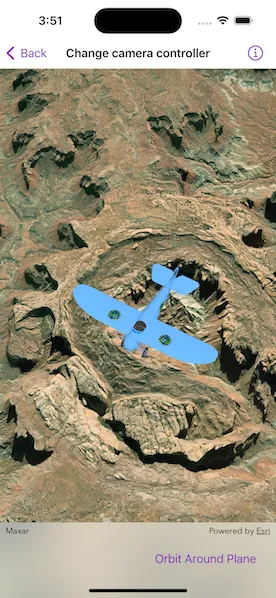
The globe camera controller (the default camera controller in all new scenes) allows a user to explore the scene freely by zooming in/out and panning around the globe. The orbit camera controllers fix the camera to look at a target location or geoelement. A primary use case is for following moving objects like cars and planes.
How to use the sample
The sample loads with the default globe camera controller. To rotate and fix the scene around the plane, exit globe mode by choosing the “Orbit camera around plane” option (i.e. camera will now be fixed to the plane). Choose the “Orbit camera around crater” option to rotate and center the scene around the location of the Upheaval Dome crater structure, or choose the “Free pan round the globe” option to return to default free navigation.
How it works
- Create an instance of a class extending
CameraController:GlobeCameraController,OrbitLocationCameraController,OrbitGeoElementCameraController. - Set the
cameraControllerproperty ofSceneView.
Relevant API
- Camera
- GlobeCameraController
- OrbitGeoElementCameraController
- OrbitLocationCameraController
- Scene
- SceneView
Tags
3D, camera controller, orbit, tracking
Sample code
// Copyright 2023 Esri//// Licensed under the Apache License, Version 2.0 (the "License");// you may not use this file except in compliance with the License.// You may obtain a copy of the License at////   https://www.apache.org/licenses/LICENSE-2.0//// Unless required by applicable law or agreed to in writing, software// distributed under the License is distributed on an "AS IS" BASIS,// WITHOUT WARRANTIES OR CONDITIONS OF ANY KIND, either express or implied.// See the License for the specific language governing permissions and// limitations under the License.
import ArcGISimport SwiftUI
struct ChangeCameraControllerView: View {    /// A scene with imagery basemap style and a tiled elevation source.    @State private var scene: ArcGIS.Scene = {        // Creates a scene.        let scene = Scene(basemapStyle: .arcGISImageryStandard)
        // Sets the initial viewpoint of the scene.        scene.initialViewpoint = Viewpoint(            latitude: .nan,            longitude: .nan,            scale: .nan,            camera: Camera(                lookingAt: Point(                    x: -109.937516,                    y: 38.456714,                    spatialReference: .wgs84                ),                distance: 5500,                heading: 150,                pitch: 20,                roll: 0            )        )
        // Creates a surface.        let surface = Surface()
        // Creates a tiled elevation source.        let worldElevationServiceURL = URL(            string: "https://elevation3d.arcgis.com/arcgis/rest/services/WorldElevation3D/Terrain3D/ImageServer"        )!        let elevationSource = ArcGISTiledElevationSource(url: worldElevationServiceURL)
        // Adds the elevation source to the surface.        surface.addElevationSource(elevationSource)
        // Sets the surface to the scene's base surface.        scene.baseSurface = surface        return scene    }()
    /// A graphics overlay containing an airplane graphic.    @State private var graphicsOverlay: GraphicsOverlay = {        let planePosition = Point(x: -109.937516, y: 38.456714, z: 5000, spatialReference: .wgs84)        let planeSymbol = ModelSceneSymbol(url: .bristol, scale: 100)        let planeGraphic = Graphic(geometry: planePosition, symbol: planeSymbol)        let graphicsOverlay = GraphicsOverlay(graphics: [planeGraphic])        graphicsOverlay.sceneProperties.surfacePlacement = .absolute        return graphicsOverlay    }()
    /// The camera controller kind of the scene view.    @State private var cameraControllerKind: CameraControllerKind = .globe
    private enum CameraControllerKind: CaseIterable {        case globe        case plane        case crater
        /// A human-readable label for the camera controller kind.        var label: String {            switch self {            case .globe: return "Pan Around Globe"            case .plane: return "Orbit Around Plane"            case .crater: return "Orbit Around Crater"            }        }    }
    /// The camera controller of the scene view.    @State private var cameraController: CameraController = GlobeCameraController()
    var body: some View {        SceneView(            scene: scene,            cameraController: cameraController,            graphicsOverlays: [graphicsOverlay]        )        .toolbar {            ToolbarItem(placement: .bottomBar) {                Picker("Camera Controller", selection: $cameraControllerKind) {                    ForEach(CameraControllerKind.allCases, id: \.self) { kind in                        Text(kind.label)                    }                }                .task(id: cameraControllerKind) {                    cameraController = makeCameraController(kind: cameraControllerKind)                }            }        }    }
    /// Creates a camera controller with the given kind of camera controller.    /// - Parameter kind: The camera controller kind.    /// - Returns: A camera controller.    private func makeCameraController(kind: CameraControllerKind) -> CameraController {        switch kind {        case .crater:            let targetLocation = Point(                x: -109.929589,                y: 38.437304,                z: 1700,                spatialReference: .wgs84            )            let cameraController = OrbitLocationCameraController(                target: targetLocation,                distance: 5000            )            cameraController.cameraPitchOffset = 3            cameraController.cameraHeadingOffset = 150            return cameraController        case .plane:            let targetGraphic = graphicsOverlay.graphics.first!            let cameraController = OrbitGeoElementCameraController(                target: targetGraphic,                distance: 5000            )            cameraController.cameraPitchOffset = 30            cameraController.cameraHeadingOffset = 150            return cameraController        case .globe:            return GlobeCameraController()        }    }}
private extension URL {    static var bristol: URL { Bundle.main.url(forResource: "Bristol", withExtension: "dae", subdirectory: "Bristol")! }}