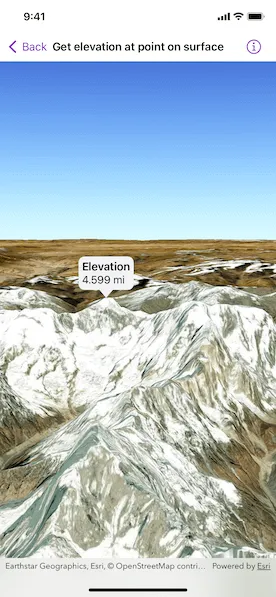
Get the elevation for a given point on a surface in a scene.
Use case
Knowing the elevation at a given point in a landscape can aid in navigation, planning and survey in the field.
How to use the sample
Tap anywhere on the surface to get the elevation at that point. Tap again to dismiss the callout. Elevation is reported in the standard local measurements. The scene view is in WGS84, which is a geographic coordinate system.
How it works
- Create a
SceneViewand aScenewith anarcGISImagerybasemap. - Set the elevation source of the scene’s base surface.
- Convert the tapped screen point into a point on surface.
- Asynchronously get the elevation using the
Surface.elevation(at:)method and display the result.
Relevant API
- ArcGISTiledElevationSource
- ElevationSource
- SceneView
- Surface
Tags
elevation, point, surface
Sample code
GetElevationAtPointOnSurfaceView.swift
// Copyright 2023 Esri//// Licensed under the Apache License, Version 2.0 (the "License");// you may not use this file except in compliance with the License.// You may obtain a copy of the License at////   https://www.apache.org/licenses/LICENSE-2.0//// Unless required by applicable law or agreed to in writing, software// distributed under the License is distributed on an "AS IS" BASIS,// WITHOUT WARRANTIES OR CONDITIONS OF ANY KIND, either express or implied.// See the License for the specific language governing permissions and// limitations under the License.
import ArcGISimport SwiftUI
struct GetElevationAtPointOnSurfaceView: View {    /// The view model for the sample.    @StateObject private var model = Model()
    /// The location callout placement.    @State private var calloutPlacement: CalloutPlacement?
    /// The screen point where to get the base surface location.    @State private var screenPoint: CGPoint?
    /// The scene point where the scene was tapped.    @State private var scenePoint: Point?
    /// The surface elevation of the tapped point.    @State private var elevation: Double?
    var body: some View {        SceneViewReader { sceneViewProxy in            SceneView(scene: model.scene)                .onSingleTapGesture { screenPoint, scenePoint in                    self.screenPoint = screenPoint                    self.scenePoint = scenePoint                }                .callout(placement: $calloutPlacement.animation(.default.speed(2))) { _ in                    VStack(alignment: .leading) {                        Text("Elevation")                            .font(.headline)                        Text(model.elevationString(elevation: elevation))                            .font(.callout)                    }                    .padding(5)                }                .task(id: scenePoint) {                    guard let scenePoint, let screenPoint else { return }                    if calloutPlacement == nil {                        // Converts the tapped screen point into a point on the surface.                        guard let relativeSurfacePoint = sceneViewProxy.baseSurfaceLocation(fromScreenPoint: screenPoint) else { return }                        // Gets the elevation from the tap location.                        elevation = await elevation(at: relativeSurfacePoint)                        // Shows the callout at the tapped location.                        calloutPlacement = CalloutPlacement.location(scenePoint)                    } else {                        // Hides the callout.                        calloutPlacement = nil                    }                }        }    }
    /// Gets the elevation at the surface point.    /// - Parameter surfacePoint: A geographical location on the base surface    /// in the same spatial reference as the scene view.    /// - Returns: The elevation in meters.    private func elevation(at surfacePoint: Point) async -> Double? {        try? await model.scene.baseSurface.elevation(at: surfacePoint)    }}
private extension GetElevationAtPointOnSurfaceView {    /// The model used to store the geo model and other expensive objects    /// used in this view.    class Model: ObservableObject {        /// A scene with imagery basemap.        let scene: ArcGIS.Scene = {            let scene = Scene(basemapStyle: .arcGISImagery)
            // Sets the initial viewpoint of the scene to northern Nepal.            scene.initialViewpoint = Viewpoint(                latitude: .nan,                longitude: .nan,                scale: .nan,                camera: Camera(                    latitude: 28.42,                    longitude: 83.9,                    altitude: 1e4,                    heading: 10,                    pitch: 80,                    roll: 0                )            )
            // Creates a surface.            let surface = Surface()
            // Adds the elevation source to the surface.            surface.addElevationSource(.worldElevationSource)
            // Sets the surface to the scene's base surface.            scene.baseSurface = surface            return scene        }()
        /// A formatter that provides localized descriptions of a linear distance.        private let lengthFormatter = LengthFormatter()
        /// Gets a elevation description from an optional value.        /// - Parameter elevation: The optional elevation.        /// - Returns: A localized elevation string, or "invalid" if it is `nil`.        func elevationString(elevation: Double?) -> String {            if let elevation {                return lengthFormatter.string(fromMeters: elevation)            } else {                return "Invalid Elevation"            }        }    }}
private extension ElevationSource {    /// A tiled elevation source that provides global elevation.    static var worldElevationSource: ArcGISTiledElevationSource {        .init(url: URL(string: "https://elevation3d.arcgis.com/arcgis/rest/services/WorldElevation3D/Terrain3D/ImageServer")!)    }}
#Preview {    GetElevationAtPointOnSurfaceView()}