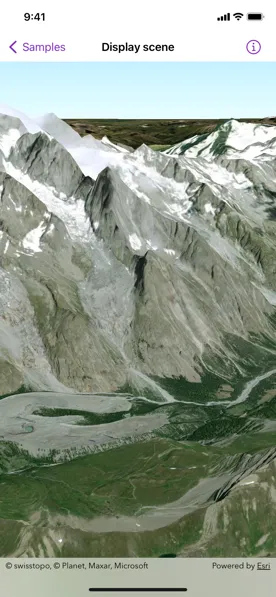
Display a scene with a terrain surface and some imagery.
Use case
Scene views are 3D representations of real-world areas and objects. Scene views are helpful for visualizing complex datasets where 3D relationships, topography, and elevation of elements are important factors.
How to use the sample
When loaded, the sample will display a scene. Pan and zoom to explore the scene.
How it works
- Create a
Sceneobject witharcGISImageryStandardbasemap style. - Create a
Surfaceobject. - Add an
ArcGISTiledElevationSourceobject to the surface. - Set the surface to the scene’s base surface.
- Create a
SceneViewinstance with the scene.
Relevant API
- ArcGISTiledElevationSource
- Scene
- SceneView
- Surface
Tags
3D, basemap, elevation, scene, surface
Sample code
DisplaySceneView.swift
// Copyright 2022 Esri//// Licensed under the Apache License, Version 2.0 (the "License");// you may not use this file except in compliance with the License.// You may obtain a copy of the License at////   https://www.apache.org/licenses/LICENSE-2.0//// Unless required by applicable law or agreed to in writing, software// distributed under the License is distributed on an "AS IS" BASIS,// WITHOUT WARRANTIES OR CONDITIONS OF ANY KIND, either express or implied.// See the License for the specific language governing permissions and// limitations under the License.
import ArcGISimport SwiftUI
struct DisplaySceneView: View {    /// A scene with imagery basemap style and a tiled elevation source.    @State private var scene: ArcGIS.Scene = {        // Creates a scene.        let scene = Scene(basemapStyle: .arcGISImageryStandard)
        // Sets the initial viewpoint of the scene.        scene.initialViewpoint = Viewpoint(            latitude: .nan,            longitude: .nan,            scale: .nan,            camera: Camera(                latitude: 45.74,                longitude: 6.88,                altitude: 4500,                heading: 10,                pitch: 70,                roll: 0            )        )
        // Creates a surface.        let surface = Surface()
        // Creates a tiled elevation source.        let worldElevationServiceURL = URL(string: "https://elevation3d.arcgis.com/arcgis/rest/services/WorldElevation3D/Terrain3D/ImageServer")!        let elevationSource = ArcGISTiledElevationSource(url: worldElevationServiceURL)
        // Adds the elevation source to the surface.        surface.addElevationSource(elevationSource)
        // Sets the surface to the scene's base surface.        scene.baseSurface = surface        return scene    }()
    var body: some View {        // Creates a scene view with the scene.        SceneView(scene: scene)    }}
#Preview {    DisplaySceneView()}