StreetMap Premium for ArcGIS Runtime provides enriched street data, which powers a high-quality cartographic maps
StreetMap Premium delivers data as a mobile map package.mmpk file) for your app to access locally. This format allows the data to be accessed offline (without a network connection, in other words) and therefore doesn’t consume data from your user’s data plan. This is the same high-quality data used by ArcGIS Online services, including the Geocoding service, Routing service, and Basemap styles service. Instead of spending your time putting together such datasets yourself, you can focus on developing apps that provide advanced searching, geocoding
StreetMap Premium data is organized into regions that are licensed as extensions and are downloaded individually (North America, Latin America, Europe, the Middle East, Africa, and Asia Pacific), allowing your apps to provide a consistent user experience across the globe. Within these regions, maps are available at the sub-region, country, or state/province level. You can even use ArcGIS Pro to clip the data to a custom area of interest.
How to add StreetMap Premium data
Follow these general steps to use StreetMap Premium in your app.
-
Download the sample version of the StreetMap Premium Greater Los Angeles mobile map package that is provided for development and testing. When you’re ready to deploy your app, you’ll need to download the required StreetMap Premium packages from My Esri and license StreetMap Premium for each extension (region) your app uses.
-
Provide the data (mobile map package) for your app. You can provide package(s) with your app or allow the user to download them as needed. Once the package (
*.mmpk) is available on the client, you can open it to retrieve data, maps, and locatorsA locator is an ArcGIS dataset that stores address information and the rules for translating descriptions of places (such as street addresses or place names) into spatial data that can be displayed on a map. . Using the contents of the package, you can:- Display StreetMap Premium data in your app.
- Locate addresses and places using a StreetMap Premium locator task.
- Solve routes using the transportation network dataset provided in the StreetMap Premium map package.
License StreetMap Premium
Each StreetMap Premium region is licensed as an extension. A StreetMap Premium extension license works with all license levels: Lite, Basic, Standard, and Advanced. Unlike other extension licenses, this license does not unlock API capabilities, but rather licenses the use of StreetMap Premium data within one of the available regions. For each region you license, you receive a license string to use in your app. These licenses are good for one year, so you must provide a mechanism to notify your users and update the license string for your app when (or before) the license expires.
The following code licenses ArcGIS Runtime and several StreetMap Premium extensions when the app initializes. To update these license strings when they expire, you will need to update and recompile the app code.
// Native Maps SDKs Lite license string.const nativeLiteLicenseKey =  'nativelite,3000,rudxxxxxxxxx,day-month-year,xxxxxxxxxxxxxxxxxxxx';
// Extension license strings for various StreetMap Premium areas.const smpNorthAmerica =  'nativesmpna,3000,rudxxxxxxxxx,day-month-year,xxxxxxxxxxxxxxxxxxxx';const smpLatinAmerica =  'nativesmpla,3000,rudxxxxxxxxx,day-month-year,xxxxxxxxxxxxxxxxxxxx';const smpEurope =  'nativesmpe,3000,rudxxxxxxxxx,day-month-year,xxxxxxxxxxxxxxxxxxxx';
// Store the extension license strings in a list.final extensions = [smpNorthAmerica, smpLatinAmerica, smpEurope];
// Set the license for ArcGIS Maps SDKs for Native// Apps and the three extensions (areas).ArcGISEnvironment.setLicenseUsingKey(  nativeLiteLicenseKey,  extensions: extensions,);
You could also read license strings on startup from a text file included with the app and set the licenses. This would allow the user to update license strings in a separate file and would eliminate the need for you to update and recompile the app code.
// ... code here to read license strings from a text file.
// Stores the ArcGIS Maps SDKs for Native Apps license string.var nativeLicense = '';
// Stores the extension license strings (all others in the file).final extensionLicenses = <String>[];
// Loop through all license strings from the file.for (final licenseString in licenseStrings) {  // See if it's an ArcGIS Maps SDKs for Native Apps license string.  if (licenseString.startsWith('nativelite') ||      licenseString.startsWith('nativebasic') ||      licenseString.startsWith('nativestandard') ||      licenseString.startsWith('nativeadvanced')) {    // Store the key.    nativeLicense = licenseString;  } else {    // All other keys are added to the list of extension license.    extensionLicenses.add(licenseString);  }}
// Set the licenses before using any// ArcGIS Maps SDKs for Native Apps objects.ArcGISEnvironment.setLicenseUsingKey(  nativeLicense,  extensions: extensionLicenses,);
As the licenses in your app near expiration, you might want to notify the user that new licensing information will be required soon.
The following code loops through all extension licenses for the app and notifies the user if a license is within 10 days of expiring.
// Get the licensing information for the current app.final licenseInfo = ArcGISEnvironment.getLicense();
// Get all extension licenses.final licenseExtensions = licenseInfo.extensions;
// Loop through extension licenses and see when each expires.for (final extensionLicense in licenseExtensions) {  // Get the number of days until the license expires.  final daysUntilExpiration =      extensionLicense.expiry.difference(DateTime.now()).inDays;
  // If within 10 days of expiration, notify the user.  if (daysUntilExpiration <= 10) {    debugPrint(      'Extension ${extensionLicense.name} expires in $daysUntilExpiration days.',    );  }}
Display StreetMap Premium data
Inside each StreetMap Premium mobile map package
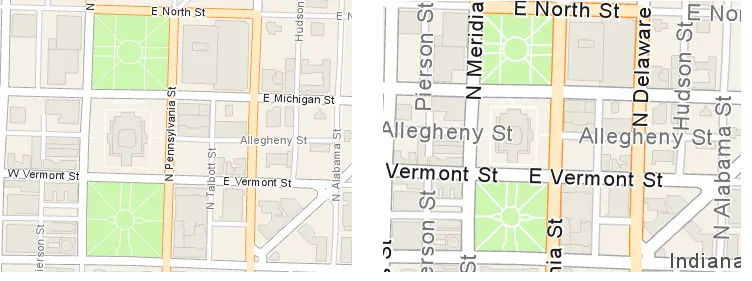
The following example opens a StreetMap Premium mobile map package file and displays the Navigation Day map in the app’s map view.
// Open a StreetMap Premium mobile map package.final streetMapPremiumPackageUri = await loadStreetMapPremiumPackageUri();final mobileMapPackage =    MobileMapPackage.withFileUri(streetMapPremiumPackageUri);await mobileMapPackage.load();
// Display the first map.if (mobileMapPackage.maps.isNotEmpty) {  navigationMap = mobileMapPackage.maps.first;  navigationMap!.initialViewpoint = indianapolisMotorSpeedwayViewpoint();
  // Assign the map to the map view.  mapViewController.arcGISMap = navigationMap;}
Locate addresses and places
In addition to street data and maps, each StreetMap Premium mobile map package
The following example opens a StreetMap Premium mobile map package file, gets the associated LocatorTask, and uses it to find a location.
// Open a StreetMap Premium mobile map package.final streetMapPremiumPackageUri = await loadStreetMapPremiumPackageUri();final mobileMapPackage =    MobileMapPackage.withFileUri(streetMapPremiumPackageUri);await mobileMapPackage.load();
// Retrieve the locator task inside the mobile map package.final packageLocatorTask = mobileMapPackage.locatorTask;
if (packageLocatorTask == null) {  return;}
// Geocode an address.final candidates = await packageLocatorTask.geocode(  searchText: 'Indianapolis Motor Speedway',);
Solve routes
Maps in a StreetMap Premium package have an associated transportation network dataset. You can use this dataset to solve routes
The following example gets a TransportationNetworkDataset from a map in the StreetMap Premium package, then uses it to create a new RouteTask.
// Get the first and only street network dataset from one of the maps in the package.final streetNetwork = navigationMap!.transportationNetworks[0];
// Create a new route task that uses the street network.final routeTask = RouteTask.withDataset(streetNetwork);
// Get the default route parameters from the route task// and solve the route.// ...