Create a custom dynamic entity data source and display it using a dynamic entity layer.
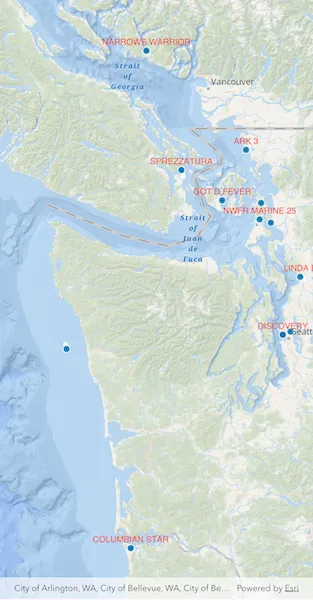
Use case
Developers can create a custom DynamicEntityDataSource to be able to visualize data from a variety of different feeds as dynamic entities using a DynamicEntityLayer. An example of this is in a mobile situational awareness app, where a custom DynamicEntityDataSource can be used to connect to peer-to-peer feeds in order to visualize real-time location tracks from teammates in the field.
How to use the sample
Run the sample to view the map and the dynamic entity layer displaying the latest observation from the custom data source. Tap on a dynamic entity to view its attributes in a callout.
How it works
Configure the custom data source:
- Create a custom data source implementation of a
CustomDynamicEntityDataProvider. - Override
onnLoad()to specify theDynamicEntityDataSourceInfofor a given unique entity ID field and a list ofFieldobjects matching the fields in the data source. - Override
onConnect()to begin processing observations from the custom data source. - Loop through the observations and deserialize each observation into an
ArcGISPointand aMap<String, dynamic>containing the attributes. - Use
NewObservation(geometry, attributes)to add each observation to the custom data source.
Configure the map view:
- Create a
DynamicEntityLayerusing the custom data source implementation. - Update values in the layer’s
trackDisplayPropertiesto customize the layer’s appearance. - Set up the layer’s
labelDefinitionsto display labels for each dynamic entity. - Configure the
ArcGISMapView(onTap: ...)handler to select a dynamic entity and display the entity’s attributes in a callout.
Relevant API
- CustomDynamicEntityDataProvider
- CustomDynamicEntityDataSource
- DynamicEntity
- DynamicEntityDataSource
- DynamicEntityLayer
- LabelDefinition
- TrackDisplayProperties
About the data
This sample uses a JSON Lines file containing observations of marine vessels in the Pacific Northwest hosted on ArcGIS Online .
Additional information
In this sample, we iterate through features in a GeoJSON file to mimic messages coming from a real-time feed. You can create a custom dyamic entity data source to process any data that contains observations which can be translated into ArcGISPoint objects with associated Map<String, dynamic> attributes.
Tags
data, dynamic, entity, label, labeling, live, real-time, stream, track
Sample code
// Copyright 2026 Esri//// Licensed under the Apache License, Version 2.0 (the "License");// you may not use this file except in compliance with the License.// You may obtain a copy of the License at////   https://www.apache.org/licenses/LICENSE-2.0//// Unless required by applicable law or agreed to in writing, software// distributed under the License is distributed on an "AS IS" BASIS,// WITHOUT WARRANTIES OR CONDITIONS OF ANY KIND, either express or implied.// See the License for the specific language governing permissions and// limitations under the License.//
import 'dart:async';import 'dart:convert';
import 'package:arcgis_maps/arcgis_maps.dart';import 'package:arcgis_maps_sdk_flutter_samples/common/common.dart';import 'package:flutter/material.dart';import 'package:flutter/services.dart';
class AddCustomDynamicEntityDataSource extends StatefulWidget {  const AddCustomDynamicEntityDataSource({super.key});
  @override  State<AddCustomDynamicEntityDataSource> createState() =>      _AddCustomDynamicEntityDataSourceState();}
class _AddCustomDynamicEntityDataSourceState    extends State<AddCustomDynamicEntityDataSource>    with SampleStateSupport {  // Create a controller for the map view.  final _mapViewController = ArcGISMapView.createController();
  // A flag for when the map view is ready and controls can be used.  var _ready = false;
  // Dynamic entity layer for identify.  DynamicEntityLayer? _dynamicEntityLayer;
  @override  Widget build(BuildContext context) {    return Scaffold(      body: SafeArea(        top: false,        left: false,        right: false,        child: Stack(          children: [            Column(              children: [                Expanded(                  // Add a map view to the widget tree and set a controller.                  child: ArcGISMapView(                    controllerProvider: () => _mapViewController,                    onMapViewReady: onMapViewReady,                    onTap: onTap,                  ),                ),              ],            ),            // Display a progress indicator and prevent interaction until state is ready.            LoadingIndicator(visible: !_ready),          ],        ),      ),    );  }
  void onMapViewReady() {    // Create map with oceans basemap.    final map = ArcGISMap.withBasemapStyle(BasemapStyle.arcGISOceans);    _mapViewController.arcGISMap = map;
    // Initial viewpoint (Pacific Northwest).    _mapViewController.setViewpoint(      Viewpoint.fromCenter(        ArcGISPoint(          x: -123.657,          y: 47.984,          spatialReference: SpatialReference.wgs84,        ),        scale: 3000000,      ),    );
    // Create the custom data provider.    final provider = VesselDynamicEntityDataProvider();
    // Create the data source driven by the provider.    final dataSource = CustomDynamicEntityDataSource(provider);
    // Create the dynamic entity layer.    final dynamicEntityLayer = DynamicEntityLayer(dataSource);
    // Configure track display properties.    final trackProps = dynamicEntityLayer.trackDisplayProperties;    trackProps.showTrackLine = true;    trackProps.showPreviousObservations = true;    trackProps.maximumObservations = 20;
    // Configure labeling (vessel name).    _configureLabeling(dynamicEntityLayer);
    // Add layer to the map.    map.operationalLayers.add(dynamicEntityLayer);
    _dynamicEntityLayer = dynamicEntityLayer;
    setState(() => _ready = true);  }
  Future<void> onTap(Offset screenPoint) async {    if (!_ready || _dynamicEntityLayer == null) return;
    // Dismiss any existing callout.    _mapViewController.callout.dismiss(animated: false);
    final identifyResult = await _mapViewController.identifyLayer(      _dynamicEntityLayer!,      screenPoint: screenPoint,      tolerance: 22,    );
    if (!mounted ||        identifyResult.error != null ||        identifyResult.geoElements.isEmpty) {      return;    }
    final geoElement = identifyResult.geoElements.first;
    final dynamicEntity = switch (geoElement) {      final DynamicEntity entity => entity,      final DynamicEntityObservation observation =>        observation.getDynamicEntity(),      _ => null,    };
    if (dynamicEntity == null) return;
    _showCallout(dynamicEntity);  }
  void _showCallout(DynamicEntity entity) {    _mapViewController.callout.showCalloutForGeoElement(      entity,      title: 'Vessel',      detailExpression: r'''concatenate(  "Name: ", $feature.VesselName,  "\nCall Sign: ", $feature.CallSign,  "\nCOG: ", $feature.COG,  "\nSOG: ", $feature.SOG)''',      animated: false,      style: ThemedCalloutStyle.themed(context),    );  }}
void _configureLabeling(DynamicEntityLayer layer) {  final labelDefinition = LabelDefinition(    labelExpression: SimpleLabelExpression(simpleExpression: '[VesselName]'),    textSymbol: TextSymbol(color: Colors.red, size: 12),  );
  labelDefinition.placement = LabelingPlacement.pointAboveCenter;
  layer.labelDefinitions.add(labelDefinition);  layer.labelsEnabled = true;}
/// A custom implementation of [CustomDynamicEntityDataProvider] that demonstrates/// how to create a dynamic entity data source for streaming real-time geospatial data.////// This sample provider reads vessel tracking data from a JSON Lines (.jsonl) asset/// file and emits observations sequentially to simulate a live data stream. Each/// observation includes vessel position (latitude/longitude), movement data/// (speed over ground, course over ground), and identifying information (MMSI, name, etc.).////// ## Key Implementation Points:////// * **onLoad()**: Initializes the data source by loading the asset file and defining///   the observation schema with field definitions for all vessel attributes.////// * **onConnect()**: Starts emitting observations by creating a periodic timer that///   calls [_emitNextObservation] at regular intervals.////// * **onDisconnect()**: Stops the observation stream by canceling the timer.////// * **_emitNextObservation()**: Parses each JSON line, constructs an observation///   with geometry (point) and attributes, and emits it using [handleEntityDataEvent].////// This pattern can be adapted to work with web sockets, REST APIs, IoT sensors,/// or any other real-time data source by modifying the data loading and emission logic.////// See also:/// * [CustomDynamicEntityDataProvider], the base class for creating custom data providers./// * [DynamicEntityLayer], which visualizes dynamic entities from this data source.
class VesselDynamicEntityDataProvider extends CustomDynamicEntityDataProvider {  // Field name that uniquely identifies each vessel entity.  static const String _entityIdFieldName = 'MMSI';
  // Delay between emitted observations to simulate live streaming data  static const Duration _emissionDelay = Duration(milliseconds: 10);
  Timer? _timer;  late final List<String> _jsonLines;  int _currentIndex = 0;
  // Path to the JSON Lines asset containing vessel observation data  static const String _dataAsset =      'assets/AIS_MarineCadastre_SelectedVessels_CustomDataSource.jsonl';
  @override  Future<DynamicEntityDataSourceInfo> onLoad() async {    final rawText = await rootBundle.loadString(_dataAsset);    _jsonLines = rawText        .split('\n')        .map((line) => line.trim())        .where((line) => line.isNotEmpty)        .toList();
    final info = DynamicEntityDataSourceInfo(      entityIdFieldName: _entityIdFieldName,      fields: _schema,    );    info.spatialReference = SpatialReference.wgs84;    return info;  }
  // Starts emitting observations sequentially.  @override  Future<void> onConnect() async {    if (_timer != null) {      return; // Already connected    }    _timer = Timer.periodic(_emissionDelay, (_) => _emitNextObservation());  }
  // Stops emitting observations and cleans up resources.  @override  Future<void> onDisconnect() async {    _timer?.cancel();    _timer = null;  }
  // Decodes and emits the next observation.  void _emitNextObservation() {    if (_currentIndex >= _jsonLines.length) {      _timer?.cancel();      _timer = null; // Allow reconnect to restart cleanly.      _currentIndex = 0;      return;    }
    final line = _jsonLines[_currentIndex++];    Map<String, dynamic> json;
    try {      json = jsonDecode(line) as Map<String, dynamic>;    } on Exception catch (_) {      // Skip malformed JSON lines.      return;    }
    final geometryJson = json['geometry'] as Map<String, dynamic>?;    final attributesJson = json['attributes'] as Map<String, dynamic>?;
    if (geometryJson == null || attributesJson == null) {      return;    }
    final x = (geometryJson['x'] as num).toDouble();    final y = (geometryJson['y'] as num).toDouble();
    final point = ArcGISPoint(      x: x,      y: y,      spatialReference: SpatialReference.wgs84,    );
    final attributes = <String, dynamic>{};    for (final field in _schema) {      attributes[field.name] = attributesJson[field.name];    }
    // Emit a CustomDynamicEntityDataEvent with the current observation.    handleEntityDataEvent(NewObservation(point, attributes));  }
  // Schema defining all fields for vessel observations.  static final List<Field> _schema = [    Field.text(name: 'MMSI', alias: 'MMSI', length: 256),    Field.double(name: 'BaseDateTime', alias: 'BaseDateTime'),    Field.double(name: 'LAT', alias: 'LAT'),    Field.double(name: 'LONG', alias: 'LONG'),    Field.double(name: 'SOG', alias: 'SOG'),    Field.double(name: 'COG', alias: 'COG'),    Field.double(name: 'Heading', alias: 'Heading'),    Field.text(name: 'VesselName', alias: 'VesselName', length: 256),    Field.text(name: 'IMO', alias: 'IMO', length: 256),    Field.text(name: 'CallSign', alias: 'CallSign', length: 256),    Field.text(name: 'VesselType', alias: 'VesselType', length: 256),    Field.text(name: 'Status', alias: 'Status', length: 256),    Field.double(name: 'Length', alias: 'Length'),    Field.double(name: 'Width', alias: 'Width'),    Field.text(name: 'Cargo', alias: 'Cargo', length: 256),    Field.text(name: 'globalid', alias: 'globalid', length: 256),  ];}