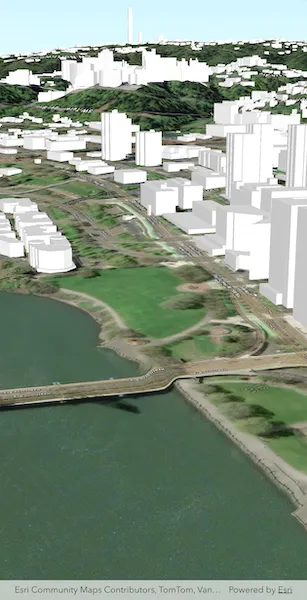
Display an ArcGIS scene layer from a URL.
Use case
Adding a scene layer from a URL allows you to author the scene layer elsewhere in the platform, say with ArcGIS Pro or CityEngine, and then add that scene layer to a scene in ArcGIS Maps SDK. Loading a scene layer from a URL also permits the layer source to change dynamically without updating the code. Each scene layer added to a scene can assist in performing helpful visual analysis. For example, if presenting the results of a shadow analysis of a major metropolitan downtown area in 3D, adding a scene layer of 3D buildings to the scene that could be toggled on/off would help to better contextualize the source of the shadows.
How to use the sample
Pan and zoom to explore the scene.
How it works
- Create an
ArcGISScene. - Create an
ArcGISTiledElevationSourceobject and add it to the scene’s base surface. - Create an
ArcGISSceneLayerpassing in the URL to a scene layer service. - Add the scene layer to the scene’s operational layers.
Relevant API
- ArcGISScene
- ArcGISSceneLayer
- ArcGISTiledElevationSource
About the data
This sample shows data from Esri 3D Buildings in Portland, Oregon.
Tags
3D, buildings, model, Portland, scene, service, URL
Sample code
// Copyright 2026 Esri//// Licensed under the Apache License, Version 2.0 (the "License");// you may not use this file except in compliance with the License.// You may obtain a copy of the License at////   https://www.apache.org/licenses/LICENSE-2.0//// Unless required by applicable law or agreed to in writing, software// distributed under the License is distributed on an "AS IS" BASIS,// WITHOUT WARRANTIES OR CONDITIONS OF ANY KIND, either express or implied.// See the License for the specific language governing permissions and// limitations under the License.//
import 'package:arcgis_maps/arcgis_maps.dart';import 'package:arcgis_maps_sdk_flutter_samples/common/common.dart';import 'package:flutter/material.dart';
class AddSceneLayerFromService extends StatefulWidget {  const AddSceneLayerFromService({super.key});
  @override  State<AddSceneLayerFromService> createState() =>      _AddSceneLayerFromServiceState();}
class _AddSceneLayerFromServiceState extends State<AddSceneLayerFromService>    with SampleStateSupport {  // Create a controller for the scene view.  final _sceneViewController = ArcGISSceneView.createController();
  @override  Widget build(BuildContext context) {    return Scaffold(      // Add a scene view to the widget tree and set a controller.      body: ArcGISSceneView(        controllerProvider: () => _sceneViewController,        onSceneViewReady: onSceneViewReady,      ),    );  }
  void onSceneViewReady() {    // Create a scene with the imagery basemap style.    final scene = ArcGISScene.withBasemapStyle(BasemapStyle.arcGISImagery);    _sceneViewController.arcGISScene = scene;
    // Add surface elevation to the scene.    final elevationSource = ArcGISTiledElevationSource.withUri(      Uri.parse(        'https://elevation3d.arcgis.com/arcgis/rest/services/WorldElevation3D/Terrain3D/ImageServer',      ),    );    scene.baseSurface.elevationSources.add(elevationSource);
    // Add a scene layer from a service URL.    final sceneLayer = ArcGISSceneLayer.withUri(      Uri.parse(        'https://basemaps3d.arcgis.com/arcgis/rest/services/Esri3D_Buildings_v1/SceneServer',      ),    );    scene.operationalLayers.add(sceneLayer);
    // Create a camera showing Portland, Oregon.    final location = ArcGISPoint(      x: -122.670,      y: 45.517,      z: 175,      spatialReference: .wgs84,    );    final camera = Camera.withLocation(      location: location,      heading: 215,      pitch: 75,      roll: 0,    );
    // Set the viewpoint of the scene using the camera.    _sceneViewController.setViewpointCamera(camera);  }}