Display data from an ArcGIS stream service using a dynamic entity layer.
Use case
A stream service is a type of service provided by ArcGIS Velocity and GeoEvent Server that allows clients to receive a stream of data observations via a web socket. ArcGIS Maps SDK for Flutter allows you to connect to a stream service and manage the information as dynamic entities and display them in a dynamic entity layer. Displaying information from feeds such as a stream service is important in applications like dashboards where users need to visualize and track updates of real-world objects in real-time.
Use ArcGISStreamService to manage the connection to the stream service and purge options to manage how much data is stored and maintained by the application. The dynamic entity layer will display the latest received observation, and you can set track display properties to determine how to display historical information for each dynamic entity. This includes the number of previous observations to show, whether to display track lines in-between previous observations, and setting renderers.
How to use the sample
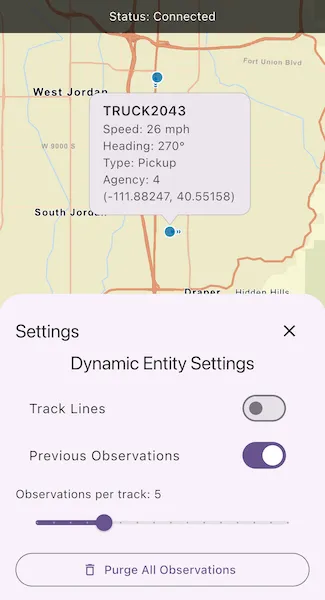
Use the controls to connect to or disconnect from the stream service, modify display properties in the dynamic entity layer, and purge all observations from the application.
How it works
- Create an
ArcGIStreamServiceusing aUri. - Set a
ArcGISStreamServiceFilteron the stream service to limit the amount of data coming from the server. - Set the
maximumDurationproperty of the stream servicepurgeOptionsto limit the amount of data managed by the application. - Create a
DynamicEntityLayerusing the stream service. - Update values in the layer’s
TrackDisplayPropertiesto customize the layer’s appearance. - Add the
DynamicEntityLayerto the map. - Configure an
onTapevent handler on theArcGISMapViewto select a dynamic entity and display the entity’s attributes in a callout.
Relevant API
- ArcGISStreamService
- ArcGISStreamServiceFilter
- ConnectionStatus
- DynamicEntity
- DynamicEntityDataSourcePurgeOptions
- DynamicEntityLayer
- TrackDisplayProperties
About the data
This sample uses a stream service that simulates live data coming from snowplows near Sandy, Utah. There are multiple vehicle types and multiple agencies operating the snowplows.
Additional information
More information about dynamic entities can be found in the guide documentation.
Tags
data, dynamic, entity, live, purge, real-time, service, stream, track
Sample code
// Copyright 2026 Esri//// Licensed under the Apache License, Version 2.0 (the "License");// you may not use this file except in compliance with the License.// You may obtain a copy of the License at////   https://www.apache.org/licenses/LICENSE-2.0//// Unless required by applicable law or agreed to in writing, software// distributed under the License is distributed on an "AS IS" BASIS,// WITHOUT WARRANTIES OR CONDITIONS OF ANY KIND, either express or implied.// See the License for the specific language governing permissions and// limitations under the License.//
import 'package:arcgis_maps/arcgis_maps.dart';import 'package:arcgis_maps_sdk_flutter_samples/common/common.dart';import 'package:flutter/material.dart';
class AddDynamicEntityLayer extends StatefulWidget {  const AddDynamicEntityLayer({super.key});
  @override  State<AddDynamicEntityLayer> createState() => _AddDynamicEntityLayerState();}
class _AddDynamicEntityLayerState extends State<AddDynamicEntityLayer>    with SampleStateSupport {  // Create a controller for the map view.  final _mapViewController = ArcGISMapView.createController();
  // A flag for when the map view is ready and controls can be used.  var _ready = false;
  // A flag for when the settings bottom sheet is visible.  var _settingsVisible = false;
  // Dynamic entity settings state  var _showsTrackLine = true;  var _showsPreviousObservations = true;
  // Maximum observations.  var _maximumObservations = 5;
  // Connection Status track.  var _isTogglingConnection = false;
  // Dynamic Entity objects.  ArcGISStreamService? _streamService;  DynamicEntityLayer? _dynamicEntityLayer;
  // Tolerance for onTap identification.  static const _identifyTolerance = 22.0;
  @override  Widget build(BuildContext context) {    return Scaffold(      body: SafeArea(        top: false,        left: false,        right: false,        child: Stack(          children: [            Column(              children: [                Expanded(                  // Add a map view to the widget tree and set a controller.                  child: ArcGISMapView(                    controllerProvider: () => _mapViewController,                    onMapViewReady: onMapViewReady,                    onTap: onTap,                  ),                ),                Row(                  mainAxisAlignment: MainAxisAlignment.spaceEvenly,                  children: [                    // Connect/Disconnect button.                    StreamBuilder<ConnectionStatus>(                      stream: _streamService?.onConnectionStatusChanged,                      initialData:                          _streamService?.connectionStatus ??                          ConnectionStatus.disconnected,                      builder: (context, snapshot) {                        final status =                            snapshot.data ?? ConnectionStatus.disconnected;
                        final isConnected =                            status == ConnectionStatus.connected;                        final isConnecting =                            status == ConnectionStatus.connecting;
                        return ElevatedButton(                          // Disable while connecting or while a toggle is already in progress.                          onPressed:                              (_ready &&                                  !isConnecting &&                                  !_isTogglingConnection)                              ? _toggleConnection                              : null,                          child: Text(isConnected ? 'Disconnect' : 'Connect'),                        );                      },                    ),
                    ElevatedButton(                      onPressed: _ready ? _showDynamicEntitySettings : null,                      child: const Text('Dynamic Entity Settings'),                    ),                  ],                ),              ],            ),            // Display a progress indicator and prevent interaction until state is ready.            LoadingIndicator(visible: !_ready),            // Display a banner with the current status at the top.            if (_streamService != null)              StreamBuilder(                stream: _streamService!.onConnectionStatusChanged,                initialData: _streamService!.connectionStatus,                builder: (context, snapshot) {                  final status = snapshot.data ?? .disconnected;                  return MapBanner(text: 'Status: ${status.label}');                },              ),          ],        ),      ),
      bottomSheet: _settingsVisible          ? _buildDynamicEntitySettings(context)          : null,    );  }
  Future<void> onMapViewReady() async {    // Create a map with the streets basemap style.    final map = ArcGISMap.withBasemapStyle(BasemapStyle.arcGISStreets);    _mapViewController.arcGISMap = map;
    // Set initial viewpoint to Sandy, Utah.    _mapViewController.setViewpoint(      Viewpoint.fromCenter(        ArcGISPoint(x: -12452361.486, y: 4949774.965),        scale: 200_000,      ),    );
    // Create a stream service using a simulated live data coming from snowplows near Sandy, Utah.    final service = ArcGISStreamService.withUri(      Uri.parse(        'https://realtimegis2016.esri.com:6443/arcgis/rest/services/SandyVehicles/StreamServer',      ),    );
    // Filter incoming observations, where objects are moving i.e. speed > 0.    final filter = ArcGISStreamServiceFilter();    filter.whereClause = 'speed > 0';    service.filter = filter;
    // Purge retention set to 5 minutes.    service.purgeOptions.maximumDuration = 5 * 60;
    // Create the dynamic entity layer and add it to the map.    final layer = DynamicEntityLayer(service);    map.operationalLayers.add(layer);
    // Store references for settings + connect/disconnect.    _streamService = service;    _dynamicEntityLayer = layer;
    setState(() {      // Initialize UI state from layer defaults.      // This is so that settings reflects actual layer state.      _showsTrackLine = layer.trackDisplayProperties.showTrackLine;      _showsPreviousObservations =          layer.trackDisplayProperties.showPreviousObservations;      _maximumObservations = layer.trackDisplayProperties.maximumObservations;      // Set the ready state variable to true to enable the sample UI.      _ready = true;    });  }
  Future<void> onTap(Offset screenPoint) async {    final layer = _dynamicEntityLayer;    if (!_ready || layer == null) return;
    // Dismiss any existing callout so taps always show fresh results.    _dismissDynamicEntityCallout();
    // Identify the first geo-element at the tap location in the dynamic entity layer.    final identifyResult = await _mapViewController.identifyLayer(      layer,      screenPoint: screenPoint,      tolerance: _identifyTolerance,    );
    if (!mounted) return;
    final geoElements = identifyResult.geoElements;
    // If identify failed or hit nothing, keep the callout dismissed.    if (identifyResult.error != null || geoElements.isEmpty) {      return;    }
    final geoElement = geoElements.first;
    // Show a callout for the DynamicEntity so it follows the moving vehicle.    final dynamicEntity = switch (geoElement) {      final DynamicEntity entity => entity,      final DynamicEntityObservation observation =>        observation.getDynamicEntity(),      _ => null,    };
    if (dynamicEntity == null) {      return;    }
    _showVehicleCallout(dynamicEntity);  }
  Future<void> _toggleConnection() async {    final service = _streamService;    if (service == null) {      return;    }
    // Guard: avoid starting another toggle while one is already running.    if (_isTogglingConnection) return;    setState(() => _isTogglingConnection = true);
    try {      // Decide action based on the current status at tap time.      if (service.connectionStatus == ConnectionStatus.connected) {        await service.disconnect();      } else {        await service.connect();      }    } on Exception catch (_) {      // Snack bar to display the connection status.      if (mounted) {        ScaffoldMessenger.of(context).showSnackBar(          const SnackBar(content: Text('Failed to change connection status.')),        );      }    } finally {      setState(() => _isTogglingConnection = false);    }  }
  // Show the vehicle dynamic entity callout.  void _showVehicleCallout(DynamicEntity entity) {    // Arcade expressions use fields from the SandyVehicles StreamServer schema:    // vehicle name, speed, heading, vehicle type, agency, point_x, point_y    final shown = _mapViewController.callout.showCalloutForGeoElement(      entity,      animated: false,      title: 'Vehicle',      detail: '',      titleExpression: r'$feature.vehiclename',      detailExpression: r'''            concatenate(              "Speed: ", $feature.speed, " mph",              "\nHeading: ", $feature.heading, "°",              "\nType: ", $feature.vehicletype,              "\nAgency: ", $feature.agency,              "\n(", Round($feature.point_x, 6), ", ", Round($feature.point_y, 6), ")"            )            ''',      style: ThemedCalloutStyle.themed(context),    );
    if (!shown) {      _dismissDynamicEntityCallout();    }  }
  // Dynamic Entity settings modal sheet.  void _showDynamicEntitySettings() {    setState(() => _settingsVisible = true);  }
  Widget _buildDynamicEntitySettings(BuildContext context) {    return BottomSheetSettings(      onCloseIconPressed: () => setState(() => _settingsVisible = false),      settingsWidgets: (context) => [        Text(          'Dynamic Entity Settings',          style: Theme.of(context).textTheme.titleLarge,        ),        const SizedBox(height: 12),
        // Track Lines        SwitchListTile(          title: const Text('Track Lines'),          value: _showsTrackLine,          onChanged: (value) {            setState(() => _showsTrackLine = value);            final layer = _dynamicEntityLayer;            if (layer != null) {              layer.trackDisplayProperties.showTrackLine = value;            }          },        ),
        // Previous Observations        SwitchListTile(          title: const Text('Previous Observations'),          value: _showsPreviousObservations,          onChanged: (value) {            setState(() => _showsPreviousObservations = value);            final layer = _dynamicEntityLayer;            if (layer != null) {              layer.trackDisplayProperties.showPreviousObservations = value;            }          },        ),
        const SizedBox(height: 8),
        // Observations per track        _buildLabeledSlider(          label: 'Observations per track',          value: _maximumObservations.toDouble(),          min: 1,          max: 16,          divisions: 15,          onChanged: (value) {            setState(() => _maximumObservations = value.toInt());            final layer = _dynamicEntityLayer;            if (layer != null) {              layer.trackDisplayProperties.maximumObservations = value.toInt();            }          },        ),
        const SizedBox(height: 8),
        // Purge button        SizedBox(          width: double.infinity,          child: OutlinedButton.icon(            icon: const Icon(Icons.delete_outline),            label: const Text('Purge All Observations'),            onPressed: () async {              final service = _streamService;              if (service != null) {                try {                  await service.purgeAll();
                  if (!context.mounted) return;                  ScaffoldMessenger.of(context).showSnackBar(                    const SnackBar(content: Text('All observations purged.')),                  );                } on Exception catch (_) {                  if (!context.mounted) return;                  ScaffoldMessenger.of(context).showSnackBar(                    const SnackBar(                      content: Text('Failed to purge observations.'),                    ),                  );                }              }            },          ),        ),      ],    );  }
  // Dismiss the dynamic entity callout  void _dismissDynamicEntityCallout() {    _mapViewController.callout.dismiss(animated: false);  }
  // Builds a labeled slider widget.  Widget _buildLabeledSlider({    required String label,    required double value,    required double min,    required double max,    required int divisions,    required ValueChanged<double> onChanged,  }) {    return Column(      crossAxisAlignment: CrossAxisAlignment.start,      children: [        Text('$label: ${value.toStringAsFixed(0)}'),        Slider(          value: value.clamp(min, max),          min: min,          max: max,          divisions: divisions,          label: value.toStringAsFixed(0),          onChanged: onChanged,        ),      ],    );  }}
extension on ConnectionStatus {  String get label {    switch (this) {      case ConnectionStatus.connecting:        return 'Connecting';      case ConnectionStatus.connected:        return 'Connected';      case ConnectionStatus.disconnected:        return 'Disconnected';      case ConnectionStatus.failed:        return 'Failed';    }  }}