Include an overview or inset map as an additional map view to show the wider context of the primary view.
Use case
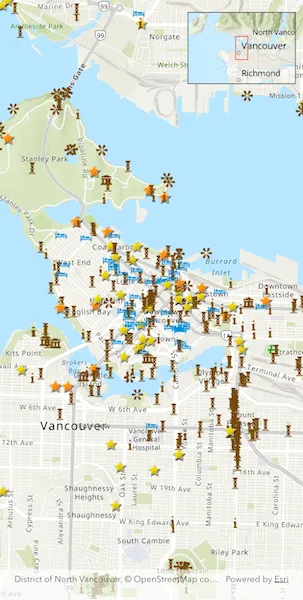
An overview map provides a useful, smaller-scale overview of the current map view’s location. For example, when you need to inspect a layer with many features while remaining aware of the wider context of the view, use an overview map to help show the extent of the main map view.
How to use the sample
Pan or zoom across the map view to browse through the tourist attractions feature layer and notice the viewpoint and scale of the linked overview map update automatically.
How it works
- Create an
ArcGISMapwith thearcGISTopographicbasemap style and add it to theArcGISMapViewController. - Instantiate a
FeatureLayerfrom aServiceFeatureTableand append it to theArcGISMap’s operational layers. - In the user interface, add an
OverviewMapwidget from the ArcGIS Maps SDK for Flutter Toolkit. - Provide the
ArcGISMapViewControllerto thecontrollerProviderproperty of theOverviewMapto connect theArcGISMapwith theOverviewMap.
Relevant API
- ArcGISMapView
- OverviewMap
About the data
The data used in this sample is the OpenStreetMap Tourist Attractions for North America feature layer, which is scale-dependent and displays at scales larger than 1:160,000.
Additional information
This sample uses the OverviewMap toolkit component, which requires the toolkit. For information about setting up the toolkit, as well as code for the underlying component, visit the toolkit repository.
Tags
context, inset, map, minimap, overview, preview, small scale, toolkit, view
Sample code
// Copyright 2026 Esri//// Licensed under the Apache License, Version 2.0 (the "License");// you may not use this file except in compliance with the License.// You may obtain a copy of the License at////   https://www.apache.org/licenses/LICENSE-2.0//// Unless required by applicable law or agreed to in writing, software// distributed under the License is distributed on an "AS IS" BASIS,// WITHOUT WARRANTIES OR CONDITIONS OF ANY KIND, either express or implied.// See the License for the specific language governing permissions and// limitations under the License.//
import 'package:arcgis_maps/arcgis_maps.dart';import 'package:arcgis_maps_sdk_flutter_samples/common/common.dart';import 'package:arcgis_maps_toolkit/arcgis_maps_toolkit.dart';import 'package:flutter/material.dart';
class DisplayOverviewMap extends StatefulWidget {  const DisplayOverviewMap({super.key});
  @override  State<DisplayOverviewMap> createState() => _DisplayOverviewMapState();}
class _DisplayOverviewMapState extends State<DisplayOverviewMap>    with SampleStateSupport {  // Create a controller for the map view.  final _mapViewController = ArcGISMapView.createController();
  @override  Widget build(BuildContext context) {    return Scaffold(      body: Stack(        children: [          // Add a map view to the widget tree and set a controller.          ArcGISMapView(            controllerProvider: () => _mapViewController,            onMapViewReady: onMapViewReady,          ),          SafeArea(            // Create an overview map and display on top of the map view in a stack.            // Pass the overview map the corresponding map view controller.            child: OverviewMap(controllerProvider: () => _mapViewController),          ),        ],      ),    );  }
  Future<void> onMapViewReady() async {    // Create a map with a topographic basemap style.    final map = ArcGISMap.withBasemapStyle(.arcGISTopographic);    _mapViewController.arcGISMap = map;
    // Set the initial viewpoint to a location in Vancouver, Canada.    map.initialViewpoint = Viewpoint.withLatLongScale(      latitude: 49.28299,      longitude: -123.12052,      scale: 70000,    );
    // Create a feature layer with the Tourist Attractions service feature table.    final serviceFeatureTable = ServiceFeatureTable.withUri(      Uri.parse(        'https://services6.arcgis.com/Do88DoK2xjTUCXd1/arcgis/rest/services/OSM_Tourism_NA/FeatureServer/0',      ),    );    final featureLayer = FeatureLayer.withFeatureTable(serviceFeatureTable);
    // Add the feature layer to the map's operational layers.    map.operationalLayers.add(featureLayer);  }}