Access and create bookmarks on a map.
Use case
Bookmarks are used for easily storing and accessing saved locations on the map. Bookmarks are of interest in educational apps (e.g. touring historical sites) or more specifically, for a land management company wishing to visually monitor flood levels over time at a particular location. These locations can be saved as bookmarks and revisited easily each time their basemap data has been updated (e.g. working with up-to-date satellite imagery to monitor water levels).
How to use the sample
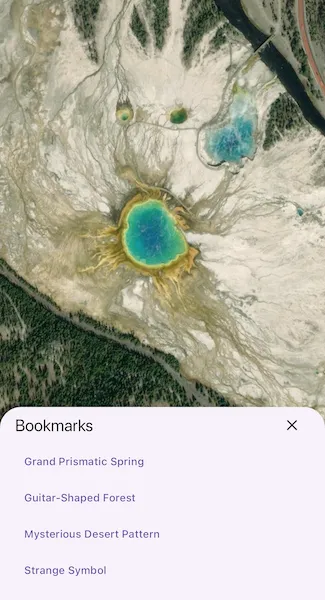
The map in the sample comes pre-populated with a set of bookmarks. To access a bookmark and move to that location, tap on a bookmark’s name from the ‘Bookmarks’ list. To add a bookmark, pan and/or zoom to a new location and tap the ‘Add Bookmark’ button. Enter a unique name for the bookmark and tap ‘Add’, and the bookmark will be added to the list.
How it works
- Instantiate a new
ArcGISMapobject and access theList<Bookmark>property atArcGISMap.bookmarks. - To create a new bookmark and add it to the bookmark list:
- Instantiate a new
Bookmarkobject passing in text (the name of the bookmark) and aViewpointas parameters. - Add the new bookmark to the bookmark list with
bookmarks.add(bookmark).
Relevant API
- Bookmark
- Viewpoint
Tags
bookmark, extent, location, zoom
Sample code
//// Copyright 2024 Esri//// Licensed under the Apache License, Version 2.0 (the "License");// you may not use this file except in compliance with the License.// You may obtain a copy of the License at////   https://www.apache.org/licenses/LICENSE-2.0//// Unless required by applicable law or agreed to in writing, software// distributed under the License is distributed on an "AS IS" BASIS,// WITHOUT WARRANTIES OR CONDITIONS OF ANY KIND, either express or implied.// See the License for the specific language governing permissions and// limitations under the License.//
import 'dart:math';import 'package:arcgis_maps/arcgis_maps.dart';import 'package:arcgis_maps_sdk_flutter_samples/common/common.dart';import 'package:flutter/material.dart';
class ManageBookmarks extends StatefulWidget {  const ManageBookmarks({super.key});
  @override  State<ManageBookmarks> createState() => _ManageBookmarksState();}
class _ManageBookmarksState extends State<ManageBookmarks> {  // Create a controller for the map view.  final _mapViewController = ArcGISMapView.createController();  // Declare a list of bookmarks.  late final List<Bookmark> _bookmarks;  // A flag for when the map view is ready and controls can be used.  var _ready = false;  // A flag for when the bookmarks bottom sheet is visible.  var _bookmarksVisible = false;
  @override  Widget build(BuildContext context) {    return Scaffold(      body: SafeArea(        top: false,        left: false,        right: false,        child: Stack(          children: [            Column(              children: [                Expanded(                  // Add a map view to the widget tree and set a controller.                  child: ArcGISMapView(                    controllerProvider: () => _mapViewController,                    onMapViewReady: onMapViewReady,                  ),                ),                Row(                  mainAxisAlignment: MainAxisAlignment.spaceEvenly,                  children: [                    // A button to add a bookmark at the current Viewpoint.                    ElevatedButton(                      onPressed: addBookmark,                      child: const Text('Add Bookmark'),                    ),                    // A button to list the bookmarks.                    ElevatedButton(                      onPressed: () => setState(() => _bookmarksVisible = true),                      child: const Text('Bookmarks'),                    ),                  ],                ),              ],            ),            // Display a progress indicator and prevent interaction until state is ready.            LoadingIndicator(visible: !_ready),          ],        ),      ),      // The Bookmarks bottom sheet.      bottomSheet: _bookmarksVisible ? buildBookmarks(context) : null,    );  }
  // The build method for the Bookmarks bottom sheet.  Widget buildBookmarks(BuildContext context) {    return Container(      padding: EdgeInsets.fromLTRB(        20,        20,        20,        max(          20,          View.of(context).viewPadding.bottom /              View.of(context).devicePixelRatio,        ),      ),      child: Column(        mainAxisSize: MainAxisSize.min,        crossAxisAlignment: CrossAxisAlignment.stretch,        children: [          Row(            children: [              Text('Bookmarks', style: Theme.of(context).textTheme.titleLarge),              const Spacer(),              IconButton(                icon: const Icon(Icons.close),                onPressed: () => setState(() => _bookmarksVisible = false),              ),            ],          ),          Container(            constraints: BoxConstraints(              maxHeight: MediaQuery.sizeOf(context).height * 0.4,            ),            child: SingleChildScrollView(              child: Column(                crossAxisAlignment: CrossAxisAlignment.stretch,                children: _bookmarks.map((bookmark) {                  // When a bookmark is tapped, set the bookmark on the map view.                  return TextButton(                    onPressed: () => _mapViewController.setBookmark(bookmark),                    style: const ButtonStyle(alignment: Alignment.centerLeft),                    child: Text(bookmark.name),                  );                }).toList(),              ),            ),          ),        ],      ),    );  }
  void onMapViewReady() {    // Create a map with an imagery basemap style.    final map = ArcGISMap.withBasemapStyle(BasemapStyle.arcGISImagery);
    // Access the bookmark list from the map.    _bookmarks = map.bookmarks;
    // Add the predefined bookmarks to the list.    _bookmarks.addAll([      Bookmark(        name: 'Grand Prismatic Spring',        viewpoint: Viewpoint.withLatLongScale(          latitude: 44.525,          longitude: -110.838,          scale: 6000,        ),      ),      Bookmark(        name: 'Guitar-Shaped Forest',        viewpoint: Viewpoint.withLatLongScale(          latitude: -33.867,          longitude: -63.985,          scale: 40000,        ),      ),      Bookmark(        name: 'Mysterious Desert Pattern',        viewpoint: Viewpoint.withLatLongScale(          latitude: 27.380,          longitude: 33.632,          scale: 6000,        ),      ),      Bookmark(        name: 'Strange Symbol',        viewpoint: Viewpoint.withLatLongScale(          latitude: 37.401,          longitude: -116.867,          scale: 6000,        ),      ),    ]);
    // Set the map on the controller and navigate to the first bookmark.    _mapViewController.arcGISMap = map;    _mapViewController.setBookmark(_bookmarks.first).ignore();
    // Set the ready state variable to true to enable the sample UI.    setState(() => _ready = true);  }
  Future<void> addBookmark() async {    // Show a dialog to get the name of the bookmark.    final name = await showDialog<String>(      context: context,      builder: (_) => const AddBookmarkDialog(),    );    if (name == null || name.isEmpty) return;
    // Create a bookmark with the current viewpoint and add it to the list.    final bookmark = Bookmark(      name: name,      viewpoint: _mapViewController.getCurrentViewpoint(        ViewpointType.centerAndScale,      ),    );    setState(() => _bookmarks.add(bookmark));  }}
// A dialog to get the name for a bookmark.class AddBookmarkDialog extends StatefulWidget {  const AddBookmarkDialog({super.key});
  @override  State<AddBookmarkDialog> createState() => _AddBookmarkDialogState();}
class _AddBookmarkDialogState extends State<AddBookmarkDialog> {  final _nameController = TextEditingController();
  @override  void dispose() {    _nameController.dispose();    super.dispose();  }
  @override  Widget build(BuildContext context) {    return AlertDialog(      content: TextField(        controller: _nameController,        autocorrect: false,        autofocus: true,        enableSuggestions: false,        decoration: const InputDecoration(labelText: 'Name'),        onSubmitted: add,      ),      actions: [        TextButton(onPressed: cancel, child: const Text('Cancel')),        TextButton(          onPressed: () => add(_nameController.text),          child: const Text('Add'),        ),      ],    );  }
  // Cancel the dialog.  void cancel() {    Navigator.of(context).pop();  }
  // Report the name to be used for the bookmark.  void add(String name) {    Navigator.of(context).pop(name);  }}