Perform a line of sight analysis in a map view between fixed observer and target positions.
Use case
Line of sight analysis determines whether a target can be seen from one or more observer locations based on elevation data. This can support planning workflows such as siting communication equipment, assessing observation coverage, or evaluating potential obstructions between known locations. In this sample, several predefined observer points are evaluated against a single fixed target to compare visibility outcomes side by side.
Note: This analysis is a form of “data-driven analysis”, which means the analysis is calculated at the resolution of the data rather than the resolution of the display.
How to use the sample
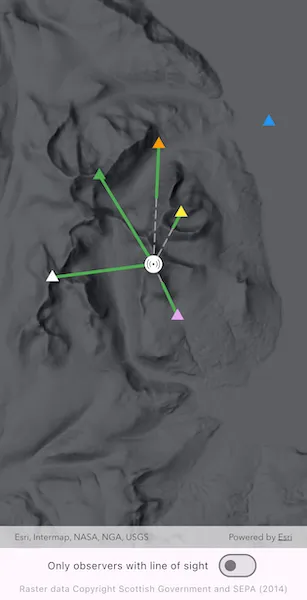
The sample loads with a map centered on the Isle of Arran, Scotland, and runs a line of sight analysis from multiple observer points (triangles) to a fixed target point (beacon icon) located at the highest point of the island. Solid green line segments represent visible portions of each line of sight result, and dashed gray segments represent not visible portions. Tap on each observer to see a callout that reports whether the target is visible and over what distance the line remains unobstructed. Use the switch to show only results where the target is visible from the observer.
How it works
- Create an
ArcGISMapand set it on anArcGISMapViewController. - Create a
GraphicsOverlayand add target and observer points to it, along with an appropriate symbol. Create anotherGraphicsOverlaythat will display the line of sight result graphics. - Create a
ContinuousFieldfrom a raster file containing elevation data. - Create a list of
LineOfSightPositionfrom target and observerArcGISPoints and aHeightOrigin.relative. - Configure
LineOfSightParameterswithObserverTargetPairs.withManyToMany, using the list of observer and target line of sight positions. - Create a
LineOfSightFunctionfrom the continuous field and line of sight parameters. - Evaluate the function to get
LineOfSightresults. - Create a
Graphicfrom each result, using the geometry of the result’svisibleLineornotVisibleLineresult, and an appropriate symbol. - Use
LineOfSight.targetVisibilityto determine if the observer position has a direct line of sight to the target position. - Get the length of the visible line result with
GeometryEngine.lengthGeodeticto report results.
Relevant API
- ContinuousField
- GeometryEngine
- GraphicsOverlay
- LineOfSight
- LineOfSightFunction
- LineOfSightParameters
- LineOfSightPosition
- ObserverTargetPairs
About the data
The sample uses a 10m resolution digital terrain elevation raster of the Isle of Arran, Scotland (Raster data Copyright Scottish Government and SEPA (2014)).
Tags
analysis, elevation, line of sight, map view, spatial analysis, terrain, visibility
Sample code
// Copyright 2026 Esri//// Licensed under the Apache License, Version 2.0 (the "License");// you may not use this file except in compliance with the License.// You may obtain a copy of the License at////   https://www.apache.org/licenses/LICENSE-2.0//// Unless required by applicable law or agreed to in writing, software// distributed under the License is distributed on an "AS IS" BASIS,// WITHOUT WARRANTIES OR CONDITIONS OF ANY KIND, either express or implied.// See the License for the specific language governing permissions and// limitations under the License.//
import 'dart:io';
import 'package:arcgis_maps/arcgis_maps.dart';import 'package:arcgis_maps_sdk_flutter_samples/common/common.dart';import 'package:flutter/material.dart';import 'package:go_router/go_router.dart';
class ShowLineOfSightAnalysisInMap extends StatefulWidget {  const ShowLineOfSightAnalysisInMap({super.key});
  @override  State<ShowLineOfSightAnalysisInMap> createState() =>      _ShowLineOfSightAnalysisInMapState();}
class _ShowLineOfSightAnalysisInMapState    extends State<ShowLineOfSightAnalysisInMap>    with SampleStateSupport {  // The elevation file used in the analysis.  late File _elevationFile;
  // Create a controller for the map view.  final _mapViewController = ArcGISMapView.createController();
  // Create a graphics overlay for the target position.  final _targetGraphicsOverlay = GraphicsOverlay();
  // Create a graphics overlay for the observer positions.  final _observersGraphicsOverlay = GraphicsOverlay();
  // Create a graphics overlay for the line of sight results.  final _resultsGraphicsOverlay = GraphicsOverlay();
  // Line of sight results by observer (for access when tapping on the observer graphics).  final _lineOfSightResults = <Observer, LineOfSight>{};
  // Whether to show only observers with line of sight to the target.  var _visibilityFilter = false;
  // A flag for when the map view is ready and controls can be used.  var _ready = false;
  @override  void initState() {    // Get the elevation data used in the sample.    final listPaths = GoRouter.of(context).state.extra! as List<String>;    _elevationFile = File(listPaths.first);
    super.initState();  }
  @override  Widget build(BuildContext context) {    return Scaffold(      body: SafeArea(        top: false,        left: false,        right: false,        child: Stack(          children: [            Column(              children: [                Expanded(                  // Add a map view to the widget tree and set a controller.                  child: ArcGISMapView(                    controllerProvider: () => _mapViewController,                    onMapViewReady: onMapViewReady,                    onTap: onTap,                  ),                ),                Row(                  mainAxisAlignment: .center,                  spacing: 10,                  children: [                    const Text('Only observers with line of sight'),                    Switch(                      value: _visibilityFilter,                      onChanged: setVisibilityFilter,                    ),                  ],                ),                Text(                  'Raster data Copyright Scottish Government and SEPA (2014)',                  style: Theme.of(                    context,                  ).textTheme.bodySmall?.copyWith(color: Colors.grey),                ),              ],            ),            // Display a progress indicator and prevent interaction until state is ready.            LoadingIndicator(visible: !_ready),          ],        ),      ),    );  }
  Future<void> onMapViewReady() async {    // Create a map with the hillshade dark style.    final map = ArcGISMap.withBasemapStyle(.arcGISHillshadeDark);    _mapViewController.arcGISMap = map;
    // Add the graphics overlays to the map view.    _mapViewController.graphicsOverlays.addAll([      _resultsGraphicsOverlay,      _observersGraphicsOverlay,      _targetGraphicsOverlay,    ]);
    // Load an image that represents the target (e.g., a radio mast or receiver).    final beaconImage = await ArcGISImage.fromAsset('assets/beacon.png');    final beaconSymbol = PictureMarkerSymbol.withImage(beaconImage)      ..width = 24      ..height = 24;
    // Create a graphic for the target and add it to the graphics overlay.    final targetPosition = ArcGISPoint(      x: -577955.365,      y: 7484288.220,      z: 5,      spatialReference: .webMercator,    );    final targetGraphic = Graphic(      geometry: targetPosition,      symbol: beaconSymbol,    );    _targetGraphicsOverlay.graphics.add(targetGraphic);
    // Create a graphic for each observer and add them to the graphics overlay.    _observersGraphicsOverlay.graphics.addAll(      Observer.values.map(        (observer) =>            Graphic(geometry: observer.position, symbol: observer.symbol)              ..attributes['observer'] = observer,      ),    );
    // Set an initial viewpoint centered on the target position.    map.initialViewpoint = Viewpoint.fromCenter(targetPosition, scale: 150000);
    // Create the continuous field from the elevation file.    final continuousField = await ContinuousField.createFromFiles(      filePaths: [_elevationFile.uri],      band: 0,    );
    // Create line of sight positions for targets and observers.    final targetPositions = [      LineOfSightPosition(position: targetPosition, heightOrigin: .relative),    ];    final observerPositions = Observer.values        .map(          (observer) => LineOfSightPosition(            position: observer.position,            heightOrigin: .relative,          ),        )        .toList();
    // Create the line of sight parameters with the observer and target positions.    final parameters = LineOfSightParameters();    parameters.observerTargetPairs = ObserverTargetPairs.withManyToMany(      observerPositions: observerPositions,      targetPositions: targetPositions,    );
    // Create the line of sight function with the continuous field and parameters.    final lineOfSightFunction = LineOfSightFunction.withContinuousField(      elevation: continuousField,      parameters: parameters,    );
    // Evaluate the line of sight function.    final results = await lineOfSightFunction.evaluate();
    // Store the results by observer.    for (var i = 0; i < results.length; i++) {      final result = results[i];      final observer = Observer.values[i];      _lineOfSightResults[observer] = result;    }
    // Create symbols for the visible and not visible line segments.    final visibleLineSymbol = SimpleLineSymbol(color: Colors.green, width: 4);    final notVisibleLineSymbol = SimpleLineSymbol(      color: Colors.grey,      width: 2,      style: .longDash,    );
    // Add the line of sight results to the graphics overlay.    for (final result in results) {      // Get the target visibility for the observer-target pair to mark the graphics.      final targetVisibility = result.targetVisibility;
      // Add the visible line segment if it exists.      if (result.visibleLine != null) {        _resultsGraphicsOverlay.graphics.add(          Graphic(geometry: result.visibleLine, symbol: visibleLineSymbol)            ..attributes['targetVisibility'] = targetVisibility,        );      }
      // Add the not visible line segment if it exists.      if (result.notVisibleLine != null) {        _resultsGraphicsOverlay.graphics.add(          Graphic(geometry: result.notVisibleLine, symbol: notVisibleLineSymbol)            ..attributes['targetVisibility'] = targetVisibility,        );      }    }
    // Set the ready state variable to true to enable the sample UI.    setState(() => _ready = true);  }
  void setVisibilityFilter(bool value) {    setState(() => _visibilityFilter = value);
    // Show the graphic if the visibility filter is off, or if the target is visible from the observer.    for (final graphic in _resultsGraphicsOverlay.graphics) {      final targetVisibility = graphic.attributes['targetVisibility'] as double;      graphic.isVisible = !_visibilityFilter || targetVisibility == 1;    }  }
  Future<void> onTap(Offset offset) async {    // Dismiss any existing callout.    _mapViewController.callout.dismiss();
    // Identify the tapped graphic from the observers graphics overlay.    final identifyResult = await _mapViewController.identifyGraphicsOverlay(      _observersGraphicsOverlay,      screenPoint: offset,      tolerance: 10,    );    if (!mounted) return;
    final graphics = identifyResult.graphics;    if (graphics.isEmpty) return;
    final observerGraphic = graphics.first;
    // Get the observer from the graphic attributes.    final observer = observerGraphic.attributes['observer'] as Observer;
    // Look up the line of sight result for the observer.    final lineOfSightResult = _lineOfSightResults[observer]!;
    // Present a callout with the result details.    _mapViewController.callout.showCalloutForGeoElement(      observerGraphic,      title: observer.name,      detail: lineOfSightResult.detail,      style: ThemedCalloutStyle.themed(context),    );  }}
// An enum capturing the different observers.enum Observer {  greenObserver(    name: 'Green Observer',    color: Colors.green,    x: -580893.546,    y: 7489102.890,  ),  whiteObserver(    name: 'White Observer',    color: Colors.white,    x: -583446.004,    y: 7483567.462,  ),  orangeObserver(    name: 'Orange Observer',    color: Colors.orange,    x: -577665.236,    y: 7490792.908,  ),  yellowObserver(    name: 'Yellow Observer',    color: Colors.yellow,    x: -576452.981,    y: 7487071.388,  ),  purpleObserver(    name: 'Purple Observer',    color: Color.fromARGB(255, 228, 168, 239),    x: -576650.067,    y: 7481479.772,  ),  blueObserver(    name: 'Blue Observer',    color: Colors.blue,    x: -571683.896,    y: 7492017.864,  );
  const Observer({    required this.name,    required this.color,    required this.x,    required this.y,  });
  final String name;  final Color color;  final double x;  final double y;
  // The position of the observer.  ArcGISPoint get position =>      ArcGISPoint(x: x, y: y, z: 5, spatialReference: .webMercator);
  // The symbol that represents the observer.  ArcGISSymbol get symbol =>      SimpleMarkerSymbol(style: .triangle, color: color, size: 15);}
extension on LineOfSight {  // Helper method to get a user-friendly detail string for the line of sight result.  String get detail {    // If there was an error during the analysis, return the error message.    if (error != null) {      return error!.additionalMessage;    }
    // If neither line is present, return an empty string (though this should not happen in a valid result).    if (notVisibleLine == null && visibleLine == null) return '';
    // Calculate the length of the visible line, which is the unobstructed distance from the observer to the target.    final visibleLength = visibleLine == null        ? 0        : GeometryEngine.lengthGeodetic(            geometry: visibleLine!,            curveType: .geodesic,          );
    // If there is no not-visible line, the target is fully visible from the observer.    // Return a message with the length of the visible line.    if (notVisibleLine == null) {      return 'Target visible from observer over ${visibleLength.toStringAsFixed(1)} meters.';    }
    // Otherwise, the target is not fully visible. Return a message with the unobstructed length.    return 'Target not visible from observer. Obstructed after ${visibleLength.toStringAsFixed(1)} meters.';  }}