Perform an exploratory line of sight analysis between two points in real time.
Use case
An exploratory line of sight analysis can be used to assess whether a view is obstructed between an observer and a target. Obstructing features could either be natural, like topography, or man-made, like buildings. Consider an events planning company wanting to commemorate a national event by lighting sequential beacons across hill summits or roof tops. To guarantee a successful event, ensuring an unobstructed line of sight between neighboring beacons would allow each beacon to be activated as intended.
Note: This analysis is a form of “exploratory analysis”, which means the results are calculated on the current scale of the data, and the results are generated very quickly but not persisted. If persisted analysis performed at the full resolution of the data is required, consider using a LineOfSightFunction to perform a line of sight calculation instead.
How to use the sample
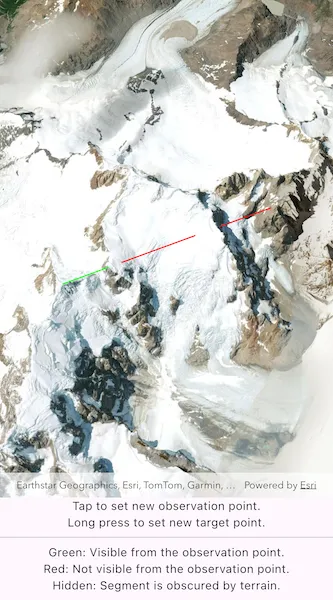
The sample loads with a preset observer and target location, linked by a colored line. A red segment on the line means the view between observer and target is obstructed, whereas green means the view is unobstructed.
Tap the scene to set the location of the observer. Long press to set the line-of-sight target location.
How it works
- Create an
AnalysisOverlayand add it to the scene view. - Create a
ExploratoryLocationLineOfSightwith initial observer and target locations and add it to the analysis overlay. - Set
onTapandonLongPresshandler functions when creating theArcGISSceneView. Use theArcGISSceneViewController.screenToBaseSurface(Offset screenOffset)function to convert the screen offset to anArcGISPointon the scene. In theonTapfunction, set theExploratoryLocationLineOfSight.observerLocationproperty. In theonLongPressfunction, set theExploratoryLocationLineOfSight.targetLocationproperty. - The
AnalysisOverlaywill automatically update when either of the locations are updated.
Relevant API
- AnalysisOverlay
- ArcGISSceneView
- ExploratoryLocationLineOfSight
Tags
3D, exploratory line of sight, visibility, visibility analysis
Sample code
// Copyright 2025 Esri//// Licensed under the Apache License, Version 2.0 (the "License");// you may not use this file except in compliance with the License.// You may obtain a copy of the License at////   https://www.apache.org/licenses/LICENSE-2.0//// Unless required by applicable law or agreed to in writing, software// distributed under the License is distributed on an "AS IS" BASIS,// WITHOUT WARRANTIES OR CONDITIONS OF ANY KIND, either express or implied.// See the License for the specific language governing permissions and// limitations under the License.//
import 'package:arcgis_maps/arcgis_maps.dart';import 'package:arcgis_maps_sdk_flutter_samples/common/common.dart';import 'package:flutter/material.dart';
class ShowExploratoryLineOfSightBetweenPoints extends StatefulWidget {  const ShowExploratoryLineOfSightBetweenPoints({super.key});
  @override  State<ShowExploratoryLineOfSightBetweenPoints> createState() =>      _ShowExploratoryLineOfSightBetweenPointsState();}
class _ShowExploratoryLineOfSightBetweenPointsState    extends State<ShowExploratoryLineOfSightBetweenPoints>    with SampleStateSupport {  // Create a controller for the scene view.  final _sceneViewController = ArcGISSceneView.createController();
  // The exploratory line of sight object that will provide the analysis for this sample.  // The object is initialized with the starting observer and target locations.  final _exploratoryLocationLineOfSight = ExploratoryLocationLineOfSight(    observerLocation: ArcGISPoint(      x: -73.095827750063904,      y: -49.319214695380957,      z: 2697.4689045762643,      spatialReference: SpatialReference.wgs84,    ),    targetLocation: ArcGISPoint(      x: -73.125568047959803,      y: -49.347049722534479,      z: 1944.1079967124388,      spatialReference: SpatialReference.wgs84,    ),  );
  // A flag for when the scene view is ready.  var _ready = false;
  @override  Widget build(BuildContext context) {    return Scaffold(      body: SafeArea(        top: false,        left: false,        right: false,        child: Stack(          children: [            Column(              children: [                Expanded(                  // Add a scene view to the widget tree and set a controller.                  child: ArcGISSceneView(                    controllerProvider: () => _sceneViewController,                    onSceneViewReady: onSceneViewReady,                    onTap: onTap,                    onLongPressEnd: onLongPressEnd,                  ),                ),                const Column(                  mainAxisAlignment: MainAxisAlignment.spaceEvenly,                  children: [                    Text('Tap to set new observation point.'),                    Text('Long press to set new target point.'),                    Divider(),                    Text('Green: Visible from the observation point.'),                    Text('Red: Not visible from the observation point.'),                    Text('Hidden: Segment is obscured by terrain.'),                  ],                ),              ],            ),            // Display a progress indicator and prevent interaction until state is ready.            LoadingIndicator(visible: !_ready),          ],        ),      ),    );  }
  void onSceneViewReady() {    // Create the scene for this sample and set it on the view controller.    final scene = _setupScene();    _sceneViewController.arcGISScene = scene;
    // Create an AnalysisOverlay and add the exploratory location line of sight object to it.    final analysisOverlay = AnalysisOverlay();    analysisOverlay.analyses.add(_exploratoryLocationLineOfSight);
    // Add the AnalysisOverlay to the view controller.    _sceneViewController.analysisOverlays.add(analysisOverlay);
    // Set the ready state variable to true to enable the sample UI.    setState(() => _ready = true);  }
  void onTap(Offset offset) {    // Get the new observer point from the screen tap offset.    final newObserverPoint = _sceneViewController.screenToBaseSurface(      screen: offset,    );    // Return if a point could not be returned.    if (newObserverPoint == null) return;
    // Set the new origin point on the analysis object.    _exploratoryLocationLineOfSight.observerLocation = newObserverPoint;  }
  void onLongPressEnd(Offset offset) {    // Get the new target point from the long press offset.    final newTargetPoint = _sceneViewController.screenToBaseSurface(      screen: offset,    );    // Return if a point could not be returned.    if (newTargetPoint == null) return;
    // Set the new origin point on the analysis object.    _exploratoryLocationLineOfSight.targetLocation = newTargetPoint;  }
  ArcGISScene _setupScene() {    // Create a scene with an imagery basemap style.    final scene = ArcGISScene.withBasemapStyle(BasemapStyle.arcGISImagery);
    // Set the scene's initial viewpoint.    scene.initialViewpoint = Viewpoint.withPointScaleCamera(      center: ArcGISPoint(x: 0, y: 0),      scale: 1,      camera: Camera.withLookAtPoint(        lookAtPoint: ArcGISPoint(          x: -73.1094,          y: -49.3325,          z: 2210,          spatialReference: SpatialReference.wgs84,        ),        distance: 10000,        heading: 150,        pitch: 20,        roll: 0,      ),    );
    // Add surface elevation to the scene.    final worldElevationService = Uri.parse(      'https://elevation3d.arcgis.com/arcgis/rest/services/WorldElevation3D/Terrain3D/ImageServer',    );    final elevationSource = ArcGISTiledElevationSource.withUri(      worldElevationService,    );    scene.baseSurface.elevationSources.add(elevationSource);
    return scene;  }}