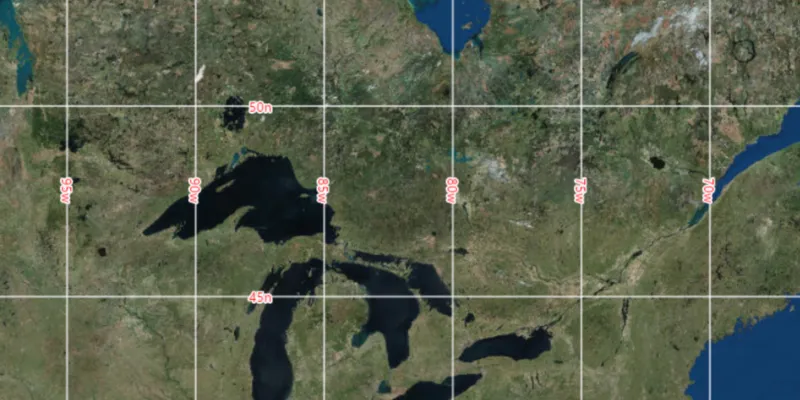
Display coordinate system grids including Latitude/Longitude, MGRS, UTM and USNG on a map view. Also, toggle label visibility and change the color of grid lines and grid labels.
Use case
Grids are often used on printed maps, but can also be helpful on digital maps, to identify locations on a map.
How to use the sample
Use the controls to select the type of grid from Grid Type (LatLong, MGRS, UTM and USNG), and to modify its properties like label visibility, grid line color, and grid label color. Click the ‘Update’ button to see the result.
How it works
- Create an instance of one of the
Gridtypes. - Grid lines and labels can be styled per grid level with
setLineSymbol(gridLevel, lineSymbol)andsetTextSymbol(gridLevel, textSymbol)methods on the grid. - The label position can be set with
setLabelPosition(labelPosition)method on the grid. - For the
LatitudeLongitudeGridtype, you can specify a label format ofDECIMAL_DEGREESorDEGREES_MINUTES_SECONDS. - To set the grid, use the
setGrid(grid)method on the map view.
Relevant API
- Grid
- LatitudeLongitudeGrid
- LineSymbol
- MapView
- MgrsGrid
- SimpleLineSymbol
- TextSymbol
- UsngGrid
- UtmGrid
Tags
coordinates, degrees, graticule, grid, latitude, longitude, MGRS, minutes, seconds, USNG, UTM
Sample code
/* * Copyright 2018 Esri. * * Licensed under the Apache License, Version 2.0 (the "License"); you may not * use this file except in compliance with the License. You may obtain a copy of * the License at * * http://www.apache.org/licenses/LICENSE-2.0 * * Unless required by applicable law or agreed to in writing, software * distributed under the License is distributed on an "AS IS" BASIS, WITHOUT * WARRANTIES OR CONDITIONS OF ANY KIND, either express or implied. See the * License for the specific language governing permissions and limitations under * the License. */
package com.esri.samples.display_grid;
import javafx.beans.binding.Bindings;import javafx.fxml.FXML;import javafx.scene.control.CheckBox;import javafx.scene.control.ColorPicker;import javafx.scene.control.ComboBox;import javafx.scene.paint.Color;
import com.esri.arcgisruntime.ArcGISRuntimeEnvironment;import com.esri.arcgisruntime.geometry.Point;import com.esri.arcgisruntime.geometry.SpatialReferences;import com.esri.arcgisruntime.mapping.ArcGISMap;import com.esri.arcgisruntime.mapping.BasemapStyle;import com.esri.arcgisruntime.mapping.Viewpoint;import com.esri.arcgisruntime.mapping.view.Grid;import com.esri.arcgisruntime.mapping.view.LatitudeLongitudeGrid;import com.esri.arcgisruntime.mapping.view.MapView;import com.esri.arcgisruntime.mapping.view.MgrsGrid;import com.esri.arcgisruntime.mapping.view.UsngGrid;import com.esri.arcgisruntime.mapping.view.UtmGrid;import com.esri.arcgisruntime.symbology.LineSymbol;import com.esri.arcgisruntime.symbology.SimpleLineSymbol;import com.esri.arcgisruntime.symbology.TextSymbol;
public class DisplayGridController {
  @FXML private MapView mapView;  @FXML private ComboBox<GridType> gridTypeComboBox;  @FXML private CheckBox labelsVisibleCheckBox;  @FXML private CheckBox gridVisibleCheckBox;  @FXML private ColorPicker gridColorPicker;  @FXML private ColorPicker labelColorPicker;  @FXML private ComboBox<Grid.LabelPosition> labelPositionComboBox;  @FXML private ComboBox<LatitudeLongitudeGrid.LabelFormat> labelFormatComboBox;
  /**   * Used for combo box.   */  private enum GridType {    LAT_LON, UTM, USNG, MGRS  }
  public void initialize() {
    // authentication with an API key or named user is required to access basemaps and other location services    String yourAPIKey = System.getProperty("apiKey");    ArcGISRuntimeEnvironment.setApiKey(yourAPIKey);
    // create a map with the standard imagery basemap style    ArcGISMap map = new ArcGISMap(BasemapStyle.ARCGIS_IMAGERY_STANDARD);
    // set the map to the map view    mapView.setMap(map);
    // set a viewpoint on the map view    mapView.setViewpoint(new Viewpoint(new Point(-10336141.70018318, 5418213.05332071,      SpatialReferences.getWebMercator()), 6450785));
    // set initial values for options    gridTypeComboBox.getItems().addAll(GridType.values());    gridTypeComboBox.setValue(GridType.LAT_LON);    gridColorPicker.setValue(Color.WHITE);    labelColorPicker.setValue(Color.RED);    labelPositionComboBox.getItems().addAll(Grid.LabelPosition.values());    labelPositionComboBox.setValue(Grid.LabelPosition.TOP_LEFT);    labelFormatComboBox.getItems().addAll(LatitudeLongitudeGrid.LabelFormat.values());    labelFormatComboBox.setValue(LatitudeLongitudeGrid.LabelFormat.DECIMAL_DEGREES);
    // label position and format only apply to Lat Lon grid type    labelPositionComboBox.disableProperty().bind(Bindings.createBooleanBinding(() ->            gridTypeComboBox.getSelectionModel().getSelectedItem() != GridType.LAT_LON,        gridTypeComboBox.getSelectionModel().selectedItemProperty())    );    labelFormatComboBox.disableProperty().bind(Bindings.createBooleanBinding(() ->        gridTypeComboBox.getSelectionModel().getSelectedItem() != GridType.LAT_LON,        gridTypeComboBox.getSelectionModel().selectedItemProperty())    );
    // update the grid with the default values on start    updateGrid();  }
  /**   * Updates the map view's grid when the "Update" button is clicked.   */  @FXML  private void updateGrid() {    // grid type    Grid grid = null;    switch (gridTypeComboBox.getSelectionModel().getSelectedItem()) {      case LAT_LON:        grid = new LatitudeLongitudeGrid();        break;      case UTM:        grid = new UtmGrid();        break;      case USNG:        grid = new UsngGrid();        break;      case MGRS:        grid = new MgrsGrid();        break;    }
    // color the grid lines and labels for each grid level    for (int i = 0; i < grid.getLevelCount(); i++) {      // grid lines      LineSymbol gridLineSymbol = new SimpleLineSymbol(SimpleLineSymbol.Style.SOLID,        gridColorPicker.getValue(), 1 + i);      grid.setLineSymbol(i, gridLineSymbol);
      // labels      TextSymbol labelTextSymbol = new TextSymbol(14, "text", labelColorPicker.getValue(),          TextSymbol.HorizontalAlignment.LEFT, TextSymbol.VerticalAlignment.BOTTOM);      labelTextSymbol.setHaloColor(Color.WHITE);      labelTextSymbol.setHaloWidth(2 + i);      grid.setTextSymbol(i, labelTextSymbol);    }
    // grid visibility    grid.setVisible(gridVisibleCheckBox.isSelected());
    // label visibility    grid.setLabelVisible(labelsVisibleCheckBox.isSelected());
    // label position and format    if (grid instanceof LatitudeLongitudeGrid) {      grid.setLabelPosition(labelPositionComboBox.getSelectionModel().getSelectedItem());      ((LatitudeLongitudeGrid) grid).setLabelFormat(labelFormatComboBox.getSelectionModel().getSelectedItem());    }
    // set the grid    mapView.setGrid(grid);  }
  /**   * Disposes of application resources.   */  void terminate() {
    if (mapView != null) {      mapView.dispose();    }  }
}
/* * Copyright 2018 Esri. * * Licensed under the Apache License, Version 2.0 (the "License"); you may not * use this file except in compliance with the License. You may obtain a copy of * the License at * * http://www.apache.org/licenses/LICENSE-2.0 * * Unless required by applicable law or agreed to in writing, software * distributed under the License is distributed on an "AS IS" BASIS, WITHOUT * WARRANTIES OR CONDITIONS OF ANY KIND, either express or implied. See the * License for the specific language governing permissions and limitations under * the License. */
package com.esri.samples.display_grid;
import java.io.IOException;
import javafx.application.Application;import javafx.fxml.FXMLLoader;import javafx.scene.Parent;import javafx.scene.Scene;import javafx.stage.Stage;
public class DisplayGridSample extends Application {
private static DisplayGridController controller;
@Override public void start(Stage stage) throws IOException { // set up the scene FXMLLoader loader = new FXMLLoader(getClass().getResource("/display_grid/main.fxml")); Parent root = loader.load(); controller = loader.getController(); Scene scene = new Scene(root);
// set up the stage stage.setTitle("Display Grid Sample"); stage.setWidth(800); stage.setHeight(700); stage.setScene(scene); stage.show(); }
/** * Stops and releases all resources used in application. */ @Override public void stop() { controller.terminate(); }
/** * Opens and runs application. * * @param args arguments passed to this application */ public static void main(String[] args) {
Application.launch(args); }}