Format coordinates in a variety of common notations.
Use case
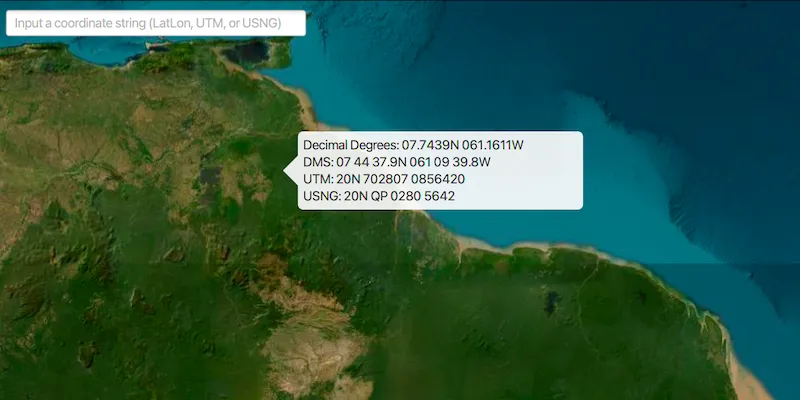
The coordinate formatter can format a map location in WGS84 in a number of common coordinate notations. Parsing one of these formats to a location is also supported. Formats include decimal degrees; degrees, minutes, seconds; Universal Transverse Mercator (UTM), and United States National Grid (USNG).
How to use the sample
Click on the map to see a callout with the clicked location’s coordinate formatted in 4 different ways. You can also put a coordinate string in any of these formats in the text field. Hit ‘Enter’ and the coordinate string will be parsed to a map location which the callout will move to.
How it works
- Get or create a map
Pointwith a spatial reference. - Use one of the static “to” methods on
CoordinateFormattersuch asCoordinateFormatter.toLatitudeLongitude(point, CoordinateFormatter.LatitudeLongitudeFormat.DECIMAL_DEGREES, 4)to get the formatted string. - To go from a formatted string to a
Point, use one of the “from” static methods likeCoordinateFormatter.fromUtm(coordinateString, map.getSpatialReference(), CoordinateFormatter.UtmConversionMode.LATITUDE_BAND_INDICATORS).
Relevant API
- CoordinateFormatter
Tags
convert, coordinate, decimal degrees, degree minutes seconds, format, latitude, longitude, USNG, UTM
Sample code
FormatCoordinatesSample.java
/* * Copyright 2018 Esri. * * Licensed under the Apache License, Version 2.0 (the "License"); you may not * use this file except in compliance with the License. You may obtain a copy of * the License at * * http://www.apache.org/licenses/LICENSE-2.0 * * Unless required by applicable law or agreed to in writing, software * distributed under the License is distributed on an "AS IS" BASIS, WITHOUT * WARRANTIES OR CONDITIONS OF ANY KIND, either express or implied. See the * License for the specific language governing permissions and limitations under * the License. */
package com.esri.samples.format_coordinates;
import com.esri.arcgisruntime.ArcGISRuntimeException;import com.esri.arcgisruntime.geometry.CoordinateFormatter;import com.esri.arcgisruntime.geometry.Point;import com.esri.arcgisruntime.layers.ArcGISTiledLayer;import com.esri.arcgisruntime.mapping.ArcGISMap;import com.esri.arcgisruntime.mapping.Basemap;import com.esri.arcgisruntime.mapping.view.Callout;import com.esri.arcgisruntime.mapping.view.MapView;import javafx.application.Application;import javafx.geometry.Insets;import javafx.geometry.Point2D;import javafx.geometry.Pos;import javafx.scene.Scene;import javafx.scene.control.Label;import javafx.scene.control.TextField;import javafx.scene.input.MouseButton;import javafx.scene.layout.StackPane;import javafx.scene.layout.VBox;import javafx.stage.Stage;
public class FormatCoordinatesSample extends Application {
  private MapView mapView;  private Callout callout;  private Label decimalDegreesLabel;  private Label degMinSecLabel;  private Label utmLabel;  private Label usngLabel;
  @Override  public void start(Stage stage) {
    try {      // create stack pane and application scene      StackPane stackPane = new StackPane();      Scene scene = new Scene(stackPane);
      // set title, size, and add scene to stage      stage.setTitle("Format Coordinates Sample");      stage.setWidth(800);      stage.setHeight(700);      stage.setScene(scene);      stage.show();
      // create a map with a wgs84 basemap and set it to the map view      mapView = new MapView();      ArcGISTiledLayer basemapLayer = new ArcGISTiledLayer("https://wi.maptiles.arcgis" +        ".com/arcgis/rest/services/World_Imagery/MapServer");      Basemap basemap = new Basemap(basemapLayer);      ArcGISMap map = new ArcGISMap(basemap);      mapView.setMap(map);
      // configure the callout to show coordinate information      callout = mapView.getCallout();      decimalDegreesLabel = new Label();      degMinSecLabel = new Label();      utmLabel  = new Label();      usngLabel  = new Label();      var calloutVBox = new VBox();      calloutVBox.setMinWidth(400);      calloutVBox.setMaxWidth(400);      calloutVBox.getChildren().addAll(decimalDegreesLabel, degMinSecLabel, utmLabel, usngLabel);      callout.setCustomView(calloutVBox);
      // click event to display the callout with the formatted coordinates of the clicked location      mapView.setOnMouseClicked(e -> {        // check that the primary mouse button was clicked and user is not panning        if (e.isStillSincePress() && e.getButton() == MouseButton.PRIMARY) {          // get the map point where the user clicked          Point2D point = new Point2D(e.getX(), e.getY());          Point mapPoint = mapView.screenToLocation(point);          // show the callout at the point with the different coordinate format strings          showCalloutWithLocationCoordinates(mapPoint);        }      });
      // create text field to input user's own coordinate string      TextField input = new TextField();      input.setMaxWidth(300);      input.setPromptText("Input a coordinate string (LatLon, UTM, or USNG)");      input.setOnAction(e -> {        String inputText = input.getText();        if (!"".equals(inputText)) {          // try each coordinate format converter, use the first one with the correct format          try {            Point point = CoordinateFormatter.fromLatitudeLongitude(inputText, map.getSpatialReference());            showCalloutWithLocationCoordinates(point);            return;          } catch (ArcGISRuntimeException ex) {            // ignore, wrong format          }          try {            Point point = CoordinateFormatter.fromUtm(inputText, map.getSpatialReference(), CoordinateFormatter.UtmConversionMode.LATITUDE_BAND_INDICATORS);            showCalloutWithLocationCoordinates(point);            return;          } catch (ArcGISRuntimeException ex) {            // ignore, wrong format          }          try {            Point point = CoordinateFormatter.fromUsng(inputText, map.getSpatialReference());            showCalloutWithLocationCoordinates(point);          } catch (ArcGISRuntimeException ex) {            // ignore, wrong format          }        }      });
      // add map view and text field to stack pane      stackPane.getChildren().addAll(mapView, input);      StackPane.setAlignment(input, Pos.TOP_LEFT);      StackPane.setMargin(input, new Insets(10, 0, 0, 10));    } catch (Exception e) {      // on any error, print the stack trace      e.printStackTrace();    }  }
  /**   * Shows a callout at the specified location with different coordinate formats displayed within the callout view.   *   * @param location coordinate to show coordinate formats for   */  private void showCalloutWithLocationCoordinates(Point location) {    // update callout content to show information for provided location    decimalDegreesLabel.setText("Decimal Degrees: " +      CoordinateFormatter.toLatitudeLongitude(location, CoordinateFormatter.LatitudeLongitudeFormat.DECIMAL_DEGREES, 4));    degMinSecLabel.setText("DMS: " +      CoordinateFormatter.toLatitudeLongitude(location, CoordinateFormatter.LatitudeLongitudeFormat.DEGREES_MINUTES_SECONDS, 1));    utmLabel.setText("UTM: " +      CoordinateFormatter.toUtm(location, CoordinateFormatter.UtmConversionMode.LATITUDE_BAND_INDICATORS, true));    usngLabel.setText("USNG: " + CoordinateFormatter.toUsng(location, 4, true));    // display the callout    callout.showCalloutAt(location);  }
  /**   * Stops and releases all resources used in application.   */  @Override  public void stop() {
    // release resources when the application closes    if (mapView != null) {      mapView.dispose();    }  }
  /**   * Opens and runs application.   *   * @param args arguments passed to this application   */  public static void main(String[] args) {
    Application.launch(args);  }
}