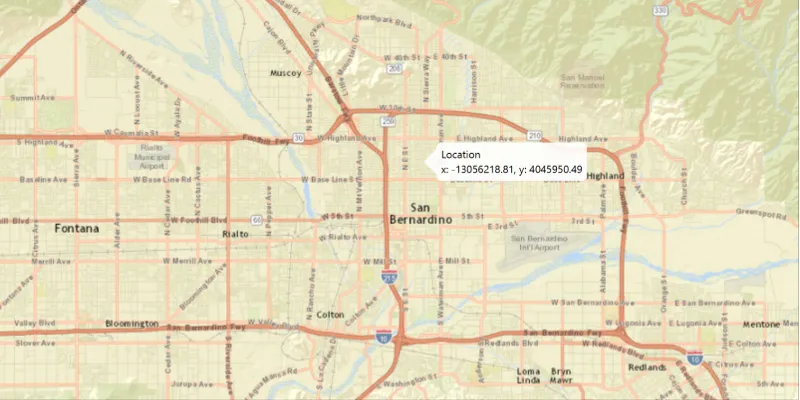
Show a callout with the latitude and longitude of user-clicked points.
Use case
Callouts are used to display temporary detail content on a map. You can display text and arbitrary UI controls in callouts.
How to use the sample
Click anywhere on the map. A callout showing the WGS84 coordinates for the clicked point will appear.
How it works
- Use
MapView.setOnMouseClicked()to create a click event handler. - Capture the click event and use its x and y coordinates to create a new
Point2Drepresenting the screen point. - Get the screen point’s location on the map using
MapView.screenToLocation(Point2D). - Get the
MapView’s callout. - Set the title and detail of the callout to display the map point’s coordinates.
- Display the callout at the map point
callout.showCalloutAt(mapPoint).
Relevant API
- Callout
- MapView
- Point
Tags
balloon, bubble, callout, click, flyout, flyover, info window, popup
Sample code
ShowCalloutSample.java
/* * Copyright 2017 Esri. * * Licensed under the Apache License, Version 2.0 (the "License"); you may not * use this file except in compliance with the License. You may obtain a copy of * the License at * * http://www.apache.org/licenses/LICENSE-2.0 * * Unless required by applicable law or agreed to in writing, software * distributed under the License is distributed on an "AS IS" BASIS, WITHOUT * WARRANTIES OR CONDITIONS OF ANY KIND, either express or implied. See the * License for the specific language governing permissions and limitations under * the License. */
package com.esri.samples.show_callout;
import javafx.application.Application;import javafx.geometry.Point2D;import javafx.scene.Scene;import javafx.scene.input.MouseButton;import javafx.scene.layout.StackPane;import javafx.stage.Stage;
import com.esri.arcgisruntime.ArcGISRuntimeEnvironment;import com.esri.arcgisruntime.geometry.GeometryEngine;import com.esri.arcgisruntime.geometry.Point;import com.esri.arcgisruntime.geometry.SpatialReferences;import com.esri.arcgisruntime.mapping.ArcGISMap;import com.esri.arcgisruntime.mapping.BasemapStyle;import com.esri.arcgisruntime.mapping.view.Callout;import com.esri.arcgisruntime.mapping.view.MapView;
public class ShowCalloutSample extends Application {
  private MapView mapView;
  @Override  public void start(Stage stage) {
    try {      // create stack pane and application scene      StackPane stackPane = new StackPane();      Scene scene = new Scene(stackPane);
      // set title, size, and add scene to stage      stage.setTitle("Show Callout Sample");      stage.setWidth(800);      stage.setHeight(700);      stage.setScene(scene);      stage.show();
      // authentication with an API key or named user is required to access basemaps and other location services      String yourAPIKey = System.getProperty("apiKey");      ArcGISRuntimeEnvironment.setApiKey(yourAPIKey);
      // create a map with the streets relief basemap style      ArcGISMap map = new ArcGISMap(BasemapStyle.ARCGIS_STREETS_RELIEF);
      // create a map view and set the map to it      mapView = new MapView();      mapView.setMap(map);
      // get the map view's callout      Callout callout = mapView.getCallout();
      // click event to display the callout      mapView.setOnMouseClicked(e -> {
        // check that the primary mouse button was clicked and user is not panning        if (e.getButton() == MouseButton.PRIMARY && e.isStillSincePress()) {
          // create a point from where the user clicked          Point2D point = new Point2D(e.getX(), e.getY());
          // create a map point from a point          Point mapPoint = mapView.screenToLocation(point);
          // project user-tapped map point location          Point projectedPoint = (Point)GeometryEngine.project(mapPoint, SpatialReferences.getWgs84());
          // set the callout's details          callout.setTitle("Location");          callout.setDetail(String.format("Lat: %.3f, Long: %.3f", projectedPoint.getY(), projectedPoint.getX()));
          // show the callout where the user clicked          callout.showCalloutAt(mapPoint);
          // dismiss the callout on secondary click        } else if (e.getButton() == MouseButton.SECONDARY && e.isStillSincePress()) {          callout.dismiss();        }      });
      // add map view and control panel to stack pane      stackPane.getChildren().addAll(mapView);
    } catch (Exception e) {      // on any error, print the stack trace      e.printStackTrace();    }  }
  /**   * Stops and releases all resources used in application.   */  @Override  public void stop() {
    // release resources when the application closes    if (mapView != null) {      mapView.dispose();    }  }
  /**   * Opens and runs application.   *   * @param args arguments passed to this application   */  public static void main(String[] args) {
    Application.launch(args);  }
}