import PictureFillSymbol from "@arcgis/core/symbols/PictureFillSymbol.js";const PictureFillSymbol = await $arcgis.import("@arcgis/core/symbols/PictureFillSymbol.js");- Inheritance
- PictureFillSymbol→
FillSymbol→ Symbol→ Accessor
- Since
- ArcGIS Maps SDK for JavaScript 4.0
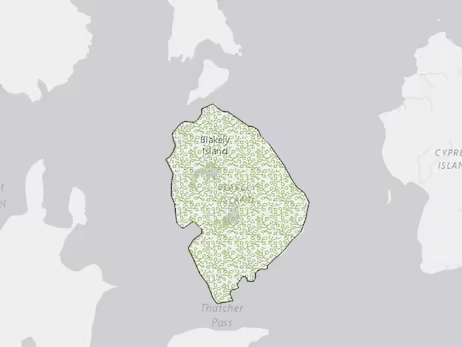
PictureFillSymbol uses an image in a repeating pattern to symbolize polygon features in a 2D MapView. A url must point to a valid image. In addition, the symbol can have an optional outline, which is defined by a SimpleLineSymbol. PictureFillSymbols may be applied to polygon features in a FeatureLayer or an individual Graphic.
PictureFillSymbol is not supported in 3D SceneView. Only use it when working in a MapView.
The image below depicts a Graphic that is styled with a PictureFillSymbol.
- See also
- Example
- let symbol = {type: "picture-fill", // autocasts as new PictureFillSymbol()url: "https://static.arcgis.com/images/Symbols/Shapes/BlackStarLargeB.png",width: "24px",height: "24px",outline: {style: "solid"},};
Constructors
Constructor
Parameters
| Parameter | Type | Description | Required |
|---|---|---|---|
| properties | | |
Properties
color
PictureFillSymbols do not utilize color information; this property is ignored if set. The color property is present for consistency with other symbol types.
- Examples
- // CSS color stringsymbol.color = "dodgerblue";// HEX stringsymbol.color = "#33cc33";// array of RGBA valuessymbol.color = [51, 204, 51, 0.3];// object with rgba propertiessymbol.color = {r: 51,g: 51,b: 204,a: 0.7};
height
- Type
- number
The height of the image in points. This value may be autocast with a string
expressing size in points or pixels (e.g. 12px).
- Default value
- 12
- Examples
- // height in pointssymbol.height = 16;// height in pixelssymbol.height = "12px";// height in pointssymbol.height = "16pt";
outline
- Type
- SimpleLineSymbol | null | undefined
The outline of the polygon.
- Example
- let sym = {type: "simple-fill", // autocasts as new SimpleFillSymbol()color: "red",outline: { // autocasts as new SimpleLineSymbol()color: [128, 128, 128, 0.5],width: "0.5px"}};
width
- Type
- number
The width of the image in points. This value may be autocast with a string
expressing size in points or pixels (e.g. 12px).
- Default value
- 12
- Examples
- // width in pointssymbol.width = 16;// width in pixelssymbol.width = "12px";// width in pointssymbol.width = "16pt";
xoffset
- Type
- number
The offset on the x-axis in points. This value may be autocast with a string
expressing size in points or pixels (e.g. 12px).
- Default value
- 0
- Examples
- // xoffset in pointssymbol.xoffset = 6;// xoffset in pixelssymbol.xoffset = "8px";// xoffset in pointssymbol.xoffset = "6pt";
yoffset
- Type
- number
The offset on the y-axis in pixels or points. This value may be autocast with a string
expressing size in points or pixels (e.g. 12px).
- Default value
- 0
- Examples
- // yoffset in pointssymbol.yoffset = 6;// yoffset in pixelssymbol.yoffset = "8px";// yoffset in pointssymbol.yoffset = "6pt";
Methods
| Method | Signature | Class |
|---|---|---|
| inherited static | fromJSON(json: any): any | |
| clone(): PictureFillSymbol | | |
| inherited | toJSON(): any |
fromJSON
- Signature
-
fromJSON (json: any): any
Creates a new instance of this class and initializes it with values from a JSON object
generated from an ArcGIS product. The object passed into the input json
parameter often comes from a response to a query operation in the REST API or a
toJSON()
method from another ArcGIS product. See the Using fromJSON()
topic in the Guide for details and examples of when and how to use this function.
Parameters
| Parameter | Type | Description | Required |
|---|---|---|---|
| json | A JSON representation of the instance in the ArcGIS format. See the ArcGIS REST API documentation for examples of the structure of various input JSON objects. | |
- Returns
- any
Returns a new instance of this class.
clone
- Signature
-
clone (): PictureFillSymbol
Creates a deep clone of the symbol.
- Returns
- PictureFillSymbol
A deep clone of the object that invoked this method.
- Example
- // Creates a deep clone of the graphic's symbollet sym = graphic.symbol.clone();
toJSON
- Signature
-
toJSON (): any
Converts an instance of this class to its ArcGIS portal JSON representation. See the Using fromJSON() guide topic for more information.
- Returns
- any
The ArcGIS portal JSON representation of an instance of this class.