Create a Feature Collection Layer from a Feature Collection Table, and add it to a map.
Use case
A Feature Collection allows easily importing external data (such as CSV files), as well as creating custom schema for data that is in non-standardized format. This data can then be used to populate a Feature Collection Table, and displayed in a Feature Collection Layer using the attributes and geometries provided in the external data source. For example, an electricity supplier could use this functionality to visualize existing location data of coverage areas (polygons), power stations (points), transmission lines (polylines), and others.
How to use the sample
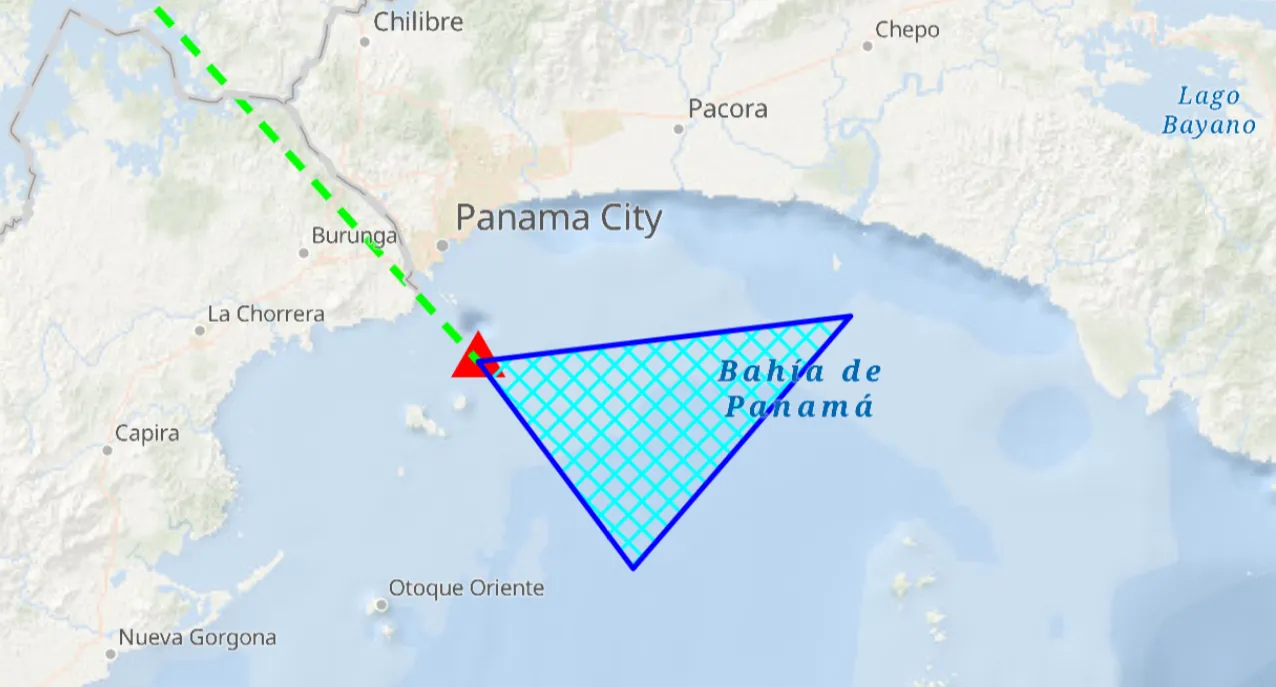
When launched, this sample displays a FeatureCollectionLayer with a Point, Polyline and Polygon geometry. Pan and zoom to explore the scene.
How it works
- Create a
FeatureCollectionLayerusing a new feature collection,FeatureCollectionLayer(featureCollection) - Add the feature collection layer to the map,
ArcGISMap.operationalLayers.add(featureCollectionLayer). - Create a
FeatureCollectionTablefor theGeometryTypesPoint,Polyline, andPolygon,FeatureCollectionTable(fields, geometryType, spatialReference) - Additionally, pass in a list of
Fieldobjects to represent the table’s schema. In this case a field of type String namednameis added. - Assign a
SimpleRendererto each table to render anyFeatures from that table using theSymbolthat was set. - Add all the feature collection tables to the feature collection,
FeatureCollection(featureCollectionTables = listOf(points, lines, polygons)). - Use the
createFeaturemethod to create a feature from the feature collection table, passing an attribute and geometry for that feature,FeatureCollectionTable.createFeature(attributes, geometry). - Add new features to the table,
FeatureCollectionTable.addFeature(feature).
Relevant API
- Feature
- FeatureCollection
- FeatureCollectionLayer
- FeatureCollectionTable
- Field
- SimpleRenderer
Tags
collection, feature, layers, table
Sample code
/* Copyright 2025 Esri * * Licensed under the Apache License, Version 2.0 (the "License"); * you may not use this file except in compliance with the License. * You may obtain a copy of the License at * *    http://www.apache.org/licenses/LICENSE-2.0 * * Unless required by applicable law or agreed to in writing, software * distributed under the License is distributed on an "AS IS" BASIS, * WITHOUT WARRANTIES OR CONDITIONS OF ANY KIND, either express or implied. * See the License for the specific language governing permissions and * limitations under the License. * */
package com.esri.arcgismaps.sample.addfeaturecollectionlayerfromtable.components
import android.app.Applicationimport androidx.lifecycle.AndroidViewModelimport androidx.lifecycle.viewModelScopeimport com.arcgismaps.Colorimport com.arcgismaps.data.FeatureCollectionimport com.arcgismaps.data.FeatureCollectionTableimport com.arcgismaps.data.Fieldimport com.arcgismaps.data.FieldTypeimport com.arcgismaps.geometry.GeometryTypeimport com.arcgismaps.geometry.Polygonimport com.arcgismaps.geometry.Pointimport com.arcgismaps.geometry.Polylineimport com.arcgismaps.geometry.SpatialReferenceimport com.arcgismaps.mapping.ArcGISMapimport com.arcgismaps.mapping.BasemapStyleimport com.arcgismaps.mapping.Viewpointimport com.arcgismaps.mapping.layers.FeatureCollectionLayerimport com.arcgismaps.mapping.symbology.SimpleFillSymbolimport com.arcgismaps.mapping.symbology.SimpleFillSymbolStyleimport com.arcgismaps.mapping.symbology.SimpleLineSymbolimport com.arcgismaps.mapping.symbology.SimpleLineSymbolStyleimport com.arcgismaps.mapping.symbology.SimpleMarkerSymbolimport com.arcgismaps.mapping.symbology.SimpleMarkerSymbolStyleimport com.arcgismaps.mapping.symbology.SimpleRendererimport com.esri.arcgismaps.sample.sampleslib.components.MessageDialogViewModelimport kotlinx.coroutines.launch
/** * ViewModel which creates three in-memory FeatureCollectionTables (point, polyline, polygon), * adds features to them, creates a FeatureCollection and displays it on the map as a * FeatureCollectionLayer. */class AddFeatureCollectionLayerFromTableViewModel(app: Application) : AndroidViewModel(app) {
    // ArcGIS map exposed for Compose screen.    val arcGISMap = ArcGISMap(BasemapStyle.ArcGISOceans).apply {        initialViewpoint = Viewpoint(latitude = 8.849289, longitude = -79.497238, scale = 1e6)    }
    // Message dialog view model for error handling    val messageDialogVM = MessageDialogViewModel()
    init {        // Load the map and then build the feature collection layer        viewModelScope.launch {            createAndAddFeatureCollectionLayer()            arcGISMap.load()                .onFailure { messageDialogVM.showMessageDialog(it) }        }    }
    private suspend fun createAndAddFeatureCollectionLayer() {
        // Create each feature collection table        val pointsTable = createPointsCollectionTable()        val linesTable = createLinesCollectionTable()        val polygonsTable = createPolygonsCollectionTable()
        // Create a FeatureCollection from the tables        val featureCollection = FeatureCollection(featureCollectionTables = listOf(pointsTable, linesTable, polygonsTable))
        // Create a layer from the feature collection and add it to the map        val featureCollectionLayer = FeatureCollectionLayer(featureCollection = featureCollection)        arcGISMap.operationalLayers.add(featureCollectionLayer)    }
    /**     * Create an in-memory points [FeatureCollectionTable], define a simple schema and renderer,     * add a single point feature and return the table.     */    private suspend fun createPointsCollectionTable(): FeatureCollectionTable {
        // Define a simple text field for a place name        val placeField = Field(            fieldType = FieldType.Text,            name = "Place",            alias = "Place name",            length = 40,            isEditable = true,            isNullable = false        )
        // Create the feature collection table for points using WGS84 spatial reference        val pointsCollectionTable = FeatureCollectionTable(            fields = listOf(placeField),            geometryType = GeometryType.Point,            spatialReference = SpatialReference.wgs84()        )
        // Set a simple renderer using a triangle marker symbol        pointsCollectionTable.renderer = SimpleRenderer(            symbol = SimpleMarkerSymbol(                style = SimpleMarkerSymbolStyle.Triangle,                color = Color.red,                size = 18f            )        )
        // Create a point geometry (x = longitude, y = latitude) and a feature with attributes        val pointGeometry = Point(x = -79.497238, y = 8.849289, spatialReference = SpatialReference.wgs84())        val placeAttributes = mapOf("Place" to "Current location")
        // Create and add the feature to the table        val pointFeature = pointsCollectionTable.createFeature(placeAttributes, pointGeometry)        pointsCollectionTable.addFeature(pointFeature).onFailure { messageDialogVM.showMessageDialog(it) }
        return pointsCollectionTable    }
    /**     * Create an in-memory polyline FeatureCollectionTable with a dash renderer and a single line     * feature between two points.     */    private suspend fun createLinesCollectionTable(): FeatureCollectionTable {        val boundaryField = Field(            fieldType = FieldType.Text,            name = "Boundary",            alias = "Boundary name",            length = 40,            isEditable = true,            isNullable = false        )
        val linesCollectionTable = FeatureCollectionTable(            fields = listOf(boundaryField),            geometryType = GeometryType.Polyline,            spatialReference = SpatialReference.wgs84()        )
        linesCollectionTable.renderer = SimpleRenderer(            symbol = SimpleLineSymbol(                style = SimpleLineSymbolStyle.Dash,                color = Color.green,                width = 3f            )        )
        val lineGeometry = Polyline(            points = listOf(                Point(x = -79.497238, y = 8.849289, spatialReference = SpatialReference.wgs84()),                Point(x = -80.035568, y = 9.432302, spatialReference = SpatialReference.wgs84())            )        )
        val lineAttributes = mapOf("Boundary" to "AManAPlanACanalPanama")        val lineFeature = linesCollectionTable.createFeature(lineAttributes, lineGeometry)        linesCollectionTable.addFeature(lineFeature).onFailure { messageDialogVM.showMessageDialog(it) }
        return linesCollectionTable    }
    /**     * Create an in-memory polygon and add it to the FeatureCollectionTable as a single polygon feature.     * A simple fill renderer is added to the FeatureCollectionTable to render the polygon.     */    private suspend fun createPolygonsCollectionTable(): FeatureCollectionTable {        val areaField = Field(            fieldType = FieldType.Text,            name = "Area",            alias = "Area name",            length = 40,            isEditable = true,            isNullable = false        )
        val polygonsCollectionTable = FeatureCollectionTable(            fields = listOf(areaField),            geometryType = GeometryType.Polygon,            spatialReference = SpatialReference.wgs84()        )
        // Create a simple fill symbol using a blue outline and cyan diagonal cross fill        val outlineSymbol = SimpleLineSymbol(            style = SimpleLineSymbolStyle.Solid,            color = Color.blue,            width = 2f        )        val fillSymbol = SimpleFillSymbol(            style = SimpleFillSymbolStyle.DiagonalCross,            color = Color.cyan,            outline = outlineSymbol        )        polygonsCollectionTable.renderer = SimpleRenderer(symbol = fillSymbol)
        val polygonGeometry = Polygon(points = listOf(            Point(x = -79.497238, y = 8.849289, spatialReference = SpatialReference.wgs84()),            Point(x = -79.337936, y = 8.638903, spatialReference = SpatialReference.wgs84()),            Point(x = -79.11409, y = 8.895422, spatialReference = SpatialReference.wgs84())        ))
        val polygonAttributes = mapOf("Area" to "Restricted area")        val polygonFeature = polygonsCollectionTable.createFeature(polygonAttributes, polygonGeometry)        polygonsCollectionTable.addFeature(polygonFeature).onFailure { messageDialogVM.showMessageDialog(it) }
        return polygonsCollectionTable    }}
/* Copyright 2025 Esri * * Licensed under the Apache License, Version 2.0 (the "License"); * you may not use this file except in compliance with the License. * You may obtain a copy of the License at * * http://www.apache.org/licenses/LICENSE-2.0 * * Unless required by applicable law or agreed to in writing, software * distributed under the License is distributed on an "AS IS" BASIS, * WITHOUT WARRANTIES OR CONDITIONS OF ANY KIND, either express or implied. * See the License for the specific language governing permissions and * limitations under the License. * */
package com.esri.arcgismaps.sample.addfeaturecollectionlayerfromtable
import android.os.Bundleimport androidx.activity.ComponentActivityimport androidx.activity.enableEdgeToEdgeimport androidx.activity.compose.setContentimport androidx.compose.material3.MaterialThemeimport androidx.compose.material3.Surfaceimport androidx.compose.runtime.Composableimport com.esri.arcgismaps.sample.sampleslib.theme.SampleAppThemeimport com.esri.arcgismaps.sample.addfeaturecollectionlayerfromtable.screens.AddFeatureCollectionLayerFromTableScreen
class MainActivity : ComponentActivity() {
override fun onCreate(savedInstanceState: Bundle?) { super.onCreate(savedInstanceState)
enableEdgeToEdge() setContent { SampleAppTheme { AddFeatureCollectionLayerFromTableApp() } } }
@Composable private fun AddFeatureCollectionLayerFromTableApp() { Surface(color = MaterialTheme.colorScheme.background) { AddFeatureCollectionLayerFromTableScreen( sampleName = getString(R.string.add_feature_collection_layer_from_table_app_name) ) } }}/* Copyright 2025 Esri * * Licensed under the Apache License, Version 2.0 (the "License"); * you may not use this file except in compliance with the License. * You may obtain a copy of the License at * * http://www.apache.org/licenses/LICENSE-2.0 * * Unless required by applicable law or agreed to in writing, software * distributed under the License is distributed on an "AS IS" BASIS, * WITHOUT WARRANTIES OR CONDITIONS OF ANY KIND, either express or implied. * See the License for the specific language governing permissions and * limitations under the License. * */
package com.esri.arcgismaps.sample.addfeaturecollectionlayerfromtable.screens
import androidx.compose.foundation.layout.fillMaxSizeimport androidx.compose.foundation.layout.paddingimport androidx.compose.material3.Scaffoldimport androidx.compose.runtime.Composableimport androidx.compose.ui.Modifierimport androidx.lifecycle.viewmodel.compose.viewModelimport com.arcgismaps.toolkit.geoviewcompose.MapViewimport com.esri.arcgismaps.sample.addfeaturecollectionlayerfromtable.components.AddFeatureCollectionLayerFromTableViewModelimport com.esri.arcgismaps.sample.sampleslib.components.MessageDialogimport com.esri.arcgismaps.sample.sampleslib.components.SampleTopAppBar
/** * Main screen layout for the sample. * Displays a MapView and relies on the ViewModel to create the feature collection layer. */@Composablefun AddFeatureCollectionLayerFromTableScreen(sampleName: String) { val mapViewModel: AddFeatureCollectionLayerFromTableViewModel = viewModel()
Scaffold( topBar = { SampleTopAppBar(title = sampleName) }, content = { paddingValues -> // MapView displays the map created/managed by the ViewModel. MapView( modifier = Modifier .fillMaxSize() .padding(paddingValues), arcGISMap = mapViewModel.arcGISMap ) // Display any error messages surfaced by the ViewModel mapViewModel.messageDialogVM.apply { if (dialogStatus) { MessageDialog( title = messageTitle, description = messageDescription, onDismissRequest = ::dismissDialog ) } } } )}