Using the routing service
Your routing app can do things like:
- Calculate point-to-point and multi- stop
A stop is a single point along a route: it can be the origin, an intermediate stop, or destination. routesA route is a polyline that defines the best path between two or more points in a street network. - Optimize the results to find the shortest or the fastest route
- Find the best sequence between stops
A stop is a single point along a route: it can be the origin, an intermediate stop, or destination. - Create routes based on the travel mode
A travel mode is the means of transportation, such as walking or driving, that defines how you can travel in a street network. (driving, cycling, walking, and so on) - Avoid restricted areas and maneuvers
- Specify time windows of arrival and departure for each stop
A stop is a single point along a route: it can be the origin, an intermediate stop, or destination. - Generate driving directions in multiple languages
What is routing?
Routing is the process of finding the best path between two or more stops
In addition to the routing described above, functionality is provided to analyze street networks. This includes the ability to create service areas
Directions
If requested, directions are returned for each route
Directions are composed of maneuvers. Each maneuver contains properties such as the direction text, which contains instructions that describe travel through a section of a route
If supported by the service
Navigation
The navigation API allows you to further enhance the routing experience using the current device location
The route tracker object provides the following functionality using the current device location
- Progress information relative to the next stop
A stop is a single point along a route: it can be the origin, an intermediate stop, or destination. , to the next maneuver, or along the entire route - Guidance for navigation as it’s needed (when approaching a maneuver, for example)
- Automatic recalculation of a route
A route is a polyline that defines the best path between two or more points in a street network. if the device locationA location is a position or region (point, line, or polygon) on the earth's surface. goes off route
How routing works
Online and local routing both rely on a transportation network to model travel. These networks are created from features
Network Analyst services
You can create a transportation network using ArcGIS Pro.mmpk), a mobile scene package.mspk), or a mobile geodatabase
If you’d like a ready-to-use and regularly updated network dataset (and locator
Route task
A route task is a network analysis task that is executed asynchronously
The RouteTask refers to the local transportation network dataset or online service. It solves a Route using the configured RouteParameters and reports the RouteResult.
//Create a Route Task from an online route service val routeTask = RouteTask( "https://route-api.arcgis.com/arcgis/rest/services/World/Route/NAServer/Route_World" )Route parameters
Route task parameters specify how a route
To initially create RouteParameters, call RouteTask.createDefaultParameters() to retrieve the default routing parameters defined for the service. You can then change individual route parameters as needed before executing the RouteTask. The service’s default parameters typically support the most common use case anticipated for that service. Different services can have different defaults.
        lifecycleScope.launch {
            val routeParameters = routeTask.createDefaultParameters().getOrElse { error ->                return@launch showError("Error creating default route parameters: " + error.message)            }
            routeParameters.apply {                // Add the stops to the route parameters                setStops(routeStops)
                // Return driving directions in Spanish                returnDirections = true                directionsLanguage = "es"            }
Route results
The results returned from finding a route
            // Calculate the route using the parameters, create a graphic that displays the route,            // and add the graphic to the routeOverlay.            val routeResult = routeTask.solveRoute(routeParameters).getOrElse { error ->                return@launch showError("Error solving route: " + error.message)            }
            if (routeResult.routes.isNotEmpty()) {                val route = routeResult.routes[0]
                val routeGraphic = Graphic(route.routeGeometry)                routeOverlay.graphics.add(routeGraphic)
                // Get the directions text for each maneuver. Display them as a list in the UI.                route.directionManeuvers.forEach { directionManeuver ->                    directionsList.add(directionManeuver.directionText)                }
            }        }
Examples
Find a route and directions
Use the routing service
To find a route, you need to define at least two stops to visit. The default travel mode
The result contains a set of ordered stops
    private fun routeBetweenStops() {        // A graphic to show the start location.        val originGraphic = Graphic(Point(-122.690, 45.522, SpatialReference.wgs84()))        // A graphic to show an intermediate stop.        val intermediateStopGraphic = Graphic(Point(-122.615, 45.526, SpatialReference.wgs84()))        // A graphic to show the final destination        val destinationGraphic = Graphic(Point(-122.688, 45.512, SpatialReference.wgs84()))
        // Add graphics to the stops overlay.        stopsOverlay.graphics.addAll(            listOf(                originGraphic,                intermediateStopGraphic,                destinationGraphic            )        )
        // Create a list of stops using each stop graphic's geometry (point)        val routeStops = stopsOverlay.graphics            .filter { graphic -> graphic.geometry != null }            .map { graphic -> Stop(graphic.geometry as Point) }
        //Create a Route Task from an online route service        val routeTask = RouteTask(            "https://route-api.arcgis.com/arcgis/rest/services/World/Route/NAServer/Route_World"        )
        lifecycleScope.launch {
            val routeParameters = routeTask.createDefaultParameters().getOrElse { error ->                return@launch showError("Error creating default route parameters: " + error.message)            }
            routeParameters.apply {                // Add the stops to the route parameters                setStops(routeStops)
                // Return driving directions in Spanish                returnDirections = true                directionsLanguage = "es"            }
            // Calculate the route using the parameters, create a graphic that displays the route,            // and add the graphic to the routeOverlay.            val routeResult = routeTask.solveRoute(routeParameters).getOrElse { error ->                return@launch showError("Error solving route: " + error.message)            }
            if (routeResult.routes.isNotEmpty()) {                val route = routeResult.routes[0]
                val routeGraphic = Graphic(route.routeGeometry)                routeOverlay.graphics.add(routeGraphic)
                // Get the directions text for each maneuver. Display them as a list in the UI.                route.directionManeuvers.forEach { directionManeuver ->                    directionsList.add(directionManeuver.directionText)                }
            }        }
    }
Use API key access tokens
Tutorials


Samples

Find route
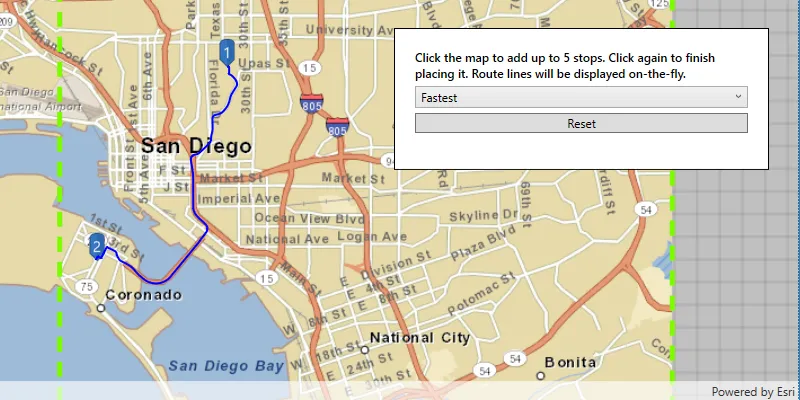
Find route in transport network

Find route around barriers

Show device location
