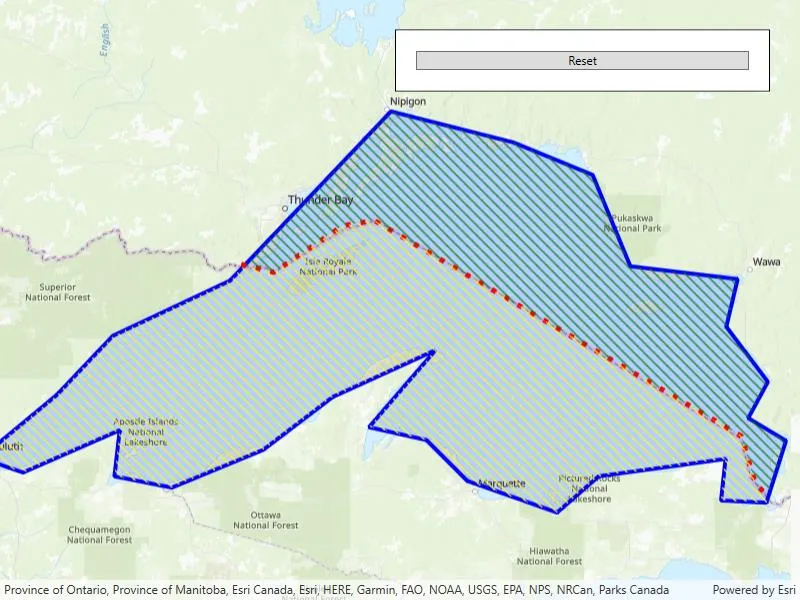
Cut a geometry along a polyline.
Use case
You might cut a polygon representing a large parcel to subdivide it into smaller parcels.
How to use the sample
Click the “Cut” button to cut the polygon with the polyline and see the resulting parts (shaded in different colors).
How it works
- Pass the polyline to the static extension method
GeometryEngine.Cut()to cut the geometry along the polyline. - Loop through the returned list of part geometries. Some of these geometries may be multi-part.
Relevant API
- GeometryEngine.Cut
- Polygon
- Polyline
Tags
cut, geometry, split
Sample code
// Copyright 2018 Esri.//// Licensed under the Apache License, Version 2.0 (the "License"); you may not use this file except in compliance with the License.// You may obtain a copy of the License at: http://www.apache.org/licenses/LICENSE-2.0//// Unless required by applicable law or agreed to in writing, software distributed under the License is distributed on an// "AS IS" BASIS, WITHOUT WARRANTIES OR CONDITIONS OF ANY KIND, either express or implied. See the License for the specific// language governing permissions and limitations under the License.
using Esri.ArcGISRuntime.Geometry;using Esri.ArcGISRuntime.Mapping;using Esri.ArcGISRuntime.Symbology;using Esri.ArcGISRuntime.UI;using System.Windows;
namespace ArcGIS.WPF.Samples.CutGeometry{    [ArcGIS.Samples.Shared.Attributes.Sample(        name: "Cut geometry",        category: "Geometry",        description: "Cut a geometry along a polyline.",        instructions: "Click the \"Cut\" button to cut the polygon with the polyline and see the resulting parts (shaded in different colors).",        tags: new[] { "cut", "geometry", "split" })]    public partial class CutGeometry    {        // Graphics overlay to display the graphics.        private GraphicsOverlay _graphicsOverlay;
        // Graphic that represents the polygon of Lake Superior.        private Graphic _lakeSuperiorPolygonGraphic;
        // Graphic that represents the Canada and USA border (polyline) of Lake Superior.        private Graphic _countryBorderPolylineGraphic;
        private bool _cut;
        public CutGeometry()        {            InitializeComponent();
            // Create a map with a topographic basemap.            Map newMap = new Map(BasemapStyle.ArcGISTopographic);
            // Assign the map to the MapView.            MyMapView.Map = newMap;
            // Create a graphics overlay to hold the various graphics.            _graphicsOverlay = new GraphicsOverlay();
            // Add the created graphics overlay to the MapView.            MyMapView.GraphicsOverlays.Add(_graphicsOverlay);
            // Create a simple line symbol for the outline of the Lake Superior graphic.            SimpleLineSymbol lakeSuperiorSimpleLineSymbol = new SimpleLineSymbol(SimpleLineSymbolStyle.Solid, System.Drawing.Color.Blue, 4);
            // Create the color that will be used for the fill the Lake Superior graphic. It will be a semi-transparent, blue color.            System.Drawing.Color lakeSuperiorFillColor = System.Drawing.Color.FromArgb(34, 0, 0, 255);
            // Create the simple fill symbol for the Lake Superior graphic - comprised of a fill style, fill color and outline.            SimpleFillSymbol lakeSuperiorSimpleFillSymbol = new SimpleFillSymbol(SimpleFillSymbolStyle.Solid, lakeSuperiorFillColor, lakeSuperiorSimpleLineSymbol);
            // Create the graphic for Lake Superior - comprised of a polygon shape and fill symbol.            _lakeSuperiorPolygonGraphic = new Graphic(CreateLakeSuperiorPolygon(), lakeSuperiorSimpleFillSymbol);
            // Add the Lake Superior graphic to the graphics overlay collection.            _graphicsOverlay.Graphics.Add(_lakeSuperiorPolygonGraphic);
            // Create a simple line symbol for the Canada and USA border (polyline) of Lake Superior.            SimpleLineSymbol countryBorderSimpleLineSymbol = new SimpleLineSymbol(SimpleLineSymbolStyle.Dot, System.Drawing.Color.Red, 5);
            // Create the graphic for Canada and USA border (polyline) of Lake Superior - comprised of a polyline shape and line symbol.            _countryBorderPolylineGraphic = new Graphic(CreateBorder(), countryBorderSimpleLineSymbol);
            // Add the Canada and USA border graphic to the graphics overlay collection.            _graphicsOverlay.Graphics.Add(_countryBorderPolylineGraphic);
            // Set the initial visual extent of the map view to that of Lake Superior.            MyMapView.SetViewpointGeometryAsync(_lakeSuperiorPolygonGraphic.Geometry);        }
        private void CutButton_Click(object sender, RoutedEventArgs e)        {            if (!_cut)            {                Cut();                _cut = true;            }            else            {                Reset();                _cut = false;            }
            CutButton.Content = _cut ? "Reset" : "Cut";        }
        private void Cut()        {            // Cut the polygon geometry with the polyline, expect two geometries.            Geometry[] cutGeometries = _lakeSuperiorPolygonGraphic.Geometry.Cut((Polyline)_countryBorderPolylineGraphic.Geometry);
            // Create a simple line symbol for the outline of the Canada side of Lake Superior.            SimpleLineSymbol canadaSideSimpleLineSymbol = new SimpleLineSymbol(SimpleLineSymbolStyle.Null, System.Drawing.Color.Blue, 0);
            // Create the simple fill symbol for the Canada side of Lake Superior graphic - comprised of a fill style, fill color and outline.            SimpleFillSymbol canadaSideSimpleFillSymbol = new SimpleFillSymbol(SimpleFillSymbolStyle.ForwardDiagonal, System.Drawing.Color.Green, canadaSideSimpleLineSymbol);
            // Create the graphic for the Canada side of Lake Superior - comprised of a polygon shape and fill symbol.            Graphic canadaSideGraphic = new Graphic(cutGeometries[0], canadaSideSimpleFillSymbol);
            // Add the Canada side of the Lake Superior graphic to the graphics overlay collection.            _graphicsOverlay.Graphics.Add(canadaSideGraphic);
            // Create a simple line symbol for the outline of the USA side of Lake Superior.            SimpleLineSymbol usaSideSimpleLineSymbol = new SimpleLineSymbol(SimpleLineSymbolStyle.Null, System.Drawing.Color.Blue, 0);
            // Create the simple fill symbol for the USA side of Lake Superior graphic - comprised of a fill style, fill color and outline.            SimpleFillSymbol usaSideSimpleFillSymbol = new SimpleFillSymbol(SimpleFillSymbolStyle.ForwardDiagonal, System.Drawing.Color.Yellow, usaSideSimpleLineSymbol);
            // Create the graphic for the USA side of Lake Superior - comprised of a polygon shape and fill symbol.            Graphic usaSideGraphic = new Graphic(cutGeometries[1], usaSideSimpleFillSymbol);
            // Add the USA side of the Lake Superior graphic to the graphics overlay collection.            _graphicsOverlay.Graphics.Add(usaSideGraphic);        }
        private void Reset()        {            // Reset the graphics.            _graphicsOverlay.Graphics.Clear();            _graphicsOverlay.Graphics.Add(_lakeSuperiorPolygonGraphic);            _graphicsOverlay.Graphics.Add(_countryBorderPolylineGraphic);        }
        private Polyline CreateBorder()        {            // Create a point collection that represents the Canada and USA border (polyline) of Lake Superior. Use the same spatial reference as the underlying base map.            PointCollection borderCountryPointCollection = new PointCollection(SpatialReferences.WebMercator)            {                // Add all of the border map points to the point collection.                new MapPoint(-9981328.687124, 6111053.281447),                new MapPoint(-9946518.044066, 6102350.620682),                new MapPoint(-9872545.427566, 6152390.920079),                new MapPoint(-9838822.617103, 6157830.083057),                new MapPoint(-9446115.050097, 5927209.572793),                new MapPoint(-9430885.393759, 5876081.440801),                new MapPoint(-9415655.737420, 5860851.784463)            };
            // Create a polyline geometry from the point collection.            Polyline borderCountryPolyline = new Polyline(borderCountryPointCollection);
            // Return the polyline.            return borderCountryPolyline;        }
        private Polygon CreateLakeSuperiorPolygon()        {            // Create a point collection that represents Lake Superior (polygon). Use the same spatial reference as the underlying base map.            PointCollection lakeSuperiorPointCollection = new PointCollection(SpatialReferences.WebMercator)            {                // Add all of the lake Superior boundary map points to the point collection.                new MapPoint(-10254374.668616, 5908345.076380),                new MapPoint(-10178382.525314, 5971402.386779),                new MapPoint(-10118558.923141, 6034459.697178),                new MapPoint(-9993252.729399, 6093474.872295),                new MapPoint(-9882498.222673, 6209888.368416),                new MapPoint(-9821057.766387, 6274562.532928),                new MapPoint(-9690092.583250, 6241417.023616),                new MapPoint(-9605207.742329, 6206654.660191),                new MapPoint(-9564786.389509, 6108834.986367),                new MapPoint(-9449989.747500, 6095091.726408),                new MapPoint(-9462116.153346, 6044160.821855),                new MapPoint(-9417652.665244, 5985145.646738),                new MapPoint(-9438671.768711, 5946341.148031),                new MapPoint(-9398250.415891, 5922088.336339),                new MapPoint(-9419269.519357, 5855797.317714),                new MapPoint(-9467775.142741, 5858222.598884),                new MapPoint(-9462924.580403, 5902686.086985),                new MapPoint(-9598740.325877, 5884092.264688),                new MapPoint(-9643203.813979, 5845287.765981),                new MapPoint(-9739406.633691, 5879241.702350),                new MapPoint(-9783061.694736, 5922896.763395),                new MapPoint(-9844502.151022, 5936640.023354),                new MapPoint(-9773360.570059, 6019099.583107),                new MapPoint(-9883306.649729, 5968977.105610),                new MapPoint(-9957681.938918, 5912387.211662),                new MapPoint(-10055501.612742, 5871965.858842),                new MapPoint(-10116942.069028, 5884092.264688),                new MapPoint(-10111283.079633, 5933406.315128),                new MapPoint(-10214761.742852, 5888134.399970),                new MapPoint(-10254374.668616, 5901877.659929)            };
            // Create a polyline geometry from the point collection.            Polygon lakeSuperiorPolygon = new Polygon(lakeSuperiorPointCollection);
// Return the polygon. return lakeSuperiorPolygon; } }}<UserControl x:Class="ArcGIS.WPF.Samples.CutGeometry.CutGeometry" xmlns="http://schemas.microsoft.com/winfx/2006/xaml/presentation" xmlns:x="http://schemas.microsoft.com/winfx/2006/xaml" xmlns:esri="http://schemas.esri.com/arcgis/runtime/2013"> <Grid> <esri:MapView x:Name="MyMapView" /> <Border Style="{StaticResource BorderStyle}"> <Button x:Name="CutButton" Click="CutButton_Click" Content="Cut" /> </Border> </Grid></UserControl>