Format coordinates in a variety of common notations.
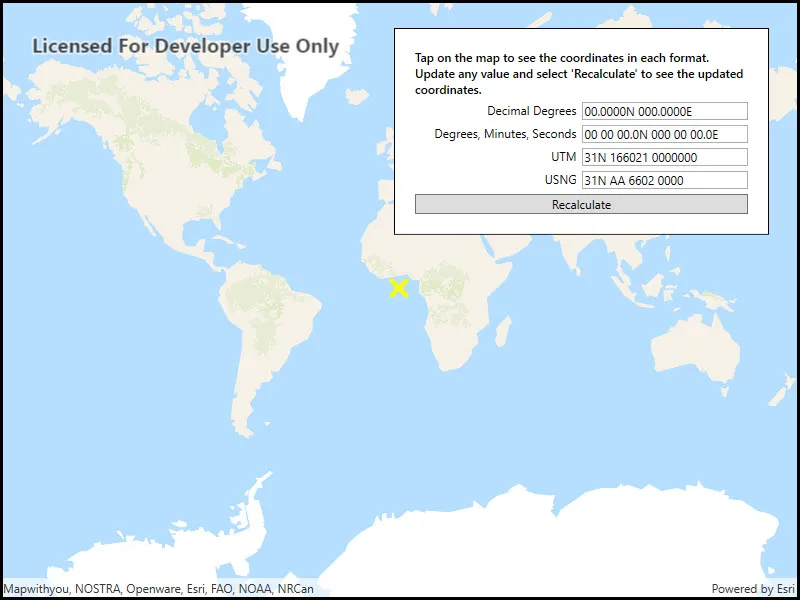
Use case
The coordinate formatter can format a map location in WGS84 in a number of common coordinate notations. Parsing one of these formats to a location is also supported. Formats include decimal degrees; degrees, minutes, seconds; Universal Transverse Mercator (UTM), and United States National Grid (USNG).
How to use the sample
Click on the map to see a callout with the clicked location’s coordinate formatted in 4 different ways. You can also put a coordinate string in any of these formats in the text field. Hit Enter and the coordinate string will be parsed to a map location which the callout will move to.
How it works
- Get or create a
MapPointwith a spatial reference. - Use one of the static “to” methods on
CoordinateFormattersuch asCoordinateFormatter.ToLatitudeLongitude(point, CoordinateFormatter.LatitudeLongitudeFormat.DecimalDegrees, 4)to get the formatted string. - To go from a formatted string to a
Point, use one of the “from” static methods likeCoordinateFormatter.FromUtm(coordinateString, map.SpatialReference, CoordinateFormatter.UtmConversionMode.NorthSouthIndicators).
Relevant API
- CoordinateFormatter
- CoordinateFormatter.LatitudeLongitudeFormat
- CoordinateFormatter.UtmConversionMode
Tags
convert, coordinate, decimal degrees, degree minutes seconds, format, latitude, longitude, USNG, UTM
Sample code
// Copyright 2018 Esri.//// Licensed under the Apache License, Version 2.0 (the "License"); you may not use this file except in compliance with the License.// You may obtain a copy of the License at: http://www.apache.org/licenses/LICENSE-2.0//// Unless required by applicable law or agreed to in writing, software distributed under the License is distributed on an// "AS IS" BASIS, WITHOUT WARRANTIES OR CONDITIONS OF ANY KIND, either express or implied. See the License for the specific// language governing permissions and limitations under the License.
using Esri.ArcGISRuntime.Geometry;using Esri.ArcGISRuntime.Mapping;using Esri.ArcGISRuntime.Symbology;using Esri.ArcGISRuntime.UI;using System;using System.Collections.Generic;using System.Drawing;using System.Windows;using System.Windows.Controls;
namespace ArcGIS.WPF.Samples.FormatCoordinates{    [ArcGIS.Samples.Shared.Attributes.Sample(        name: "Format coordinates",        category: "Geometry",        description: "Format coordinates in a variety of common notations.",        instructions: "Click on the map to see a callout with the clicked location's coordinate formatted in 4 different ways. You can also put a coordinate string in any of these formats in the text field. Hit Enter and the coordinate string will be parsed to a map location which the callout will move to.",        tags: new[] { "USNG", "UTM", "convert", "coordinate", "decimal degrees", "degree minutes seconds", "format", "latitude", "longitude" })]    public partial class FormatCoordinates    {        // Hold a reference to the most recently updated field.        private TextBox _selectedTextBox;
        private List<TextBox> _textBoxes;
        public FormatCoordinates()        {            InitializeComponent();            Initialize();        }
        private void Initialize()        {            // Create a list of the text boxes.            _textBoxes = new List<TextBox> { UtmTextField, DmsTextField, DecimalDegreesTextField, UsngTextField };
            // Create the map.            MyMapView.Map = new Map(BasemapStyle.ArcGISNavigation);
            // Add the graphics overlay to the map.            MyMapView.GraphicsOverlays.Add(new GraphicsOverlay());
            // Create the starting point.            var startingPoint = new MapPoint(0, 0, SpatialReferences.WebMercator);
            // Update the UI with the initial point.            UpdateUIFromMapPoint(startingPoint);
            // Subscribe to map tap events to enable tapping on map to update coordinates.            MyMapView.GeoViewTapped += (s, e) => { UpdateUIFromMapPoint(e.Location); };        }
        private void InputTextChanged(object sender, TextChangedEventArgs e)        {            // Keep track of the last edited field.            _selectedTextBox = (TextBox)sender;        }
        private void RecalculateFields(object sender, RoutedEventArgs e)        {            // Only update the point if the user has changed text.            if (_selectedTextBox == null) return;
            // Hold the entered point.            MapPoint enteredPoint = null;
            // Update the point based on which text sent the event.            try            {                switch (_selectedTextBox.Tag.ToString())                {                    case "Decimal Degrees":                    case "Degrees, Minutes, Seconds":                        enteredPoint =                            CoordinateFormatter.FromLatitudeLongitude(_selectedTextBox.Text, MyMapView.SpatialReference);                        break;
                    case "UTM":                        enteredPoint =                            CoordinateFormatter.FromUtm(_selectedTextBox.Text, MyMapView.SpatialReference, UtmConversionMode.NorthSouthIndicators);                        break;
                    case "USNG":                        enteredPoint =                            CoordinateFormatter.FromUsng(_selectedTextBox.Text, MyMapView.SpatialReference);                        break;                }            }            catch (Exception ex)            {                // The coordinate is malformed, warn and return.                MessageBox.Show(ex.Message, "Invalid format");                return;            }
            // Update the UI from the MapPoint.            UpdateUIFromMapPoint(enteredPoint);        }
        private void UpdateUIFromMapPoint(MapPoint selectedPoint)        {            try            {                // Check if the selected point can be formatted into coordinates.                CoordinateFormatter.ToLatitudeLongitude(selectedPoint, LatitudeLongitudeFormat.DecimalDegrees, 0);            }            catch (Exception ex)            {                MessageBox.Show(ex.Message, "Error");                return;            }
            // "Deselect" any text box.            _selectedTextBox = null;
            // Disable event handlers while updating text in text boxes.            _textBoxes.ForEach(box => box.TextChanged -= InputTextChanged);
            // Update textbox values.            DecimalDegreesTextField.Text = CoordinateFormatter.ToLatitudeLongitude(selectedPoint, LatitudeLongitudeFormat.DecimalDegrees, 4);            DmsTextField.Text = CoordinateFormatter.ToLatitudeLongitude(selectedPoint, LatitudeLongitudeFormat.DegreesMinutesSeconds, 1);            UtmTextField.Text = CoordinateFormatter.ToUtm(selectedPoint, UtmConversionMode.NorthSouthIndicators, true);            UsngTextField.Text = CoordinateFormatter.ToUsng(selectedPoint, 4, true);
            // Enable event handlers for all of the text boxes.            _textBoxes.ForEach(box => box.TextChanged += InputTextChanged);
            // Clear existing graphics.            MyMapView.GraphicsOverlays[0].Graphics.Clear();
            // Create a symbol to symbolize the point.            var symbol = new SimpleMarkerSymbol(SimpleMarkerSymbolStyle.X, Color.Yellow, 20);
            // Create the graphic.            var symbolGraphic = new Graphic(selectedPoint, symbol);
// Add the graphic to the graphics overlay. MyMapView.GraphicsOverlays[0].Graphics.Add(symbolGraphic); } }}<UserControl x:Class="ArcGIS.WPF.Samples.FormatCoordinates.FormatCoordinates" xmlns="http://schemas.microsoft.com/winfx/2006/xaml/presentation" xmlns:x="http://schemas.microsoft.com/winfx/2006/xaml" xmlns:esri="http://schemas.esri.com/arcgis/runtime/2013"> <UserControl.Resources> <Style TargetType="TextBlock"> <Setter Property="Margin" Value="0,5,5,0" /> </Style> <Style TargetType="TextBox"> <Setter Property="Margin" Value="0,5,0,0" /> </Style> </UserControl.Resources> <Grid> <esri:MapView x:Name="MyMapView" /> <Border Style="{StaticResource BorderStyle}"> <Grid> <Grid.RowDefinitions> <RowDefinition Height="Auto" /> <RowDefinition Height="Auto" /> <RowDefinition Height="Auto" /> <RowDefinition Height="Auto" /> <RowDefinition Height="Auto" /> <RowDefinition Height="Auto" /> </Grid.RowDefinitions> <Grid.ColumnDefinitions> <ColumnDefinition Width="*" /> <ColumnDefinition Width="*" /> </Grid.ColumnDefinitions> <TextBlock Grid.Row="0" Grid.Column="0" Grid.ColumnSpan="2" Margin="0,0,0,0" FontWeight="SemiBold" Text="Tap on the map to see the coordinates in each format. Update any value and select 'Recalculate' to see the updated coordinates." TextWrapping="Wrap" /> <TextBlock Grid.Row="1" Grid.Column="0" HorizontalAlignment="Right" Text="Decimal Degrees" /> <TextBox x:Name="DecimalDegreesTextField" Grid.Row="1" Grid.Column="1" Tag="Decimal Degrees" /> <TextBlock Grid.Row="2" Grid.Column="0" HorizontalAlignment="Right" Text="Degrees, Minutes, Seconds" /> <TextBox x:Name="DmsTextField" Grid.Row="2" Grid.Column="1" Tag="Degrees, Minutes, Seconds" /> <TextBlock Grid.Row="3" Grid.Column="0" HorizontalAlignment="Right" Text="UTM" /> <TextBox x:Name="UtmTextField" Grid.Row="3" Grid.Column="1" Tag="UTM" /> <TextBlock Grid.Row="4" Grid.Column="0" HorizontalAlignment="Right" Text="USNG" /> <TextBox x:Name="UsngTextField" Grid.Row="4" Grid.Column="1" Tag="USNG" /> <Button Grid.Row="5" Grid.Column="0" Grid.ColumnSpan="2" Margin="0,5,0,0" Click="RecalculateFields" Content="Recalculate" /> </Grid> </Border> </Grid></UserControl>