Find the union, intersection, or difference of two geometries.
Use case
The different spatial operations (union, difference, symmetric difference, and intersection) can be used for a variety of spatial analyses. For example, government authorities may use the intersect operation to determine whether a proposed road cuts through a restricted piece of land such as a nature reserve or a private property. When these operations are chained together, they become even more powerful. An analysis of food deserts within an urban area might begin by union-ing service areas of grocery stores, farmer’s markets, and food co-ops. Taking the difference between this single geometry of all services areas and that of a polygon delineating a neighborhood would reveal the areas within that neighborhood where access to healthy, whole foods may not exist.
How to use the sample
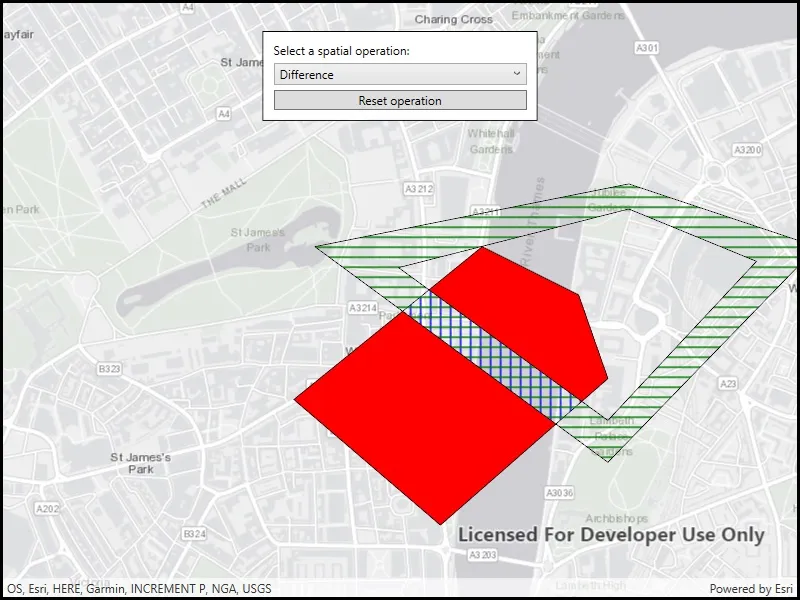
The sample provides an option to select a spatial operation. When an operation is selected, the resulting geometry is shown in red. The ‘reset operation’ button undoes the action and allow selecting a different operation.
How it works
- Create a
GraphicsOverlayand add it to theMapView. - Define a
PointCollectionof eachGeometry. - Add the overlapping polygons to the graphics overlay.
- Perform spatial relationships between the polygons by using the appropriate operation:
geometry1.Union(geometry2)- This method returns the two geometries united together as one geometry.geometry1.Difference(geometry2)- This method returns any part of Geometry2 that does not intersect Geometry1.geometry1.SymmetricDifference(geometry2)- This method returns any part of Geometry1 or Geometry2 which do not intersect.geometry1.Intersection(geometry2)- This method returns the intersection of Geometry1 and Geometry2.
- Use the geometry that is returned from the method call to create a new
Graphicand add it to the graphics overlay for it to be displayed.
Relevant API
- Geometry
- GeometryEngine
- GeometryEngine.Difference
- GeometryEngine.Intersection
- GeometryEngine.SymmetricDifference
- GeometryEngine.Union
- Graphic
- GraphicsOverlay
Tags
analysis, combine, difference, geometry, intersection, merge, polygon, union
Sample code
// Copyright 2018 Esri.//// Licensed under the Apache License, Version 2.0 (the "License"); you may not use this file except in compliance with the License.// You may obtain a copy of the License at: http://www.apache.org/licenses/LICENSE-2.0//// Unless required by applicable law or agreed to in writing, software distributed under the License is distributed on an// "AS IS" BASIS, WITHOUT WARRANTIES OR CONDITIONS OF ANY KIND, either express or implied. See the License for the specific// language governing permissions and limitations under the License.
using Esri.ArcGISRuntime.Geometry;using Esri.ArcGISRuntime.Mapping;using Esri.ArcGISRuntime.Symbology;using Esri.ArcGISRuntime.UI;using System.Collections.Generic;using System.Windows;
namespace ArcGIS.WPF.Samples.SpatialOperations{    [ArcGIS.Samples.Shared.Attributes.Sample(        name: "Perform spatial operations",        category: "Geometry",        description: "Find the union, intersection, or difference of two geometries.",        instructions: "The sample provides an option to select a spatial operation. When an operation is selected, the resulting geometry is shown in red. The 'reset operation' button undoes the action and allow selecting a different operation.",        tags: new[] { "analysis", "combine", "difference", "geometry", "intersection", "merge", "polygon", "union" })]    public partial class SpatialOperations    {        // GraphicsOverlay to hold the polygon graphics.        private GraphicsOverlay _polygonsOverlay;
        // Polygon graphics to run spatial operations on.        private Graphic _graphicOne;        private Graphic _graphicTwo;
        // Graphic to display the spatial operation result polygon.        private Graphic _resultGraphic;
        public SpatialOperations()        {            InitializeComponent();
            // Create the map, set the initial extent, and add the polygon graphics.            Initialize();        }
        private void Initialize()        {            // Create the map with a gray canvas basemap and an initial location centered on London, UK.            Map spatialOperationsMap = new Map(BasemapStyle.ArcGISLightGray);            spatialOperationsMap.InitialViewpoint = new Viewpoint(51.5017, -0.12714, 20000);
            // Add the map to the map view.            MyMapView.Map = spatialOperationsMap;
            // Create and add two overlapping polygon graphics to operate on.            CreatePolygonsOverlay();
            // Fill the combo box with some spatial operations to run on the polygon graphics.            SpatialOperationComboBox.Items.Add("Difference");            SpatialOperationComboBox.Items.Add("Intersection");            SpatialOperationComboBox.Items.Add("Symmetric difference");            SpatialOperationComboBox.Items.Add("Union");        }
        // Handle the spatial operation selection by performing the operation and showing the result polygon.        private void SpatialOperationComboBox_SelectionChanged(object sender, System.Windows.Controls.SelectionChangedEventArgs e)        {            // If an operation hasn't been selected, return.            if (SpatialOperationComboBox.SelectedItem == null) { return; }
            // Remove any currently displayed result.            _polygonsOverlay.Graphics.Remove(_resultGraphic);
            // Polygon geometry from the input graphics.            Geometry polygonOne = _graphicOne.Geometry;            Geometry polygonTwo = _graphicTwo.Geometry;
            // Result polygon for spatial operations.            Geometry resultPolygon = null;
            // Run the selected spatial operation on the polygon graphics and get the result geometry.            string operation = (string)SpatialOperationComboBox.SelectedItem;            switch (operation)            {                case "Union":                    resultPolygon = polygonOne.Union(polygonTwo);                    break;
                case "Difference":                    resultPolygon = polygonOne.Difference(polygonTwo);                    break;
                case "Symmetric difference":                    resultPolygon = polygonOne.SymmetricDifference(polygonTwo);                    break;
                case "Intersection":                    resultPolygon = polygonOne.Intersection(polygonTwo);                    break;            }
            // Create a black outline symbol to use for the result polygon.            SimpleLineSymbol outlineSymbol = new SimpleLineSymbol(SimpleLineSymbolStyle.Solid, System.Drawing.Color.Black, 1);
            // Create a solid red fill symbol for the result polygon graphic.            SimpleFillSymbol resultSymbol = new SimpleFillSymbol(SimpleFillSymbolStyle.Solid, System.Drawing.Color.Red, outlineSymbol);
            // Create the result polygon graphic and add it to the graphics overlay.            _resultGraphic = new Graphic(resultPolygon, resultSymbol);            _polygonsOverlay.Graphics.Add(_resultGraphic);        }
        private void ResetOperationButton_Click(object sender, RoutedEventArgs e)        {            // Remove any currently displayed result.            _polygonsOverlay.Graphics.Remove(_resultGraphic);
            // Clear the selected spatial operation.            SpatialOperationComboBox.SelectedIndex = -1;        }
        private void CreatePolygonsOverlay()        {            // Create a black outline symbol to use for the polygons.            SimpleLineSymbol outlineSymbol = new SimpleLineSymbol(SimpleLineSymbolStyle.Solid, System.Drawing.Color.Black, 1);
            // Create a point collection to define polygon vertices.            PointCollection polygonVertices = new PointCollection(SpatialReferences.WebMercator)            {                new MapPoint(-13960, 6709400),                new MapPoint(-14660, 6710000),                new MapPoint(-13760, 6710730),                new MapPoint(-13300, 6710500),                new MapPoint(-13160, 6710100)            };
            // Create a polygon graphic with a blue fill.            SimpleFillSymbol fillSymbol = new SimpleFillSymbol(SimpleFillSymbolStyle.Vertical, System.Drawing.Color.Blue, outlineSymbol);            Polygon polygonOne = new Polygon(polygonVertices);            _graphicOne = new Graphic(polygonOne, fillSymbol);
            // Create a point collection to define outer polygon ring vertices.            PointCollection outerRingVerticesCollection = new PointCollection(SpatialReferences.WebMercator)            {                new MapPoint(-13060, 6711030),                new MapPoint(-12160, 6710730),                new MapPoint(-13160, 6709700),                new MapPoint(-14560, 6710730)            };
            // Create a point collection to define inner polygon ring vertices ("donut hole").            PointCollection innerRingVerticesCollection = new PointCollection(SpatialReferences.WebMercator)            {                new MapPoint(-13060, 6710910),                new MapPoint(-14160, 6710630),                new MapPoint(-13160, 6709900),                new MapPoint(-12450, 6710660)            };
            // Create a list to contain the inner and outer ring point collections.            List<PointCollection> polygonParts = new List<PointCollection>            {                outerRingVerticesCollection,                innerRingVerticesCollection            };
            // Create a polygon graphic with a green fill.            fillSymbol = new SimpleFillSymbol(SimpleFillSymbolStyle.Horizontal, System.Drawing.Color.Green, outlineSymbol);            _graphicTwo = new Graphic(new Polygon(polygonParts), fillSymbol);
            // Create a graphics overlay in the map view to hold the polygons.            _polygonsOverlay = new GraphicsOverlay();            MyMapView.GraphicsOverlays.Add(_polygonsOverlay);
// Add the polygons to the graphics overlay. _polygonsOverlay.Graphics.Add(_graphicOne); _polygonsOverlay.Graphics.Add(_graphicTwo); } }}<UserControl x:Class="ArcGIS.WPF.Samples.SpatialOperations.SpatialOperations" xmlns="http://schemas.microsoft.com/winfx/2006/xaml/presentation" xmlns:x="http://schemas.microsoft.com/winfx/2006/xaml" xmlns:esri="http://schemas.esri.com/arcgis/runtime/2013"> <Grid> <esri:MapView x:Name="MyMapView" /> <Border Style="{StaticResource BorderStyle}"> <StackPanel> <TextBlock Margin="5" Text="Select a spatial operation:" /> <ComboBox x:Name="SpatialOperationComboBox" Margin="5" SelectionChanged="SpatialOperationComboBox_SelectionChanged" /> <Button x:Name="ResetOperationButton" Margin="5" Click="ResetOperationButton_Click" Content="Reset operation" /> </StackPanel> </Border> </Grid></UserControl>