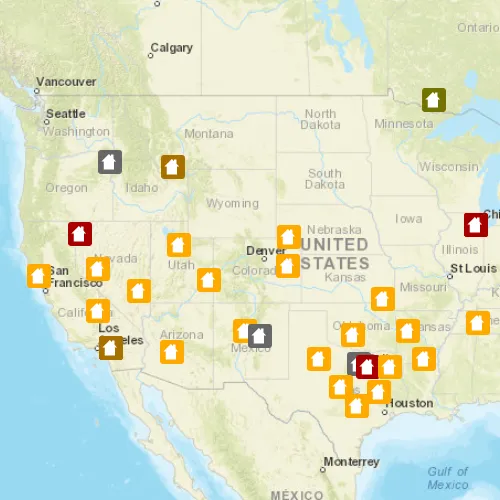
Add features to a feature layer.
Use case
An end-user performing a survey may want to add features to the map during the course of their work.
How to use the sample
Click on a location on the map to add a feature at that location.
How it works
A Feature is added to a ServiceFeatureTable which then pushes that new feature to the server.
- Create a
ServiceFeatureTablefrom a URL. - Create a
FeatureLayerfrom the service feature table. - Create a
Featurewith attributes and a location usingcreateFeatureAsync(). - Add the feature to the table.
- Update the table on the server using
applyEditsAsync().
Relevant API
- Feature
- FeatureEditResult
- FeatureLayer
- ServiceFeatureTable
Tags
edit, feature, online service
Sample code
// [WriteFile Name=AddFeaturesFeatureService, Category=EditData]// [Legal]// Copyright 2022 Esri.//// Licensed under the Apache License, Version 2.0 (the "License");// you may not use this file except in compliance with the License.// You may obtain a copy of the License at// http://www.apache.org/licenses/LICENSE-2.0//// Unless required by applicable law or agreed to in writing, software// distributed under the License is distributed on an "AS IS" BASIS,// WITHOUT WARRANTIES OR CONDITIONS OF ANY KIND, either express or implied.// See the License for the specific language governing permissions and// limitations under the License.// [Legal]
#ifdef PCH_BUILD#include "pch.hpp"#endif // PCH_BUILD
// sample headers#include "AddFeaturesFeatureService.h"
// ArcGIS Maps SDK headers#include "Basemap.h"#include "Feature.h"#include "FeatureEditResult.h"#include "FeatureLayer.h"#include "LayerListModel.h"#include "Map.h"#include "MapQuickView.h"#include "MapTypes.h"#include "Point.h"#include "ServiceFeatureTable.h"#include "SpatialReference.h"#include "Viewpoint.h"
// Qt headers#include <QFuture>#include <QMap>#include <QMouseEvent>#include <QUrl>#include <QUuid>#include <QVariant>
using namespace Esri::ArcGISRuntime;
namespace{  // Convenience RAII struct that deletes all pointers in given container.  struct FeatureListResultLock  {    FeatureListResultLock(const QList<FeatureEditResult*>& list) : results(list) { }    ~FeatureListResultLock() { qDeleteAll(results); }    const QList<FeatureEditResult*>& results;  };}
AddFeaturesFeatureService::AddFeaturesFeatureService(QObject* parent /* = nullptr */):  QObject(parent),  m_map(new Map(BasemapStyle::ArcGISStreets, this)){  m_map->setInitialViewpoint(Viewpoint(Point(-10800000, 4500000, SpatialReference(102100)), 3e7));
  m_featureTable = new ServiceFeatureTable(QUrl("https://sampleserver6.arcgisonline.com/arcgis/rest/services/DamageAssessment/FeatureServer/0"), this);  m_featureLayer = new FeatureLayer(m_featureTable, this);  m_map->operationalLayers()->append(m_featureLayer);}
AddFeaturesFeatureService::~AddFeaturesFeatureService() = default;
void AddFeaturesFeatureService::init(){  // Register the map view for QML  qmlRegisterType<MapQuickView>("Esri.Samples", 1, 0, "MapView");  qmlRegisterType<AddFeaturesFeatureService>("Esri.Samples", 1, 0, "AddFeaturesFeatureServiceSample");}
MapQuickView* AddFeaturesFeatureService::mapView() const{  return m_mapView;}
// Set the view (created in QML)void AddFeaturesFeatureService::setMapView(MapQuickView* mapView){  if (!mapView || mapView == m_mapView)    return;
  m_mapView = mapView;  m_mapView->setMap(m_map);
  emit mapViewChanged();
  connectSignals();}
void AddFeaturesFeatureService::connectSignals(){  //! [AddFeaturesFeatureService add at mouse click]  // connect to the mouse clicked signal on the MapQuickView  connect(m_mapView, &MapQuickView::mouseClicked, this, [this](QMouseEvent& mouseEvent)  {    // obtain the map point    const double screenX = mouseEvent.position().x();    const double screenY = mouseEvent.position().y();    Point newPoint = m_mapView->screenToLocation(screenX, screenY);
    // create the feature attributes    QMap<QString, QVariant> featureAttributes;    featureAttributes.insert("typdamage", "Minor");    featureAttributes.insert("primcause", "Earthquake");
    // create a new feature and add it to the feature table    Feature* feature = m_featureTable->createFeature(featureAttributes, newPoint, this);    m_featureTable->addFeatureAsync(feature).then(this, [this]()    {      // if add feature was successful, call apply edits       m_featureTable->applyEditsAsync().then(this, [](const QList<FeatureEditResult*>& featureEditResults)       {         // Lock is a convenience wrapper that deletes the contents of the list once we leave scope.         FeatureListResultLock lock(featureEditResults);
         if (lock.results.isEmpty())           return;
         // obtain the first item in the list         FeatureEditResult* featureEditResult = lock.results.first();         // check if there were errors, and if not, log the new object ID         if (!featureEditResult->isCompletedWithErrors())           qDebug() << "New Object ID is:" << featureEditResult->objectId();         else           qDebug() << "Apply edits error.";       });    });  });  //! [AddFeaturesFeatureService add at mouse click]}
// [WriteFile Name=AddFeaturesFeatureService, Category=EditData]// [Legal]// Copyright 2022 Esri.//// Licensed under the Apache License, Version 2.0 (the "License");// you may not use this file except in compliance with the License.// You may obtain a copy of the License at// http://www.apache.org/licenses/LICENSE-2.0//// Unless required by applicable law or agreed to in writing, software// distributed under the License is distributed on an "AS IS" BASIS,// WITHOUT WARRANTIES OR CONDITIONS OF ANY KIND, either express or implied.// See the License for the specific language governing permissions and// limitations under the License.// [Legal]
#ifndef ADDFEATURESFEATURESERVICE_H#define ADDFEATURESFEATURESERVICE_H
// Qt headers#include <QObject>
namespace Esri::ArcGISRuntime{class FeatureLayer;class Map;class MapQuickView;class ServiceFeatureTable;}
Q_MOC_INCLUDE("MapQuickView.h");
class AddFeaturesFeatureService : public QObject{ Q_OBJECT
Q_PROPERTY(Esri::ArcGISRuntime::MapQuickView* mapView READ mapView WRITE setMapView NOTIFY mapViewChanged)
public: explicit AddFeaturesFeatureService(QObject* parent = nullptr); ~AddFeaturesFeatureService() override;
static void init();
signals: void mapViewChanged();
private: Esri::ArcGISRuntime::MapQuickView* mapView() const; void setMapView(Esri::ArcGISRuntime::MapQuickView* mapView); void connectSignals();
Esri::ArcGISRuntime::Map* m_map = nullptr; Esri::ArcGISRuntime::MapQuickView* m_mapView = nullptr; Esri::ArcGISRuntime::FeatureLayer* m_featureLayer = nullptr; Esri::ArcGISRuntime::ServiceFeatureTable* m_featureTable = nullptr;};
#endif // ADDFEATURESFEATURESERVICE_H// [WriteFile Name=AddFeaturesFeatureService, Category=EditData]// [Legal]// Copyright 2022 Esri.//// Licensed under the Apache License, Version 2.0 (the "License");// you may not use this file except in compliance with the License.// You may obtain a copy of the License at// http://www.apache.org/licenses/LICENSE-2.0//// Unless required by applicable law or agreed to in writing, software// distributed under the License is distributed on an "AS IS" BASIS,// WITHOUT WARRANTIES OR CONDITIONS OF ANY KIND, either express or implied.// See the License for the specific language governing permissions and// limitations under the License.// [Legal]
import QtQuickimport QtQuick.Controlsimport Esri.Samples
Item {
// add a mapView component MapView { id: view anchors.fill: parent
Component.onCompleted: { // Set the focus on MapView to initially enable keyboard navigation forceActiveFocus(); } }
// Declare the C++ instance which creates the map etc. and supply the view AddFeaturesFeatureServiceSample { id: model mapView: view }}