Update a feature’s location in an online feature service.
Use case
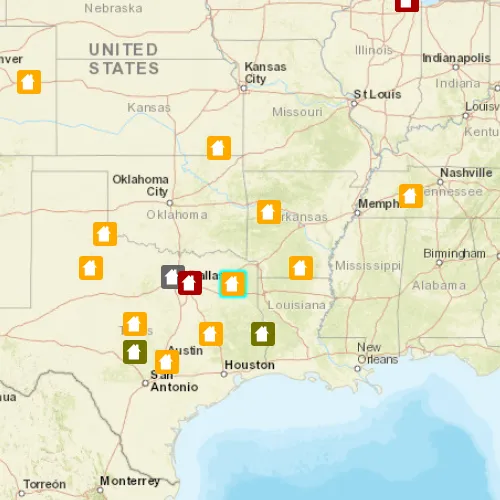
Sometimes users may want to edit features in an online feature service by moving them.
How to use the sample
Tap a feature to select it. Tap again to set the updated location for that feature.
How it works
- Create a
ServiceFeatureTableobject from a URL. - Create a
FeatureLayerobject from theServiceFeatureTable. - Select a feature from the
FeatureLayer,SelectFeature. - Load the selected feature.
- Change the selected feature’s location using
Feature::setGeometry(Geometry). - After the change, update the table on the server using
applyEditsAsync.
Relevant API
- Feature
- FeatureLayer
- ServiceFeatureTable
Tags
editing, feature layer, feature table, moving, service, updating
Sample code
// [WriteFile Name=UpdateGeometryFeatureService, Category=EditData]// [Legal]// Copyright 2016 Esri.//// Licensed under the Apache License, Version 2.0 (the "License");// you may not use this file except in compliance with the License.// You may obtain a copy of the License at// http://www.apache.org/licenses/LICENSE-2.0//// Unless required by applicable law or agreed to in writing, software// distributed under the License is distributed on an "AS IS" BASIS,// WITHOUT WARRANTIES OR CONDITIONS OF ANY KIND, either express or implied.// See the License for the specific language governing permissions and// limitations under the License.// [Legal]
#ifdef PCH_BUILD#include "pch.hpp"#endif // PCH_BUILD
// sample headers#include "UpdateGeometryFeatureService.h"
// ArcGIS Maps SDK headers#include "Basemap.h"#include "Feature.h"#include "FeatureEditResult.h"#include "FeatureLayer.h"#include "IdentifyLayerResult.h"#include "LayerListModel.h"#include "Map.h"#include "MapQuickView.h"#include "MapTypes.h"#include "MapViewTypes.h"#include "Point.h"#include "ServiceFeatureTable.h"#include "SpatialReference.h"#include "Viewpoint.h"
// Qt headers#include <QFuture>#include <QList>#include <QMouseEvent>#include <QUrl>
using namespace Esri::ArcGISRuntime;
namespace{  // Convenience RAII struct that deletes all pointers in given container.  struct FeatureEditListResultLock  {    FeatureEditListResultLock(const QList<FeatureEditResult*>& list) : results(list) { }    ~FeatureEditListResultLock() { qDeleteAll(results); }    const QList<FeatureEditResult*>& results;  };}
UpdateGeometryFeatureService::UpdateGeometryFeatureService(QQuickItem* parent) :  QQuickItem(parent){}
UpdateGeometryFeatureService::~UpdateGeometryFeatureService() = default;void UpdateGeometryFeatureService::init(){  qmlRegisterType<MapQuickView>("Esri.Samples", 1, 0, "MapView");  qmlRegisterType<UpdateGeometryFeatureService>("Esri.Samples", 1, 0, "UpdateGeometryFeatureServiceSample");}
void UpdateGeometryFeatureService::componentComplete(){  QQuickItem::componentComplete();
  // find QML MapView component  m_mapView = findChild<MapQuickView*>("mapView");  m_mapView->setWrapAroundMode(WrapAroundMode::Disabled);
  // create a Map by passing in the Basemap  m_map = new Map(BasemapStyle::ArcGISStreets, this);  m_map->setInitialViewpoint(Viewpoint(Point(-10800000, 4500000, SpatialReference(102100)), 3e7));
  // set map on the map view  m_mapView->setMap(m_map);
  // create the ServiceFeatureTable  m_featureTable = new ServiceFeatureTable(QUrl("https://sampleserver6.arcgisonline.com/arcgis/rest/services/DamageAssessment/FeatureServer/0"), this);
  // create the FeatureLayer with the ServiceFeatureTable and add it to the Map  m_featureLayer = new FeatureLayer(m_featureTable, this);  m_map->operationalLayers()->append(m_featureLayer);
  connectSignals();}
void UpdateGeometryFeatureService::connectSignals(){  // connect to the mouse clicked signal on the MapQuickView  connect(m_mapView, &MapQuickView::mouseClicked, this, [this](QMouseEvent& mouseEvent)  {    // get the point from the mouse point    Point mapPoint = m_mapView->screenToLocation(mouseEvent.position().x(), mouseEvent.position().y());
    // if a feature is already selected, move the selected feature to the new geometry    if (m_featureSelected)    {      // set the selected feature's geometry to the tapped map point      m_selectedFeature->setGeometry(mapPoint);
      // update the feature table with the new feature      m_featureTable->updateFeatureAsync(m_selectedFeature).then(this, [this]()      {        // once updateFeatureAsync is done, call applyEditsAsync        m_featureTable->applyEditsAsync().then(this, [](const QList<FeatureEditResult*>& featureEditResults)        {          // Lock is a convenience wrapper that deletes the contents of featureEditResults when we leave scope.          FeatureEditListResultLock lock(featureEditResults);
          // obtain the first item in the list          FeatureEditResult* featureEditResult = lock.results.isEmpty() ? nullptr : lock.results.first();          // check if there were errors, and if not, log the new object ID          if (featureEditResult && !featureEditResult->isCompletedWithErrors())            qDebug() << "Successfully updated geometry for Object ID:" << featureEditResult->objectId();          else            qDebug() << "Apply edits error.";        });      });
      // reset the feature layer      m_featureLayer->clearSelection();      m_featureSelected = false;    }
    // else select a new feature    else    {      // first clear the selection      m_featureLayer->clearSelection();
      // call identify on the map view      m_mapView->identifyLayerAsync(m_featureLayer, mouseEvent.position(), 5, false, 1).then(this, [this](IdentifyLayerResult* identifyResult)      {        // process the identifyLayerAsync result from the future        if (!identifyResult)          return;
        if (identifyResult->geoElements().size() > 0)        {          // first delete if not nullptr          if (m_selectedFeature)            delete m_selectedFeature;
          m_selectedFeature = static_cast<Feature*>(identifyResult->geoElements().at(0));          // Prevent the feature from being deleted along with the identifyResult.          m_selectedFeature->setParent(this);
          // select the item in the result          m_featureLayer->selectFeature(m_selectedFeature);          m_featureSelected = true;        }      });    }  });}
// [WriteFile Name=UpdateGeometryFeatureService, Category=EditData]// [Legal]// Copyright 2016 Esri.//// Licensed under the Apache License, Version 2.0 (the "License");// you may not use this file except in compliance with the License.// You may obtain a copy of the License at// http://www.apache.org/licenses/LICENSE-2.0//// Unless required by applicable law or agreed to in writing, software// distributed under the License is distributed on an "AS IS" BASIS,// WITHOUT WARRANTIES OR CONDITIONS OF ANY KIND, either express or implied.// See the License for the specific language governing permissions and// limitations under the License.// [Legal]
#ifndef UPDATE_GEOMETRY_FEATURE_SERVICE_H#define UPDATE_GEOMETRY_FEATURE_SERVICE_H
// Qt headers#include <QQuickItem>
namespace Esri::ArcGISRuntime{ class Map; class MapQuickView; class FeatureLayer; class ServiceFeatureTable; class Feature;}
class UpdateGeometryFeatureService : public QQuickItem{ Q_OBJECT
public: explicit UpdateGeometryFeatureService(QQuickItem* parent = nullptr); ~UpdateGeometryFeatureService() override;
void componentComplete() override; static void init();
private: void connectSignals();
private: Esri::ArcGISRuntime::Map* m_map = nullptr; Esri::ArcGISRuntime::MapQuickView* m_mapView = nullptr; Esri::ArcGISRuntime::FeatureLayer* m_featureLayer = nullptr; Esri::ArcGISRuntime::ServiceFeatureTable* m_featureTable = nullptr; Esri::ArcGISRuntime::Feature* m_selectedFeature = nullptr; bool m_featureSelected = false;};
#endif // UPDATE_GEOMETRY_FEATURE_SERVICE_H// [WriteFile Name=UpdateGeometryFeatureService, Category=EditData]// [Legal]// Copyright 2016 Esri.//// Licensed under the Apache License, Version 2.0 (the "License");// you may not use this file except in compliance with the License.// You may obtain a copy of the License at// http://www.apache.org/licenses/LICENSE-2.0//// Unless required by applicable law or agreed to in writing, software// distributed under the License is distributed on an "AS IS" BASIS,// WITHOUT WARRANTIES OR CONDITIONS OF ANY KIND, either express or implied.// See the License for the specific language governing permissions and// limitations under the License.// [Legal]
import QtQuickimport QtQuick.Controlsimport Esri.Samples
UpdateGeometryFeatureServiceSample { width: 800 height: 600
// add a mapView component MapView { anchors.fill: parent objectName: "mapView"
Component.onCompleted: { // Set the focus on MapView to initially enable keyboard navigation forceActiveFocus(); } }}