Create and add features whose attribute values satisfy a predefined set of contingencies.
Use case
Contingent values are a data design feature that allow you to make values in one field dependent on values in another field. Your choice for a value on one field further constrains the domain values that can be placed on another field. In this way, contingent values enforce data integrity by applying additional constraints to reduce the number of valid field inputs.
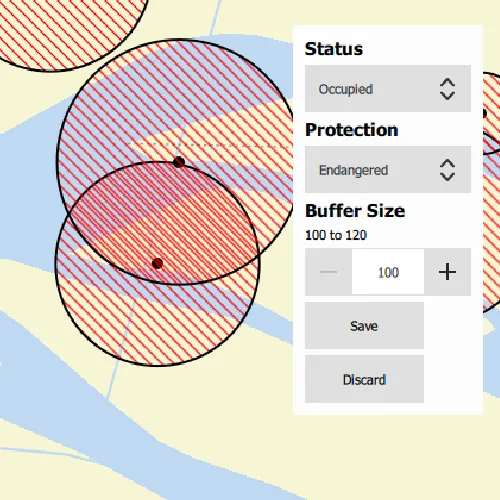
For example, a field crew working in a sensitive habitat area may be required to stay a certain distance away from occupied bird nests, but the size of that exclusion area differs depending on the bird’s level of protection according to presiding laws. Surveyors can add points of bird nests in the work area and their selection of the size of the exclusion area will be contingent on the values in other attribute fields.
How to use the sample
Tap on the map to add a feature symbolizing a bird’s nest. Then choose values describing the nest’s status, protection, and buffer size. Notice how different values are available depending on the values of preceding fields. Once the contingent values are validated, tap “Save” to add the feature to the map.
How it works
- Create and load a
Geodatabase. - Load the “BirdNests”
GeodatabaseFeatureTable. - Load the
ContingentValuesDefinitionfrom the feature table. - Create a new
FeatureLayerfrom the feature table and add it to the map. - Create a new
Featurefrom the feature table usingFeatureTable::createFeatureAsync - Supply the initial list of selections. This can also be retrieved from the
FeatureTable’sField’sCodedValueDomain - After making the initial selection, retrieve the valid contingent values for each field as you select the values for the attributes.
i. Create a
ContingentValuesResultfromFeatureTable::contingentValuesand pass in the current feature and the target field by name. ii. Get a list of validContingentValues fromContingentValuesResult::contingentValuesByFieldGroupwith the name of the relevant field group. iii. Loop through the list to create a list ofContingentCodedValuenames or the minimum and maximum values of aContingentRangeValuedepending on the type ofContingentValuereturned. - Validate the new feature’s contingent values by creating a list of
ContingencyConstrantViolations by passing the new feature toFeatureTable::validateContingencyConstraints. If the list is empty, then it is valid and can be saved to the map.
Relevant API
- ContingencyConstraintViolation
- ContingentCodedValue
- ContingentRangeValue
- ContingentValuesDefinition
- ContingentValuesResult
- Geodatabase
- GeodatabaseFeatureTable
Offline Data
To set up the sample’s offline data, see the Use offline data in the samples section of the Qt Samples repository overview.
| Link | Local Location |
|---|---|
| Contingent Values Bird Nests | <userhome>/ArcGIS/Runtime/Data/geodatabase/ContingentValuesBirdNests.geodatabase |
| Fillmore topographic map | <userhome>/ArcGIS/Runtime/Data/vtpk/FillmoreTopographicMap.vtpk |
About the data
The mobile geodatabase contains birds nests in the Fillmore area, defined with contingent values. Each feature contains information about its status, protection, and buffer size.
Additional information
Learn more about contingent values and how to utilize them on the ArcGIS Pro documentation.
Tags
coded values, contingent values, feature table, geodatabase, range values
Sample code
// [WriteFile Name=ContingentValues, Category=EditData]// [Legal]// Copyright 2022 Esri.//// Licensed under the Apache License, Version 2.0 (the "License");// you may not use this file except in compliance with the License.// You may obtain a copy of the License at// http://www.apache.org/licenses/LICENSE-2.0//// Unless required by applicable law or agreed to in writing, software// distributed under the License is distributed on an "AS IS" BASIS,// WITHOUT WARRANTIES OR CONDITIONS OF ANY KIND, either express or implied.// See the License for the specific language governing permissions and// limitations under the License.// [Legal]
#ifdef PCH_BUILD#include "pch.hpp"#endif // PCH_BUILD
// sample headers#include "ContingentValues.h"
// ArcGIS Maps SDK headers#include "ArcGISFeature.h"#include "ArcGISVectorTiledLayer.h"#include "AttributeListModel.h"#include "Basemap.h"#include "CodedValueDomain.h"#include "ContingentCodedValue.h"#include "ContingentRangeValue.h"#include "ContingentValuesDefinition.h"#include "ContingentValuesResult.h"#include "FeatureIterator.h"#include "FeatureLayer.h"#include "FeatureQueryResult.h"#include "Geodatabase.h"#include "GeodatabaseFeatureTable.h"#include "GeodatabaseTypes.h"#include "GeometryEngine.h"#include "Graphic.h"#include "GraphicListModel.h"#include "GraphicsOverlay.h"#include "GraphicsOverlayListModel.h"#include "LayerListModel.h"#include "Map.h"#include "MapQuickView.h"#include "MapTypes.h"#include "Point.h"#include "Polygon.h"#include "QueryParameters.h"#include "SimpleFillSymbol.h"#include "SimpleLineSymbol.h"#include "SimpleRenderer.h"#include "SymbolTypes.h"#include "Viewpoint.h"
// Qt headers#include <QFuture>#include <QStandardPaths>#include <QUuid>
using namespace Esri::ArcGISRuntime;
// helper method to get cross platform data pathnamespace{QString defaultDataPath(){  QString dataPath;
#ifdef Q_OS_IOS  dataPath = QStandardPaths::writableLocation(QStandardPaths::DocumentsLocation);#else  dataPath = QStandardPaths::writableLocation(QStandardPaths::HomeLocation);#endif
  return dataPath;}}
ContingentValues::ContingentValues(QObject* parent /* = nullptr */):  QObject(parent){  //! [map with basemap from vtpk]  // Load the basemap from a vector tile package  const QString vtpkDataPath = defaultDataPath() + "/ArcGIS/Runtime/Data/vtpk/FillmoreTopographicMap.vtpk";  ArcGISVectorTiledLayer* fillmoreVTPK = new ArcGISVectorTiledLayer(QUrl::fromLocalFile(vtpkDataPath), this);  Basemap* fillmoreBasemap = new Basemap(fillmoreVTPK, this);  m_map = new Map(fillmoreBasemap, this);  //! [map with basemap from vtpk]
  // Load the geodatabase from a mobile geodatabase  const QString gdbDataPath = defaultDataPath() + "/ArcGIS/Runtime/Data/geodatabase/ContingentValuesBirdNests.geodatabase";  m_geodatabase = new Geodatabase(gdbDataPath, this);
  // The coded value domains in this sample are hardcoded for simplicity, but can be retrieved from the GeodatabaseFeatureTable's Field's Domains.  m_statusValues = QVariantMap{{"Occupied", "OCCUPIED"}, {"Unoccupied", "UNOCCUPIED"}};  m_protectionValues = QVariantMap{{"Endangered", "ENDANGERED"}, {"Not endangered", "NOT_ENDANGERED"}, {"N/A", "NA"}};}
ContingentValues::~ContingentValues() = default;
void ContingentValues::init(){  // Register the map view for QML  qmlRegisterType<MapQuickView>("Esri.Samples", 1, 0, "MapView");  qmlRegisterType<ContingentValues>("Esri.Samples", 1, 0, "ContingentValuesSample");}
MapQuickView* ContingentValues::mapView() const{  return m_mapView;}
// Set the view with a graphics overlayvoid ContingentValues::setMapView(MapQuickView* mapView){  if (!mapView || mapView == m_mapView)    return;
  m_mapView = mapView;
  m_mapView->setMap(m_map);  m_mapView->setViewpointAsync(Viewpoint(Point(-13236000, 4081200), 8822));
  // Create the graphics overlay with which to display the nest buffer exclusion areas  m_graphicsOverlay = new GraphicsOverlay(this);  Symbol* bufferSymbol = new SimpleFillSymbol(SimpleFillSymbolStyle::ForwardDiagonal, Qt::red, new SimpleLineSymbol(SimpleLineSymbolStyle::Solid, Qt::black, 2, this), this);  m_graphicsOverlay->setRenderer(new SimpleRenderer(bufferSymbol, this));  m_mapView->graphicsOverlays()->append(m_graphicsOverlay);
  createConnections();  m_geodatabase->load();
  emit mapViewChanged();}
// Load the Geodatabase, GeodatabaseFeatureTable, and the ContingentValuesDefinitionvoid ContingentValues::createConnections(){  connect(m_geodatabase, &Geodatabase::doneLoading, this, [this]()  {    // Retrieve the "BirdNests" geodatabaseFeatureTable which contains the ContingentValuesDefinition, among other important member variables and functions    m_gdbFeatureTable = m_geodatabase->geodatabaseFeatureTable("BirdNests");
    if (!m_gdbFeatureTable)      return;
    connect(m_gdbFeatureTable, &GeodatabaseFeatureTable::doneLoading, this, [this]    {      // Load the ContingentValuesDefinition to enable access to the GeodatabaseFeatureTable's ContingentValues data such as FieldGroups and ContingentValuesResults      m_gdbFeatureTable->contingentValuesDefinition()->load();
      // Load and display the mobile geodatabase's predefined bird nests on the map      FeatureLayer* nestLayer = new FeatureLayer(m_gdbFeatureTable, this);      m_map->operationalLayers()->append(nestLayer);
      queryAndBufferFeatures();    });
    m_gdbFeatureTable->load();  });
  connect(m_mapView, &MapQuickView::mouseClicked, this, &ContingentValues::createNewEmptyFeature);}
// When the user clicks or taps on the map, instantiate a new feature and show the attribute form interfacevoid ContingentValues::createNewEmptyFeature(QMouseEvent& mouseEvent){  // Create a new empty feature to define attributes for  m_newFeature = static_cast<ArcGISFeature*>(m_gdbFeatureTable->createFeature({}, m_mapView->screenToLocation(mouseEvent.position().x(), mouseEvent.position().y()), this));  auto f = m_gdbFeatureTable->addFeatureAsync(m_newFeature);  Q_UNUSED(f)
  // Show the attribute form interface  setFeatureAttributesPaneVisibe(true);}
// Get a list of a feature's valid contingent values for field within a participating contingent value field groupQVariantList ContingentValues::getContingentValues(const QString& field, const QString& fieldGroupName){  if (m_gdbFeatureTable->contingentValuesDefinition()->loadStatus() != LoadStatus::Loaded)    return {};
  // Create an empty list with which to return the valid contingent values  QVariantList contingentValuesNamesList = {};
  // Instantiate a dictionary containing all possible values for a field in the context of the contingent field groups it participates in  ContingentValuesResult* contingentValuesResult = m_gdbFeatureTable->contingentValues(m_newFeature, field);
  // Loop through the contingent values. The QML UI is hardcoded to expect a list of contingent coded value names or a minimum and maximum value from a contingent range value  for (ContingentValue* contingentValue : contingentValuesResult->contingentValuesByFieldGroup(this).value(fieldGroupName))  {    // Contingent coded values are contingent values defined from a coded value domain.    // There are often multiple results returned by the ContingentValuesResult    if (contingentValue->contingentValueType() == ContingentValueType::ContingentCodedValue)    {      ContingentCodedValue* contingentCodedValue = static_cast<ContingentCodedValue*>(contingentValue);      if (contingentCodedValue)        contingentValuesNamesList.append(contingentCodedValue->codedValue().name());    }    // Contingent range values constrain a range value domain    // the ContingentValuesResult for a field defined by a range value domain often contains only one entry with a minimum and maximum value    else if (contingentValue->contingentValueType() == ContingentValueType::ContingentRangeValue)    {      ContingentRangeValue* contingentRangeValue = static_cast<ContingentRangeValue*>(contingentValue);      if (contingentRangeValue)      {        contingentValuesNamesList.append({contingentRangeValue->minValue()});        contingentValuesNamesList.append({contingentRangeValue->maxValue()});      }    }  }
  return contingentValuesNamesList;}
// Validates if the sample's new feature has any constraint violationsbool ContingentValues::validateContingentValues(){  if (m_gdbFeatureTable->contingentValuesDefinition()->loadStatus() != LoadStatus::Loaded || !m_newFeature)    return false;  // Returns a list of field groups whose contingencies are in violation as well as the type of violation  QList<ContingencyConstraintViolation*> constraintViolations = m_gdbFeatureTable->validateContingencyConstraints(m_newFeature);
  // If the list is empty, there are no violations and the attribute map satisfies all contingencies  if (constraintViolations.isEmpty())    return true;
  return false;}
// Save the sample's new feature to the map's geodatabse feature tablevoid ContingentValues::createNewNest(){  // Once the attribute map is filled and validated, save the feature to the geodatabase feature table  auto f = m_gdbFeatureTable->updateFeatureAsync(m_newFeature);  Q_UNUSED(f)
  queryAndBufferFeatures();}
void ContingentValues::discardFeature(){  auto f = m_gdbFeatureTable->deleteFeatureAsync(m_newFeature);  Q_UNUSED(f)}
// Update a specific field with a new value in the new feature's attribute mapvoid ContingentValues::updateField(const QString& field, const QVariant& value){  if (field == "Status")    m_newFeature->attributes()->replaceAttribute(field, m_statusValues.value(value.toString()));  else if (field == "Protection")    m_newFeature->attributes()->replaceAttribute(field, m_protectionValues.value(value.toString()));  else if (field == "BufferSize")    m_newFeature->attributes()->replaceAttribute(field, value.toInt());  else    qWarning() << field << "not found in any of the data dictionaries";}
// The following two functions create a buffer around nest features based on their BufferSize value// They are included to demonstrate the sample use case
// Kicks off a query feature task to return all features with buffer sizes greater than zerovoid ContingentValues::queryAndBufferFeatures(){  if (!m_gdbFeatureTable || m_gdbFeatureTable->loadStatus() != LoadStatus::Loaded)    return;
  m_graphicsOverlay->graphics()->clear();
  QueryParameters params;  params.setWhereClause("BufferSize > 0");  m_gdbFeatureTable->queryFeaturesAsync(params).then(this, [this](FeatureQueryResult* result)  {    bufferFeaturesFromQueryResults(result);  });}
// Buffers all features from the preceeding feature query using the BufferSize field value, create graphics with the results, and adds them to the graphics overlayvoid ContingentValues::bufferFeaturesFromQueryResults(FeatureQueryResult* results){  FeatureIterator iterator = results->iterator();
  while (iterator.hasNext())  {    Feature* feature = iterator.next(this);    const double bufferDistance = feature->attributes()->attributeValue("BufferSize").toDouble();    Polygon buffer = GeometryEngine::buffer(feature->geometry(), bufferDistance);    m_mapView->graphicsOverlays()->at(0)->graphics()->append(new Graphic(buffer, this));  }}
bool ContingentValues::featureAttributesPaneVisibe() const{  return m_featureAttributesPaneVisible;}
void ContingentValues::setFeatureAttributesPaneVisibe(bool showFeatureAttributesPane){  m_featureAttributesPaneVisible = showFeatureAttributesPane;  emit featureAttributesPaneVisibeChanged();}
QVariantMap ContingentValues::statusValues() const{  return m_statusValues;}
// [WriteFile Name=ContingentValues, Category=EditData]// [Legal]// Copyright 2022 Esri.//// Licensed under the Apache License, Version 2.0 (the "License");// you may not use this file except in compliance with the License.// You may obtain a copy of the License at// http://www.apache.org/licenses/LICENSE-2.0//// Unless required by applicable law or agreed to in writing, software// distributed under the License is distributed on an "AS IS" BASIS,// WITHOUT WARRANTIES OR CONDITIONS OF ANY KIND, either express or implied.// See the License for the specific language governing permissions and// limitations under the License.// [Legal]
#ifndef CONTINGENTVALUES_H#define CONTINGENTVALUES_H
// Qt headers#include <QMouseEvent>#include <QObject>
namespace Esri::ArcGISRuntime{class ArcGISFeature;class FeatureQueryResult;class Geodatabase;class GeodatabaseFeatureTable;class GraphicsOverlay;class Map;class MapQuickView;}
Q_MOC_INCLUDE("MapQuickView.h")
class ContingentValues : public QObject{ Q_OBJECT
Q_PROPERTY(Esri::ArcGISRuntime::MapQuickView* mapView READ mapView WRITE setMapView NOTIFY mapViewChanged) Q_PROPERTY(QVariantMap statusValues READ statusValues CONSTANT) Q_PROPERTY(bool featureAttributesPaneVisibe READ featureAttributesPaneVisibe WRITE setFeatureAttributesPaneVisibe NOTIFY featureAttributesPaneVisibeChanged)
public: explicit ContingentValues(QObject* parent = nullptr); ~ContingentValues();
static void init();
Q_INVOKABLE void createNewNest(); Q_INVOKABLE void discardFeature(); Q_INVOKABLE QVariantList getContingentValues(const QString& field, const QString& fieldGroupName); Q_INVOKABLE void updateField(const QString& field, const QVariant& value); Q_INVOKABLE bool validateContingentValues();
signals: void featureAttributesPaneVisibeChanged(); void mapViewChanged();
private: Esri::ArcGISRuntime::MapQuickView* mapView() const; void setMapView(Esri::ArcGISRuntime::MapQuickView* mapView);
void queryAndBufferFeatures(); void bufferFeaturesFromQueryResults(Esri::ArcGISRuntime::FeatureQueryResult* results); void createConnections(); void createNewEmptyFeature(QMouseEvent& mouseEvent); bool featureAttributesPaneVisibe() const; QVariantMap statusValues() const; void setFeatureAttributesPaneVisibe(bool showFeatureAttributesPane);
Esri::ArcGISRuntime::ArcGISFeature* m_newFeature = nullptr; Esri::ArcGISRuntime::Geodatabase* m_geodatabase = nullptr; Esri::ArcGISRuntime::GeodatabaseFeatureTable* m_gdbFeatureTable = nullptr; Esri::ArcGISRuntime::GraphicsOverlay* m_graphicsOverlay = nullptr; Esri::ArcGISRuntime::Map* m_map = nullptr; Esri::ArcGISRuntime::MapQuickView* m_mapView = nullptr;
QVariantMap m_statusValues; QVariantMap m_protectionValues; bool m_featureAttributesPaneVisible = false;};
#endif // CONTINGENTVALUES_H// [WriteFile Name=ContingentValues, Category=EditData]// [Legal]// Copyright 2022 Esri.//// Licensed under the Apache License, Version 2.0 (the "License");// you may not use this file except in compliance with the License.// You may obtain a copy of the License at// http://www.apache.org/licenses/LICENSE-2.0//// Unless required by applicable law or agreed to in writing, software// distributed under the License is distributed on an "AS IS" BASIS,// WITHOUT WARRANTIES OR CONDITIONS OF ANY KIND, either express or implied.// See the License for the specific language governing permissions and// limitations under the License.// [Legal]
import QtQuickimport QtQuick.Controlsimport QtQuick.Layoutsimport Esri.Samples
Item { id: sampleWindow
// add a mapView component MapView { id: view anchors.fill: sampleWindow
MouseArea { anchors.fill: parent visible: attributePrompt.visible onClicked: mouse => mouse.accepted = !attributePrompt.visible onWheel: wheel.accepted = !attributePrompt.visible }
Component.onCompleted: { // Set and keep the focus on MapView to enable keyboard navigation forceActiveFocus(); } }
// Declare the C++ instance which creates the map etc. and supply the view ContingentValuesSample { id: contingentValuesSample mapView: view }
Control { id: attributePrompt anchors { top: sampleWindow.top right: sampleWindow.right margins: 5 }
background: Rectangle { color: "#fdfdfd" }
visible: contingentValuesSample.featureAttributesPaneVisibe
contentItem: Column { id: inputColumn spacing: 5 padding: 10
Text { text: "Status" font { bold: true pointSize: 11 } }
ComboBox { id: statusComboBox
// This ComboBox is hardcoded, but can be dynamically obtained from the feature layer's domain values model: [""].concat(Object.keys(contingentValuesSample.statusValues));
onCurrentValueChanged: { if (statusComboBox.currentValue === "") { protectionComboBox.model = [""]; return; }
// Update the feature's attribute map with the selection contingentValuesSample.updateField("Status", statusComboBox.currentValue); // Append the valid contingent coded values to the subsequent ComboBox protectionComboBox.model = [""].concat(contingentValuesSample.getContingentValues("Protection", "ProtectionFieldGroup")); } }
Text { text: "Protection" font { bold: true pointSize: 11 } }
ComboBox { id: protectionComboBox model: [""];
enabled: statusComboBox.currentText !== ""
onCurrentValueChanged: { if (protectionComboBox.currentValue === "") return;
// Update the feature's attribute map with the selection contingentValuesSample.updateField("Protection", protectionComboBox.currentValue);
// Get the valid contingent range values for the subsequent SpinBox const minMax = contingentValuesSample.getContingentValues("BufferSize", "BufferSizeFieldGroup")
// If getContingentValues() returned results, update the spin box values if (minMax[0] !== "") { rangeValuesSpinBox.from = minMax[0]; rangeValuesSpinBox.to = minMax[1];
// If the maxValue in the range is 0, set the buffer size to 0 if (minMax[1] === 0) { contingentValuesSample.updateField("BufferSize", 0); saveButton.enabled = contingentValuesSample.validateContingentValues(); } } } }
Text { text: "Buffer Size" font { bold: true pointSize: 11 } }
Text { text: rangeValuesSpinBox.from + " to " + rangeValuesSpinBox.to; }
SpinBox { id: rangeValuesSpinBox editable: true from: 0; to: 0; stepSize: 10 value: 0;
enabled: protectionComboBox.currentText !== ""
onValueChanged: { if (protectionComboBox.currentValue === "") return;
contingentValuesSample.updateField("BufferSize", rangeValuesSpinBox.value);
// Validate that all contingencies are valid, if so, enable the save button saveButton.enabled = contingentValuesSample.validateContingentValues(); } }
Button { id: saveButton Text { anchors.fill: parent horizontalAlignment: Text.AlignHCenter verticalAlignment: Text.AlignVCenter text: "Save" }
enabled: false
onClicked: { const valid = contingentValuesSample.validateContingentValues(); if (valid) { contingentValuesSample.createNewNest(); contingentValuesSample.featureAttributesPaneVisibe = false; } } }
Button { id: discardButton Text { anchors.fill: parent horizontalAlignment: Text.AlignHCenter verticalAlignment: Text.AlignVCenter text: "Discard" } onClicked: { contingentValuesSample.featureAttributesPaneVisibe = false; contingentValuesSample.discardFeature(); } } }
onVisibleChanged: { if (!visible) return;
// Reset attribute panel values when the panel opens statusComboBox.currentIndex = 0; protectionComboBox.currentIndex = 0; rangeValuesSpinBox.from = 0; rangeValuesSpinBox.to = 0; } }}