Calculate a geodesic path between two points and measure its distance.
Use case
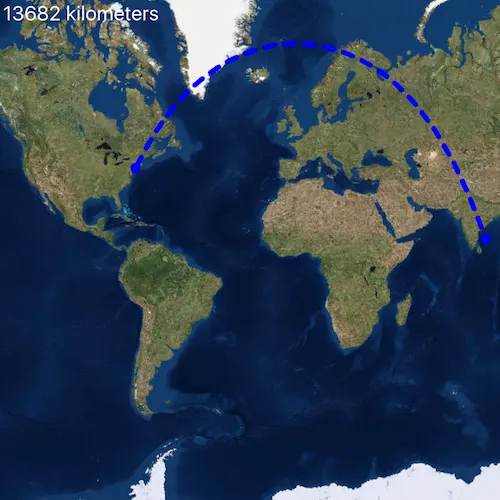
A geodesic distance provides an accurate, real-world distance between two points. Visualizing flight paths between cities is a common example of a geodesic operation since the flight path between two airports takes into account the curvature of the earth, rather than following the planar path between those points, which appears as a straight line on a projected map.
How to use the sample
Click anywhere on the map. A line graphic will display the geodesic line between the two points. In addition, text that indicates the geodesic distance between the two points will be updated. Click elsewhere and a new line will be created.
How it works
- Create a
Pointin New York City and display it as aGraphic. - Obtain a new point when a click occurs on the
MapViewand add this point as a graphic. - Create a
Polylinefrom the two points. - Execute
GeometryEngine::densifyGeodeticby passing in the created polyine then create a graphic from the returnedGeometry. - Execute
GeometryEngine::distanceGeodeticby passing in the two points and display the returned length on the screen.
Relevant API
- GeometryEngine::densifyGeodetic
- GeometryEngine::distanceGeodetic
About the data
The Imagery basemap provides the global context for the displayed geodesic line.
Tags
densify, distance, geodesic, geodetic
Sample code
// [WriteFile Name=GeodesicOperations, Category=Geometry]// [Legal]// Copyright 2018 Esri.//// Licensed under the Apache License, Version 2.0 (the "License");// you may not use this file except in compliance with the License.// You may obtain a copy of the License at// http://www.apache.org/licenses/LICENSE-2.0//// Unless required by applicable law or agreed to in writing, software// distributed under the License is distributed on an "AS IS" BASIS,// WITHOUT WARRANTIES OR CONDITIONS OF ANY KIND, either express or implied.// See the License for the specific language governing permissions and// limitations under the License.// [Legal]
#ifdef PCH_BUILD#include "pch.hpp"#endif // PCH_BUILD
// sample headers#include "GeodesicOperations.h"
// ArcGIS Maps SDK headers#include "AngularUnit.h"#include "GeodeticDistanceResult.h"#include "GeometryEngine.h"#include "Graphic.h"#include "GraphicListModel.h"#include "GraphicsOverlay.h"#include "GraphicsOverlayListModel.h"#include "LinearUnit.h"#include "Map.h"#include "MapQuickView.h"#include "MapTypes.h"#include "Point.h"#include "PolylineBuilder.h"#include "SimpleLineSymbol.h"#include "SimpleMarkerSymbol.h"#include "SpatialReference.h"#include "SymbolTypes.h"
using namespace Esri::ArcGISRuntime;
GeodesicOperations::GeodesicOperations(QQuickItem* parent /* = nullptr */):  QQuickItem(parent){}
void GeodesicOperations::init(){  // Register the map view for QML  qmlRegisterType<MapQuickView>("Esri.Samples", 1, 0, "MapView");  qmlRegisterType<GeodesicOperations>("Esri.Samples", 1, 0, "GeodesicOperationsSample");}
void GeodesicOperations::componentComplete(){  QQuickItem::componentComplete();
  // find QML MapView component  m_mapView = findChild<MapQuickView*>("mapView");
  // Create a map using the imagery basemap  m_map = new Map(BasemapStyle::ArcGISImageryStandard, this);
  // Set map to map view  m_mapView->setMap(m_map);
  // Create a GraphicsOverlay  GraphicsOverlay* graphicsOverlay = new GraphicsOverlay(this);  m_mapView->graphicsOverlays()->append(graphicsOverlay);
  // Create Graphic Symbols  SimpleMarkerSymbol* markerSymbol = new SimpleMarkerSymbol(SimpleMarkerSymbolStyle::Circle, QColor("blue"), 10.0f /*size*/, this);  SimpleLineSymbol* pathSymbol = new SimpleLineSymbol(SimpleLineSymbolStyle::Dash, QColor("blue"), 5.0f /*width*/, this);
  // Create NYC graphic  const Point nycPoint(-73.7781, 40.6413, SpatialReference(4326));  m_nycGraphic = new Graphic(nycPoint, markerSymbol, this);  graphicsOverlay->graphics()->append(m_nycGraphic);
  // Create destination graphic  m_destinationGraphic = new Graphic(this);  m_destinationGraphic->setSymbol(markerSymbol);  graphicsOverlay->graphics()->append(m_destinationGraphic);
  // Create path graphic  m_pathGraphic = new Graphic(this);  m_pathGraphic->setSymbol(pathSymbol);  graphicsOverlay->graphics()->append(m_pathGraphic);
  // connect to mouse clicked signal  connect(m_mapView, &MapQuickView::mouseClicked, this, [this, nycPoint](QMouseEvent& mouseEvent)  {    // re-project the point to match the NYC graphic    const Point clickedPoint = m_mapView->screenToLocation(mouseEvent.position().x(), mouseEvent.position().y());    const Point destination = geometry_cast<Point>(GeometryEngine::project(clickedPoint, m_nycGraphic->geometry().spatialReference()));
    // update the destination graphic    m_destinationGraphic->setGeometry(destination);
    // create line with start/end points    const QList<Point> points = {nycPoint, destination};    const Polyline polyline = pointsToPolyline(points);
    // densify the path as a geodesic curve and show it with the path graphic    constexpr double maxSegmentLength = 1.0;    const LinearUnit linearUnitOfMeasurementKm = LinearUnit::kilometers();    const AngularUnit angularUnitOfMeasurementRads = AngularUnit::radians();    constexpr GeodeticCurveType curveType = GeodeticCurveType::Geodesic;    const Geometry pathGeometry = GeometryEngine::densifyGeodetic(polyline, maxSegmentLength, linearUnitOfMeasurementKm, curveType);
    // update the graphic    m_pathGraphic->setGeometry(pathGeometry);
    // calculate the path's geodetic length    const GeodeticDistanceResult result = GeometryEngine::distanceGeodetic(nycPoint, destination, linearUnitOfMeasurementKm, angularUnitOfMeasurementRads, curveType);    m_distanceText = QString::number(result.distance());    emit distanceTextChanged();  });}
// helper function to create a new Polyline from a list of pointsPolyline GeodesicOperations::pointsToPolyline(const QList<Point>& points){  PolylineBuilder polylineBuilder(SpatialReference(4326));  for (const Point& point : points)    polylineBuilder.addPoint(point);
  return polylineBuilder.toPolyline();}
QString GeodesicOperations::distanceText() const{  return m_distanceText;}
// [WriteFile Name=GeodesicOperations, Category=Geometry]// [Legal]// Copyright 2018 Esri.//// Licensed under the Apache License, Version 2.0 (the "License");// you may not use this file except in compliance with the License.// You may obtain a copy of the License at// http://www.apache.org/licenses/LICENSE-2.0//// Unless required by applicable law or agreed to in writing, software// distributed under the License is distributed on an "AS IS" BASIS,// WITHOUT WARRANTIES OR CONDITIONS OF ANY KIND, either express or implied.// See the License for the specific language governing permissions and// limitations under the License.// [Legal]
#ifndef GEODESICOPERATIONS_H#define GEODESICOPERATIONS_H
// ArcGIS Maps SDK headers#include "Point.h"#include "Polyline.h"
// Qt headers#include <QQuickItem>
namespace Esri::ArcGISRuntime{class Map;class MapQuickView;class Graphic;}
class GeodesicOperations : public QQuickItem{ Q_OBJECT
Q_PROPERTY(QString distanceText READ distanceText NOTIFY distanceTextChanged)
public: explicit GeodesicOperations(QQuickItem* parent = nullptr); ~GeodesicOperations() override = default;
void componentComplete() override; static void init();
signals: void distanceTextChanged();
private: Esri::ArcGISRuntime::Map* m_map = nullptr; Esri::ArcGISRuntime::MapQuickView* m_mapView = nullptr; Esri::ArcGISRuntime::Graphic* m_nycGraphic = nullptr; Esri::ArcGISRuntime::Graphic* m_pathGraphic = nullptr; Esri::ArcGISRuntime::Graphic* m_destinationGraphic = nullptr; QString m_distanceText;
private: Esri::ArcGISRuntime::Polyline pointsToPolyline(const QList<Esri::ArcGISRuntime::Point>& points); QString distanceText() const;};
#endif // GEODESICOPERATIONS_H// [WriteFile Name=GeodesicOperations, Category=Geometry]// [Legal]// Copyright 2018 Esri.//// Licensed under the Apache License, Version 2.0 (the "License");// you may not use this file except in compliance with the License.// You may obtain a copy of the License at// http://www.apache.org/licenses/LICENSE-2.0//// Unless required by applicable law or agreed to in writing, software// distributed under the License is distributed on an "AS IS" BASIS,// WITHOUT WARRANTIES OR CONDITIONS OF ANY KIND, either express or implied.// See the License for the specific language governing permissions and// limitations under the License.// [Legal]
import QtQuickimport QtQuick.Controlsimport Esri.Samples
GeodesicOperationsSample { id: rootRectangle clip: true width: 800 height: 600
// add a mapView component MapView { anchors.fill: parent objectName: "mapView"
Component.onCompleted: { // Set the focus on MapView to initially enable keyboard navigation forceActiveFocus(); } }
// display text for geodesic length Text { anchors { left: parent.left top: parent.top margins: 10 }
text: "%1 kilometers".arg(distanceText) visible: distanceText.length > 0 font.pixelSize: 20 color: "white" }}