Project a point from one spatial reference to another.
Use case
Being able to project between spatial references is fundamental to a GIS. An example of when you would need to re-project data is if you had data in two different spatial references, but wanted to perform an intersect analysis with the GeometryEngine::intersect function. This function takes two geometries as parameters, and both geometries must be in the same spatial reference. If they are not, you could first use GeometryEngine::project to convert the geometries so they match.
How to use the sample
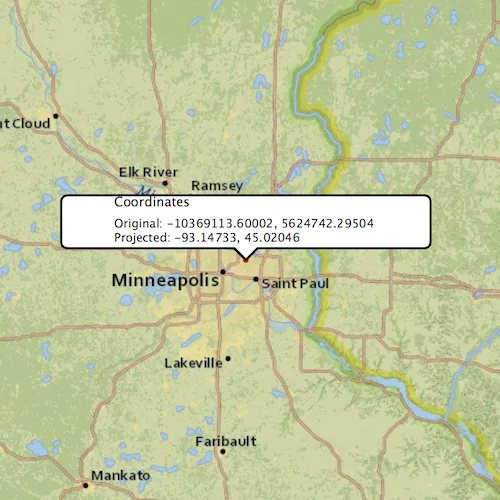
Click anywhere on the map. A callout will display the clicked location’s coordinate in the original (basemap’s) spatial reference and in the projected spatial reference.
How it works
- Call the static method,
GeometryEngine::project, passing in the originalGeometryand aSpatialReferenceto which it should be projected.
Relevant API
- GeometryEngine
- Point
- SpatialReference
Additional information
In cases where the the output spatial reference uses a different geographic coordinate system than that of the input spatial reference, see the GeometryEngine.project method that additionally takes in a DatumTransformation parameter.
Tags
coordinate system, coordinates, latitude, longitude, projected, projection, spatial reference, Web Mercator, WGS 84
Sample code
// [WriteFile Name=ProjectGeometry, Category=Geometry]// [Legal]// Copyright 2018 Esri.//// Licensed under the Apache License, Version 2.0 (the "License");// you may not use this file except in compliance with the License.// You may obtain a copy of the License at// http://www.apache.org/licenses/LICENSE-2.0//// Unless required by applicable law or agreed to in writing, software// distributed under the License is distributed on an "AS IS" BASIS,// WITHOUT WARRANTIES OR CONDITIONS OF ANY KIND, either express or implied.// See the License for the specific language governing permissions and// limitations under the License.// [Legal]
#ifdef PCH_BUILD#include "pch.hpp"#endif // PCH_BUILD
// sample headers#include "ProjectGeometry.h"
// ArcGIS Maps SDK headers#include "CalloutData.h"#include "Envelope.h"#include "GeometryEngine.h"#include "Graphic.h"#include "GraphicListModel.h"#include "GraphicsOverlay.h"#include "GraphicsOverlayListModel.h"#include "Map.h"#include "MapQuickView.h"#include "MapTypes.h"#include "Point.h"#include "SimpleMarkerSymbol.h"#include "SpatialReference.h"#include "SymbolTypes.h"#include "Viewpoint.h"
using namespace Esri::ArcGISRuntime;
ProjectGeometry::ProjectGeometry(QQuickItem* parent /* = nullptr */):  QQuickItem(parent){}
void ProjectGeometry::init(){  // Register the map view for QML  qmlRegisterType<MapQuickView>("Esri.Samples", 1, 0, "MapView");  qmlRegisterType<ProjectGeometry>("Esri.Samples", 1, 0, "ProjectGeometrySample");  qmlRegisterUncreatableType<CalloutData>("Esri.Samples", 1, 0, "CalloutData", "CalloutData is an uncreatable type");}
void ProjectGeometry::componentComplete(){  QQuickItem::componentComplete();
  // find QML MapView component  m_mapView = findChild<MapQuickView*>("mapView");
  // connect to mouse clicked signal  connect(m_mapView, &MapQuickView::mouseClicked, this, &ProjectGeometry::onMouseClicked);
  // Create a map using a topographic basemap  m_map = new Map(BasemapStyle::ArcGISTopographic, this);
  // Set initial viewpoint to Minneapolis  Viewpoint initialViewpoint(Envelope(-10995912.335747, 5267868.874421, -9880363.974046, 5960699.183877, SpatialReference::webMercator()));  m_map->setInitialViewpoint(initialViewpoint);
  // Add a GraphicsOverlay  GraphicsOverlay* overlay = new GraphicsOverlay(this);  m_mapView->graphicsOverlays()->append(overlay);
  // Add a Point Graphic  SimpleMarkerSymbol* sms = new SimpleMarkerSymbol(SimpleMarkerSymbolStyle::Circle, QColor("red"), 5.0f /*size*/, this);  m_inputGraphic = new Graphic(this);  m_inputGraphic->setSymbol(sms);  overlay->graphics()->append(m_inputGraphic);
  // Set map to map view  m_mapView->setMap(m_map);
  // Set up callout data  m_calloutData = m_mapView->calloutData();  m_calloutData->setTitle(QStringLiteral("Coordinates"));}
void ProjectGeometry::onMouseClicked(QMouseEvent& event){  // get the mouse click as a point  const Point originalPoint = m_mapView->screenToLocation(event.position().x(), event.position().y());
  // show the clicked location on the map with a graphic  m_inputGraphic->setGeometry(originalPoint);
  // create the output SpatialReference by specifying a well known ID (WKID)  const SpatialReference spatialReference(4326);
  // project the web mercator point to WGS84  const Point projectedPoint = geometry_cast<Point>(GeometryEngine::project(originalPoint, spatialReference));
  // update callout data  m_calloutData->setLocation(originalPoint);  const QString ox = QString::number(originalPoint.x(), 'f', 5);  const QString oy = QString::number(originalPoint.y(), 'f', 5);  const QString px = QString::number(projectedPoint.x(), 'f', 5);  const QString py = QString::number(projectedPoint.y(), 'f', 5);  m_calloutData->setDetail(QString("Original: %1, %2\nProjected: %3, %4").arg(ox, oy, px, py));  m_calloutData->setVisible(true);}
// [WriteFile Name=ProjectGeometry, Category=Geometry]// [Legal]// Copyright 2018 Esri.//// Licensed under the Apache License, Version 2.0 (the "License");// you may not use this file except in compliance with the License.// You may obtain a copy of the License at// http://www.apache.org/licenses/LICENSE-2.0//// Unless required by applicable law or agreed to in writing, software// distributed under the License is distributed on an "AS IS" BASIS,// WITHOUT WARRANTIES OR CONDITIONS OF ANY KIND, either express or implied.// See the License for the specific language governing permissions and// limitations under the License.// [Legal]
#ifndef PROJECTGEOMETRY_H#define PROJECTGEOMETRY_H
// Qt headers#include <QMouseEvent>#include <QQuickItem>
namespace Esri::ArcGISRuntime{class Map;class MapQuickView;class Graphic;class CalloutData;}
class ProjectGeometry : public QQuickItem{ Q_OBJECT
public: explicit ProjectGeometry(QQuickItem* parent = nullptr); ~ProjectGeometry() override = default;
void componentComplete() override; static void init();
private slots: void onMouseClicked(QMouseEvent& event);
private: Esri::ArcGISRuntime::Map* m_map = nullptr; Esri::ArcGISRuntime::MapQuickView* m_mapView = nullptr; Esri::ArcGISRuntime::Graphic* m_inputGraphic = nullptr; Esri::ArcGISRuntime::CalloutData* m_calloutData = nullptr;};
#endif // PROJECTGEOMETRY_H// [WriteFile Name=ProjectGeometry, Category=Geometry]// [Legal]// Copyright 2018 Esri.//// Licensed under the Apache License, Version 2.0 (the "License");// you may not use this file except in compliance with the License.// You may obtain a copy of the License at// http://www.apache.org/licenses/LICENSE-2.0//// Unless required by applicable law or agreed to in writing, software// distributed under the License is distributed on an "AS IS" BASIS,// WITHOUT WARRANTIES OR CONDITIONS OF ANY KIND, either express or implied.// See the License for the specific language governing permissions and// limitations under the License.// [Legal]
import QtQuickimport QtQuick.Windowimport QtQuick.Controlsimport Esri.Samplesimport Esri.ArcGISRuntime.Toolkit
ProjectGeometrySample { id: rootRectangle clip: true width: 800 height: 600
// add a mapView component MapView { id: mapView anchors.fill: parent objectName: "mapView"
Component.onCompleted: { // Set the focus on MapView to initially enable keyboard navigation forceActiveFocus(); }
// Declare a callout Callout { id: callout calloutData: mapView.calloutData accessoryButtonVisible: false autoAdjustWidth: true maxWidth: 350 leaderPosition: Callout.LeaderPosition.Automatic } }}