You can perform many different types of geometry analyses with the ArcGIS APIs
The operations are categorized into the following:
Click on the tables below to learn how to execute each operation with ArcGIS APIs
Spatial relationship
Spatial relationship operations determine the topological association between two geometriestrue or false.
| Operation | Description | Relation (yellow = true) |
|---|---|---|
| Contains | Returns true if one geometry contains another geometry. | 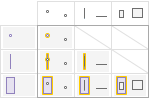 The left geometry contains the top geometry. |
| Disjoint | Returns true if one geometry does not intersect another geometry. | 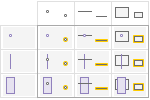 The left geometry is disjoint from the top geometry. |
| Intersects | Returns true if one geometry intersects another geometry. | 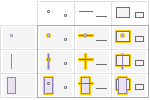 The left geometry intersects the top geometry. |
| Overlaps | Returns true if one geometry overlaps another geometry. NOTE: Only valid for geometries of the same type or dimension. | 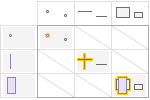 The left geometry overlaps the top geometry. |
| Touches | Returns true if one geometry touches another geometry. | 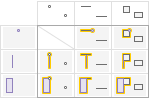 The left geometry touches the top geometry. |
| Within | Returns true if one geometry is fully within another geometry. | 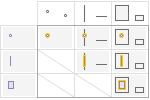 The left geometry is within the top geometry. |
| Relate | Returns true if input geometries satisfy the specified DE-9IM spatial relation. You can provide any combination of the supported DE-9IM operations. | 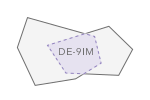 |
Geometric calculation
Geometric calculation operations evaluate one or more geometries
| Operation | Description | Example |
|---|---|---|
| Buffer | Returns a polygon that surrounds a geometry at a specified distance. | 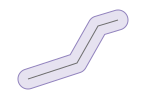 |
| Clip | Returns a geometry where a target geometry and envelope intersect. | 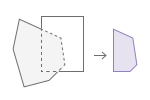 |
| Convex Hull | Returns a polygon with the shortest perimeter that encloses one or more geometries. | 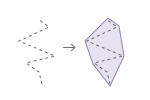 |
| Cut | Returns geometries where an input polyline crosses an existing geometry. | 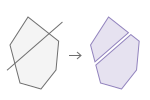 |
| Densify | Returns a geometry that has intermediate points at a specified distance between existing vertices. | 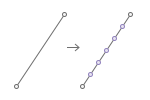 |
| Difference | Returns one or more geometries that are the result of the set theoretic difference between one geometry and another geometry. | 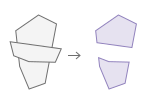 |
| Extent | Returns a rectangle geometry that encompasses the coordinates of an input geometry. | 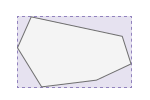 |
| Generalize | Returns a geometry where the vertices that contribute least to the shape of the input polygon or polyline are removed, while preserving the overall characteristics of the shape. The number of vertices removed depends on the specified maximum deviation distance (tolerance) allowed between the original and generalized geometry. | 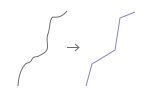 |
| Intersect | Returns a geometry representing the set theoretic intersection of the input geometries. | 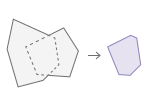 |
| Nearest Coordinate | Returns the coordinate of a geometry that is closest to a specified point. | 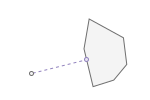 |
| Nearest Vertex | Returns the vertex of a geometry that is closest to a specified point. | 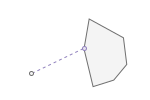 |
| Offset | Returns a geometry that is a constant distance from an input polyline or polygon. | 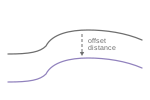 |
| Reshape | Returns a geometry that takes the shape of the reshaper input where the reshaper geometry intersects the input geometry. | 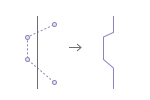 |
| Simplify | Returns a geometry that is topologically correct. Depending on your API, can apply either Esri or OGC simplification. | 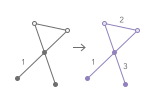 |
| Union | Returns a geometry representing the set theoretic union of the input geometries. | 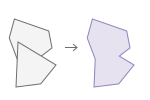 |
Length and area
Length and area measures calculate the length, distance, and area of one or more geometries
| Operation | Description | Example |
|---|---|---|
| Area | Returns the planar | 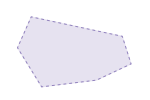 |
| Distance | Returns the planar | 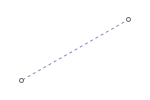 |
| Length | Returns the planar | 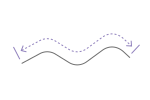 |
Projection
A project operation projects one or more input geometries
| Operation | Description | Example |
|---|---|---|
| Project | Returns a projected geometry in the specified spatial reference. | 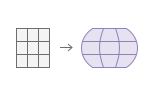 |