Learn how to execute a SQL query to return features
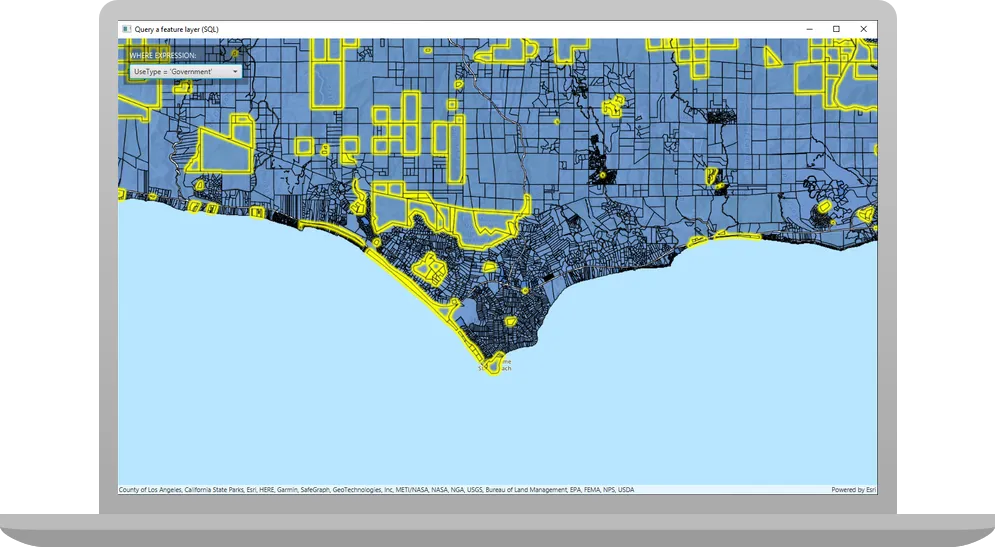
A feature layer
In this tutorial, you’ll write code to perform SQL queries that return a subset of features
Prerequisites
Before starting this tutorial:
-
You need an ArcGIS Location Platform or ArcGIS Online account.
-
Confirm that your system meets the minimum system requirements.
-
An IDE for Java.
Steps
Open a Java project with Gradle
-
To start this tutorial, complete the Display a map tutorial, or download and unzip the Display a map solution into a new folder.
-
Open the build.gradle file as a project in IntelliJ IDEA.
-
If you downloaded the solution, get an access token and set the API key.
An API key
An API key is a long-lived access token created using API key credentials. They are valid for up to one year and are typically embedded directly into client applications. gives your app access to secure resourcesA secure resource is any item or service in an ArcGIS that requires an ArcGIS account and authentication to access. Examples include ArcGIS Location Services, and items and data services in an ArcGIS portal. used in this tutorial.-
Go to the Create an API key tutorial to obtain a new API key access token
An access token is an authorization string that provides access to secure ArcGIS content, data, and services. Its capabilities are determined by the privileges it supports. It is obtained by implementing API key authentication, User authentication, or App authentication. using your ArcGIS Location PlatformAn ArcGIS Location Platform account, formerly known as an ArcGIS Developer account, is an identity associated with an ArcGIS Location Platform subscription. or ArcGIS OnlineAn ArcGIS Online account, also known as an ArcGIS Organization account, is an identity associated with an ArcGIS Online subscription. It can be used to access ArcGIS tools and develop applications with ArcGIS location services for an organization. account. Ensure that the following privilegePrivileges are a set of permissions assigned to ArcGIS accounts, developer credentials, and applications that grant access to secure resources and functionality in ArcGIS. is enabled: Location services > Basemaps > Basemap styles service. Copy the access token as it will be used in the next step. -
In IntelliJ IDEA’s Project tool window, open src/main/java/com.example.app and double-click App.
-
In the
start()method, set the API key property on theArcGISRuntimeEnvironmentwith your access tokenAn access token is an authorization string that provides access to secure ArcGIS content, data, and services. Its capabilities are determined by the privileges it supports. It is obtained by implementing API key authentication, User authentication, or App authentication. . Replace YOUR_ACCESS_TOKEN with your copied access token. Be sure to surround your access token with double quotes as it is a string.App.javaArcGISRuntimeEnvironment.setApiKey("YOUR_ACCESS_TOKEN");
-
Rename the app and modify the initial viewpoint
Modify the Display a map tutorial’s App.java file for use in this tutorial by changing the app title and modifying the viewpoint.
-
In the
start()life-cycle method, change the title that will appear on the application window toQuery a feature layer (SQL).App.java60 collapsed lines// Copyright 2022 Esri// Licensed under the Apache License, Version 2.0 (the "License");// you may not use this file except in compliance with the License.// You may obtain a copy of the License at//// http://www.apache.org/licenses/LICENSE-2.0//// Unless required by applicable law or agreed to in writing, software// distributed under the License is distributed on an "AS IS" BASIS,// WITHOUT WARRANTIES OR CONDITIONS OF ANY KIND, either express or implied.// See the License for the specific language governing permissions and// limitations under the License.package com.example.app;import javafx.application.Application;import javafx.collections.FXCollections;import javafx.collections.ObservableList;import javafx.geometry.Insets;import javafx.geometry.Pos;import javafx.scene.Scene;import javafx.scene.control.Alert;import javafx.scene.control.ComboBox;import javafx.scene.control.SingleSelectionModel;import javafx.scene.layout.Background;import javafx.scene.layout.BackgroundFill;import javafx.scene.layout.CornerRadii;import javafx.scene.layout.StackPane;import javafx.scene.layout.VBox;import javafx.stage.Stage;import javafx.scene.paint.Paint;import javafx.scene.paint.Color;import javafx.scene.control.Label;import com.esri.arcgisruntime.ArcGISRuntimeEnvironment;import com.esri.arcgisruntime.concurrent.ListenableFuture;import com.esri.arcgisruntime.data.Feature;import com.esri.arcgisruntime.data.FeatureQueryResult;import com.esri.arcgisruntime.data.FeatureTable;import com.esri.arcgisruntime.data.QueryParameters;import com.esri.arcgisruntime.data.ServiceFeatureTable;import com.esri.arcgisruntime.geometry.Envelope;import com.esri.arcgisruntime.layers.FeatureLayer;import com.esri.arcgisruntime.layers.Layer;import com.esri.arcgisruntime.loadable.LoadStatus;import com.esri.arcgisruntime.mapping.ArcGISMap;import com.esri.arcgisruntime.mapping.BasemapStyle;import com.esri.arcgisruntime.mapping.Viewpoint;import com.esri.arcgisruntime.mapping.view.MapView;public class App extends Application {private ComboBox<String> parcelsComboBox;private MapView mapView;public static void main(String[] args) {Application.launch(args);}@Overridepublic void start(Stage stage) {// set the title and size of the stage and show itstage.setTitle("Query a feature layer (SQL)");stage.setWidth(800);stage.setHeight(700);stage.show();28 collapsed lines// create a JavaFX scene with a stack pane as the root node, and set it on the stageStackPane stackPane = new StackPane();Scene scene = new Scene(stackPane);stage.setScene(scene);ArcGISRuntimeEnvironment.setApiKey("YOUR_ACCESS_TOKEN");// create a map view to display the map, and add it to the stack panemapView = new MapView();stackPane.getChildren().add(mapView);ArcGISMap map = new ArcGISMap(BasemapStyle.ARCGIS_TOPOGRAPHIC);mapView.setMap(map);mapView.setViewpoint(new Viewpoint(34.02700, -118.80543, 72000));}// stops and releases all resources used in application@Overridepublic void stop() {if (mapView != null) {mapView.dispose();}}} -
Modify the
Viewpointconstructor call so it passes ascaleparameter of 72000, which is more appropriate to this tutorial.App.java81 collapsed lines// Copyright 2022 Esri// Licensed under the Apache License, Version 2.0 (the "License");// you may not use this file except in compliance with the License.// You may obtain a copy of the License at//// http://www.apache.org/licenses/LICENSE-2.0//// Unless required by applicable law or agreed to in writing, software// distributed under the License is distributed on an "AS IS" BASIS,// WITHOUT WARRANTIES OR CONDITIONS OF ANY KIND, either express or implied.// See the License for the specific language governing permissions and// limitations under the License.package com.example.app;import javafx.application.Application;import javafx.collections.FXCollections;import javafx.collections.ObservableList;import javafx.geometry.Insets;import javafx.geometry.Pos;import javafx.scene.Scene;import javafx.scene.control.Alert;import javafx.scene.control.ComboBox;import javafx.scene.control.SingleSelectionModel;import javafx.scene.layout.Background;import javafx.scene.layout.BackgroundFill;import javafx.scene.layout.CornerRadii;import javafx.scene.layout.StackPane;import javafx.scene.layout.VBox;import javafx.stage.Stage;import javafx.scene.paint.Paint;import javafx.scene.paint.Color;import javafx.scene.control.Label;import com.esri.arcgisruntime.ArcGISRuntimeEnvironment;import com.esri.arcgisruntime.concurrent.ListenableFuture;import com.esri.arcgisruntime.data.Feature;import com.esri.arcgisruntime.data.FeatureQueryResult;import com.esri.arcgisruntime.data.FeatureTable;import com.esri.arcgisruntime.data.QueryParameters;import com.esri.arcgisruntime.data.ServiceFeatureTable;import com.esri.arcgisruntime.geometry.Envelope;import com.esri.arcgisruntime.layers.FeatureLayer;import com.esri.arcgisruntime.layers.Layer;import com.esri.arcgisruntime.loadable.LoadStatus;import com.esri.arcgisruntime.mapping.ArcGISMap;import com.esri.arcgisruntime.mapping.BasemapStyle;import com.esri.arcgisruntime.mapping.Viewpoint;import com.esri.arcgisruntime.mapping.view.MapView;public class App extends Application {private ComboBox<String> parcelsComboBox;private MapView mapView;public static void main(String[] args) {Application.launch(args);}@Overridepublic void start(Stage stage) {// set the title and size of the stage and show itstage.setTitle("Query a feature layer (SQL)");stage.setWidth(800);stage.setHeight(700);stage.show();// create a JavaFX scene with a stack pane as the root node, and set it on the stageStackPane stackPane = new StackPane();Scene scene = new Scene(stackPane);stage.setScene(scene);ArcGISRuntimeEnvironment.setApiKey("YOUR_ACCESS_TOKEN");// create a map view to display the map, and add it to the stack panemapView = new MapView();stackPane.getChildren().add(mapView);ArcGISMap map = new ArcGISMap(BasemapStyle.ARCGIS_TOPOGRAPHIC);mapView.setMap(map);mapView.setViewpoint(new Viewpoint(34.02700, -118.80543, 72000));12 collapsed lines}// stops and releases all resources used in application@Overridepublic void stop() {if (mapView != null) {mapView.dispose();}}}
Add import statements
You will import the types needed in this tutorial.
-
In IntelliJ IDEA’s’Project tool window, open src/main/java/com.example.app and double-click App. Add the following imports, replacing those from the
Display a maptutorial.App.javapackage com.example.app;import javafx.application.Application;import javafx.collections.FXCollections;import javafx.collections.ObservableList;import javafx.geometry.Insets;import javafx.geometry.Pos;import javafx.scene.Scene;import javafx.scene.control.Alert;import javafx.scene.control.ComboBox;import javafx.scene.control.SingleSelectionModel;import javafx.scene.layout.Background;import javafx.scene.layout.BackgroundFill;import javafx.scene.layout.CornerRadii;import javafx.scene.layout.StackPane;import javafx.scene.layout.VBox;import javafx.stage.Stage;import javafx.scene.paint.Paint;import javafx.scene.paint.Color;import javafx.scene.control.Label;import com.esri.arcgisruntime.ArcGISRuntimeEnvironment;import com.esri.arcgisruntime.concurrent.ListenableFuture;import com.esri.arcgisruntime.data.Feature;import com.esri.arcgisruntime.data.FeatureQueryResult;import com.esri.arcgisruntime.data.FeatureTable;import com.esri.arcgisruntime.data.QueryParameters;import com.esri.arcgisruntime.data.ServiceFeatureTable;import com.esri.arcgisruntime.geometry.Envelope;import com.esri.arcgisruntime.layers.FeatureLayer;import com.esri.arcgisruntime.layers.Layer;import com.esri.arcgisruntime.loadable.LoadStatus;import com.esri.arcgisruntime.mapping.ArcGISMap;import com.esri.arcgisruntime.mapping.BasemapStyle;import com.esri.arcgisruntime.mapping.Viewpoint;import com.esri.arcgisruntime.mapping.view.MapView;public class App extends Application {
Add UI for selecting a predefined query expression
To make performing a query on a feature layer more flexible, add a JavaFX ComboBox control that presents a list of predefined attribute queries for the parcels dataset.
-
Create a private field named
parcelsComboBoxin theAppclass.App.javapublic class App extends Application {private ComboBox<String> parcelsComboBox;private MapView mapView; -
Create a
setupUI()method, and define the label for the combo box and the strings (as anObservableList<String>) that the combo box will present to the user. These strings are the SQL expressions for querying the feature layer. Then create the combo box, set its width, and set the default value to index 0, whose value is “Select an expression”.App.java96 collapsed lines// Copyright 2022 Esri// Licensed under the Apache License, Version 2.0 (the "License");// you may not use this file except in compliance with the License.// You may obtain a copy of the License at//// http://www.apache.org/licenses/LICENSE-2.0//// Unless required by applicable law or agreed to in writing, software// distributed under the License is distributed on an "AS IS" BASIS,// WITHOUT WARRANTIES OR CONDITIONS OF ANY KIND, either express or implied.// See the License for the specific language governing permissions and// limitations under the License.package com.example.app;import javafx.application.Application;import javafx.collections.FXCollections;import javafx.collections.ObservableList;import javafx.geometry.Insets;import javafx.geometry.Pos;import javafx.scene.Scene;import javafx.scene.control.Alert;import javafx.scene.control.ComboBox;import javafx.scene.control.SingleSelectionModel;import javafx.scene.layout.Background;import javafx.scene.layout.BackgroundFill;import javafx.scene.layout.CornerRadii;import javafx.scene.layout.StackPane;import javafx.scene.layout.VBox;import javafx.stage.Stage;import javafx.scene.paint.Paint;import javafx.scene.paint.Color;import javafx.scene.control.Label;import com.esri.arcgisruntime.ArcGISRuntimeEnvironment;import com.esri.arcgisruntime.concurrent.ListenableFuture;import com.esri.arcgisruntime.data.Feature;import com.esri.arcgisruntime.data.FeatureQueryResult;import com.esri.arcgisruntime.data.FeatureTable;import com.esri.arcgisruntime.data.QueryParameters;import com.esri.arcgisruntime.data.ServiceFeatureTable;import com.esri.arcgisruntime.geometry.Envelope;import com.esri.arcgisruntime.layers.FeatureLayer;import com.esri.arcgisruntime.layers.Layer;import com.esri.arcgisruntime.loadable.LoadStatus;import com.esri.arcgisruntime.mapping.ArcGISMap;import com.esri.arcgisruntime.mapping.BasemapStyle;import com.esri.arcgisruntime.mapping.Viewpoint;import com.esri.arcgisruntime.mapping.view.MapView;public class App extends Application {private ComboBox<String> parcelsComboBox;private MapView mapView;public static void main(String[] args) {Application.launch(args);}@Overridepublic void start(Stage stage) {// set the title and size of the stage and show itstage.setTitle("Query a feature layer (SQL)");stage.setWidth(800);stage.setHeight(700);stage.show();// create a JavaFX scene with a stack pane as the root node, and set it on the stageStackPane stackPane = new StackPane();Scene scene = new Scene(stackPane);stage.setScene(scene);ArcGISRuntimeEnvironment.setApiKey("YOUR_ACCESS_TOKEN");// create a map view to display the map, and add it to the stack panemapView = new MapView();stackPane.getChildren().add(mapView);ArcGISMap map = new ArcGISMap(BasemapStyle.ARCGIS_TOPOGRAPHIC);mapView.setMap(map);mapView.setViewpoint(new Viewpoint(34.02700, -118.80543, 72000));}// stops and releases all resources used in application@Overridepublic void stop() {if (mapView != null) {mapView.dispose();}}// Creates a UI with a combo box.private void setupUI(StackPane stackPane) {// create a labelLabel parcelsComboBoxLabel = new Label("WHERE EXPRESSION: ");parcelsComboBoxLabel.setTextFill(Color.WHITE);// create the list of expressions for the combo box and then create the combo boxObservableList<String> parcelsComboBoxList = FXCollections.observableArrayList("Select an expression","UseType = 'Government'", "UseType = 'Residential'", "UseType = 'Irrigated Farm'", "TaxRateArea = 10853","TaxRateArea = 10860", "Roll_LandValue > 1000000", "Roll_LandValue < 1000000");parcelsComboBox = new ComboBox<>(parcelsComboBoxList);parcelsComboBox.setMaxWidth(Double.MAX_VALUE);// set the default combo box valueparcelsComboBox.getSelectionModel().select(0);}2 collapsed lines} -
Configure the
VBoxthat will contain the label and the combo box.App.java113 collapsed lines// Copyright 2022 Esri// Licensed under the Apache License, Version 2.0 (the "License");// you may not use this file except in compliance with the License.// You may obtain a copy of the License at//// http://www.apache.org/licenses/LICENSE-2.0//// Unless required by applicable law or agreed to in writing, software// distributed under the License is distributed on an "AS IS" BASIS,// WITHOUT WARRANTIES OR CONDITIONS OF ANY KIND, either express or implied.// See the License for the specific language governing permissions and// limitations under the License.package com.example.app;import javafx.application.Application;import javafx.collections.FXCollections;import javafx.collections.ObservableList;import javafx.geometry.Insets;import javafx.geometry.Pos;import javafx.scene.Scene;import javafx.scene.control.Alert;import javafx.scene.control.ComboBox;import javafx.scene.control.SingleSelectionModel;import javafx.scene.layout.Background;import javafx.scene.layout.BackgroundFill;import javafx.scene.layout.CornerRadii;import javafx.scene.layout.StackPane;import javafx.scene.layout.VBox;import javafx.stage.Stage;import javafx.scene.paint.Paint;import javafx.scene.paint.Color;import javafx.scene.control.Label;import com.esri.arcgisruntime.ArcGISRuntimeEnvironment;import com.esri.arcgisruntime.concurrent.ListenableFuture;import com.esri.arcgisruntime.data.Feature;import com.esri.arcgisruntime.data.FeatureQueryResult;import com.esri.arcgisruntime.data.FeatureTable;import com.esri.arcgisruntime.data.QueryParameters;import com.esri.arcgisruntime.data.ServiceFeatureTable;import com.esri.arcgisruntime.geometry.Envelope;import com.esri.arcgisruntime.layers.FeatureLayer;import com.esri.arcgisruntime.layers.Layer;import com.esri.arcgisruntime.loadable.LoadStatus;import com.esri.arcgisruntime.mapping.ArcGISMap;import com.esri.arcgisruntime.mapping.BasemapStyle;import com.esri.arcgisruntime.mapping.Viewpoint;import com.esri.arcgisruntime.mapping.view.MapView;public class App extends Application {private ComboBox<String> parcelsComboBox;private MapView mapView;public static void main(String[] args) {Application.launch(args);}@Overridepublic void start(Stage stage) {// set the title and size of the stage and show itstage.setTitle("Query a feature layer (SQL)");stage.setWidth(800);stage.setHeight(700);stage.show();// create a JavaFX scene with a stack pane as the root node, and set it on the stageStackPane stackPane = new StackPane();Scene scene = new Scene(stackPane);stage.setScene(scene);ArcGISRuntimeEnvironment.setApiKey("YOUR_ACCESS_TOKEN");// create a map view to display the map, and add it to the stack panemapView = new MapView();stackPane.getChildren().add(mapView);ArcGISMap map = new ArcGISMap(BasemapStyle.ARCGIS_TOPOGRAPHIC);mapView.setMap(map);mapView.setViewpoint(new Viewpoint(34.02700, -118.80543, 72000));}// stops and releases all resources used in application@Overridepublic void stop() {if (mapView != null) {mapView.dispose();}}// Creates a UI with a combo box.private void setupUI(StackPane stackPane) {// create a labelLabel parcelsComboBoxLabel = new Label("WHERE EXPRESSION: ");parcelsComboBoxLabel.setTextFill(Color.WHITE);// create the list of expressions for the combo box and then create the combo boxObservableList<String> parcelsComboBoxList = FXCollections.observableArrayList("Select an expression","UseType = 'Government'", "UseType = 'Residential'", "UseType = 'Irrigated Farm'", "TaxRateArea = 10853","TaxRateArea = 10860", "Roll_LandValue > 1000000", "Roll_LandValue < 1000000");parcelsComboBox = new ComboBox<>(parcelsComboBoxList);parcelsComboBox.setMaxWidth(Double.MAX_VALUE);// set the default combo box valueparcelsComboBox.getSelectionModel().select(0);// set up the control panel UIVBox controlsVBox = new VBox(6);controlsVBox.setBackground(new Background(new BackgroundFill(Paint.valueOf("rgba(0, 0, 0, 0.3)"),CornerRadii.EMPTY, Insets.EMPTY)));controlsVBox.setPadding(new Insets(10.0));controlsVBox.setMaxSize(210, 50);controlsVBox.setVisible(true);4 collapsed lines}} -
Add the label and the combo box to the
VBoxnamedcontrolsVBox. Then addcontrolsVBoxto the stack pane.App.java121 collapsed lines// Copyright 2022 Esri// Licensed under the Apache License, Version 2.0 (the "License");// you may not use this file except in compliance with the License.// You may obtain a copy of the License at//// http://www.apache.org/licenses/LICENSE-2.0//// Unless required by applicable law or agreed to in writing, software// distributed under the License is distributed on an "AS IS" BASIS,// WITHOUT WARRANTIES OR CONDITIONS OF ANY KIND, either express or implied.// See the License for the specific language governing permissions and// limitations under the License.package com.example.app;import javafx.application.Application;import javafx.collections.FXCollections;import javafx.collections.ObservableList;import javafx.geometry.Insets;import javafx.geometry.Pos;import javafx.scene.Scene;import javafx.scene.control.Alert;import javafx.scene.control.ComboBox;import javafx.scene.control.SingleSelectionModel;import javafx.scene.layout.Background;import javafx.scene.layout.BackgroundFill;import javafx.scene.layout.CornerRadii;import javafx.scene.layout.StackPane;import javafx.scene.layout.VBox;import javafx.stage.Stage;import javafx.scene.paint.Paint;import javafx.scene.paint.Color;import javafx.scene.control.Label;import com.esri.arcgisruntime.ArcGISRuntimeEnvironment;import com.esri.arcgisruntime.concurrent.ListenableFuture;import com.esri.arcgisruntime.data.Feature;import com.esri.arcgisruntime.data.FeatureQueryResult;import com.esri.arcgisruntime.data.FeatureTable;import com.esri.arcgisruntime.data.QueryParameters;import com.esri.arcgisruntime.data.ServiceFeatureTable;import com.esri.arcgisruntime.geometry.Envelope;import com.esri.arcgisruntime.layers.FeatureLayer;import com.esri.arcgisruntime.layers.Layer;import com.esri.arcgisruntime.loadable.LoadStatus;import com.esri.arcgisruntime.mapping.ArcGISMap;import com.esri.arcgisruntime.mapping.BasemapStyle;import com.esri.arcgisruntime.mapping.Viewpoint;import com.esri.arcgisruntime.mapping.view.MapView;public class App extends Application {private ComboBox<String> parcelsComboBox;private MapView mapView;public static void main(String[] args) {Application.launch(args);}@Overridepublic void start(Stage stage) {// set the title and size of the stage and show itstage.setTitle("Query a feature layer (SQL)");stage.setWidth(800);stage.setHeight(700);stage.show();// create a JavaFX scene with a stack pane as the root node, and set it on the stageStackPane stackPane = new StackPane();Scene scene = new Scene(stackPane);stage.setScene(scene);ArcGISRuntimeEnvironment.setApiKey("YOUR_ACCESS_TOKEN");// create a map view to display the map, and add it to the stack panemapView = new MapView();stackPane.getChildren().add(mapView);ArcGISMap map = new ArcGISMap(BasemapStyle.ARCGIS_TOPOGRAPHIC);mapView.setMap(map);mapView.setViewpoint(new Viewpoint(34.02700, -118.80543, 72000));}// stops and releases all resources used in application@Overridepublic void stop() {if (mapView != null) {mapView.dispose();}}// Creates a UI with a combo box.private void setupUI(StackPane stackPane) {// create a labelLabel parcelsComboBoxLabel = new Label("WHERE EXPRESSION: ");parcelsComboBoxLabel.setTextFill(Color.WHITE);// create the list of expressions for the combo box and then create the combo boxObservableList<String> parcelsComboBoxList = FXCollections.observableArrayList("Select an expression","UseType = 'Government'", "UseType = 'Residential'", "UseType = 'Irrigated Farm'", "TaxRateArea = 10853","TaxRateArea = 10860", "Roll_LandValue > 1000000", "Roll_LandValue < 1000000");parcelsComboBox = new ComboBox<>(parcelsComboBoxList);parcelsComboBox.setMaxWidth(Double.MAX_VALUE);// set the default combo box valueparcelsComboBox.getSelectionModel().select(0);// set up the control panel UIVBox controlsVBox = new VBox(6);controlsVBox.setBackground(new Background(new BackgroundFill(Paint.valueOf("rgba(0, 0, 0, 0.3)"),CornerRadii.EMPTY, Insets.EMPTY)));controlsVBox.setPadding(new Insets(10.0));controlsVBox.setMaxSize(210, 50);controlsVBox.setVisible(true);// add the label and combo box to the control boxcontrolsVBox.getChildren().addAll(parcelsComboBoxLabel, parcelsComboBox);// add the control box to the stack pane and set its alignment and marginsstackPane.getChildren().add(controlsVBox);StackPane.setAlignment(controlsVBox, Pos.TOP_LEFT);StackPane.setMargin(controlsVBox, new Insets(10,0,0,10));4 collapsed lines}} -
In the
start()life-cycle function, call thesetupUI()function you just created.App.java81 collapsed lines// Copyright 2022 Esri// Licensed under the Apache License, Version 2.0 (the "License");// you may not use this file except in compliance with the License.// You may obtain a copy of the License at//// http://www.apache.org/licenses/LICENSE-2.0//// Unless required by applicable law or agreed to in writing, software// distributed under the License is distributed on an "AS IS" BASIS,// WITHOUT WARRANTIES OR CONDITIONS OF ANY KIND, either express or implied.// See the License for the specific language governing permissions and// limitations under the License.package com.example.app;import javafx.application.Application;import javafx.collections.FXCollections;import javafx.collections.ObservableList;import javafx.geometry.Insets;import javafx.geometry.Pos;import javafx.scene.Scene;import javafx.scene.control.Alert;import javafx.scene.control.ComboBox;import javafx.scene.control.SingleSelectionModel;import javafx.scene.layout.Background;import javafx.scene.layout.BackgroundFill;import javafx.scene.layout.CornerRadii;import javafx.scene.layout.StackPane;import javafx.scene.layout.VBox;import javafx.stage.Stage;import javafx.scene.paint.Paint;import javafx.scene.paint.Color;import javafx.scene.control.Label;import com.esri.arcgisruntime.ArcGISRuntimeEnvironment;import com.esri.arcgisruntime.concurrent.ListenableFuture;import com.esri.arcgisruntime.data.Feature;import com.esri.arcgisruntime.data.FeatureQueryResult;import com.esri.arcgisruntime.data.FeatureTable;import com.esri.arcgisruntime.data.QueryParameters;import com.esri.arcgisruntime.data.ServiceFeatureTable;import com.esri.arcgisruntime.geometry.Envelope;import com.esri.arcgisruntime.layers.FeatureLayer;import com.esri.arcgisruntime.layers.Layer;import com.esri.arcgisruntime.loadable.LoadStatus;import com.esri.arcgisruntime.mapping.ArcGISMap;import com.esri.arcgisruntime.mapping.BasemapStyle;import com.esri.arcgisruntime.mapping.Viewpoint;import com.esri.arcgisruntime.mapping.view.MapView;public class App extends Application {private ComboBox<String> parcelsComboBox;private MapView mapView;public static void main(String[] args) {Application.launch(args);}@Overridepublic void start(Stage stage) {// set the title and size of the stage and show itstage.setTitle("Query a feature layer (SQL)");stage.setWidth(800);stage.setHeight(700);stage.show();// create a JavaFX scene with a stack pane as the root node, and set it on the stageStackPane stackPane = new StackPane();Scene scene = new Scene(stackPane);stage.setScene(scene);ArcGISRuntimeEnvironment.setApiKey("YOUR_ACCESS_TOKEN");// create a map view to display the map, and add it to the stack panemapView = new MapView();stackPane.getChildren().add(mapView);ArcGISMap map = new ArcGISMap(BasemapStyle.ARCGIS_TOPOGRAPHIC);mapView.setMap(map);mapView.setViewpoint(new Viewpoint(34.02700, -118.80543, 72000));// create a parcels combo box and label, and add to vertical controls boxsetupUI(stackPane);46 collapsed lines}// stops and releases all resources used in application@Overridepublic void stop() {if (mapView != null) {mapView.dispose();}}// Creates a UI with a combo box.private void setupUI(StackPane stackPane) {// create a labelLabel parcelsComboBoxLabel = new Label("WHERE EXPRESSION: ");parcelsComboBoxLabel.setTextFill(Color.WHITE);// create the list of expressions for the combo box and then create the combo boxObservableList<String> parcelsComboBoxList = FXCollections.observableArrayList("Select an expression","UseType = 'Government'", "UseType = 'Residential'", "UseType = 'Irrigated Farm'", "TaxRateArea = 10853","TaxRateArea = 10860", "Roll_LandValue > 1000000", "Roll_LandValue < 1000000");parcelsComboBox = new ComboBox<>(parcelsComboBoxList);parcelsComboBox.setMaxWidth(Double.MAX_VALUE);// set the default combo box valueparcelsComboBox.getSelectionModel().select(0);// set up the control panel UIVBox controlsVBox = new VBox(6);controlsVBox.setBackground(new Background(new BackgroundFill(Paint.valueOf("rgba(0, 0, 0, 0.3)"),CornerRadii.EMPTY, Insets.EMPTY)));controlsVBox.setPadding(new Insets(10.0));controlsVBox.setMaxSize(210, 50);controlsVBox.setVisible(true);// add the label and combo box to the control boxcontrolsVBox.getChildren().addAll(parcelsComboBoxLabel, parcelsComboBox);// add the control box to the stack pane and set its alignment and marginsstackPane.getChildren().add(controlsVBox);StackPane.setAlignment(controlsVBox, Pos.TOP_LEFT);StackPane.setMargin(controlsVBox, new Insets(10,0,0,10));}}
Add code to execute the selected query for the current map extent
In this step, create a new function that queries a FeatureLayer (identified using its ID) using both attribute and spatial criteria. After clearing any currently selected features, a new query will be executed to find features in the map’s current extent that meet the selected attribute expression. The features in the FeatureQueryResult will be selected in the parcels layer.
The method takes three arguments: the ID for the layer to query (string), a SQL expression that defines attribute criteria (string), and the area of the MapView currently being viewed (Envelope).
-
Create a
queryFeatureLayer()method that takes three parameters. Access the map’s operational layers, and useLayer.getId()to retrieve the feature layer you wish to query. Then get the layer’s feature table.App.java134 collapsed lines// Copyright 2022 Esri// Licensed under the Apache License, Version 2.0 (the "License");// you may not use this file except in compliance with the License.// You may obtain a copy of the License at//// http://www.apache.org/licenses/LICENSE-2.0//// Unless required by applicable law or agreed to in writing, software// distributed under the License is distributed on an "AS IS" BASIS,// WITHOUT WARRANTIES OR CONDITIONS OF ANY KIND, either express or implied.// See the License for the specific language governing permissions and// limitations under the License.package com.example.app;import javafx.application.Application;import javafx.collections.FXCollections;import javafx.collections.ObservableList;import javafx.geometry.Insets;import javafx.geometry.Pos;import javafx.scene.Scene;import javafx.scene.control.Alert;import javafx.scene.control.ComboBox;import javafx.scene.control.SingleSelectionModel;import javafx.scene.layout.Background;import javafx.scene.layout.BackgroundFill;import javafx.scene.layout.CornerRadii;import javafx.scene.layout.StackPane;import javafx.scene.layout.VBox;import javafx.stage.Stage;import javafx.scene.paint.Paint;import javafx.scene.paint.Color;import javafx.scene.control.Label;import com.esri.arcgisruntime.ArcGISRuntimeEnvironment;import com.esri.arcgisruntime.concurrent.ListenableFuture;import com.esri.arcgisruntime.data.Feature;import com.esri.arcgisruntime.data.FeatureQueryResult;import com.esri.arcgisruntime.data.FeatureTable;import com.esri.arcgisruntime.data.QueryParameters;import com.esri.arcgisruntime.data.ServiceFeatureTable;import com.esri.arcgisruntime.geometry.Envelope;import com.esri.arcgisruntime.layers.FeatureLayer;import com.esri.arcgisruntime.layers.Layer;import com.esri.arcgisruntime.loadable.LoadStatus;import com.esri.arcgisruntime.mapping.ArcGISMap;import com.esri.arcgisruntime.mapping.BasemapStyle;import com.esri.arcgisruntime.mapping.Viewpoint;import com.esri.arcgisruntime.mapping.view.MapView;public class App extends Application {private ComboBox<String> parcelsComboBox;private MapView mapView;public static void main(String[] args) {Application.launch(args);}@Overridepublic void start(Stage stage) {// set the title and size of the stage and show itstage.setTitle("Query a feature layer (SQL)");stage.setWidth(800);stage.setHeight(700);stage.show();// create a JavaFX scene with a stack pane as the root node, and set it on the stageStackPane stackPane = new StackPane();Scene scene = new Scene(stackPane);stage.setScene(scene);ArcGISRuntimeEnvironment.setApiKey("YOUR_ACCESS_TOKEN");// create a map view to display the map, and add it to the stack panemapView = new MapView();stackPane.getChildren().add(mapView);ArcGISMap map = new ArcGISMap(BasemapStyle.ARCGIS_TOPOGRAPHIC);mapView.setMap(map);mapView.setViewpoint(new Viewpoint(34.02700, -118.80543, 72000));// create a parcels combo box and label, and add to vertical controls boxsetupUI(stackPane);}// stops and releases all resources used in application@Overridepublic void stop() {if (mapView != null) {mapView.dispose();}}// Creates a UI with a combo box.private void setupUI(StackPane stackPane) {// create a labelLabel parcelsComboBoxLabel = new Label("WHERE EXPRESSION: ");parcelsComboBoxLabel.setTextFill(Color.WHITE);// create the list of expressions for the combo box and then create the combo boxObservableList<String> parcelsComboBoxList = FXCollections.observableArrayList("Select an expression","UseType = 'Government'", "UseType = 'Residential'", "UseType = 'Irrigated Farm'", "TaxRateArea = 10853","TaxRateArea = 10860", "Roll_LandValue > 1000000", "Roll_LandValue < 1000000");parcelsComboBox = new ComboBox<>(parcelsComboBoxList);parcelsComboBox.setMaxWidth(Double.MAX_VALUE);// set the default combo box valueparcelsComboBox.getSelectionModel().select(0);// set up the control panel UIVBox controlsVBox = new VBox(6);controlsVBox.setBackground(new Background(new BackgroundFill(Paint.valueOf("rgba(0, 0, 0, 0.3)"),CornerRadii.EMPTY, Insets.EMPTY)));controlsVBox.setPadding(new Insets(10.0));controlsVBox.setMaxSize(210, 50);controlsVBox.setVisible(true);// add the label and combo box to the control boxcontrolsVBox.getChildren().addAll(parcelsComboBoxLabel, parcelsComboBox);// add the control box to the stack pane and set its alignment and marginsstackPane.getChildren().add(controlsVBox);StackPane.setAlignment(controlsVBox, Pos.TOP_LEFT);StackPane.setMargin(controlsVBox, new Insets(10,0,0,10));}// Query the feature layer, providing a Where expression and the current extent.// Then select the features returned by the query.private void queryFeatureLayer(String featureLayerId, String whereExpression, Envelope queryExtent) {try {FeatureLayer featureLayerToQuery = null;// get the layer based on its Idfor (Layer layer : mapView.getMap().getOperationalLayers()) {if (layer.getId().equals(featureLayerId)) {featureLayerToQuery = (FeatureLayer) layer;break;}}// check if feature layer retrieved based on layer Idif (featureLayerToQuery == null){String msg = "Specified Id did not match any feature layer in this map";new Alert(Alert.AlertType.ERROR, msg).show();return;}// get the feature table from the feature layerFeatureTable featureTableToQuery = featureLayerToQuery.getFeatureTable();} catch (Exception e) {// on any error, display the stack tracee.printStackTrace();}}2 collapsed lines} -
Clear any previous selections from the feature layer. Then create query parameters, using the
whereExpressionandqueryExtentparameters passed into the function.App.java159 collapsed lines// Copyright 2022 Esri// Licensed under the Apache License, Version 2.0 (the "License");// you may not use this file except in compliance with the License.// You may obtain a copy of the License at//// http://www.apache.org/licenses/LICENSE-2.0//// Unless required by applicable law or agreed to in writing, software// distributed under the License is distributed on an "AS IS" BASIS,// WITHOUT WARRANTIES OR CONDITIONS OF ANY KIND, either express or implied.// See the License for the specific language governing permissions and// limitations under the License.package com.example.app;import javafx.application.Application;import javafx.collections.FXCollections;import javafx.collections.ObservableList;import javafx.geometry.Insets;import javafx.geometry.Pos;import javafx.scene.Scene;import javafx.scene.control.Alert;import javafx.scene.control.ComboBox;import javafx.scene.control.SingleSelectionModel;import javafx.scene.layout.Background;import javafx.scene.layout.BackgroundFill;import javafx.scene.layout.CornerRadii;import javafx.scene.layout.StackPane;import javafx.scene.layout.VBox;import javafx.stage.Stage;import javafx.scene.paint.Paint;import javafx.scene.paint.Color;import javafx.scene.control.Label;import com.esri.arcgisruntime.ArcGISRuntimeEnvironment;import com.esri.arcgisruntime.concurrent.ListenableFuture;import com.esri.arcgisruntime.data.Feature;import com.esri.arcgisruntime.data.FeatureQueryResult;import com.esri.arcgisruntime.data.FeatureTable;import com.esri.arcgisruntime.data.QueryParameters;import com.esri.arcgisruntime.data.ServiceFeatureTable;import com.esri.arcgisruntime.geometry.Envelope;import com.esri.arcgisruntime.layers.FeatureLayer;import com.esri.arcgisruntime.layers.Layer;import com.esri.arcgisruntime.loadable.LoadStatus;import com.esri.arcgisruntime.mapping.ArcGISMap;import com.esri.arcgisruntime.mapping.BasemapStyle;import com.esri.arcgisruntime.mapping.Viewpoint;import com.esri.arcgisruntime.mapping.view.MapView;public class App extends Application {private ComboBox<String> parcelsComboBox;private MapView mapView;public static void main(String[] args) {Application.launch(args);}@Overridepublic void start(Stage stage) {// set the title and size of the stage and show itstage.setTitle("Query a feature layer (SQL)");stage.setWidth(800);stage.setHeight(700);stage.show();// create a JavaFX scene with a stack pane as the root node, and set it on the stageStackPane stackPane = new StackPane();Scene scene = new Scene(stackPane);stage.setScene(scene);ArcGISRuntimeEnvironment.setApiKey("YOUR_ACCESS_TOKEN");// create a map view to display the map, and add it to the stack panemapView = new MapView();stackPane.getChildren().add(mapView);ArcGISMap map = new ArcGISMap(BasemapStyle.ARCGIS_TOPOGRAPHIC);mapView.setMap(map);mapView.setViewpoint(new Viewpoint(34.02700, -118.80543, 72000));// create a parcels combo box and label, and add to vertical controls boxsetupUI(stackPane);}// stops and releases all resources used in application@Overridepublic void stop() {if (mapView != null) {mapView.dispose();}}// Creates a UI with a combo box.private void setupUI(StackPane stackPane) {// create a labelLabel parcelsComboBoxLabel = new Label("WHERE EXPRESSION: ");parcelsComboBoxLabel.setTextFill(Color.WHITE);// create the list of expressions for the combo box and then create the combo boxObservableList<String> parcelsComboBoxList = FXCollections.observableArrayList("Select an expression","UseType = 'Government'", "UseType = 'Residential'", "UseType = 'Irrigated Farm'", "TaxRateArea = 10853","TaxRateArea = 10860", "Roll_LandValue > 1000000", "Roll_LandValue < 1000000");parcelsComboBox = new ComboBox<>(parcelsComboBoxList);parcelsComboBox.setMaxWidth(Double.MAX_VALUE);// set the default combo box valueparcelsComboBox.getSelectionModel().select(0);// set up the control panel UIVBox controlsVBox = new VBox(6);controlsVBox.setBackground(new Background(new BackgroundFill(Paint.valueOf("rgba(0, 0, 0, 0.3)"),CornerRadii.EMPTY, Insets.EMPTY)));controlsVBox.setPadding(new Insets(10.0));controlsVBox.setMaxSize(210, 50);controlsVBox.setVisible(true);// add the label and combo box to the control boxcontrolsVBox.getChildren().addAll(parcelsComboBoxLabel, parcelsComboBox);// add the control box to the stack pane and set its alignment and marginsstackPane.getChildren().add(controlsVBox);StackPane.setAlignment(controlsVBox, Pos.TOP_LEFT);StackPane.setMargin(controlsVBox, new Insets(10,0,0,10));}// Query the feature layer, providing a Where expression and the current extent.// Then select the features returned by the query.private void queryFeatureLayer(String featureLayerId, String whereExpression, Envelope queryExtent) {try {FeatureLayer featureLayerToQuery = null;// get the layer based on its Idfor (Layer layer : mapView.getMap().getOperationalLayers()) {if (layer.getId().equals(featureLayerId)) {featureLayerToQuery = (FeatureLayer) layer;break;}}// check if feature layer retrieved based on layer Idif (featureLayerToQuery == null){String msg = "Specified Id did not match any feature layer in this map";new Alert(Alert.AlertType.ERROR, msg).show();return;}// get the feature table from the feature layerFeatureTable featureTableToQuery = featureLayerToQuery.getFeatureTable();// clear any previous selectionsfeatureLayerToQuery.clearSelection();// create a query for the state that was enteredQueryParameters query = new QueryParameters();query.setWhereClause(whereExpression);query.setReturnGeometry(true);query.setGeometry(queryExtent);9 collapsed lines} catch (Exception e) {// on any error, display the stack tracee.printStackTrace();}}} -
Call
queryFeaturesAsync(), passing in thequeryparameter. The call returns a listenable future that will contain the feature query result. Add a done listener, which will execute when the query is complete. The listener will select features from the feature layer you queried.App.java168 collapsed lines// Copyright 2022 Esri// Licensed under the Apache License, Version 2.0 (the "License");// you may not use this file except in compliance with the License.// You may obtain a copy of the License at//// http://www.apache.org/licenses/LICENSE-2.0//// Unless required by applicable law or agreed to in writing, software// distributed under the License is distributed on an "AS IS" BASIS,// WITHOUT WARRANTIES OR CONDITIONS OF ANY KIND, either express or implied.// See the License for the specific language governing permissions and// limitations under the License.package com.example.app;import javafx.application.Application;import javafx.collections.FXCollections;import javafx.collections.ObservableList;import javafx.geometry.Insets;import javafx.geometry.Pos;import javafx.scene.Scene;import javafx.scene.control.Alert;import javafx.scene.control.ComboBox;import javafx.scene.control.SingleSelectionModel;import javafx.scene.layout.Background;import javafx.scene.layout.BackgroundFill;import javafx.scene.layout.CornerRadii;import javafx.scene.layout.StackPane;import javafx.scene.layout.VBox;import javafx.stage.Stage;import javafx.scene.paint.Paint;import javafx.scene.paint.Color;import javafx.scene.control.Label;import com.esri.arcgisruntime.ArcGISRuntimeEnvironment;import com.esri.arcgisruntime.concurrent.ListenableFuture;import com.esri.arcgisruntime.data.Feature;import com.esri.arcgisruntime.data.FeatureQueryResult;import com.esri.arcgisruntime.data.FeatureTable;import com.esri.arcgisruntime.data.QueryParameters;import com.esri.arcgisruntime.data.ServiceFeatureTable;import com.esri.arcgisruntime.geometry.Envelope;import com.esri.arcgisruntime.layers.FeatureLayer;import com.esri.arcgisruntime.layers.Layer;import com.esri.arcgisruntime.loadable.LoadStatus;import com.esri.arcgisruntime.mapping.ArcGISMap;import com.esri.arcgisruntime.mapping.BasemapStyle;import com.esri.arcgisruntime.mapping.Viewpoint;import com.esri.arcgisruntime.mapping.view.MapView;public class App extends Application {private ComboBox<String> parcelsComboBox;private MapView mapView;public static void main(String[] args) {Application.launch(args);}@Overridepublic void start(Stage stage) {// set the title and size of the stage and show itstage.setTitle("Query a feature layer (SQL)");stage.setWidth(800);stage.setHeight(700);stage.show();// create a JavaFX scene with a stack pane as the root node, and set it on the stageStackPane stackPane = new StackPane();Scene scene = new Scene(stackPane);stage.setScene(scene);ArcGISRuntimeEnvironment.setApiKey("YOUR_ACCESS_TOKEN");// create a map view to display the map, and add it to the stack panemapView = new MapView();stackPane.getChildren().add(mapView);ArcGISMap map = new ArcGISMap(BasemapStyle.ARCGIS_TOPOGRAPHIC);mapView.setMap(map);mapView.setViewpoint(new Viewpoint(34.02700, -118.80543, 72000));// create a parcels combo box and label, and add to vertical controls boxsetupUI(stackPane);}// stops and releases all resources used in application@Overridepublic void stop() {if (mapView != null) {mapView.dispose();}}// Creates a UI with a combo box.private void setupUI(StackPane stackPane) {// create a labelLabel parcelsComboBoxLabel = new Label("WHERE EXPRESSION: ");parcelsComboBoxLabel.setTextFill(Color.WHITE);// create the list of expressions for the combo box and then create the combo boxObservableList<String> parcelsComboBoxList = FXCollections.observableArrayList("Select an expression","UseType = 'Government'", "UseType = 'Residential'", "UseType = 'Irrigated Farm'", "TaxRateArea = 10853","TaxRateArea = 10860", "Roll_LandValue > 1000000", "Roll_LandValue < 1000000");parcelsComboBox = new ComboBox<>(parcelsComboBoxList);parcelsComboBox.setMaxWidth(Double.MAX_VALUE);// set the default combo box valueparcelsComboBox.getSelectionModel().select(0);// set up the control panel UIVBox controlsVBox = new VBox(6);controlsVBox.setBackground(new Background(new BackgroundFill(Paint.valueOf("rgba(0, 0, 0, 0.3)"),CornerRadii.EMPTY, Insets.EMPTY)));controlsVBox.setPadding(new Insets(10.0));controlsVBox.setMaxSize(210, 50);controlsVBox.setVisible(true);// add the label and combo box to the control boxcontrolsVBox.getChildren().addAll(parcelsComboBoxLabel, parcelsComboBox);// add the control box to the stack pane and set its alignment and marginsstackPane.getChildren().add(controlsVBox);StackPane.setAlignment(controlsVBox, Pos.TOP_LEFT);StackPane.setMargin(controlsVBox, new Insets(10,0,0,10));}// Query the feature layer, providing a Where expression and the current extent.// Then select the features returned by the query.private void queryFeatureLayer(String featureLayerId, String whereExpression, Envelope queryExtent) {try {FeatureLayer featureLayerToQuery = null;// get the layer based on its Idfor (Layer layer : mapView.getMap().getOperationalLayers()) {if (layer.getId().equals(featureLayerId)) {featureLayerToQuery = (FeatureLayer) layer;break;}}// check if feature layer retrieved based on layer Idif (featureLayerToQuery == null){String msg = "Specified Id did not match any feature layer in this map";new Alert(Alert.AlertType.ERROR, msg).show();return;}// get the feature table from the feature layerFeatureTable featureTableToQuery = featureLayerToQuery.getFeatureTable();// clear any previous selectionsfeatureLayerToQuery.clearSelection();// create a query for the state that was enteredQueryParameters query = new QueryParameters();query.setWhereClause(whereExpression);query.setReturnGeometry(true);query.setGeometry(queryExtent);// call query featuresListenableFuture<FeatureQueryResult> future = featureTableToQuery.queryFeaturesAsync(query);// create an effectively final variable for access from add done listenerFeatureLayer finalFeatureLayerToQuery = featureLayerToQuery;// add done listener to fire when the query returnsfuture.addDoneListener(() -> {try {// check if there are some resultsFeatureQueryResult featureQueryResult = future.get();if (featureQueryResult.iterator().hasNext()) {for (Feature feature : featureQueryResult) {finalFeatureLayerToQuery.selectFeature(feature);}} else {String msg = "No parcels found in the current extent, using Where expression: " + whereExpression + ".";new Alert(Alert.AlertType.INFORMATION, msg).show();}}catch (Exception e) {String msg = "Feature search failed for: " + whereExpression + ". Error: " + e.getMessage();new Alert(Alert.AlertType.ERROR, msg).show();e.printStackTrace();}});9 collapsed lines} catch (Exception e) {// on any error, display the stack tracee.printStackTrace();}}}
Create the parcels feature layer and add a selection listener to the combo box
Create the LA parcels FeatureLayer from the feature service. Providing a Layer.setId() allows for referencing the parcels layer from the layer collection when needed. Load the layer and define a done loading listener.
In the done loading listener, create a listener that handles changes to the current selection in the combo box. The selection listener gets the current combo box choice and the current extent and then calls queryFeatureLayer() with those parameters.
Then add the parcels feature layer to the map’s collection of data layers (GeoModel.getOperationalLayers()) and finally, define the selection color via the map view’s SelectionProperties to distinguish selected features in the map.
-
Create a method named
createFeatureLayer()and pass in the map. Create a service feature table from a feature service URL. Then useLayer.setId()to set an ID for use when querying the layer.App.java202 collapsed lines// Copyright 2022 Esri// Licensed under the Apache License, Version 2.0 (the "License");// you may not use this file except in compliance with the License.// You may obtain a copy of the License at//// http://www.apache.org/licenses/LICENSE-2.0//// Unless required by applicable law or agreed to in writing, software// distributed under the License is distributed on an "AS IS" BASIS,// WITHOUT WARRANTIES OR CONDITIONS OF ANY KIND, either express or implied.// See the License for the specific language governing permissions and// limitations under the License.package com.example.app;import javafx.application.Application;import javafx.collections.FXCollections;import javafx.collections.ObservableList;import javafx.geometry.Insets;import javafx.geometry.Pos;import javafx.scene.Scene;import javafx.scene.control.Alert;import javafx.scene.control.ComboBox;import javafx.scene.control.SingleSelectionModel;import javafx.scene.layout.Background;import javafx.scene.layout.BackgroundFill;import javafx.scene.layout.CornerRadii;import javafx.scene.layout.StackPane;import javafx.scene.layout.VBox;import javafx.stage.Stage;import javafx.scene.paint.Paint;import javafx.scene.paint.Color;import javafx.scene.control.Label;import com.esri.arcgisruntime.ArcGISRuntimeEnvironment;import com.esri.arcgisruntime.concurrent.ListenableFuture;import com.esri.arcgisruntime.data.Feature;import com.esri.arcgisruntime.data.FeatureQueryResult;import com.esri.arcgisruntime.data.FeatureTable;import com.esri.arcgisruntime.data.QueryParameters;import com.esri.arcgisruntime.data.ServiceFeatureTable;import com.esri.arcgisruntime.geometry.Envelope;import com.esri.arcgisruntime.layers.FeatureLayer;import com.esri.arcgisruntime.layers.Layer;import com.esri.arcgisruntime.loadable.LoadStatus;import com.esri.arcgisruntime.mapping.ArcGISMap;import com.esri.arcgisruntime.mapping.BasemapStyle;import com.esri.arcgisruntime.mapping.Viewpoint;import com.esri.arcgisruntime.mapping.view.MapView;public class App extends Application {private ComboBox<String> parcelsComboBox;private MapView mapView;public static void main(String[] args) {Application.launch(args);}@Overridepublic void start(Stage stage) {// set the title and size of the stage and show itstage.setTitle("Query a feature layer (SQL)");stage.setWidth(800);stage.setHeight(700);stage.show();// create a JavaFX scene with a stack pane as the root node, and set it on the stageStackPane stackPane = new StackPane();Scene scene = new Scene(stackPane);stage.setScene(scene);ArcGISRuntimeEnvironment.setApiKey("YOUR_ACCESS_TOKEN");// create a map view to display the map, and add it to the stack panemapView = new MapView();stackPane.getChildren().add(mapView);ArcGISMap map = new ArcGISMap(BasemapStyle.ARCGIS_TOPOGRAPHIC);mapView.setMap(map);mapView.setViewpoint(new Viewpoint(34.02700, -118.80543, 72000));// create a parcels combo box and label, and add to vertical controls boxsetupUI(stackPane);}// stops and releases all resources used in application@Overridepublic void stop() {if (mapView != null) {mapView.dispose();}}// Creates a UI with a combo box.private void setupUI(StackPane stackPane) {// create a labelLabel parcelsComboBoxLabel = new Label("WHERE EXPRESSION: ");parcelsComboBoxLabel.setTextFill(Color.WHITE);// create the list of expressions for the combo box and then create the combo boxObservableList<String> parcelsComboBoxList = FXCollections.observableArrayList("Select an expression","UseType = 'Government'", "UseType = 'Residential'", "UseType = 'Irrigated Farm'", "TaxRateArea = 10853","TaxRateArea = 10860", "Roll_LandValue > 1000000", "Roll_LandValue < 1000000");parcelsComboBox = new ComboBox<>(parcelsComboBoxList);parcelsComboBox.setMaxWidth(Double.MAX_VALUE);// set the default combo box valueparcelsComboBox.getSelectionModel().select(0);// set up the control panel UIVBox controlsVBox = new VBox(6);controlsVBox.setBackground(new Background(new BackgroundFill(Paint.valueOf("rgba(0, 0, 0, 0.3)"),CornerRadii.EMPTY, Insets.EMPTY)));controlsVBox.setPadding(new Insets(10.0));controlsVBox.setMaxSize(210, 50);controlsVBox.setVisible(true);// add the label and combo box to the control boxcontrolsVBox.getChildren().addAll(parcelsComboBoxLabel, parcelsComboBox);// add the control box to the stack pane and set its alignment and marginsstackPane.getChildren().add(controlsVBox);StackPane.setAlignment(controlsVBox, Pos.TOP_LEFT);StackPane.setMargin(controlsVBox, new Insets(10,0,0,10));}// Query the feature layer, providing a Where expression and the current extent.// Then select the features returned by the query.private void queryFeatureLayer(String featureLayerId, String whereExpression, Envelope queryExtent) {try {FeatureLayer featureLayerToQuery = null;// get the layer based on its Idfor (Layer layer : mapView.getMap().getOperationalLayers()) {if (layer.getId().equals(featureLayerId)) {featureLayerToQuery = (FeatureLayer) layer;break;}}// check if feature layer retrieved based on layer Idif (featureLayerToQuery == null){String msg = "Specified Id did not match any feature layer in this map";new Alert(Alert.AlertType.ERROR, msg).show();return;}// get the feature table from the feature layerFeatureTable featureTableToQuery = featureLayerToQuery.getFeatureTable();// clear any previous selectionsfeatureLayerToQuery.clearSelection();// create a query for the state that was enteredQueryParameters query = new QueryParameters();query.setWhereClause(whereExpression);query.setReturnGeometry(true);query.setGeometry(queryExtent);// call query featuresListenableFuture<FeatureQueryResult> future = featureTableToQuery.queryFeaturesAsync(query);// create an effectively final variable for access from add done listenerFeatureLayer finalFeatureLayerToQuery = featureLayerToQuery;// add done listener to fire when the query returnsfuture.addDoneListener(() -> {try {// check if there are some resultsFeatureQueryResult featureQueryResult = future.get();if (featureQueryResult.iterator().hasNext()) {for (Feature feature : featureQueryResult) {finalFeatureLayerToQuery.selectFeature(feature);}} else {String msg = "No parcels found in the current extent, using Where expression: " + whereExpression + ".";new Alert(Alert.AlertType.INFORMATION, msg).show();}}catch (Exception e) {String msg = "Feature search failed for: " + whereExpression + ". Error: " + e.getMessage();new Alert(Alert.AlertType.ERROR, msg).show();e.printStackTrace();}});} catch (Exception e) {// on any error, display the stack tracee.printStackTrace();}}// Create and load the parcels feature layer from the feature service. When the layer is loaded, query it based on// current extent and current selection in parcelsComboBoxprivate void createFeatureLayer(ArcGISMap map){FeatureTable serviceFeatureTable =new ServiceFeatureTable("https://services3.arcgis.com/GVgbJbqm8hXASVYi/arcgis/rest/services/LA_County_Parcels/FeatureServer/0");FeatureLayer layer = new FeatureLayer(serviceFeatureTable);// give the layer an ID, so we can easily find it laterlayer.setId("Parcels");}2 collapsed lines} -
Load the feature layer and add a done loading listener in which you do the following: get the selection model for the combo box and then the
selectedItemProperty().Then add a different listener that handles changes to the selected item property. (It is the
InvalidationListener, since whenever the selected item property is changed to a new value, the property is considered “invalidated”.) In the property listener, clear any current selection of features, get the current selection in the combo box and the current extent, and finally, callqueryFeatureLayer()with layer ID “Parcels”, the combo box choice, and the extent.App.java214 collapsed lines// Copyright 2022 Esri// Licensed under the Apache License, Version 2.0 (the "License");// you may not use this file except in compliance with the License.// You may obtain a copy of the License at//// http://www.apache.org/licenses/LICENSE-2.0//// Unless required by applicable law or agreed to in writing, software// distributed under the License is distributed on an "AS IS" BASIS,// WITHOUT WARRANTIES OR CONDITIONS OF ANY KIND, either express or implied.// See the License for the specific language governing permissions and// limitations under the License.package com.example.app;import javafx.application.Application;import javafx.collections.FXCollections;import javafx.collections.ObservableList;import javafx.geometry.Insets;import javafx.geometry.Pos;import javafx.scene.Scene;import javafx.scene.control.Alert;import javafx.scene.control.ComboBox;import javafx.scene.control.SingleSelectionModel;import javafx.scene.layout.Background;import javafx.scene.layout.BackgroundFill;import javafx.scene.layout.CornerRadii;import javafx.scene.layout.StackPane;import javafx.scene.layout.VBox;import javafx.stage.Stage;import javafx.scene.paint.Paint;import javafx.scene.paint.Color;import javafx.scene.control.Label;import com.esri.arcgisruntime.ArcGISRuntimeEnvironment;import com.esri.arcgisruntime.concurrent.ListenableFuture;import com.esri.arcgisruntime.data.Feature;import com.esri.arcgisruntime.data.FeatureQueryResult;import com.esri.arcgisruntime.data.FeatureTable;import com.esri.arcgisruntime.data.QueryParameters;import com.esri.arcgisruntime.data.ServiceFeatureTable;import com.esri.arcgisruntime.geometry.Envelope;import com.esri.arcgisruntime.layers.FeatureLayer;import com.esri.arcgisruntime.layers.Layer;import com.esri.arcgisruntime.loadable.LoadStatus;import com.esri.arcgisruntime.mapping.ArcGISMap;import com.esri.arcgisruntime.mapping.BasemapStyle;import com.esri.arcgisruntime.mapping.Viewpoint;import com.esri.arcgisruntime.mapping.view.MapView;public class App extends Application {private ComboBox<String> parcelsComboBox;private MapView mapView;public static void main(String[] args) {Application.launch(args);}@Overridepublic void start(Stage stage) {// set the title and size of the stage and show itstage.setTitle("Query a feature layer (SQL)");stage.setWidth(800);stage.setHeight(700);stage.show();// create a JavaFX scene with a stack pane as the root node, and set it on the stageStackPane stackPane = new StackPane();Scene scene = new Scene(stackPane);stage.setScene(scene);ArcGISRuntimeEnvironment.setApiKey("YOUR_ACCESS_TOKEN");// create a map view to display the map, and add it to the stack panemapView = new MapView();stackPane.getChildren().add(mapView);ArcGISMap map = new ArcGISMap(BasemapStyle.ARCGIS_TOPOGRAPHIC);mapView.setMap(map);mapView.setViewpoint(new Viewpoint(34.02700, -118.80543, 72000));// create a parcels combo box and label, and add to vertical controls boxsetupUI(stackPane);}// stops and releases all resources used in application@Overridepublic void stop() {if (mapView != null) {mapView.dispose();}}// Creates a UI with a combo box.private void setupUI(StackPane stackPane) {// create a labelLabel parcelsComboBoxLabel = new Label("WHERE EXPRESSION: ");parcelsComboBoxLabel.setTextFill(Color.WHITE);// create the list of expressions for the combo box and then create the combo boxObservableList<String> parcelsComboBoxList = FXCollections.observableArrayList("Select an expression","UseType = 'Government'", "UseType = 'Residential'", "UseType = 'Irrigated Farm'", "TaxRateArea = 10853","TaxRateArea = 10860", "Roll_LandValue > 1000000", "Roll_LandValue < 1000000");parcelsComboBox = new ComboBox<>(parcelsComboBoxList);parcelsComboBox.setMaxWidth(Double.MAX_VALUE);// set the default combo box valueparcelsComboBox.getSelectionModel().select(0);// set up the control panel UIVBox controlsVBox = new VBox(6);controlsVBox.setBackground(new Background(new BackgroundFill(Paint.valueOf("rgba(0, 0, 0, 0.3)"),CornerRadii.EMPTY, Insets.EMPTY)));controlsVBox.setPadding(new Insets(10.0));controlsVBox.setMaxSize(210, 50);controlsVBox.setVisible(true);// add the label and combo box to the control boxcontrolsVBox.getChildren().addAll(parcelsComboBoxLabel, parcelsComboBox);// add the control box to the stack pane and set its alignment and marginsstackPane.getChildren().add(controlsVBox);StackPane.setAlignment(controlsVBox, Pos.TOP_LEFT);StackPane.setMargin(controlsVBox, new Insets(10,0,0,10));}// Query the feature layer, providing a Where expression and the current extent.// Then select the features returned by the query.private void queryFeatureLayer(String featureLayerId, String whereExpression, Envelope queryExtent) {try {FeatureLayer featureLayerToQuery = null;// get the layer based on its Idfor (Layer layer : mapView.getMap().getOperationalLayers()) {if (layer.getId().equals(featureLayerId)) {featureLayerToQuery = (FeatureLayer) layer;break;}}// check if feature layer retrieved based on layer Idif (featureLayerToQuery == null){String msg = "Specified Id did not match any feature layer in this map";new Alert(Alert.AlertType.ERROR, msg).show();return;}// get the feature table from the feature layerFeatureTable featureTableToQuery = featureLayerToQuery.getFeatureTable();// clear any previous selectionsfeatureLayerToQuery.clearSelection();// create a query for the state that was enteredQueryParameters query = new QueryParameters();query.setWhereClause(whereExpression);query.setReturnGeometry(true);query.setGeometry(queryExtent);// call query featuresListenableFuture<FeatureQueryResult> future = featureTableToQuery.queryFeaturesAsync(query);// create an effectively final variable for access from add done listenerFeatureLayer finalFeatureLayerToQuery = featureLayerToQuery;// add done listener to fire when the query returnsfuture.addDoneListener(() -> {try {// check if there are some resultsFeatureQueryResult featureQueryResult = future.get();if (featureQueryResult.iterator().hasNext()) {for (Feature feature : featureQueryResult) {finalFeatureLayerToQuery.selectFeature(feature);}} else {String msg = "No parcels found in the current extent, using Where expression: " + whereExpression + ".";new Alert(Alert.AlertType.INFORMATION, msg).show();}}catch (Exception e) {String msg = "Feature search failed for: " + whereExpression + ". Error: " + e.getMessage();new Alert(Alert.AlertType.ERROR, msg).show();e.printStackTrace();}});} catch (Exception e) {// on any error, display the stack tracee.printStackTrace();}}// Create and load the parcels feature layer from the feature service. When the layer is loaded, query it based on// current extent and current selection in parcelsComboBoxprivate void createFeatureLayer(ArcGISMap map){FeatureTable serviceFeatureTable =new ServiceFeatureTable("https://services3.arcgis.com/GVgbJbqm8hXASVYi/arcgis/rest/services/LA_County_Parcels/FeatureServer/0");FeatureLayer layer = new FeatureLayer(serviceFeatureTable);// give the layer an ID, so we can easily find it laterlayer.setId("Parcels");// Load the layer and add a done loading listener, which runs only when the layer is completely loaded.layer.loadAsync();layer.addDoneLoadingListener( () -> {if (layer.getLoadStatus() == LoadStatus.LOADED) {// get the selected item property from the combo box, and add a listener that runs// when the property value is changed by the user.SingleSelectionModel<String> selectionModel = parcelsComboBox.getSelectionModel();selectionModel.selectedItemProperty().addListener(observable -> {if (selectionModel.getSelectedIndex() == 0) {layer.clearSelection();return;}String currentParcelsChoice = selectionModel.getSelectedItem();Envelope currentExtent =(Envelope) (mapView.getCurrentViewpoint(Viewpoint.Type.BOUNDING_GEOMETRY).getTargetGeometry());queryFeatureLayer(layer.getId(), currentParcelsChoice, currentExtent);});}});4 collapsed lines}} -
Add the feature layer to the map’s operational layers.
App.java236 collapsed lines// Copyright 2022 Esri// Licensed under the Apache License, Version 2.0 (the "License");// you may not use this file except in compliance with the License.// You may obtain a copy of the License at//// http://www.apache.org/licenses/LICENSE-2.0//// Unless required by applicable law or agreed to in writing, software// distributed under the License is distributed on an "AS IS" BASIS,// WITHOUT WARRANTIES OR CONDITIONS OF ANY KIND, either express or implied.// See the License for the specific language governing permissions and// limitations under the License.package com.example.app;import javafx.application.Application;import javafx.collections.FXCollections;import javafx.collections.ObservableList;import javafx.geometry.Insets;import javafx.geometry.Pos;import javafx.scene.Scene;import javafx.scene.control.Alert;import javafx.scene.control.ComboBox;import javafx.scene.control.SingleSelectionModel;import javafx.scene.layout.Background;import javafx.scene.layout.BackgroundFill;import javafx.scene.layout.CornerRadii;import javafx.scene.layout.StackPane;import javafx.scene.layout.VBox;import javafx.stage.Stage;import javafx.scene.paint.Paint;import javafx.scene.paint.Color;import javafx.scene.control.Label;import com.esri.arcgisruntime.ArcGISRuntimeEnvironment;import com.esri.arcgisruntime.concurrent.ListenableFuture;import com.esri.arcgisruntime.data.Feature;import com.esri.arcgisruntime.data.FeatureQueryResult;import com.esri.arcgisruntime.data.FeatureTable;import com.esri.arcgisruntime.data.QueryParameters;import com.esri.arcgisruntime.data.ServiceFeatureTable;import com.esri.arcgisruntime.geometry.Envelope;import com.esri.arcgisruntime.layers.FeatureLayer;import com.esri.arcgisruntime.layers.Layer;import com.esri.arcgisruntime.loadable.LoadStatus;import com.esri.arcgisruntime.mapping.ArcGISMap;import com.esri.arcgisruntime.mapping.BasemapStyle;import com.esri.arcgisruntime.mapping.Viewpoint;import com.esri.arcgisruntime.mapping.view.MapView;public class App extends Application {private ComboBox<String> parcelsComboBox;private MapView mapView;public static void main(String[] args) {Application.launch(args);}@Overridepublic void start(Stage stage) {// set the title and size of the stage and show itstage.setTitle("Query a feature layer (SQL)");stage.setWidth(800);stage.setHeight(700);stage.show();// create a JavaFX scene with a stack pane as the root node, and set it on the stageStackPane stackPane = new StackPane();Scene scene = new Scene(stackPane);stage.setScene(scene);ArcGISRuntimeEnvironment.setApiKey("YOUR_ACCESS_TOKEN");// create a map view to display the map, and add it to the stack panemapView = new MapView();stackPane.getChildren().add(mapView);ArcGISMap map = new ArcGISMap(BasemapStyle.ARCGIS_TOPOGRAPHIC);mapView.setMap(map);mapView.setViewpoint(new Viewpoint(34.02700, -118.80543, 72000));// create a parcels combo box and label, and add to vertical controls boxsetupUI(stackPane);}// stops and releases all resources used in application@Overridepublic void stop() {if (mapView != null) {mapView.dispose();}}// Creates a UI with a combo box.private void setupUI(StackPane stackPane) {// create a labelLabel parcelsComboBoxLabel = new Label("WHERE EXPRESSION: ");parcelsComboBoxLabel.setTextFill(Color.WHITE);// create the list of expressions for the combo box and then create the combo boxObservableList<String> parcelsComboBoxList = FXCollections.observableArrayList("Select an expression","UseType = 'Government'", "UseType = 'Residential'", "UseType = 'Irrigated Farm'", "TaxRateArea = 10853","TaxRateArea = 10860", "Roll_LandValue > 1000000", "Roll_LandValue < 1000000");parcelsComboBox = new ComboBox<>(parcelsComboBoxList);parcelsComboBox.setMaxWidth(Double.MAX_VALUE);// set the default combo box valueparcelsComboBox.getSelectionModel().select(0);// set up the control panel UIVBox controlsVBox = new VBox(6);controlsVBox.setBackground(new Background(new BackgroundFill(Paint.valueOf("rgba(0, 0, 0, 0.3)"),CornerRadii.EMPTY, Insets.EMPTY)));controlsVBox.setPadding(new Insets(10.0));controlsVBox.setMaxSize(210, 50);controlsVBox.setVisible(true);// add the label and combo box to the control boxcontrolsVBox.getChildren().addAll(parcelsComboBoxLabel, parcelsComboBox);// add the control box to the stack pane and set its alignment and marginsstackPane.getChildren().add(controlsVBox);StackPane.setAlignment(controlsVBox, Pos.TOP_LEFT);StackPane.setMargin(controlsVBox, new Insets(10,0,0,10));}// Query the feature layer, providing a Where expression and the current extent.// Then select the features returned by the query.private void queryFeatureLayer(String featureLayerId, String whereExpression, Envelope queryExtent) {try {FeatureLayer featureLayerToQuery = null;// get the layer based on its Idfor (Layer layer : mapView.getMap().getOperationalLayers()) {if (layer.getId().equals(featureLayerId)) {featureLayerToQuery = (FeatureLayer) layer;break;}}// check if feature layer retrieved based on layer Idif (featureLayerToQuery == null){String msg = "Specified Id did not match any feature layer in this map";new Alert(Alert.AlertType.ERROR, msg).show();return;}// get the feature table from the feature layerFeatureTable featureTableToQuery = featureLayerToQuery.getFeatureTable();// clear any previous selectionsfeatureLayerToQuery.clearSelection();// create a query for the state that was enteredQueryParameters query = new QueryParameters();query.setWhereClause(whereExpression);query.setReturnGeometry(true);query.setGeometry(queryExtent);// call query featuresListenableFuture<FeatureQueryResult> future = featureTableToQuery.queryFeaturesAsync(query);// create an effectively final variable for access from add done listenerFeatureLayer finalFeatureLayerToQuery = featureLayerToQuery;// add done listener to fire when the query returnsfuture.addDoneListener(() -> {try {// check if there are some resultsFeatureQueryResult featureQueryResult = future.get();if (featureQueryResult.iterator().hasNext()) {for (Feature feature : featureQueryResult) {finalFeatureLayerToQuery.selectFeature(feature);}} else {String msg = "No parcels found in the current extent, using Where expression: " + whereExpression + ".";new Alert(Alert.AlertType.INFORMATION, msg).show();}}catch (Exception e) {String msg = "Feature search failed for: " + whereExpression + ". Error: " + e.getMessage();new Alert(Alert.AlertType.ERROR, msg).show();e.printStackTrace();}});} catch (Exception e) {// on any error, display the stack tracee.printStackTrace();}}// Create and load the parcels feature layer from the feature service. When the layer is loaded, query it based on// current extent and current selection in parcelsComboBoxprivate void createFeatureLayer(ArcGISMap map){FeatureTable serviceFeatureTable =new ServiceFeatureTable("https://services3.arcgis.com/GVgbJbqm8hXASVYi/arcgis/rest/services/LA_County_Parcels/FeatureServer/0");FeatureLayer layer = new FeatureLayer(serviceFeatureTable);// give the layer an ID, so we can easily find it laterlayer.setId("Parcels");// Load the layer and add a done loading listener, which runs only when the layer is completely loaded.layer.loadAsync();layer.addDoneLoadingListener( () -> {if (layer.getLoadStatus() == LoadStatus.LOADED) {// get the selected item property from the combo box, and add a listener that runs// when the property value is changed by the user.SingleSelectionModel<String> selectionModel = parcelsComboBox.getSelectionModel();selectionModel.selectedItemProperty().addListener(observable -> {if (selectionModel.getSelectedIndex() == 0) {layer.clearSelection();return;}String currentParcelsChoice = selectionModel.getSelectedItem();Envelope currentExtent =(Envelope) (mapView.getCurrentViewpoint(Viewpoint.Type.BOUNDING_GEOMETRY).getTargetGeometry());queryFeatureLayer(layer.getId(), currentParcelsChoice, currentExtent);});}});// add the layer to the mapmap.getOperationalLayers().add(layer);3 collapsed lines}} -
Set the color in which features returned by the query are highlighted. You set the selection properties by calling
mapView.getSelectionProperties().setColor(Color.Yellow). The highlight color is yellow.App.java236 collapsed lines// Copyright 2022 Esri// Licensed under the Apache License, Version 2.0 (the "License");// you may not use this file except in compliance with the License.// You may obtain a copy of the License at//// http://www.apache.org/licenses/LICENSE-2.0//// Unless required by applicable law or agreed to in writing, software// distributed under the License is distributed on an "AS IS" BASIS,// WITHOUT WARRANTIES OR CONDITIONS OF ANY KIND, either express or implied.// See the License for the specific language governing permissions and// limitations under the License.package com.example.app;import javafx.application.Application;import javafx.collections.FXCollections;import javafx.collections.ObservableList;import javafx.geometry.Insets;import javafx.geometry.Pos;import javafx.scene.Scene;import javafx.scene.control.Alert;import javafx.scene.control.ComboBox;import javafx.scene.control.SingleSelectionModel;import javafx.scene.layout.Background;import javafx.scene.layout.BackgroundFill;import javafx.scene.layout.CornerRadii;import javafx.scene.layout.StackPane;import javafx.scene.layout.VBox;import javafx.stage.Stage;import javafx.scene.paint.Paint;import javafx.scene.paint.Color;import javafx.scene.control.Label;import com.esri.arcgisruntime.ArcGISRuntimeEnvironment;import com.esri.arcgisruntime.concurrent.ListenableFuture;import com.esri.arcgisruntime.data.Feature;import com.esri.arcgisruntime.data.FeatureQueryResult;import com.esri.arcgisruntime.data.FeatureTable;import com.esri.arcgisruntime.data.QueryParameters;import com.esri.arcgisruntime.data.ServiceFeatureTable;import com.esri.arcgisruntime.geometry.Envelope;import com.esri.arcgisruntime.layers.FeatureLayer;import com.esri.arcgisruntime.layers.Layer;import com.esri.arcgisruntime.loadable.LoadStatus;import com.esri.arcgisruntime.mapping.ArcGISMap;import com.esri.arcgisruntime.mapping.BasemapStyle;import com.esri.arcgisruntime.mapping.Viewpoint;import com.esri.arcgisruntime.mapping.view.MapView;public class App extends Application {private ComboBox<String> parcelsComboBox;private MapView mapView;public static void main(String[] args) {Application.launch(args);}@Overridepublic void start(Stage stage) {// set the title and size of the stage and show itstage.setTitle("Query a feature layer (SQL)");stage.setWidth(800);stage.setHeight(700);stage.show();// create a JavaFX scene with a stack pane as the root node, and set it on the stageStackPane stackPane = new StackPane();Scene scene = new Scene(stackPane);stage.setScene(scene);ArcGISRuntimeEnvironment.setApiKey("YOUR_ACCESS_TOKEN");// create a map view to display the map, and add it to the stack panemapView = new MapView();stackPane.getChildren().add(mapView);ArcGISMap map = new ArcGISMap(BasemapStyle.ARCGIS_TOPOGRAPHIC);mapView.setMap(map);mapView.setViewpoint(new Viewpoint(34.02700, -118.80543, 72000));// create a parcels combo box and label, and add to vertical controls boxsetupUI(stackPane);}// stops and releases all resources used in application@Overridepublic void stop() {if (mapView != null) {mapView.dispose();}}// Creates a UI with a combo box.private void setupUI(StackPane stackPane) {// create a labelLabel parcelsComboBoxLabel = new Label("WHERE EXPRESSION: ");parcelsComboBoxLabel.setTextFill(Color.WHITE);// create the list of expressions for the combo box and then create the combo boxObservableList<String> parcelsComboBoxList = FXCollections.observableArrayList("Select an expression","UseType = 'Government'", "UseType = 'Residential'", "UseType = 'Irrigated Farm'", "TaxRateArea = 10853","TaxRateArea = 10860", "Roll_LandValue > 1000000", "Roll_LandValue < 1000000");parcelsComboBox = new ComboBox<>(parcelsComboBoxList);parcelsComboBox.setMaxWidth(Double.MAX_VALUE);// set the default combo box valueparcelsComboBox.getSelectionModel().select(0);// set up the control panel UIVBox controlsVBox = new VBox(6);controlsVBox.setBackground(new Background(new BackgroundFill(Paint.valueOf("rgba(0, 0, 0, 0.3)"),CornerRadii.EMPTY, Insets.EMPTY)));controlsVBox.setPadding(new Insets(10.0));controlsVBox.setMaxSize(210, 50);controlsVBox.setVisible(true);// add the label and combo box to the control boxcontrolsVBox.getChildren().addAll(parcelsComboBoxLabel, parcelsComboBox);// add the control box to the stack pane and set its alignment and marginsstackPane.getChildren().add(controlsVBox);StackPane.setAlignment(controlsVBox, Pos.TOP_LEFT);StackPane.setMargin(controlsVBox, new Insets(10,0,0,10));}// Query the feature layer, providing a Where expression and the current extent.// Then select the features returned by the query.private void queryFeatureLayer(String featureLayerId, String whereExpression, Envelope queryExtent) {try {FeatureLayer featureLayerToQuery = null;// get the layer based on its Idfor (Layer layer : mapView.getMap().getOperationalLayers()) {if (layer.getId().equals(featureLayerId)) {featureLayerToQuery = (FeatureLayer) layer;break;}}// check if feature layer retrieved based on layer Idif (featureLayerToQuery == null){String msg = "Specified Id did not match any feature layer in this map";new Alert(Alert.AlertType.ERROR, msg).show();return;}// get the feature table from the feature layerFeatureTable featureTableToQuery = featureLayerToQuery.getFeatureTable();// clear any previous selectionsfeatureLayerToQuery.clearSelection();// create a query for the state that was enteredQueryParameters query = new QueryParameters();query.setWhereClause(whereExpression);query.setReturnGeometry(true);query.setGeometry(queryExtent);// call query featuresListenableFuture<FeatureQueryResult> future = featureTableToQuery.queryFeaturesAsync(query);// create an effectively final variable for access from add done listenerFeatureLayer finalFeatureLayerToQuery = featureLayerToQuery;// add done listener to fire when the query returnsfuture.addDoneListener(() -> {try {// check if there are some resultsFeatureQueryResult featureQueryResult = future.get();if (featureQueryResult.iterator().hasNext()) {for (Feature feature : featureQueryResult) {finalFeatureLayerToQuery.selectFeature(feature);}} else {String msg = "No parcels found in the current extent, using Where expression: " + whereExpression + ".";new Alert(Alert.AlertType.INFORMATION, msg).show();}}catch (Exception e) {String msg = "Feature search failed for: " + whereExpression + ". Error: " + e.getMessage();new Alert(Alert.AlertType.ERROR, msg).show();e.printStackTrace();}});} catch (Exception e) {// on any error, display the stack tracee.printStackTrace();}}// Create and load the parcels feature layer from the feature service. When the layer is loaded, query it based on// current extent and current selection in parcelsComboBoxprivate void createFeatureLayer(ArcGISMap map){FeatureTable serviceFeatureTable =new ServiceFeatureTable("https://services3.arcgis.com/GVgbJbqm8hXASVYi/arcgis/rest/services/LA_County_Parcels/FeatureServer/0");FeatureLayer layer = new FeatureLayer(serviceFeatureTable);// give the layer an ID, so we can easily find it laterlayer.setId("Parcels");// Load the layer and add a done loading listener, which runs only when the layer is completely loaded.layer.loadAsync();layer.addDoneLoadingListener( () -> {if (layer.getLoadStatus() == LoadStatus.LOADED) {// get the selected item property from the combo box, and add a listener that runs// when the property value is changed by the user.SingleSelectionModel<String> selectionModel = parcelsComboBox.getSelectionModel();selectionModel.selectedItemProperty().addListener(observable -> {if (selectionModel.getSelectedIndex() == 0) {layer.clearSelection();return;}String currentParcelsChoice = selectionModel.getSelectedItem();Envelope currentExtent =(Envelope) (mapView.getCurrentViewpoint(Viewpoint.Type.BOUNDING_GEOMETRY).getTargetGeometry());queryFeatureLayer(layer.getId(), currentParcelsChoice, currentExtent);});}});// add the layer to the mapmap.getOperationalLayers().add(layer);mapView.getSelectionProperties().setColor(Color.YELLOW);4 collapsed lines}} -
In the
start()life-cycle method, callcreateFeatureLayer().App.java81 collapsed lines// Copyright 2022 Esri// Licensed under the Apache License, Version 2.0 (the "License");// you may not use this file except in compliance with the License.// You may obtain a copy of the License at//// http://www.apache.org/licenses/LICENSE-2.0//// Unless required by applicable law or agreed to in writing, software// distributed under the License is distributed on an "AS IS" BASIS,// WITHOUT WARRANTIES OR CONDITIONS OF ANY KIND, either express or implied.// See the License for the specific language governing permissions and// limitations under the License.package com.example.app;import javafx.application.Application;import javafx.collections.FXCollections;import javafx.collections.ObservableList;import javafx.geometry.Insets;import javafx.geometry.Pos;import javafx.scene.Scene;import javafx.scene.control.Alert;import javafx.scene.control.ComboBox;import javafx.scene.control.SingleSelectionModel;import javafx.scene.layout.Background;import javafx.scene.layout.BackgroundFill;import javafx.scene.layout.CornerRadii;import javafx.scene.layout.StackPane;import javafx.scene.layout.VBox;import javafx.stage.Stage;import javafx.scene.paint.Paint;import javafx.scene.paint.Color;import javafx.scene.control.Label;import com.esri.arcgisruntime.ArcGISRuntimeEnvironment;import com.esri.arcgisruntime.concurrent.ListenableFuture;import com.esri.arcgisruntime.data.Feature;import com.esri.arcgisruntime.data.FeatureQueryResult;import com.esri.arcgisruntime.data.FeatureTable;import com.esri.arcgisruntime.data.QueryParameters;import com.esri.arcgisruntime.data.ServiceFeatureTable;import com.esri.arcgisruntime.geometry.Envelope;import com.esri.arcgisruntime.layers.FeatureLayer;import com.esri.arcgisruntime.layers.Layer;import com.esri.arcgisruntime.loadable.LoadStatus;import com.esri.arcgisruntime.mapping.ArcGISMap;import com.esri.arcgisruntime.mapping.BasemapStyle;import com.esri.arcgisruntime.mapping.Viewpoint;import com.esri.arcgisruntime.mapping.view.MapView;public class App extends Application {private ComboBox<String> parcelsComboBox;private MapView mapView;public static void main(String[] args) {Application.launch(args);}@Overridepublic void start(Stage stage) {// set the title and size of the stage and show itstage.setTitle("Query a feature layer (SQL)");stage.setWidth(800);stage.setHeight(700);stage.show();// create a JavaFX scene with a stack pane as the root node, and set it on the stageStackPane stackPane = new StackPane();Scene scene = new Scene(stackPane);stage.setScene(scene);ArcGISRuntimeEnvironment.setApiKey("YOUR_ACCESS_TOKEN");// create a map view to display the map, and add it to the stack panemapView = new MapView();stackPane.getChildren().add(mapView);ArcGISMap map = new ArcGISMap(BasemapStyle.ARCGIS_TOPOGRAPHIC);mapView.setMap(map);mapView.setViewpoint(new Viewpoint(34.02700, -118.80543, 72000));// create a parcels combo box and label, and add to vertical controls boxsetupUI(stackPane);// create parcels feature layercreateFeatureLayer(map);156 collapsed lines}// stops and releases all resources used in application@Overridepublic void stop() {if (mapView != null) {mapView.dispose();}}// Creates a UI with a combo box.private void setupUI(StackPane stackPane) {// create a labelLabel parcelsComboBoxLabel = new Label("WHERE EXPRESSION: ");parcelsComboBoxLabel.setTextFill(Color.WHITE);// create the list of expressions for the combo box and then create the combo boxObservableList<String> parcelsComboBoxList = FXCollections.observableArrayList("Select an expression","UseType = 'Government'", "UseType = 'Residential'", "UseType = 'Irrigated Farm'", "TaxRateArea = 10853","TaxRateArea = 10860", "Roll_LandValue > 1000000", "Roll_LandValue < 1000000");parcelsComboBox = new ComboBox<>(parcelsComboBoxList);parcelsComboBox.setMaxWidth(Double.MAX_VALUE);// set the default combo box valueparcelsComboBox.getSelectionModel().select(0);// set up the control panel UIVBox controlsVBox = new VBox(6);controlsVBox.setBackground(new Background(new BackgroundFill(Paint.valueOf("rgba(0, 0, 0, 0.3)"),CornerRadii.EMPTY, Insets.EMPTY)));controlsVBox.setPadding(new Insets(10.0));controlsVBox.setMaxSize(210, 50);controlsVBox.setVisible(true);// add the label and combo box to the control boxcontrolsVBox.getChildren().addAll(parcelsComboBoxLabel, parcelsComboBox);// add the control box to the stack pane and set its alignment and marginsstackPane.getChildren().add(controlsVBox);StackPane.setAlignment(controlsVBox, Pos.TOP_LEFT);StackPane.setMargin(controlsVBox, new Insets(10,0,0,10));}// Query the feature layer, providing a Where expression and the current extent.// Then select the features returned by the query.private void queryFeatureLayer(String featureLayerId, String whereExpression, Envelope queryExtent) {try {FeatureLayer featureLayerToQuery = null;// get the layer based on its Idfor (Layer layer : mapView.getMap().getOperationalLayers()) {if (layer.getId().equals(featureLayerId)) {featureLayerToQuery = (FeatureLayer) layer;break;}}// check if feature layer retrieved based on layer Idif (featureLayerToQuery == null){String msg = "Specified Id did not match any feature layer in this map";new Alert(Alert.AlertType.ERROR, msg).show();return;}// get the feature table from the feature layerFeatureTable featureTableToQuery = featureLayerToQuery.getFeatureTable();// clear any previous selectionsfeatureLayerToQuery.clearSelection();// create a query for the state that was enteredQueryParameters query = new QueryParameters();query.setWhereClause(whereExpression);query.setReturnGeometry(true);query.setGeometry(queryExtent);// call query featuresListenableFuture<FeatureQueryResult> future = featureTableToQuery.queryFeaturesAsync(query);// create an effectively final variable for access from add done listenerFeatureLayer finalFeatureLayerToQuery = featureLayerToQuery;// add done listener to fire when the query returnsfuture.addDoneListener(() -> {try {// check if there are some resultsFeatureQueryResult featureQueryResult = future.get();if (featureQueryResult.iterator().hasNext()) {for (Feature feature : featureQueryResult) {finalFeatureLayerToQuery.selectFeature(feature);}} else {String msg = "No parcels found in the current extent, using Where expression: " + whereExpression + ".";new Alert(Alert.AlertType.INFORMATION, msg).show();}}catch (Exception e) {String msg = "Feature search failed for: " + whereExpression + ". Error: " + e.getMessage();new Alert(Alert.AlertType.ERROR, msg).show();e.printStackTrace();}});} catch (Exception e) {// on any error, display the stack tracee.printStackTrace();}}// Create and load the parcels feature layer from the feature service. When the layer is loaded, query it based on// current extent and current selection in parcelsComboBoxprivate void createFeatureLayer(ArcGISMap map){FeatureTable serviceFeatureTable =new ServiceFeatureTable("https://services3.arcgis.com/GVgbJbqm8hXASVYi/arcgis/rest/services/LA_County_Parcels/FeatureServer/0");FeatureLayer layer = new FeatureLayer(serviceFeatureTable);// give the layer an ID, so we can easily find it laterlayer.setId("Parcels");// Load the layer and add a done loading listener, which runs only when the layer is completely loaded.layer.loadAsync();layer.addDoneLoadingListener( () -> {if (layer.getLoadStatus() == LoadStatus.LOADED) {// get the selected item property from the combo box, and add a listener that runs// when the property value is changed by the user.SingleSelectionModel<String> selectionModel = parcelsComboBox.getSelectionModel();selectionModel.selectedItemProperty().addListener(observable -> {if (selectionModel.getSelectedIndex() == 0) {layer.clearSelection();return;}String currentParcelsChoice = selectionModel.getSelectedItem();Envelope currentExtent =(Envelope) (mapView.getCurrentViewpoint(Viewpoint.Type.BOUNDING_GEOMETRY).getTargetGeometry());queryFeatureLayer(layer.getId(), currentParcelsChoice, currentExtent);});}});// add the layer to the mapmap.getOperationalLayers().add(layer);mapView.getSelectionProperties().setColor(Color.YELLOW);}} -
Run the app. Ensure to run the app as a Gradle task and not as an application in your IDE. In the Gradle tool window, under Tasks > application, double-click run.
The app loads with the map centered on the Santa Monica Mountains in California with the parcels feature layer displayed. Choose an attribute expression, and parcels in the current extent that meet the selected criteria will display in the specified selection color.
What’s next?
Learn how to use additional API features, ArcGIS location services, and ArcGIS tools in these tutorials: