▾
import VirtualLighting from "@arcgis/core/views/3d/environment/VirtualLighting.js";const VirtualLighting = await $arcgis.import("@arcgis/core/views/3d/environment/VirtualLighting.js");- Inheritance
- VirtualLighting→
VirtualLighting→ Accessor
- Since
- ArcGIS Maps SDK for JavaScript 4.23
The VirtualLighting class allows you to change the lighting in the scene to virtual light. The position of the light follows the camera and has a slight top-right offset in respect to the camera.
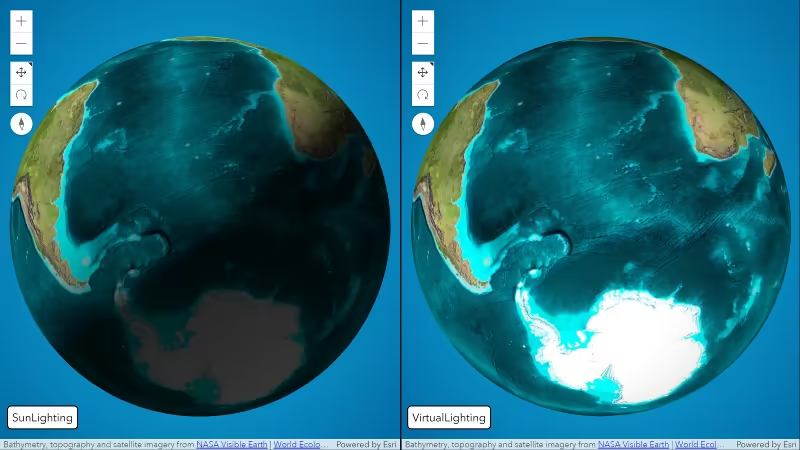
Example:
let view = new SceneView({  container: "viewDiv",
  map: new Map({    basemap: "satellite",    ground: "world-elevation"  }),  environment: {    lighting: {      type: "virtual"    // autocasts as new VirtualLighting()    }  }});
The lighting visualization updates as soon as the type property changes:
view.environment.lighting = { type: "virtual", directShadowsEnabled: true // autocasts as new VirtualLighting({ directShadowsEnabled: true })}Constructors
Constructor
Parameters
| Parameter | Type | Description | Required |
|---|---|---|---|
| properties | | |
Properties
| Property | Type | Class |
|---|---|---|
| readonly inherited | ||
| inherited | ||
| | ||
| inherited | ||
| readonly | "virtual" | |
directShadowsEnabled
- Type
- boolean
Indicates whether to show shadows cast by the light source.
Shadows are only displayed for real world 3D objects. Terrain doesn't cast shadows. In local scenes at small zoom
levels, shadows are not displayed. For more control on which 3D objects cast shadows use the castShadows
property available on ObjectSymbol3DLayer.castShadows,
FillSymbol3DLayer.castShadows, ExtrudeSymbol3DLayer.castShadows, and PathSymbol3DLayer.castShadows.
- Default value
- false
globalIllumination
- Type
- boolean
- Since
- ArcGIS Maps SDK for JavaScript 5.2
Enables global illumination for more realistic lighting in the scene through ambient occlusion and emissive lighting.
- Ambient occlusion darkens areas where surrounding geometry blocks ambient light, adding definition to corners, crevices, and spaces between buildings.
- Emissive lighting illuminates surfaces near emissive materials. The illumination depends on the emitters’ strength and color, as well as their distance from the surfaces they illuminate. See the Visualizations with light-emitting symbols sample for more details on configuring emissive symbols.
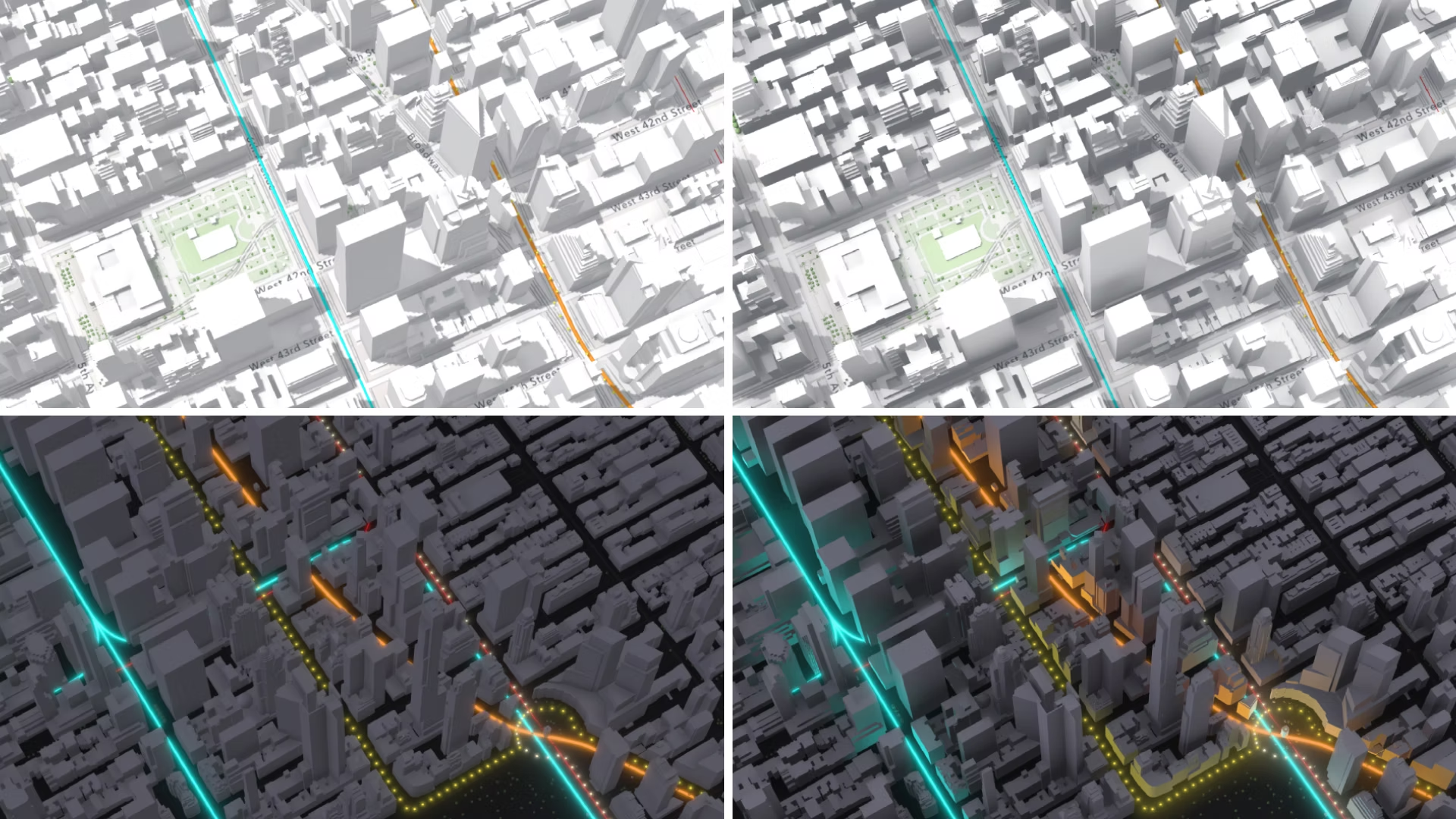
Global illumination is a camera-dependent, screen-space approximation based on visible depth, surface normals, and recent frame data. It is not a physically exact lighting simulation or a scene-wide path tracer. Off-screen or hidden geometry cannot reliably provide indirect light. It is meant to be used mainly for visual context, not illumination measurements or lighting-compliance analysis.
Global illumination progressively accumulates lighting over multiple frames, reducing noise and improving visual quality. After camera or scene changes, lighting settles over successive rendered frames. During navigation, reduced resolution trades detail for rendering cost.
Known limitations
- Global illumination is not supported with GaussianSplatLayer: neither ambient occlusion nor emissive lighting will be computed for this layer.
- SceneView.takeScreenshot() uses a dedicated accumulation path to compute global illumination. Captures with global illumination enabled can therefore take substantially longer to finish.
- Small emitters, or emitters that appear small on screen due to distance may produce only weak illumination. Increasing size, emissive strength and enabling glow can help improve visibility, but cannot guarantee a particular light footprint or replace missing screen-space samples from arbitrary distances and angles.
- Global illumination is disabled at high camera altitudes.
- See also
- Default value
- false
glow
Adds a glow effect to the scene intended for stylistic visualizations. When set, this property creates a halo around
light emitters, making them appear brighter and more prominent. Accepts a Glow instance or null to
disable the effect.
Example:
scene.environment.lighting.glow = new Glow({ intensity: 1 });Methods
| Method | Signature | Class |
|---|---|---|
| inherited static | fromJSON(json: any): any | |
| inherited | clone(): VirtualLighting | |
| inherited | emit<Type extends EventNames<this>>(type: Type, event?: this["@eventTypes"][Type]): boolean | |
| inherited | hasEventListener<Type extends EventNames<this>>(type: Type): boolean | |
| inherited | on<Type extends EventNames<this>>(type: Type, listener: EventedCallback<this["@eventTypes"][Type]>): ResourceHandle | |
| inherited | toJSON(): any |
fromJSON
- Signature
-
fromJSON (json: any): any
Creates a new instance of this class and initializes it with values from a JSON object
generated from an ArcGIS product. The object passed into the input json
parameter often comes from a response to a query operation in the REST API or a
toJSON()
method from another ArcGIS product. See the Using fromJSON()
topic in the Guide for details and examples of when and how to use this function.
Parameters
| Parameter | Type | Description | Required |
|---|---|---|---|
| json | A JSON representation of the instance in the ArcGIS format. See the ArcGIS REST API documentation for examples of the structure of various input JSON objects. | |
- Returns
- any
Returns a new instance of this class.
clone
- Signature
-
clone (): VirtualLighting
Creates a deep clone of this object.
- Returns
- VirtualLighting
Creates a new clone of the instance calling this method.
emit
- Signature
-
emit <Type extends EventNames<this>>(type: Type, event?: this["@eventTypes"][Type]): boolean
- Type parameters
- <Type extends EventNames<this>>
Emits an event on the instance. This method should only be used when creating subclasses of this class.
hasEventListener
- Signature
-
hasEventListener <Type extends EventNames<this>>(type: Type): boolean
- Type parameters
- <Type extends EventNames<this>>
Indicates whether there is an event listener on the instance that matches the provided event name.
Parameters
| Parameter | Type | Description | Required |
|---|---|---|---|
| type | Type | The name of the event. | |
- Returns
- boolean
Returns true if the class supports the input event.
on
- Signature
-
on <Type extends EventNames<this>>(type: Type, listener: EventedCallback<this["@eventTypes"][Type]>): ResourceHandle
- Type parameters
- <Type extends EventNames<this>>
Registers an event handler on the instance. Call this method to hook an event with a listener.
Parameters
| Parameter | Type | Description | Required |
|---|---|---|---|
| type | Type | An event or an array of events to listen for. | |
| listener | EventedCallback<this["@eventTypes"][Type]> | The function to call when the event fires. | |
- Returns
- ResourceHandle
Returns an event handler with a
remove()method that should be called to stop listening for the event(s).Property Type Description remove Function When called, removes the listener from the event.
- Example
- view.on("click", function(event){// event is the event handle returned after the event fires.console.log(event.mapPoint);});
toJSON
- Signature
-
toJSON (): any
Converts an instance of this class to its ArcGIS portal JSON representation. See the Using fromJSON() guide topic for more information.
- Returns
- any
The ArcGIS portal JSON representation of an instance of this class.