Note: Sign in to access the data in this sample. username: viewer01 password: I68VGU^nMurF
Getting Started
Knowledge graphs allow you to model real-world systems that contain both spatial and nonspatial entities (such as people, places and things) and the relationships that connect them, allowing you to leverage both spatial and nonspatial tools in your analysis. A knowledge graph allows you work with a graph network. Both entities and relationships are objects in the graph data structure and can have associated properties. Entity types can be defined with or without spatial information. Spatial entities can be connected to nonspatial entities, but when knowledge graph data is added to a map only spatial entities are drawn. To visualize both spatial and nonspatial data and how they are connected, see link charts.
A KnowledgeGraphLayer is a composite layer that represents a knowledge graph service on a map. The layer contains sublayers for each entity type and relationship type contained in the KnowledgeGraphLayer.
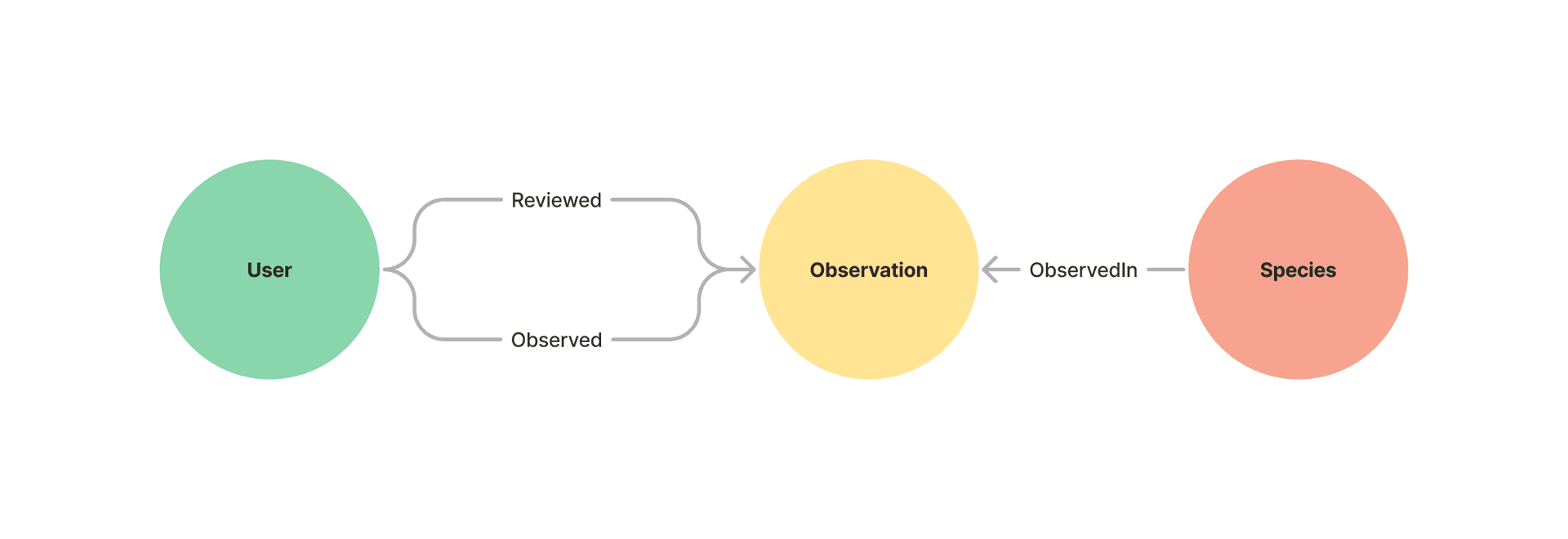
The sample dataset contains observations of bumble bees made at locations around the United States. Each observation was made and verified by users and is of a specific species of bumble bee.
Known Limitations KnowledgeGraphLayer can only be used with KnowledgeGraphServices on ArcGIS Enterprise 11.1 or later.
For additional information on working with knowledge graph services see:
- Introduction to Knowledge Graph in the JavaScript SDK.
- Search a knowledge graph
- Query a knowledge graph
- Edit knowledge graph data
- Get started with ArcGIS Knowledge Server for overview of ArcGIS Knowledge for ArcGIS Enterprise.
- Hosted Knowledge Graph Service for information on managing knowledge graph services via ArcGIS Enterprise and the REST API.
How it works
To create a KnowledgeGraphLayer from a knowledge graph service, set the url property to the REST endpoint of the service.
A KnowledgeGraphLayer also optionally takes an inclusion definition.
The inclusion definition specifies a set of entity or relationship types and/or specific entities and relationships to be included in the layer.
This sample illustrates how to use an inclusion definition to only include the research grade Observations in the layer.
These specific observations are determined by first querying the knowledge graph to get just the observations who’s property quality_grade is “research”.
See KnowledgeGraphLayer.inclusionModeDefinition for more on inclusion lists.
The inclusionModeDefinition is optional. If excluded, all entity and relationship types will be included as sublayers. All spatial entity types will be drawn on the map.
Any non spatial entity types and all relationship types will be included as table sublayers and will not be drawn on the map.
      // set knowledge graph with url to service      const url =        "https://sampleserver7.arcgisonline.com/server/rest/services/Hosted/BumbleBees/KnowledgeGraphServer";      const knowledgeGraph = await knowledgeGraphService.fetchKnowledgeGraph(url);
      const viewElement = document.querySelector("arcgis-map");      await viewElement.viewOnReady();
      //query the knowledge graph to get only the research grade observations      const results = await knowledgeGraphService.executeQuery(knowledgeGraph, {        openCypherQuery: `MATCH (o:Observation{quality_grade: "research"}) RETURN o`,      });
      //create a js map object of the ids and named types from the records returned from the query to include in the layer.      let memberslist = new Map();      for (const result of results.resultRows) {        for (const index in result) {          const record = result[index];          if (!memberslist.has(record.typeName)) {            memberslist.set(record.typeName, { useAllData: false, members: new Map() });          }          memberslist.get(record.typeName).members.set(record.id, { id: record.id });        }      }
      //only create a sublayer for the specified named types.      const inclusionDef = {        generateAllSublayers: false,        namedTypeDefinitions: memberslist,      };
      //create the layer      //the inclusionModeDefinition is an optional property for layer construction. If not defined, all records in the graph will be included and the knowledge graph      // layer will be dynamic.      //Any non spatial entity types and all relationship types will be included as table sublayers and will not be drawn on the map      const kgLayer = new KnowledgeGraphLayer({        url: url,        inclusionModeDefinition: inclusionDef, //optional      });
Knowledge graph layers are generated with default symbology and labels. You can optionally enable popups and or apply specific configurations to individual sublayers once the layer is loaded.
kgLayer.layers.forEach((sublayer) => { sublayer.popupTemplate = sublayer.createPopupTemplate(); }); //add layer to map component viewElement.map.add(kgLayer);