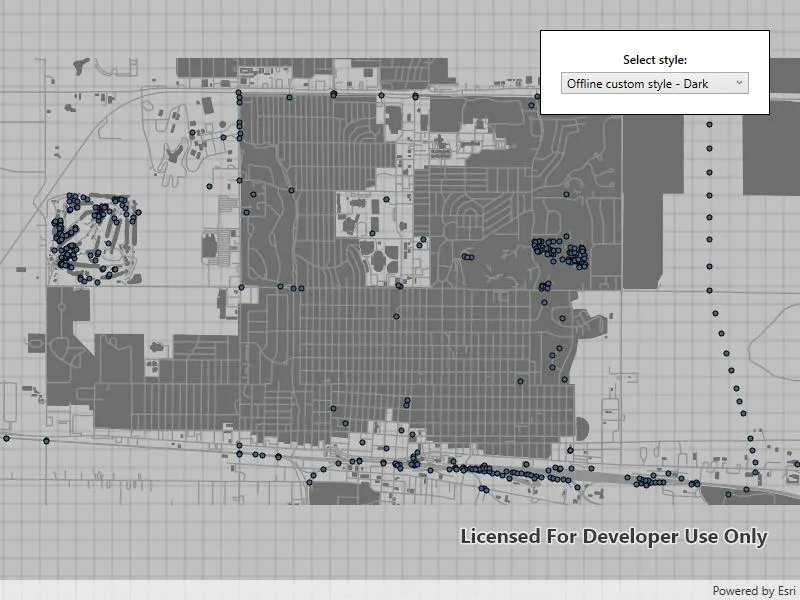
Load ArcGIS vector tiled layers using custom styles.
Use case
Vector tile basemaps can be created in ArcGIS Pro and published as offline packages or online services. You can create a custom style tailored to your needs and easily apply them to your map. The layer’s colors, patterns, icons, and labels could be modified, for example.
How to use the sample
Pan and zoom to explore the vector tile basemap.
How it works
- Create a
PortalItemfor each vector tiled layer. - Create a
Mapand set the defaultViewpoint. - Export the light and dark offline custom styles.
i. Create aExportVectorTilesTaskusing the portal item.
ii. Get the path for where the cache is being stored locally.
iii. Return with the cache if the path already exists.
iv. Else, create aExportVectorTilesJobby having the task callExportStyleResourceCachewith the path as a parameter.
v. Start the job.
vi. When the job completes, store the result as aExportVectorTilesResult.
vii. Return the result’s item resource cache. - Update the
BasemapandViewpointwhen a new style is selected.
Relevant API
- ExportVectorTilesJob
- ExportVectorTilesResult
- ExportVectorTilesTask
- VectorTileCache
- VectorTiledLayer
- VectorTilesTask
Tags
tiles, vector, vector basemap, vector tiled layer, vector tiles
Sample code
// Copyright 2023 Esri.//// Licensed under the Apache License, Version 2.0 (the "License"); you may not use this file except in compliance with the License.// You may obtain a copy of the License at: http://www.apache.org/licenses/LICENSE-2.0//// Unless required by applicable law or agreed to in writing, software distributed under the License is distributed on an// "AS IS" BASIS, WITHOUT WARRANTIES OR CONDITIONS OF ANY KIND, either express or implied. See the License for the specific// language governing permissions and limitations under the License.
using ArcGIS.Samples.Managers;using Esri.ArcGISRuntime.Mapping;using Esri.ArcGISRuntime.Portal;using Esri.ArcGISRuntime.Tasks.Offline;using System;using System.Collections.Generic;using System.IO;using System.Threading.Tasks;using System.Windows;using System.Windows.Controls;
namespace ArcGIS.WPF.Samples.AddVectorTiledLayerFromCustomStyle{    [ArcGIS.Samples.Shared.Attributes.Sample(        name: "Add vector tiled layer from custom style",        category: "Layers",        description: "Load ArcGIS vector tiled layers using custom styles.",        instructions: "Pan and zoom to explore the vector tile basemap.",        tags: new[] { "tiles", "vector", "vector basemap", "vector tiled layer", "vector tiles" })]    [ArcGIS.Samples.Shared.Attributes.OfflineData("f4b742a57af344988b02227e2824ca5f")]    public partial class AddVectorTiledLayerFromCustomStyle    {        // ArcGIS Online vector tile layers.        private readonly string[] _portalItemIDs =        {            "1349bfa0ed08485d8a92c442a3850b06",            "bd8ac41667014d98b933e97713ba8377",            "02f85ec376084c508b9c8e5a311724fa",            "1bf0cc4a4380468fbbff107e100f65a5",
            // Offline custom style vector tiled layer will be created once a VTPK is exported.            "e01262ef2a4f4d91897d9bbd3a9b1075",            "ce8a34e5d4ca4fa193a097511daa8855"        };
        // Path to Dodge City vector tile package.        private readonly string _localVectorPackagePath = DataManager.GetDataFolder("f4b742a57af344988b02227e2824ca5f", "dodge_city.vtpk");
        private List<PortalItem> _vectorTiledLayers = new List<PortalItem>();
        private readonly Viewpoint _defaultViewpoint = new Viewpoint(10, 5.5, 1e8);        private readonly Viewpoint _dodgeCityViewpoint = new Viewpoint(37.76528, -100.01766, 4e4);
        private ItemResourceCache _lightStyleResourceCache;        private ItemResourceCache _darkStyleResourceCache;
        public AddVectorTiledLayerFromCustomStyle()        {            InitializeComponent();            _ = Initialize();        }
        private async Task Initialize()        {            try            {                // Load the default portal.                ArcGISPortal portal = await ArcGISPortal.CreateAsync();
                // Store a list all portal items.                foreach (string itemID in _portalItemIDs)                {                    PortalItem portalItem = await PortalItem.CreateAsync(portal, itemID);                    _vectorTiledLayers.Add(portalItem);                }
                // Create a map using defaults.                MyMapView.Map = new Map() { InitialViewpoint = _defaultViewpoint };
                // Populate the combo box.                StyleChooser.ItemsSource = new string[]                {                    "Default",                    "Style 1",                    "Style 2",                    "Style 3",                    "Offline custom style - Light",                    "Offline custom style - Dark"                };
                // Select the default style.                StyleChooser.SelectedIndex = 0;
                // Export offline custom styles.                _lightStyleResourceCache = await ExportStyle(_vectorTiledLayers[4]);                _darkStyleResourceCache = await ExportStyle(_vectorTiledLayers[5]);            }            catch (Exception ex)            {                // Report exceptions.                MessageBox.Show("Error: " + ex.Message, ex.GetType().Name, MessageBoxButton.OK, MessageBoxImage.Error);            }        }
        private async void StyleChooser_SelectionChanged(object sender, SelectionChangedEventArgs e)        {            try            {                // Get the style name and index of the selected item.                await ChangeStyleAsync(StyleChooser.SelectedIndex, StyleChooser.SelectedItem.ToString());            }            catch (Exception ex)            {                // Report exceptions.                MessageBox.Show("Error: " + ex.Message, ex.GetType().Name, MessageBoxButton.OK, MessageBoxImage.Error);            }        }
        private async Task ChangeStyleAsync(int styleIndex, string styleName)        {            // Check if the user selected a offline custom style.            // Create a new basemap with the appropriate style.            if (styleName.Contains("Offline"))            {                // Determine which cache to use based on if the style selected is light or dark.                ItemResourceCache cache = styleName.Contains("Light") ? _lightStyleResourceCache : _darkStyleResourceCache;
                MyMapView.Map.Basemap = new Basemap(new ArcGISVectorTiledLayer(new VectorTileCache(_localVectorPackagePath), cache));                await MyMapView.SetViewpointAsync(_dodgeCityViewpoint);                await cache.LoadAsync();            }            else            {                MyMapView.Map.Basemap = new Basemap(new ArcGISVectorTiledLayer(_vectorTiledLayers[styleIndex]));                await MyMapView.SetViewpointAsync(_defaultViewpoint);            }        }
        private async Task<ItemResourceCache> ExportStyle(PortalItem vectorTiledLayer)        {            try            {                // Create the task.                ExportVectorTilesTask exportTask = await ExportVectorTilesTask.CreateAsync(vectorTiledLayer.Url);
                // Get the item resource path for the basemap styling.                string itemResourceCachePath = Path.Combine(Path.GetTempPath(), vectorTiledLayer.ItemId + "_styleItemResources");
                // If cache has been created previously, return.                if (Directory.Exists(itemResourceCachePath) && (Directory.GetFiles(itemResourceCachePath).Length != 0))                {                    return new ItemResourceCache(itemResourceCachePath);                }
                // Create the export job and start it.                ExportVectorTilesJob job = exportTask.ExportStyleResourceCache(itemResourceCachePath);                job.Start();
                // Wait for the job to complete.                ExportVectorTilesResult vectorTilesResult = await job.GetResultAsync();
return vectorTilesResult.ItemResourceCache; } catch (Exception ex) { // Report exceptions. MessageBox.Show("Error: " + ex.Message, ex.GetType().Name, MessageBoxButton.OK, MessageBoxImage.Error); return null; } } }}<UserControl x:Class="ArcGIS.WPF.Samples.AddVectorTiledLayerFromCustomStyle.AddVectorTiledLayerFromCustomStyle" xmlns="http://schemas.microsoft.com/winfx/2006/xaml/presentation" xmlns:x="http://schemas.microsoft.com/winfx/2006/xaml" xmlns:esri="http://schemas.esri.com/arcgis/runtime/2013"> <Grid> <esri:MapView x:Name="MyMapView" /> <Border MaxWidth="230" Style="{StaticResource BorderStyle}"> <StackPanel> <TextBlock Margin="0,0,0,5" HorizontalAlignment="Center" FontWeight="SemiBold" Text="Select style:" TextWrapping="Wrap" /> <ComboBox x:Name="StyleChooser" SelectionChanged="StyleChooser_SelectionChanged" /> </StackPanel> </Border> </Grid></UserControl>