Add rasters and feature tables from a GeoPackage to a map.
Use case
The OGC GeoPackage specification defines an open standard for sharing raster and vector data. GeoPackages are designed to simplify file management and transfer. An end-user wishing to transfer rasters from ArcGIS Pro or between ArcGIS Maps SDK apps, might need to import raster files from GeoPackages into their map to view and analyze the data.
How to use the sample
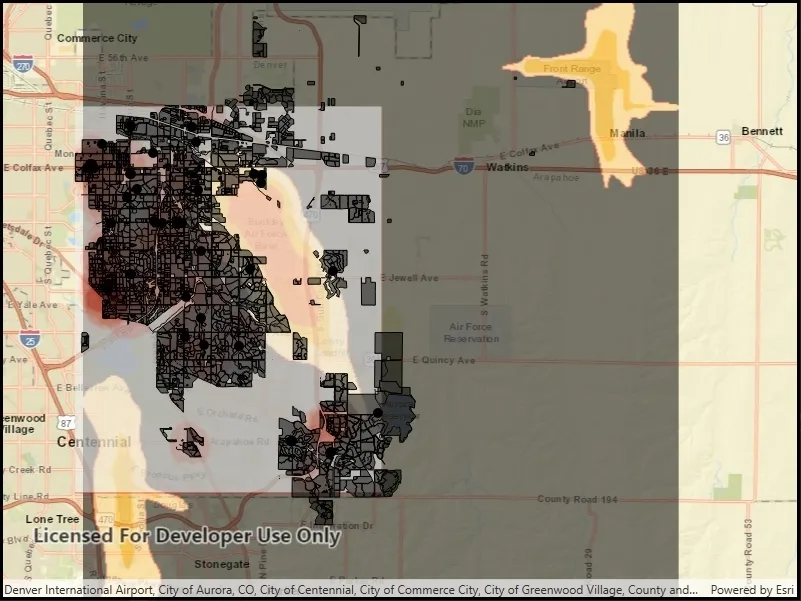
When the sample loads, the feature tables and rasters from the GeoPackage will be shown on the map.
How it works
- Open the GeoPackage using
GeoPackage.OpenAsync(path). - Iterate through available rasters exposed by
geopackage.GeoPackageRasters.- For each raster, create a raster layer using
new Rasterlayer(geopackageRaster), then add it to the map.
- For each raster, create a raster layer using
- Iterate through available feature tables, exposed by
geopackage.GeoPackageFeatureTables.- For each feature table, create a feature layer using
new FeatureLayer(geopackageFeatureTable), then add it to the map.
- For each feature table, create a feature layer using
Relevant API
- FeatureLayer
- GeoPackage
- GeoPackage.GeoPackageFeatureTables
- GeoPackage.GeoPackageRasters
- GeoPackageFeatureTable
- GeoPackageRaster
- RasterLayer
Offline data
This sample features a Aurora Colorado GeoPackage that holds datasets that cover Aurora, Colorado. It has various data including Public art (points), Bike trails (lines), Subdivisions (polygons), Airport noise (raster), and liquor license density (raster).
Additional information
GeoPackage uses a single SQLite file (.gpkg) that conforms to the OGC GeoPackage Standard. You can create a GeoPackage file (.gpkg) from your own data using the create a SQLite Database tool in ArcGIS Pro.
Tags
container, layer, map, OGC, package, raster, table
Sample code
// Copyright 2018 Esri.//// Licensed under the Apache License, Version 2.0 (the "License"); you may not use this file except in compliance with the License.// You may obtain a copy of the License at: http://www.apache.org/licenses/LICENSE-2.0//// Unless required by applicable law or agreed to in writing, software distributed under the License is distributed on an// "AS IS" BASIS, WITHOUT WARRANTIES OR CONDITIONS OF ANY KIND, either express or implied. See the License for the specific// language governing permissions and limitations under the License.
using ArcGIS.Samples.Managers;using Esri.ArcGISRuntime.Data;using Esri.ArcGISRuntime.Mapping;using Esri.ArcGISRuntime.Rasters;using System;using System.Threading.Tasks;
namespace ArcGIS.WinUI.Samples.AddRastersAndFeatureTablesFromGeopackage{    [ArcGIS.Samples.Shared.Attributes.Sample(        name: "Add rasters and feature tables from geopackage",        category: "Data",        description: "Add rasters and feature tables from a GeoPackage to a map.",        instructions: "When the sample loads, the feature tables and rasters from the GeoPackage will be shown on the map.",        tags: new[] { "OGC", "container", "layer", "map", "package", "raster", "table" })]    [ArcGIS.Samples.Shared.Attributes.OfflineData("68ec42517cdd439e81b036210483e8e7")]    public partial class AddRastersAndFeatureTablesFromGeopackage    {        public AddRastersAndFeatureTablesFromGeopackage()        {            InitializeComponent();            _ = Initialize();        }
        private async Task Initialize()        {            // Create a new map centered on Aurora Colorado.            MyMapView.Map = new Map(BasemapStyle.ArcGISStreets);            MyMapView.Map.InitialViewpoint = new Viewpoint(39.7294, -104.73, 175000);
            // Get the full path to the GeoPackage on the device.            string myGeoPackagePath = DataManager.GetDataFolder("68ec42517cdd439e81b036210483e8e7", "AuroraCO.gpkg");
            try            {                // Open the GeoPackage.                GeoPackage myGeoPackage = await GeoPackage.OpenAsync(myGeoPackagePath);
                // Loop through each GeoPackageRaster.                foreach (GeoPackageRaster oneGeoPackageRaster in myGeoPackage.GeoPackageRasters)                {                    // Create a RasterLayer from the GeoPackageRaster.                    RasterLayer myRasterLayer = new RasterLayer(oneGeoPackageRaster)                    {                        // Set the opacity on the RasterLayer to partially visible.                        Opacity = 0.55                    };
                    // Add the raster layer to the map.                    MyMapView.Map.OperationalLayers.Add(myRasterLayer);                }
                // Loop through each GeoPackageFeatureTable.                foreach (GeoPackageFeatureTable oneGeoPackageFeatureTable in myGeoPackage.GeoPackageFeatureTables)                {                    // Create a FeatureLayer from the GeoPackageFeatureLayer.                    FeatureLayer myFeatureLayer = new FeatureLayer(oneGeoPackageFeatureTable);
// Add the layer to the map. MyMapView.Map.OperationalLayers.Add(myFeatureLayer); } } catch (Exception e) { await new MessageDialog2(e.ToString(), "Error").ShowAsync(); } } }}<UserControl x:Class="ArcGIS.WinUI.Samples.AddRastersAndFeatureTablesFromGeopackage.AddRastersAndFeatureTablesFromGeopackage" xmlns="http://schemas.microsoft.com/winfx/2006/xaml/presentation" xmlns:x="http://schemas.microsoft.com/winfx/2006/xaml" xmlns:esriUI="using:Esri.ArcGISRuntime.UI.Controls"> <Grid> <esriUI:MapView x:Name="MyMapView" /> </Grid></UserControl>