List features related to the selected feature.
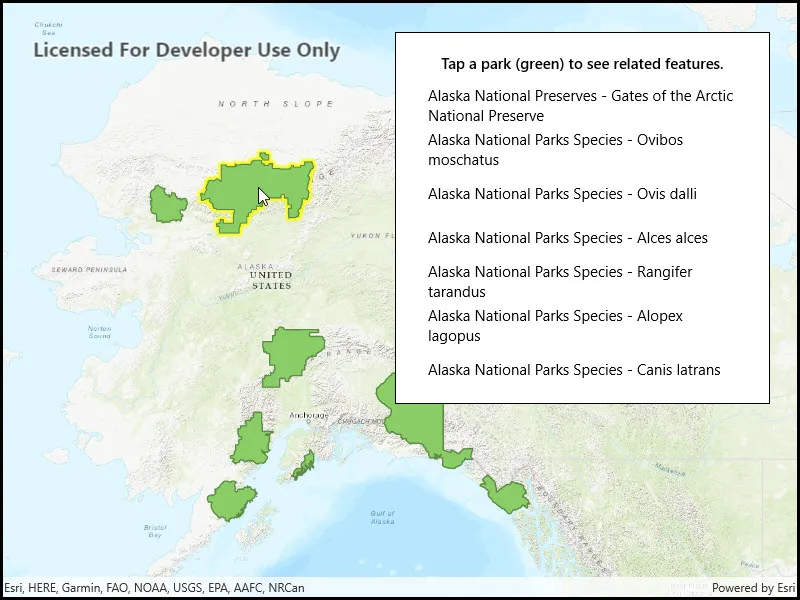
Use case
Related features are useful for managing relational information, like what you would store in a relational database management system (RDBMS). You can define relationship between records as one-to-one, one-to-many, or many-to-one. For example, you could model inspections and facilities as a many-to-one relationship. Then, for any facility feature, you could list related inspection features.
How to use the sample
Click on a feature to select it. The related features will be displayed in a list.
How it works
- With a
Feature, callQueryRelatedFeaturesAsyncon the feature’s feature table. - Iterate over the result’s collection of
RelatedFeatureQueryResultobjects to get the related features and add them to a list.
Relevant API
- ArcGISFeature
- ArcGISFeatureTable
- FeatureQueryResult
- FeatureTable.QueryRelatedFeatures
- RelatedFeatureQueryResult
Tags
features, identify, query, related, relationship, search
Sample code
// Copyright 2018 Esri.//// Licensed under the Apache License, Version 2.0 (the "License"); you may not use this file except in compliance with the License.// You may obtain a copy of the License at: http://www.apache.org/licenses/LICENSE-2.0//// Unless required by applicable law or agreed to in writing, software distributed under the License is distributed on an// "AS IS" BASIS, WITHOUT WARRANTIES OR CONDITIONS OF ANY KIND, either express or implied. See the License for the specific// language governing permissions and limitations under the License.
using Esri.ArcGISRuntime.Data;using Esri.ArcGISRuntime.Mapping;using Esri.ArcGISRuntime.Portal;using Esri.ArcGISRuntime.UI.Controls;using Microsoft.UI.Xaml;using System;using System.Collections.Generic;using System.Drawing;using System.Linq;using System.Threading.Tasks;
namespace ArcGIS.WinUI.Samples.ListRelatedFeatures{    [ArcGIS.Samples.Shared.Attributes.Sample(        name: "List related features",        category: "Data",        description: "List features related to the selected feature.",        instructions: "Click on a feature to select it. The related features will be displayed in a list.",        tags: new[] { "features", "identify", "query", "related", "relationship", "search" })]    public partial class ListRelatedFeatures    {        // URL to the web map        private readonly Uri _mapUri =            new Uri("https://arcgisruntime.maps.arcgis.com/home/item.html?id=dcc7466a91294c0ab8f7a094430ab437");
        // Reference to the feature layer        private FeatureLayer _myFeatureLayer;
        public ListRelatedFeatures()        {            InitializeComponent();
            // Setup the control references and execute initialization            _ = Initialize();        }
        private async Task Initialize()        {            try            {                // Create the portal item from the URL to the webmap.                PortalItem alaskaPortalItem = await PortalItem.CreateAsync(_mapUri);
                // Create the map from the portal item.                Map myMap = new Map(alaskaPortalItem);
                // Add the map to the mapview.                MyMapView.Map = myMap;
                // Wait for the map to load.                await myMap.LoadAsync();
                // Get the feature layer from the map.                _myFeatureLayer = (FeatureLayer)myMap.OperationalLayers.First();
                // Wait for the layer to load.                await _myFeatureLayer.LoadAsync();
                // Update the selection color.                MyMapView.SelectionProperties.Color = Color.Yellow;
                // Listen for GeoViewTapped events.                MyMapView.GeoViewTapped += MyMapViewOnGeoViewTapped;
                // Hide the loading indicator.                LoadingProgress.Visibility = Visibility.Collapsed;            }            catch (Exception e)            {                await new MessageDialog2(e.ToString(), "Error").ShowAsync();            }        }
        private async void MyMapViewOnGeoViewTapped(object sender, GeoViewInputEventArgs e)        {            try            {                // Clear any existing feature selection and results list.                _myFeatureLayer.ClearSelection();                MyResultsView.ItemsSource = null;
                // Identify the tapped feature.                IdentifyLayerResult results = await MyMapView.IdentifyLayerAsync(_myFeatureLayer, e.Position, 10, false);
                // Return if there are no results.                if (results.GeoElements.Count < 1)                {                    return;                }
                // Show the loading indicator (this can take a while).                LoadingProgress.Visibility = Visibility.Visible;
                // Get the first result.                ArcGISFeature myFeature = (ArcGISFeature)results.GeoElements.First();
                // Select the feature.                _myFeatureLayer.SelectFeature(myFeature);
                // Get the feature table for the feature.                ArcGISFeatureTable myFeatureTable = (ArcGISFeatureTable)myFeature.FeatureTable;
                // Query related features.                IReadOnlyList<RelatedFeatureQueryResult> relatedFeaturesResult =                    await myFeatureTable.QueryRelatedFeaturesAsync(myFeature);
                // Create a list to hold the formatted results of the query.                List<string> queryResultsForUi = new List<string>();
                // For each query result.                foreach (RelatedFeatureQueryResult result in relatedFeaturesResult)                {                    // And then for each feature in the result.                    foreach (Feature resultFeature in result)                    {                        // Get a reference to the feature's table.                        ArcGISFeatureTable relatedTable = (ArcGISFeatureTable)resultFeature.FeatureTable;
                        // Get the display field name - this is the name of the field that is intended for display.                        string displayFieldName = relatedTable.LayerInfo.DisplayFieldName;
                        // Get the name of the feature's table.                        string tableName = relatedTable.TableName;
                        // Get the display name for the feature.                        string featureDisplayname = resultFeature.Attributes[displayFieldName].ToString();
                        // Create a formatted result string.                        string formattedResult = $"{tableName} - {featureDisplayname}";
                        // Add the result to the list.                        queryResultsForUi.Add(formattedResult);                    }                }
                // Update the UI with the result list.                MyResultsView.ItemsSource = queryResultsForUi;
// Hide the loading indicator. LoadingProgress.Visibility = Visibility.Collapsed; } catch (Exception ex) { await new MessageDialog2(ex.ToString(), "Error").ShowAsync(); } } }}<UserControl x:Class="ArcGIS.WinUI.Samples.ListRelatedFeatures.ListRelatedFeatures" xmlns="http://schemas.microsoft.com/winfx/2006/xaml/presentation" xmlns:x="http://schemas.microsoft.com/winfx/2006/xaml" xmlns:esriUI="using:Esri.ArcGISRuntime.UI.Controls"> <Grid> <esriUI:MapView x:Name="MyMapView" /> <Border Style="{StaticResource BorderStyle}"> <StackPanel> <TextBlock Margin="0,0,0,10" FontWeight="SemiBold" Text="Tap a park (green) to see related features." TextAlignment="Center" /> <ProgressBar x:Name="LoadingProgress" Height="15" Margin="0,0,0,10" IsIndeterminate="True" Visibility="Visible" /> <ListView x:Name="MyResultsView" MaxHeight="300" ScrollViewer.HorizontalScrollBarVisibility="Disabled" SelectionMode="None"> <ListView.ItemTemplate> <DataTemplate> <TextBlock Text="{Binding}" TextWrapping="Wrap" /> </DataTemplate> </ListView.ItemTemplate> </ListView> </StackPanel> </Border> </Grid></UserControl>