Read a shapefile and display its metadata.
Use case
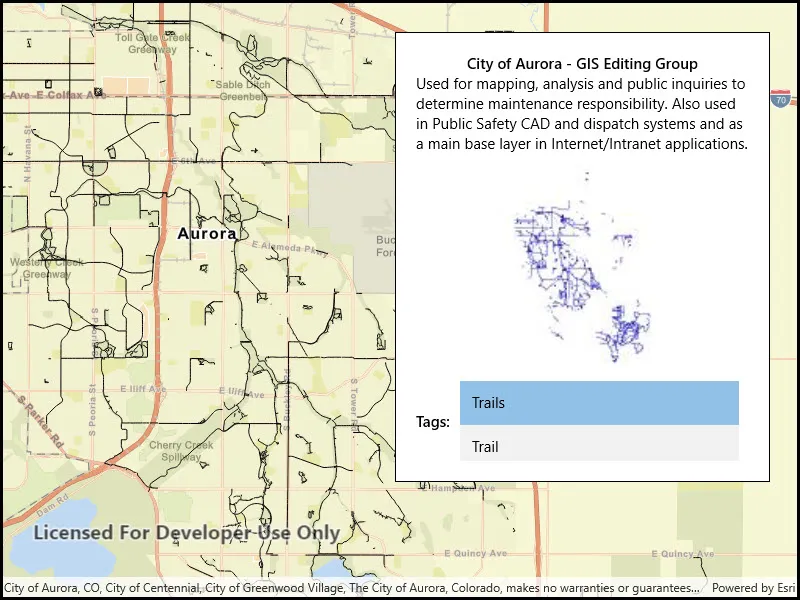
You can display information about the shapefile your user is viewing, like tags, credits, and summary.
How to use the sample
The shapefile’s metadata will be displayed when you open the sample.
How it works
- Call
ShapefileFeatureTable.OpenAsync("path_to_shapefile")to create theShapefileFeatureTable. - Get the
ShapefileInfofrom the feature table’sInfoproperty. - Get the image from
fileInfo.Thumbnailand display it. - Display the
Summary,Credits, andTagsproperties from the shapefile info.
Relevant API
- ShapefileFeatureTable
- ShapefileFeatureTable.Info
- ShapefileFeatureTable.OpenAsync
- ShapefileInfo
- ShapefileInfo.Credits
- ShapefileInfo.Summary
- ShapefileInfo.Tags
- ShapefileInfo.Thumbnail
Offline data
Aurora Colorado Shapefiles is available as an item hosted on ArcGIS Online].
About the data
This sample uses a shapefile showing bike trails in Aurora, CO. The Aurora Colorado Shapefiles are available as an item on ArcGIS Online.
Tags
credits, description, metadata, package, shape file, shapefile, summary, symbology, tags, visualization
Sample code
// Copyright 2017 Esri.//// Licensed under the Apache License, Version 2.0 (the "License"); you may not use this file except in compliance with the License.// You may obtain a copy of the License at: http://www.apache.org/licenses/LICENSE-2.0//// Unless required by applicable law or agreed to in writing, software distributed under the License is distributed on an// "AS IS" BASIS, WITHOUT WARRANTIES OR CONDITIONS OF ANY KIND, either express or implied. See the License for the specific// language governing permissions and limitations under the License.
using ArcGIS.Samples.Managers;using Esri.ArcGISRuntime.Data;using Esri.ArcGISRuntime.Mapping;using Esri.ArcGISRuntime.UI;using System;using System.Threading.Tasks;
namespace ArcGIS.WinUI.Samples.ReadShapefileMetadata{    [ArcGIS.Samples.Shared.Attributes.Sample(        name: "Read shapefile metadata",        category: "Data",        description: "Read a shapefile and display its metadata.",        instructions: "The shapefile's metadata will be displayed when you open the sample.",        tags: new[] { "credits", "description", "metadata", "package", "shape file", "shapefile", "summary", "symbology", "tags", "visualization" })]    [ArcGIS.Samples.Shared.Attributes.OfflineData("d98b3e5293834c5f852f13c569930caa")]    public partial class ReadShapefileMetadata    {        public ReadShapefileMetadata()        {            InitializeComponent();
            // Open a shapefile stored locally and add it to the map as a feature layer            _ = Initialize();        }
        private async Task Initialize()        {            // Create a new map to display in the map view with a streets basemap            Map streetMap = new Map(BasemapStyle.ArcGISStreets);
            // Get the path to the downloaded shapefile            string filepath = GetShapefilePath();
            try            {                // Open the shapefile                ShapefileFeatureTable myShapefile = await ShapefileFeatureTable.OpenAsync(filepath);
                // Read metadata about the shapefile and display it in the UI                ShapefileInfo fileInfo = myShapefile.Info;                InfoPanel.DataContext = fileInfo;
                // Display the shapefile thumbnail in an image control                ShapefileThumbnailImage.Source = await RuntimeImageExtensions.ToImageSourceAsync(fileInfo.Thumbnail);
                // Create a feature layer to display the shapefile                FeatureLayer newFeatureLayer = new FeatureLayer(myShapefile);                await newFeatureLayer.LoadAsync();
                // Zoom the map to the extent of the shapefile                MyMapView.SpatialReferenceChanged += async (s, e) =>                {                    await MyMapView.SetViewpointGeometryAsync(newFeatureLayer.FullExtent);                };
                // Add the feature layer to the map                streetMap.OperationalLayers.Add(newFeatureLayer);
                // Show the map in the MapView                MyMapView.Map = streetMap;            }            catch (Exception e)            {                await new MessageDialog2(e.ToString(), "Error").ShowAsync();            }        }
private static string GetShapefilePath() { return DataManager.GetDataFolder("d98b3e5293834c5f852f13c569930caa", "TrailBikeNetwork.shp"); } }}<UserControl x:Class="ArcGIS.WinUI.Samples.ReadShapefileMetadata.ReadShapefileMetadata" xmlns="http://schemas.microsoft.com/winfx/2006/xaml/presentation" xmlns:x="http://schemas.microsoft.com/winfx/2006/xaml" xmlns:esriUI="using:Esri.ArcGISRuntime.UI.Controls"> <Grid> <esriUI:MapView x:Name="MyMapView" /> <Border Style="{StaticResource BorderStyle}"> <Grid x:Name="InfoPanel"> <Grid.RowDefinitions> <RowDefinition Height="Auto" /> <RowDefinition Height="Auto" /> <RowDefinition Height="Auto" /> <RowDefinition Height="Auto" /> </Grid.RowDefinitions> <Grid.ColumnDefinitions> <ColumnDefinition Width="Auto" /> <ColumnDefinition Width="*" /> </Grid.ColumnDefinitions> <TextBlock Grid.Row="0" Grid.Column="0" Grid.ColumnSpan="2" FontWeight="SemiBold" Text="{Binding Credits}" TextAlignment="Center" /> <TextBlock Grid.Row="1" Grid.Column="0" Grid.ColumnSpan="2" Text="{Binding Summary}" TextWrapping="Wrap" /> <Image x:Name="ShapefileThumbnailImage" Grid.Row="2" Grid.Column="0" Grid.ColumnSpan="2" Margin="10" /> <TextBlock Grid.Row="3" Grid.Column="0" VerticalAlignment="Center" FontWeight="SemiBold" Text="Tags:" /> <ListBox Grid.Row="3" Grid.Column="1" Height="80" Margin="10,0" HorizontalAlignment="Stretch" ItemsSource="{Binding Tags}" /> </Grid> </Border> </Grid></UserControl>