Select features in a feature layer.
Use case
Selecting features, whether by query or identify, can be an important step both in editing data and visualizing results. One possible use case would be to query a feature layer containing street furniture. A query might look for type “bench” and return a list of bench features contained in the features with an attribute of type bench. These might be selected for further editing (see FeatureQueryResult) or may just be highlighted visually.
How to use the sample
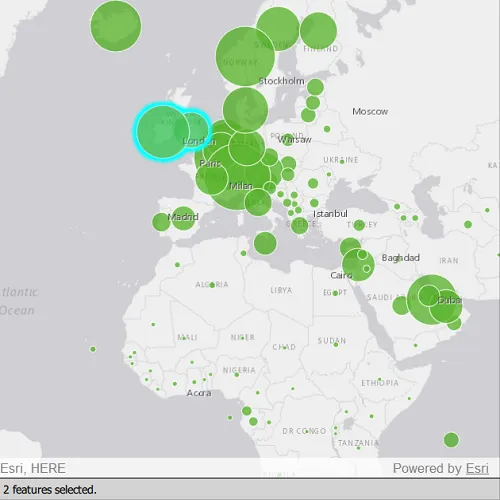
Click on a feature in the map. All features within a given tolerance (in pixels) of the click will be selected.
How it works
- Create a
ServiceFeatureTablefrom a feature service URL. - Create a
FeatureLayerfrom the service feature table. - Identify nearby features at the clicked location using
identifyLayerAsync(featureLayer, mouseEvent.position(), tolerance, returnPopupsOnly, maxResults)on the map view. - Select all identified features in the feature layer with
selectFeatures(features).
Relevant API
- Feature
- FeatureLayer
- ServiceFeatureTable
About the data
This sample uses the Gross Domestic Product, 1960-2016 feature service. Only the 2016 GDP values are shown.
Tags
features, layers, select, selection, tolerance
Sample code
// [WriteFile Name=FeatureLayerSelection, Category=Features]// [Legal]// Copyright 2022 Esri.//// Licensed under the Apache License, Version 2.0 (the "License");// you may not use this file except in compliance with the License.// You may obtain a copy of the License at// http://www.apache.org/licenses/LICENSE-2.0//// Unless required by applicable law or agreed to in writing, software// distributed under the License is distributed on an "AS IS" BASIS,// WITHOUT WARRANTIES OR CONDITIONS OF ANY KIND, either express or implied.// See the License for the specific language governing permissions and// limitations under the License.// [Legal]
#ifdef PCH_BUILD#include "pch.hpp"#endif // PCH_BUILD
// sample headers#include "FeatureLayerSelection.h"
// ArcGIS Maps SDK headers#include "Envelope.h"#include "Feature.h"#include "FeatureLayer.h"#include "IdentifyLayerResult.h"#include "LayerListModel.h"#include "Map.h"#include "MapQuickView.h"#include "MapTypes.h"#include "ServiceFeatureTable.h"#include "SpatialReference.h"#include "Viewpoint.h"
// Qt headers#include <QFuture>#include <QUuid>
// STL headers#include <memory>
using namespace Esri::ArcGISRuntime;
FeatureLayerSelection::FeatureLayerSelection(QObject* parent /* = nullptr */):  QObject(parent),  m_map(new Map(BasemapStyle::ArcGISLightGray, this)){  m_map->setInitialViewpoint(Viewpoint(Envelope(-6603299.491810, 1679677.742046, 9002253.947487, 8691318.054732, SpatialReference::webMercator())));
  m_featureTable = new ServiceFeatureTable(QUrl("https://services1.arcgis.com/4yjifSiIG17X0gW4/arcgis/rest/services/GDP_per_capita_1960_2016/FeatureServer/0"), this);  m_featureLayer = new FeatureLayer(m_featureTable, this);  m_map->operationalLayers()->append(m_featureLayer);}
FeatureLayerSelection::~FeatureLayerSelection() = default;
void FeatureLayerSelection::init(){  // Register the map view for QML  qmlRegisterType<MapQuickView>("Esri.Samples", 1, 0, "MapView");  qmlRegisterType<FeatureLayerSelection>("Esri.Samples", 1, 0, "FeatureLayerSelectionSample");}
MapQuickView* FeatureLayerSelection::mapView() const{  return m_mapView;}
QString FeatureLayerSelection::selectedFeatureText() const{  return m_selectedFeatureText;}
// Set the view (created in QML)void FeatureLayerSelection::setMapView(MapQuickView* mapView){  if (!mapView || mapView == m_mapView)    return;
  m_mapView = mapView;  m_mapView->setMap(m_map);
  connectSignals();
  emit mapViewChanged();}
//! [identify feature layer qml api snippet]void FeatureLayerSelection::connectSignals(){  // lambda expression for the mouse press event on the mapview... do an identify operation  connect(m_mapView, &MapQuickView::mouseClicked, this, [this](QMouseEvent& mouseEvent)  {    constexpr double tolerance = 22.0;    constexpr bool returnPopupsOnly = false;    constexpr int maximumResults = 1000;    m_mapView->identifyLayerAsync(m_featureLayer, mouseEvent.position(), tolerance, returnPopupsOnly, maximumResults).then(this,    [this](IdentifyLayerResult* result)    {      onIdentifyLayerCompleted_(result);    });  });}
void FeatureLayerSelection::onIdentifyLayerCompleted_(IdentifyLayerResult* result){  auto identifyResult = std::unique_ptr<IdentifyLayerResult>(result);
  if (!identifyResult)    return;
  // clear any existing selection  m_featureLayer->clearSelection();
  // create a list to store the identified elements  QList<Feature*> identifiedFeatures;  for (int i = 0; i < identifyResult->geoElements().size(); i++)  {    GeoElement* element = identifyResult->geoElements().at(i);    if (nullptr != element)    {      // add the element to the list and take ownership of it.      Feature* feature = static_cast<Feature*>(element);      feature->setParent(this);      identifiedFeatures.append(feature);    }  }
  // select the identified features  m_featureLayer->selectFeatures(identifiedFeatures);  // update the member with the number of selected features  const qsizetype count = identifiedFeatures.length();  m_selectedFeatureText = count > 1 ? QString::number(count) + " features selected." : QString::number(count) + " feature selected.";  emit selectedFeatureTextChanged();}//! [identify feature layer qml api snippet]
// [WriteFile Name=FeatureLayerSelection, Category=Features]// [Legal]// Copyright 2022 Esri.//// Licensed under the Apache License, Version 2.0 (the "License");// you may not use this file except in compliance with the License.// You may obtain a copy of the License at// http://www.apache.org/licenses/LICENSE-2.0//// Unless required by applicable law or agreed to in writing, software// distributed under the License is distributed on an "AS IS" BASIS,// WITHOUT WARRANTIES OR CONDITIONS OF ANY KIND, either express or implied.// See the License for the specific language governing permissions and// limitations under the License.// [Legal]
#ifndef FEATURELAYERSELECTION_H#define FEATURELAYERSELECTION_H
// Qt headers#include <QObject>
namespace Esri::ArcGISRuntime{class FeatureLayer;class Map;class MapQuickView;class ServiceFeatureTable;class IdentifyLayerResult;}
Q_MOC_INCLUDE("MapQuickView.h");
class FeatureLayerSelection : public QObject{ Q_OBJECT
Q_PROPERTY(Esri::ArcGISRuntime::MapQuickView* mapView READ mapView WRITE setMapView NOTIFY mapViewChanged) Q_PROPERTY(QString selectedFeatureText READ selectedFeatureText NOTIFY selectedFeatureTextChanged)
public: explicit FeatureLayerSelection(QObject* parent = nullptr); ~FeatureLayerSelection() override;
static void init();
signals: void selectedFeatureTextChanged(); void mapViewChanged();
private: void onIdentifyLayerCompleted_(Esri::ArcGISRuntime::IdentifyLayerResult* result); Esri::ArcGISRuntime::MapQuickView* mapView() const; QString selectedFeatureText() const;
void setMapView(Esri::ArcGISRuntime::MapQuickView* mapView); void connectSignals();
Esri::ArcGISRuntime::Map* m_map = nullptr; Esri::ArcGISRuntime::MapQuickView* m_mapView = nullptr; Esri::ArcGISRuntime::FeatureLayer* m_featureLayer = nullptr; Esri::ArcGISRuntime::ServiceFeatureTable* m_featureTable = nullptr;
QString m_selectedFeatureText = QStringLiteral("Click or tap to select features.");};
#endif // FEATURELAYERSELECTION_H// [WriteFile Name=FeatureLayerSelection, Category=Features]// [Legal]// Copyright 2022 Esri.//// Licensed under the Apache License, Version 2.0 (the "License");// you may not use this file except in compliance with the License.// You may obtain a copy of the License at// http://www.apache.org/licenses/LICENSE-2.0//// Unless required by applicable law or agreed to in writing, software// distributed under the License is distributed on an "AS IS" BASIS,// WITHOUT WARRANTIES OR CONDITIONS OF ANY KIND, either express or implied.// See the License for the specific language governing permissions and// limitations under the License.// [Legal]
import QtQuickimport QtQuick.Controlsimport Esri.Samples
Item {
// add a mapView component MapView { id: view anchors.fill: parent
Component.onCompleted: { // Set and keep the focus on MapView to enable keyboard navigation forceActiveFocus(); } }
// Declare the C++ instance which creates the map etc. and supply the view FeatureLayerSelectionSample { id: model mapView: view }
Rectangle { id: messageBar anchors { left: parent.left right: parent.right bottom: parent.bottom } height: 30 color: "lightgrey" border { width: 0.5 color: "black" }
Text { id: msgText anchors { verticalCenter: parent.verticalCenter left: parent.left leftMargin: 10 } // set the text equal to the C++ property text: model.selectedFeatureText font.pixelSize: 14 } }}