Identify features in all layers in a map.
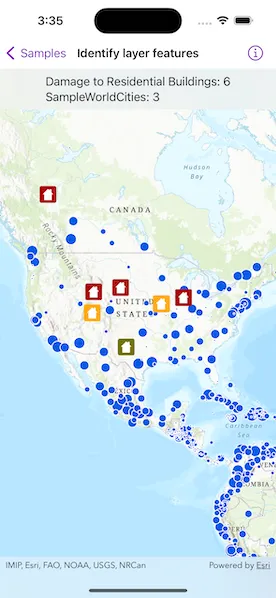
Use case
“Identify layers” operation allows users to tap on a map, returning features at that location across multiple layers. Because some layer types have sublayers, the sample recursively counts results for sublayers within each layer.
How to use the sample
Tap to identify features. The text overlay will update to show all layers with features under the tapped location, as well as a layer count.
How it works
- The tapped position is passed to
MapViewProxy.identifyLayers(screenPoint:tolerance:returnPopupsOnly:maximumResultsPerLayer:)method. - For each
IdentifyLayerResultin the results, features are counted.- Note: there is one identify result per layer with matching features; if the feature count is 0, that means a sublayer contains the matching features.
Relevant API
- IdentifyLayerResult
- LayerContent
Additional information
The GeoView supports two methods of identify: identifyLayer, which identifies features within a specific layer and identifyLayers, which identifies features for all layers in the current view.
Tags
identify, recursion, recursive, sublayers
Sample code
IdentifyLayerFeaturesView.swift
// Copyright 2023 Esri//// Licensed under the Apache License, Version 2.0 (the "License");// you may not use this file except in compliance with the License.// You may obtain a copy of the License at////   https://www.apache.org/licenses/LICENSE-2.0//// Unless required by applicable law or agreed to in writing, software// distributed under the License is distributed on an "AS IS" BASIS,// WITHOUT WARRANTIES OR CONDITIONS OF ANY KIND, either express or implied.// See the License for the specific language governing permissions and// limitations under the License.
import ArcGISimport SwiftUI
struct IdentifyLayerFeaturesView: View {    /// A map with a topographic basemap centered on the United States.    @State private var map: Map = {        let map = Map(basemapStyle: .arcGISTopographic)        map.initialViewpoint = Viewpoint(            center: Point(x: -10977012.785807, y: 4514257.550369, spatialReference: .webMercator),            scale: 68015210        )        return map    }()
    /// The tapped screen point.    @State private var tapScreenPoint: CGPoint?
    /// The string text for the identify layer results overlay.    @State private var overlayText = "Tap on the map to identify feature layers."
    /// The error shown in the error alert.    @State private var error: (any Error)?
    var body: some View {        ZStack {            MapViewReader { proxy in                MapView(map: map)                    .onSingleTapGesture { screenPoint, _ in                        tapScreenPoint = screenPoint                    }                    .task {                        do {                            // Add map image layer to the map.                            let mapImageLayer = ArcGISMapImageLayer(url: .worldCities)                            try await mapImageLayer.load()
                            // Hide continent and world layers.                            mapImageLayer.subLayerContents[1].isVisible = false                            mapImageLayer.subLayerContents[2].isVisible = false                            map.addOperationalLayer(mapImageLayer)
                            // Add feature layer to the map.                            let featureTable = ServiceFeatureTable(url: .damageAssessment)                            try await featureTable.load()                            let featureLayer = FeatureLayer(featureTable: featureTable)                            map.addOperationalLayer(featureLayer)                        } catch {                            // Present error load the layers if any.                            self.error = error                        }                    }                    .task(id: tapScreenPoint) {                        // Identify layers using the screen point.                        if let screenPoint = tapScreenPoint,                           let results = try? await proxy.identifyLayers(                            screenPoint: screenPoint,                            tolerance: 12,                            returnPopupsOnly: false,                            maximumResultsPerLayer: 10                           ) {                            handleIdentifyResults(results)                        }                    }                    .overlay(alignment: .top) {                        Text(overlayText)                            .frame(maxWidth: .infinity, alignment: .center)                            .padding(8)                            .background(.thinMaterial, ignoresSafeAreaEdges: .horizontal)                    }                    .errorAlert(presentingError: $error)            }        }    }}
private extension IdentifyLayerFeaturesView {    /// Updates the overlay text based on the identify layer results.    /// - Parameter results: An `IdentifyLayerResult` array to handle.    func handleIdentifyResults(_ results: [IdentifyLayerResult]) {        // Get layer names and geoelement counts from the results.        let identifyLayerResultInfo: [(layerName: String, geoElementsCount: Int)] = results.map { identifyLayerResult in            let layerName = identifyLayerResult.layerContent.name            let geoElementsCount = geoElementsCountFromResult(identifyLayerResult)            return (layerName, geoElementsCount)        }
        let message = identifyLayerResultInfo            .map { "\($0.layerName): \($0.geoElementsCount)" }            .joined(separator: "\n")
        let totalGeoElementsCount = identifyLayerResultInfo.map(\.geoElementsCount).reduce(0, +)
        // Update overlay text with the geo-elements found if any.        overlayText = totalGeoElementsCount > 0 ? message : "No element found."    }
    /// Counts the geo-elements from an identify layer result using recursion.    /// - Parameter result: The `IdentifyLayerResult` to count.    /// - Returns: The count of the geo-elements.    private func geoElementsCountFromResult(_ identifyResult: IdentifyLayerResult) -> Int {        // Get geoElements count from the result.        var count = identifyResult.geoElements.count
        // Get the count using recursion from the result's sublayer results if any.        for result in identifyResult.sublayerResults {            count += geoElementsCountFromResult(result)        }        return count    }}
private extension URL {    /// A world cities image layer URL.    static var worldCities: URL {        URL(string: "https://sampleserver6.arcgisonline.com/arcgis/rest/services/SampleWorldCities/MapServer")!    }
    /// A damage assessment feature layer URL.    static var damageAssessment: URL {        URL(string: "https://sampleserver6.arcgisonline.com/arcgis/rest/services/DamageAssessment/FeatureServer/0")!    }}
#Preview {    IdentifyLayerFeaturesView()}