Find features in a sublayer based on attributes and location.
Use case
Sublayers of an ArcGISMapImageLayer may expose a ServiceFeatureTable through a table property. This allows you to perform the same queries available when working with a table from a FeatureLayer: attribute query, spatial query, statistics query, query for related features, etc. An image layer with a sublayer of counties can be queried by population to only show those above a minimum population.
How to use the sample
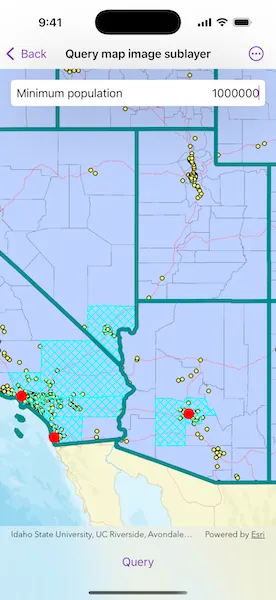
Specify a minimum population in the input field (values under 1810000 will produce a selection in all layers) and tap the “Query” button to query the sublayers in the current view extent. After a short time, the results for each sublayer will appear as graphics.
How it works
- Create an
ArcGISMapImageLayerobject using the URL of an image service. - After loading the layer, get the sublayer you want to query from the map image layer’s
mapImageSublayersarray. - Load the sublayer, and then get its
ServiceFeatureTableusingArcGISMapImageSublayer.table. - Create
QueryParametersand define itswhereClauseandgeometry. - Use
FeatureTable.queryFeatures(using:)to get aFeatureQueryResultwith features matching the query. The result is an enumerator of features.
Relevant API
- ArcGISMapImageLayer
- ArcGISMapImageSublayer
- FeatureQueryResult
- QueryParameters
- ServiceFeatureTable
About the data
The ArcGISMapImageLayer in the map uses the “USA” map service as its data source. This service is hosted by ArcGIS Online and is composed of four sublayers: “Cities”, “Highways”, “States”, and “Counties”.
Since the cities, counties, and states tables all have a POP2000 field, they can all execute a query against that attribute and a map extent.
Tags
query, search
Sample code
// Copyright 2025 Esri//// Licensed under the Apache License, Version 2.0 (the "License");// you may not use this file except in compliance with the License.// You may obtain a copy of the License at////   https://www.apache.org/licenses/LICENSE-2.0//// Unless required by applicable law or agreed to in writing, software// distributed under the License is distributed on an "AS IS" BASIS,// WITHOUT WARRANTIES OR CONDITIONS OF ANY KIND, either express or implied.// See the License for the specific language governing permissions and// limitations under the License.
import ArcGISimport SwiftUI
struct QueryMapImageSublayerView: View {    /// The view model for this sample.    @State private var model = Model()
    /// The current viewpoint of the map view.    @State private var viewpoint: Viewpoint? = .westernUSA
    /// A Boolean value indicating whether there is an ongoing query operation.    @State private var isQuerying = false
    /// The minimum population value in the text field.    @State private var minimumPopulation: Int?
    /// The error shown in the error alert.    @State private var error: (any Error)?
    var body: some View {        MapView(map: model.map, viewpoint: viewpoint, graphicsOverlays: [model.graphicsOverlay])            .onViewpointChanged(kind: .boundingGeometry) { viewpoint = $0 }            .overlay(alignment: .top) {                LabeledContent("Minimum population") {                    TextField("1,000,000", value: $minimumPopulation, format: .number)                        .multilineTextAlignment(.trailing)                }                .padding(8)                .background(Color.primary.colorInvert())                .clipShape(.rect(cornerRadius: 5))                .shadow(radius: 50)                .padding()            }            .toolbar {                ToolbarItem(placement: .bottomBar) {                    Button("Query") {                        isQuerying = true                    }                    .disabled(isQuerying || minimumPopulation == nil || viewpoint == nil)                    .task(id: isQuerying) {                        guard isQuerying, let minimumPopulation, let viewpoint else {                            return                        }                        defer { isQuerying = false }
                        do {                            try await model.queryMapImageSublayers(                                minimumPopulation: minimumPopulation,                                geometry: viewpoint.targetGeometry                            )                        } catch {                            self.error = error                        }                    }                }            }            .task {                // Sets up the sublayers when the sample appears.                do {                    try await model.setUpMapImageSublayers()                } catch {                    self.error = error                }            }            .errorAlert(presentingError: $error)    }}
/// The view model for this sample.@MainActorprivate final class Model {    /// A map with a streets basemap.    let map = Map(basemapStyle: .arcGISStreets)
    /// The graphics overlay for the query result graphics.    let graphicsOverlay = GraphicsOverlay()
    /// The map image sublayers to query.    private var mapImageSublayers: [ArcGISMapImageSublayer] = []
    /// The sublayer names and corresponding symbol that will be used for the    /// layers' query result graphics.    private let sublayerGraphicSymbols: [String: Symbol] = {        let citiesSymbol = SimpleMarkerSymbol(style: .circle, color: .red, size: 16)
        let countyOutline = SimpleLineSymbol(style: .dash, color: .cyan, width: 2)        let countySymbol = SimpleFillSymbol(style: .diagonalCross, color: .cyan, outline: countyOutline)
        let darkCyan = UIColor(red: 0, green: 0.55, blue: 0.55, alpha: 1)        let stateOutline = SimpleLineSymbol(style: .solid, color: darkCyan, width: 6)        let stateSymbol = SimpleFillSymbol(style: .noFill, color: .cyan, outline: stateOutline)
        return ["Cities": citiesSymbol, "Counties": countySymbol, "States": stateSymbol]    }()
    /// Sets up the map image sublayers used by this sample.    func setUpMapImageSublayers() async throws {        // Creates a map image layer and adds it to the map.        let mapImageLayer = ArcGISMapImageLayer(url: .usaMapService)        map.addOperationalLayer(mapImageLayer)
        // Loads the layer and its map image sublayers.        try await mapImageLayer.load()        await mapImageLayer.mapImageSublayers.load()
        // Gets the sublayers containing the field we will be querying (POP2000).        mapImageSublayers = mapImageLayer.mapImageSublayers.filter { sublayer in            sublayer.table?.field(named: "POP2000") != nil        }    }
    /// Queries the map image sublayers and adds graphics for the resulting features.    /// - Parameters:    ///   - minimumPopulation: The minimum population a feature must have to be    ///   included in the results.    ///   - geometry: The geometry to query within.    func queryMapImageSublayers(minimumPopulation: Int, geometry: Geometry) async throws {        // Removes all the graphics to have a fresh start.        graphicsOverlay.removeAllGraphics()
        // Creates parameters to query for features with a population greater than the minimum.        let queryParameters = QueryParameters()        queryParameters.whereClause = "POP2000 > \(minimumPopulation)"        queryParameters.geometry = geometry
        await withThrowingTaskGroup(of: Void.self) { group in            for sublayer in mapImageSublayers {                group.addTask { [weak self] in                    // Queries the sublayer's table using the parameters.                    let result = try await sublayer.table!.queryFeatures(using: queryParameters)
                    // Creates a graphic for each feature in the result.                    let symbol = self?.sublayerGraphicSymbols[sublayer.name]                    let graphics = result.features().map { feature in                        let graphic = Graphic(geometry: feature.geometry, symbol: symbol)                        // Sets the Z-index for consistent draw order.                        graphic.zIndex = -sublayer.id                        return graphic                    }
                    // Adds the graphics to the overlay.                    self?.graphicsOverlay.addGraphics(graphics)                }            }        }    }}
private extension Viewpoint {    /// A viewpoint centered on the western United States.    static var westernUSA: Viewpoint {        .init(            boundingGeometry: Envelope(                xRange: -13_933_000 ... -12_071_000,                yRange: 3_387_000 ... 6_701_000,                spatialReference: .webMercator            )        )    }}
private extension URL {    /// A web URL to a "USA" map server containing sample data for the United States.    static var usaMapService: URL {        URL(string: "https://sampleserver6.arcgisonline.com/arcgis/rest/services/USA/MapServer")!    }}
#Preview {    QueryMapImageSublayerView()}