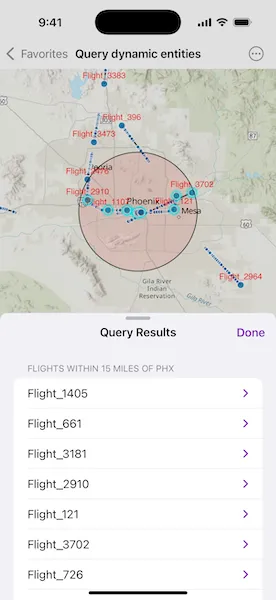
Find dynamic entities from a data source that match a query.
Use case
Developers can query a DynamicEntityDataSource to find dynamic entities that meet spatial and/or attribute criteria. The query returns a collection of dynamic entities matching the DynamicEntityQueryParameters at the moment the query is executed. An example of this is a flight tracking app that monitors airspace near a particular airport, allowing the user to monitor flights based on different criteria such as arrival airport or flight number.
How to use the sample
Tap the “Query Flights” button and select a query to perform from the menu. Once the query is complete, a list of the resulting flights will be displayed. Tap on a flight to see its latest attributes in real-time.
How it works
- Create a
DynamicEntityDataSourceto stream dynamic entity events. - Create
DynamicEntityQueryParametersand set its properties to specify the parameters for the query:- To spatially filter results, set the
geometryandspatialRelationship. The spatial relationship isintersectsby default. - To query entities with certain attribute values, set the
whereClause. - To get entities with specific track IDs, modify the
trackIDscollection.
- To spatially filter results, set the
- To perform a dynamic entities query, call
DynamicEntityDataSource.queryDynamicEntities(using:)passing in the parameters. - When complete, get the dynamic entities from the result using
DynamicEntityQueryResult.entities(). - Use
DynamicEntity.changesto get the entities’ change notifications. - Get the new observation from the resulting
DynamicEntityChangedInfoobjects usingreceivedObservationand usedynamicEntityWasPurgedto determine whether a dynamic entity has been purged.
Relevant API
- DynamicEntity
- DynamicEntityChangedInfo
- DynamicEntityDataSource
- DynamicEntityLayer
- DynamicEntityObservation
- DynamicEntityObservationInfo
- DynamicEntityQueryParameters
- DynamicEntityQueryResult
About the data
This sample uses the PHX Air Traffic JSON portal item, which is hosted on ArcGIS Online and downloaded automatically. The file contains JSON data for mock air traffic around the Phoenix Sky Harbor International Airport in Phoenix, AZ, USA. The decoded data is used to simulate dynamic entity events through a CustomDynamicEntityDataSource, which is displayed on the map with a DynamicEntityLayer.
Additional information
A dynamic entities query is performed on the most recent observation of each dynamic entity in the data source at the time the query is executed. As the dynamic entities change, they may no longer match the query parameters.
Tags
data, dynamic, entity, live, query, real-time, search, stream, track
Sample code
// Copyright 2025 Esri//// Licensed under the Apache License, Version 2.0 (the "License");// you may not use this file except in compliance with the License.// You may obtain a copy of the License at////   https://www.apache.org/licenses/LICENSE-2.0//// Unless required by applicable law or agreed to in writing, software// distributed under the License is distributed on an "AS IS" BASIS,// WITHOUT WARRANTIES OR CONDITIONS OF ANY KIND, either express or implied.// See the License for the specific language governing permissions and// limitations under the License.
import ArcGISimport SwiftUI
struct QueryDynamicEntitiesView: View {    /// The view model for the sample.    @State private var model = Model()
    /// A Boolean value indicating whether the alert for entering a flight number is showing.    @State private var flightNumberAlertIsShowing = false
    /// The text entered into the flight number alert's text field.    @State private var flightNumber = ""
    /// The type of query currently being performed.    @State private var selectedQueryType: QueryType?
    /// The result of a dynamic entities query operation.    @State private var queryResult: Result<[DynamicEntity], any Error>?
    var body: some View {        MapView(map: model.map, graphicsOverlays: [model.graphicsOverlay])            .contentInsets(.init(top: 0, leading: 0, bottom: 250, trailing: 0))            .toolbar {                ToolbarItemGroup(placement: .bottomBar) {                    Spacer()                    Menu("Query Flights") {                        Button("Within 15 Miles of PHX", systemImage: "dot.circle") {                            selectedQueryType = .geometry                        }                        Button("Arriving in PHX", systemImage: "airplane.arrival") {                            selectedQueryType = .attributes                        }                        Button("With Flight Number", systemImage: "magnifyingglass") {                            flightNumberAlertIsShowing = true                        }                    }                    .menuOrder(.fixed)                    .alert("Enter a Flight Number to Query", isPresented: $flightNumberAlertIsShowing) {                        TextField("Flight Number", text: $flightNumber, prompt: .init("Flight_396"))
                        Button("Done") {                            selectedQueryType = .trackID(flightNumber)                        }                        .disabled(flightNumber.isEmpty)
                        Button("Cancel", role: .cancel, action: {})                    }                    .task(id: selectedQueryType) {                        guard let selectedQueryType else { return }                        queryResult = await model.queryDynamicEntities(type: selectedQueryType)                    }                    .popover(item: $selectedQueryType) { queryType in                        QueryResultView(result: queryResult, type: queryType)                            .onDisappear(perform: model.resetDisplay)                            .presentationDetents([.fraction(0.5), .large])                            .frame(idealWidth: 320, idealHeight: 380)                    }                    Spacer()                }            }    }}
private extension QueryDynamicEntitiesView {    /// A view that displays the result of a dynamic entities query operation.    struct QueryResultView: View {        /// The result of the dynamic entities query operation.        let result: Result<[DynamicEntity], any Error>?
        /// The type of query that was performed.        let type: QueryType
        /// The action to dismiss the view.        @Environment(\.dismiss) private var dismiss
        var body: some View {            NavigationStack {                Group {                    switch result {                    case .success(let entities):                        if !entities.isEmpty {                            List {                                Section(type.resultLabel) {                                    ForEach(entities, id: \.id) { entity in                                        DynamicEntityObservationView(entity: entity)                                    }                                }                            }                        } else {                            ContentUnavailableView(                                "No Results",                                systemImage: "airplane",                                description: .init("There are no flights to display for this query.")                            )                        }                    case .failure(let error):                        ContentUnavailableView(                            "Error",                            systemImage: "exclamationmark.triangle",                            description: .init(String(reflecting: error))                        )                    case nil:                        ProgressView("Querying dynamic entities")                    }                }                .navigationTitle("Query Results")                .navigationBarTitleDisplayMode(.inline)                .toolbar {                    ToolbarItem(placement: .confirmationAction) {                        Button("Done") { dismiss() }                    }                }            }        }    }
    /// A view that displays the latest observation of a dynamic entity.    struct DynamicEntityObservationView: View {        /// The dynamic entity to observe.        let entity: DynamicEntity
        /// The latest observation's attributes to display.        @State private var attributes: [String: any Sendable] = [:]
        /// A Boolean value indicating whether the disclosure group is expanded.        @State private var isExpanded = false
        var body: some View {            let flightNumber = entity.attributes["flight_number"] as? String            DisclosureGroup(flightNumber ?? "N/A", isExpanded: $isExpanded) {                let attributes = attributes.sorted(by: { $0.key < $1.key })                ForEach(attributes, id: \.key) { name, value in                    let label = PlaneAttributeKey(rawValue: name)?.label ?? name                    if let string = value as? String {                        LabeledContent(label, value: string)                    } else if let double = value as? Double {                        LabeledContent(                            label,                            value: double,                            format: .number.precision(.fractionLength(0...2))                        )                    }                }            }            .task {                attributes = entity.latestObservation?.attributes ?? [:]
                for await changedInfo in entity.changes {                    attributes = changedInfo.receivedObservation?.attributes ?? [:]                }            }        }    }}
private extension QueryDynamicEntitiesView.PlaneAttributeKey {    /// A human-readable label for the attribute.    var label: String {        switch self {        case .aircraft: "Aircraft"        case .altitudeFeet: "Altitude (ft)"        case .arrivalAirport: "Arrival Airport"        case .flightNumber: "Flight Number"        case .heading: "Heading"        case .speed: "Speed"        case .status: "Status"        }    }}
private extension QueryDynamicEntitiesView.QueryType {    /// The human-readable text describing the query results.    var resultLabel: String {        switch self {        case .geometry: "Flights within 15 miles of PHX"        case .attributes: "Flights arriving in PHX"        case .trackID(let trackID): "Flights matching number: \(trackID)"        }    }}
// Copyright 2025 Esri//// Licensed under the Apache License, Version 2.0 (the "License");// you may not use this file except in compliance with the License.// You may obtain a copy of the License at//// https://www.apache.org/licenses/LICENSE-2.0//// Unless required by applicable law or agreed to in writing, software// distributed under the License is distributed on an "AS IS" BASIS,// WITHOUT WARRANTIES OR CONDITIONS OF ANY KIND, either express or implied.// See the License for the specific language governing permissions and// limitations under the License.
import ArcGISimport Foundation
extension QueryDynamicEntitiesView { /// The view model for this sample. @MainActor @Observable final class Model { /// A map with a topographic basemap. let map: Map = { let map = Map(basemapStyle: .arcGISTopographic) map.initialViewpoint = Viewpoint(center: .phoenixAirport, scale: 1_266_500) return map }()
/// The graphics overlay for displaying the phoenix airport buffer graphic. let graphicsOverlay = GraphicsOverlay()
/// The data source containing the dynamic dynamic entities to query. private let dataSource: CustomDynamicEntityDataSource = { // Creates the metadata for the data source. let fields = PlaneAttributeKey.allCases.map { attribute in Field(type: attribute.fieldType, name: attribute.rawValue, alias: "") } let info = DynamicEntityDataSourceInfo(entityIDFieldName: "flight_number", fields: fields) info.spatialReference = .wgs84
// Creates a custom data source using the data feed. return CustomDynamicEntityDataSource(info: info, makeFeed: PlaneFeed.init) }()
/// The layer displaying the dynamic entities on the map. private let dynamicEntityLayer: DynamicEntityLayer
/// A geometry representing a 15 mile buffer around the Phoenix airport. private let phoenixAirportBuffer = GeometryEngine.geodeticBuffer( around: .phoenixAirport, distance: 15, distanceUnit: .miles, maxDeviation: .nan, curveType: .geodesic )
init() { dynamicEntityLayer = DynamicEntityLayer(dataSource: dataSource) setUpDynamicEntityLayer()
setUpGraphicsOverlay() }
/// Queries the dynamic entities on the data source. /// - Parameter type: The type of query to perform. /// - Returns: The result of the query operation. func queryDynamicEntities(type: QueryType) async -> Result<[DynamicEntity], any Error> { let parameters = DynamicEntityQueryParameters()
switch type { case .geometry: // Sets the parameters' geometry and spatial relationship to query within the buffer. parameters.geometry = phoenixAirportBuffer parameters.spatialRelationship = .intersects
graphicsOverlay.isVisible = true case .attributes: // Sets the parameters' where clause to query the entities' attributes. parameters.whereClause = "status = 'In flight' AND arrival_airport = 'PHX'" case .trackID(let id): // Adds a track ID to query for to the parameters. parameters.addTrackID(id) }
return await Result { // Performs a dynamic entities query on the data source. let queryResult = try await dataSource.queryDynamicEntities(using: parameters)
// Gets the entities from the query result and selects them on the layer. let entities = Array(queryResult.entities()) dynamicEntityLayer.selectDynamicEntities(entities)
return entities } }
/// Clears selected dynamic entities and hides the graphics overlay. func resetDisplay() { dynamicEntityLayer.clearSelection() graphicsOverlay.isVisible = false }
/// Sets up the dynamic entity layer's properties and adds it to the map. private func setUpDynamicEntityLayer() { // Sets display tracking properties on the layer. let trackDisplayProperties = dynamicEntityLayer.trackDisplayProperties trackDisplayProperties.showsPreviousObservations = true trackDisplayProperties.showsTrackLine = true trackDisplayProperties.maximumObservations = 20
// Creates a label definition to display the entities' flight numbers. let labelDefinition = LabelDefinition( labelExpression: SimpleLabelExpression(simpleExpression: "[flight_number]"), textSymbol: .init(color: .red, size: 12) ) labelDefinition.placement = .pointAboveCenter
dynamicEntityLayer.addLabelDefinition(labelDefinition) dynamicEntityLayer.labelsAreEnabled = true
map.addOperationalLayer(dynamicEntityLayer) }
/// Creates a phoenix airport buffer graphic and adds it to the overlay. private func setUpGraphicsOverlay() { let blackLineSymbol = SimpleLineSymbol(style: .solid, color: .black, width: 1) let redFillSymbol = SimpleFillSymbol( color: .red.withAlphaComponent(0.1), outline: blackLineSymbol )
let bufferGraphic = Graphic(geometry: phoenixAirportBuffer, symbol: redFillSymbol) graphicsOverlay.addGraphic(bufferGraphic)
// Hides the graphics overlay initially. graphicsOverlay.isVisible = false } }
/// A plane that can be decoded from JSON. fileprivate struct Plane { /// The location of the plane. let point: Point /// The attributes of the plane. let attributes: [String: any Sendable] }
/// A custom dynamic entity feed that emits events representing planes. private struct PlaneFeed: CustomDynamicEntityFeed { /// The feed's stream of events. let events = URL.phoenixAirTrafficJSON.lines.map { line in // Delays the next observation to simulate live data. try await Task.sleep(for: .seconds(0.1))
// Decodes the plane from the line and uses it to create a new observation. let plane = try JSONDecoder().decode(Plane.self, from: .init(line.utf8)) return CustomDynamicEntityFeedEvent.newObservation( geometry: plane.point, attributes: plane.attributes ) } }
/// A type of dynamic entities query. enum QueryType: Hashable, Identifiable { case geometry, attributes, trackID(String)
var id: Self { self } }
/// The keys for decoding `Plane.attributes`. enum PlaneAttributeKey: String, CodingKey, CaseIterable { case aircraft case altitudeFeet = "altitude_feet" case arrivalAirport = "arrival_airport" case flightNumber = "flight_number" case heading case speed case status
/// The type used to decode the attribute. fileprivate var decodeType: (Decodable & Sendable).Type { isNumeric ? Double.self : String.self }
/// The type used to create a field for the attribute. fileprivate var fieldType: FieldType { isNumeric ? .float64 : .text }
/// A Boolean value indicating whether the attribute has a numeric value. private var isNumeric: Bool { switch self { case .heading, .altitudeFeet, .speed: true default: false } } }}
extension QueryDynamicEntitiesView.Plane: Decodable { private enum CodingKeys: CodingKey { case geometry, attributes }
private typealias AttributeKeys = QueryDynamicEntitiesView.PlaneAttributeKey
init(from decoder: Decoder) throws { let container = try decoder.container(keyedBy: CodingKeys.self) point = try container.decode(Point.self, forKey: .geometry)
let attributesDecoder = try container.superDecoder(forKey: .attributes) let attributesContainer = try attributesDecoder.container(keyedBy: AttributeKeys.self) attributes = try AttributeKeys.allCases.reduce(into: [:]) { attributes, key in let attribute = try attributesContainer.decodeIfPresent(key.decodeType, forKey: key) attributes[key.rawValue] = attribute } }}
private extension Geometry { /// The location of the phoenix airport. static var phoenixAirport: Point { .init(latitude: 33.4352, longitude: -112.0101) }}
private extension URL { /// The URL to a JSON file containing mock air traffic data around the Phoenix Sky Harbor International Airport. static var phoenixAirTrafficJSON: URL { Bundle.main.url(forResource: "phx_air_traffic", withExtension: "json")! }}