Learn about API key credentials with ArcGIS Location Platform.
API key credentials are an item
Creating API key credentials
Prerequisites
All ArcGIS Location Platform accounts have the correct privileges to create API key credentials by default.
Steps
The steps to create API key credentials are described in the Create an API key tutorial:
Create an API key
Create and configure API key credentials to get a long-lived API key access token.
Privileges
API key credentials

The privileges available to API key credentials with an ArcGIS Location Platform account include:
- ArcGIS Location Services
ArcGIS Location Services, also referred to as Location Services, are services hosted by Esri that provide geospatial functionality for developing mapping applications. They include the ArcGIS Basemap Styles service, ArcGIS Static Basemap Tiles service, ArcGIS Static Maps service, ArcGIS Places service, ArcGIS Geocoding service, ArcGIS Routing service, ArcGIS GeoEnrichment service, and ArcGIS Elevation service. An ArcGIS Location Platform or ArcGIS Online account is required to use the services. , such as the Basemap Styles serviceThe ArcGIS Basemap Styles service, also referred to as the Basemap Styles service, is a location service that provides basemap styles and data for the world. It returns styles as Mapbox styles and web maps, and data as vector tiles and/or map tiles. It supports all of the styles in the ArcGIS Basemap style and Open Basemap style family. An ArcGIS Location Platform or ArcGIS Online account is required to use the service. and Routing serviceA routing service is a service that uses network analysis and streets data to calculate the most effective path and turn-by-turn directions on a street network, optimize fleet routing and deliveries, find the closest facilities, calculate service areas, and more. It is hosted by Esri as the ArcGIS Routing service and can also be hosted in ArcGIS Enterprise. . - Portal
A portal service provides the functionality to securely create, access, and manage content, data services, users, and groups in a portal. The service can be hosted by Esri or in ArcGIS Enterprise. operations, such as creating and managing items. - Spatial analysis services
Spatial analysis services are services that perform geometry and statistical analyses on feature and raster data. for performing feature and raster analysis operations.
Edit privileges
You can edit the privileges of your API key credentials to adjust the authorization level of your API keys.
-
Go to Settings on the item page
An item page is a web page in ArcGIS Online or the developer dashboard used to access and manage the properties for an item and the content it references such as a web map, hosted layer, or file. of your API key credentialsAPI key credentials are an item that contains the parameters used to create and manage long-lived access tokens for API key authentication. They are a type of developer credential. . -
Under Application > Credentials, click the Edit button. In the warning that appears, click Continue. .
-
Select a type of application that your key will be used in.
-
Select No item access if you do not want to grant access to any items, or select Grant access to specific items if you want to grant access to certain items in your portal. Then, click Next.
-
Select new privileges for your API key credentials using the privileges window. To view a list of all available privileges, go to Privileges.
-
Click Save to close the window. Then, click the Save button again under Application to update your developer credential.
Item access privileges

API key credentials
The items available in this menu include all of the items owned by your ArcGIS Location Platform account. API key credentials can be configured to access a maximum of 100 items.
Edit item access
You can edit the items that your API key credentials are authorized to access.
-
Go to Settings on the item page
An item page is a web page in ArcGIS Online or the developer dashboard used to access and manage the properties for an item and the content it references such as a web map, hosted layer, or file. of your API key credentialsAPI key credentials are an item that contains the parameters used to create and manage long-lived access tokens for API key authentication. They are a type of developer credential. . -
Under Application > Credentials, click the Edit button. In the warning that appears, click Continue. .
-
In the Item access window, select Grant access to specific items to grant access to specific items in your portal.
-
Select items to grant your API key credentials access to.
-
Click Save to close the window. Then, click the Save button again under Application to update your developer credential.
Referrers
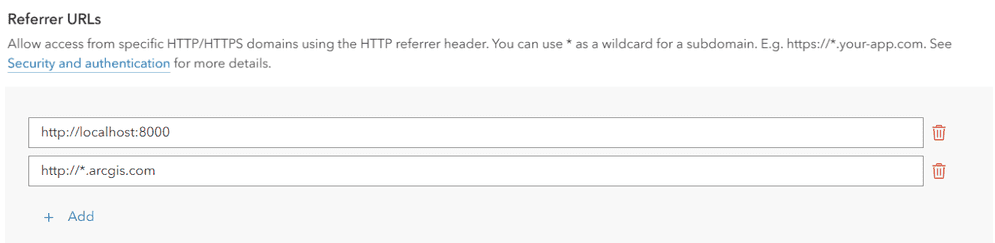
A referrer is an HTTP header field used to identify the client requesting a server resource. This functions as a security measure, allowing applications to confirm their client's identity. When API key credentialsreferer header set, services can confirm that an incoming request's referrer matches one of the valid referrers assigned to that access token.
Specific domains can be provided or you can use wildcard characters (*) in the subdomain of your allowed referrer. For example https will allow the access token to be used on both https and https. While it is also possible to restrict access token use to specific paths (https), we do not recommend this method because browsers may remove the path due to privacy concerns.
Manage API keys

API key credentials are used to manage API keys
The following management actions are supported for API keys:
Generate a secondary API key
You can generate a secondary API key
-
Go to Settings on the item page
An item page is a web page in ArcGIS Online or the developer dashboard used to access and manage the properties for an item and the content it references such as a web map, hosted layer, or file. of your API key credentials. -
Under Application > API keys, click Generate a secondary API key.

-
Set an Expiration date for the key and click Generate API key.
-
Copy the API key
An API key is a long-lived access token created using API key credentials. They are valid for up to one year and are typically embedded directly into client applications. from the window that appears and paste it into your application.
Regenerate an API key
If you lose access to an API key, you can regenerate it with a new expiration date. This will invalidate the previous key.
-
Go to Settings on the item page
An item page is a web page in ArcGIS Online or the developer dashboard used to access and manage the properties for an item and the content it references such as a web map, hosted layer, or file. of your API key credentials. -
Under Application > API keys, find the API key you want to regenerate. Click Regenerate API key.

-
Click Confirm expiration date and set a new expiration date if desired.
-
Click Yes, regenerate API key. Copy the API key
An API key is a long-lived access token created using API key credentials. They are valid for up to one year and are typically embedded directly into client applications. from the window that appears and paste it into your application.
Invalidate an API key
You can invalidate an API key so that it no longer functions in applications. If your API key gets stolen, it should be invalidated to avoid fraudulent charges to your subscription
-
Go to Settings on the item page
An item page is a web page in ArcGIS Online or the developer dashboard used to access and manage the properties for an item and the content it references such as a web map, hosted layer, or file. of your API key credentials. -
Under Application > API keys, find the API key you want to regenerate. Click Invalidate API key.

-
Click Yes, invalidate API key.
Rotate API keys
Up to two API keys
Creating two API keys in one set of credentials allows you to seamlessly rotate keys in your deployed application. When an API key is about to expire, you can generate a second API key and replace it in your application without the app going offline. The high-level workflow for rotating API keys is as follows:
-
Sign in to your portal
ArcGIS portal, also known as a portal, is a website with applications and tools that can be used to create, manage, access, and share geospatial content and data. It supports security and authentication, developer credentials, content and data service management, user and group management, and site administration. A portal can be hosted in Esri's infrastructure or your own infrastructure. to view your API key credentialsAPI key credentials are an item that contains the parameters used to create and manage long-lived access tokens for API key authentication. They are a type of developer credential. . -
Check the expiration date of your API key 1. API keys should be rotated in your applications when they are close to their expiration date.
-
When your API key 1's expiration date is approaching, go to Settings > Application in your API key credentials and click Generate a secondary API key.
-
Set the Expiration date of your API key 2 and click Generate API key.
-
Copy the API key 2 and paste it into your application.
-
Deploy your application using the new API key 2 before your API key 1 expires.
Usage tracking
All services and content accessed with API key credentials
ArcGIS Location Platform developers use their dashboard
-
Go to location.arcgis.com and sign in with an ArcGIS Location Platform account
An ArcGIS Location Platform account, formerly known as an ArcGIS Developer account, is an identity associated with an ArcGIS Location Platform subscription. . -
Click My dashboard > Usage > Developer credentials.
-
In the left sidebar, select the API key credentials
API key credentials are an item that contains the parameters used to create and manage long-lived access tokens for API key authentication. They are a type of developer credential. item you would like to review usage for. -
In the Billing cycle selector, choose a billing cycle to inspect. The main panel of the window will show a usage report.

-
Review the usage report for your API key credentials
API key credentials are an item that contains the parameters used to create and manage long-lived access tokens for API key authentication. They are a type of developer credential. . Usage information is organized by secure resourceA secure resource is any item or service in an ArcGIS that requires an ArcGIS account and authentication to access. Examples include ArcGIS Location Services, and items and data services in an ArcGIS portal. . Click Download CSV to download the information as a.csvfile.
-
Click the dropdown button on a specific service to view a usage timeline. The panel will show the resource consumption for each day of the billing cycle.
