Get a server-defined trace configuration for a given tier and modify its traversability scope, add new condition barriers, and control what is included in the subnetwork trace result.
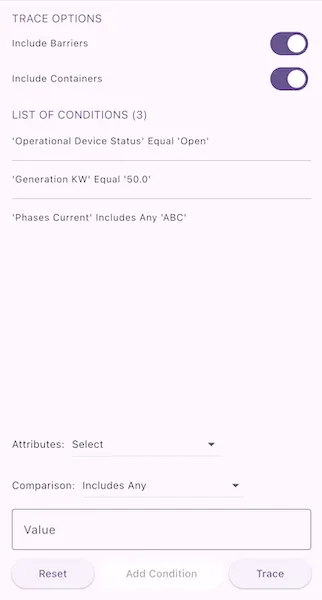
Use case
While some traces are built from an ad-hoc group of parameters, many are based on a variation of the trace configuration taken from the subnetwork definition. For example, an electrical trace will be based on the trace configuration of the subnetwork, but may add additional clauses to constrain the trace along a single phase. Similarly, a trace in a gas or electric design application may include features with a status of “In Design” that are normally excluded from trace results.
How to use the sample
- The sample loads with the default trace configuration for a chosen tier.
- Toggle inclusions (containers, barriers, associations, etc.).
- Define a conditional network attribute comparison with the ‘Attributes’ and ‘Comparison’ dropdowns.
- Tap “Add condition” to append the condition to the barrier expression.
- Tap “Trace” to run a subnetwork trace from the predefined starting location using the modified configuration.
- Tap “Reset” to restore the original server-provided barrier expression.
Example barrier conditions for the default dataset:
Transformer LoadEqual15Phases CurrentDoesNotIncludeTheValuesAGeneration KWLessThan50
How it works
- Instantiate a
ServiceGeodatabasefrom the feature service URL. - Create and load a
UtilityNetworkfrom the service geodatabase; look up the requiredUtilityAssetTypeandUtilityTierby name. - Populate the comparison source list with non-system
definition.networkAttributes, and the operator list fromUtilityAttributeComparisonOperatorenum values. - Build a default starting
UtilityElementfrom the selected asset type. - Initialize UI options and the barrier expression from the tier’s
TraceConfiguration. - When a network attribute is chosen, if its
Domainis aCodedValueDomain, populate the value list from its coded values; otherwise present a free-form input. - On “Add condition”, create a
UtilityNetworkAttributeComparison(source, operator, value), coercing the value to the source attribute’sUtilityNetworkAttribute.dataType. - If existing
UtilityTraversability.barriersare present, combine them and the new comparison in aUtilityTraceOrCondition. - On “Trace”, create
UtilityTraceParameters(UtilityTraceType.subnetwork, starting element), apply modified options and expression in itsTraceConfiguration, then executeUtilityNetwork.trace. - On “Reset”, restore the original barrier expression.
- Present the count of returned
UtilityElementTraceResultlist.
Relevant API
- CodedValueDomain
- UtilityAssetType
- UtilityCategory
- UtilityCategoryComparison
- UtilityCategoryComparisonOperator
- UtilityDomainNetwork
- UtilityElement
- UtilityElementTraceResult
- UtilityNetwork
- UtilityNetworkAttribute
- UtilityNetworkAttributeComparison
- UtilityNetworkAttributeComparison.withValue
- UtilityNetworkDefinition
- UtilityTerminal
- UtilityTier
- UtilityTraceAndCondition
- UtilityTraceConfiguration
- UtilityTraceOrCondition
- UtilityTraceParameters
- UtilityTraceResult
- UtilityTraceType
- UtilityTraversability
About the data
The Naperville Electric utility network feature service (authentication required; handled in code) provides the subnetwork and tier definitions used for this trace.
Additional information
Using a utility network on ArcGIS Enterprise 10.8 requires an Enterprise member account licensed with the Utility Network user type extension. See the utility network services documentation for publishing and configuration details.
Tags
category comparison, condition barriers, network analysis, network attribute comparison, subnetwork trace, trace configuration, traversability, utility network, validate consistency
Sample code
// Copyright 2025 Esri//// Licensed under the Apache License, Version 2.0 (the "License");// you may not use this file except in compliance with the License.// You may obtain a copy of the License at//// https://www.apache.org/licenses/LICENSE-2.0//// Unless required by applicable law or agreed to in writing, software// distributed under the License is distributed on an "AS IS" BASIS,// WITHOUT WARRANTIES OR CONDITIONS OF ANY KIND, either express or implied.// See the License for the specific language governing permissions and// limitations under the License.//
import 'package:arcgis_maps/arcgis_maps.dart';import 'package:arcgis_maps_sdk_flutter_samples/common/common.dart';import 'package:arcgis_maps_sdk_flutter_samples/common/token_challenger_handler.dart';import 'package:flutter/material.dart';
class AnalyzeNetworkWithSubnetworkTrace extends StatefulWidget { const AnalyzeNetworkWithSubnetworkTrace({super.key});
@override State<AnalyzeNetworkWithSubnetworkTrace> createState() => _AnalyzeNetworkWithSubnetworkTraceState();}
class _AnalyzeNetworkWithSubnetworkTraceState extends State<AnalyzeNetworkWithSubnetworkTrace> with SampleStateSupport { // The utility network used for tracing. late UtilityNetwork _utilityNetwork;
// The trace configuration. late UtilityTraceConfiguration _configuration;
// The starting location for the trace. late UtilityElement _startingLocation;
// The default condition that's always present. late UtilityTraceConditionalExpression _defaultCondition;
// An array of conditional expressions. final _traceConditionalExpressions = <UtilityTraceConditionalExpression>[];
// The selected attribute for adding a condition. UtilityNetworkAttribute? _selectedAttribute;
// An array of possible network attributes. var _attributes = <UtilityNetworkAttribute>[];
// The selected operator for adding a condition. var _selectedOperator = UtilityAttributeComparisonOperator.equal;
// The selected value for adding a condition. dynamic _selectedValue;
// The coded values for the selected attribute. var _codedValues = <CodedValue>[];
// The value controller for text input when adding a condition. final _valueController = TextEditingController();
// A flag indicating whether to include barriers. var _includeBarriers = true;
// A flag indicating whether to include containers. var _includeContainers = true;
// The number of trace result. var _elementsCount = 0;
// A flag for when the utility network and trace configuration are ready to be used. var _ready = false;
@override void initState() { super.initState(); // Set up authentication for the sample server. // Note: Never hardcode login information in a production application. // This is done solely for the sake of the sample. ArcGISEnvironment .authenticationManager .arcGISAuthenticationChallengeHandler = TokenChallengeHandler( 'viewer01', 'I68VGU^nMurF', );
_setup().ignore(); }
@override void dispose() { // Remove the TokenChallengeHandler and erase any credentials that were generated. ArcGISEnvironment .authenticationManager .arcGISAuthenticationChallengeHandler = null; ArcGISEnvironment.authenticationManager.arcGISCredentialStore.removeAll(); _valueController.dispose(); super.dispose(); }
@override Widget build(BuildContext context) { return Scaffold( body: SafeArea( child: Stack( children: [ Column( children: [ Expanded( child: SingleChildScrollView( padding: const EdgeInsets.symmetric(horizontal: 16), child: Column( crossAxisAlignment: CrossAxisAlignment.start, children: [ const SizedBox(height: 14), Text( 'TRACE OPTIONS', style: TextStyle( fontSize: 15, color: Theme.of(context).colorScheme.primary, ), ), // Switch to include barriers in the trace. SwitchListTile( title: const Text('Include Barriers'), value: _includeBarriers, contentPadding: EdgeInsets.zero, dense: true, onChanged: (value) => setState(() => _includeBarriers = value), ), // Switch to include containers in the trace. SwitchListTile( title: const Text('Include Containers'), value: _includeContainers, dense: true, contentPadding: EdgeInsets.zero, onChanged: (value) => setState(() => _includeContainers = value), ), const SizedBox(height: 14), // Display conditions if any exist. if (_traceConditionalExpressions.isNotEmpty) ...[ Text( 'LIST OF CONDITIONS (${_traceConditionalExpressions.length})', style: TextStyle( fontSize: 15, color: Theme.of(context).colorScheme.primary, ), ), const SizedBox(height: 8), ListView.separated( itemCount: _traceConditionalExpressions.length, shrinkWrap: true, itemBuilder: (context, index) { final condition = _traceConditionalExpressions[index]; return ListTile( title: Text(_conditionString(condition)), dense: true, minTileHeight: 0, contentPadding: EdgeInsets.zero, ); }, separatorBuilder: (context, index) { return const Divider(); }, ), ], ], ), ), ), Padding( padding: const EdgeInsets.symmetric(horizontal: 16), child: Column( crossAxisAlignment: CrossAxisAlignment.start, spacing: 8, children: [ // Dropdown for selecting attributes. Row( spacing: 10, children: [ const Text('Attributes:'), DropdownButton( hint: Text( 'Select', style: Theme.of(context).textTheme.bodyMedium, ), value: _selectedAttribute, items: _attributes .map( (attribute) => DropdownMenuItem<UtilityNetworkAttribute>( value: attribute, child: Text( attribute.name, style: Theme.of( context, ).textTheme.bodyMedium, ), ), ) .toList(), onChanged: (value) { setState(() { _selectedAttribute = value; _prepareValueInput(); }); }, ), ], ), // Dropdown for selecting comparison operators. Row( spacing: 10, children: [ const Text('Comparison:'), DropdownButton( hint: Text( 'Operator', style: Theme.of(context).textTheme.bodyMedium, ), value: _selectedOperator, items: UtilityAttributeComparisonOperator.values .map( (op) => DropdownMenuItem( value: op, child: Text( _operatorLabel(op), style: Theme.of( context, ).textTheme.bodyMedium, ), ), ) .toList(), onChanged: (value) { if (value != null) { setState(() => _selectedOperator = value); } }, ), ], ), // Dropdown or TextField for inputting values based on attribute type. if (_selectedAttribute?.domain is CodedValueDomain) DropdownButton( isExpanded: true, hint: Text( 'Value', style: Theme.of(context).textTheme.bodyMedium, ), value: _selectedValue, items: _codedValues .map( (cv) => DropdownMenuItem( value: cv.code, child: Text( cv.name, style: Theme.of( context, ).textTheme.bodyMedium, ), ), ) .toList(), onChanged: (value) => setState(() => _selectedValue = value), ) else TextField( controller: _valueController, decoration: const InputDecoration( labelText: 'Value', border: OutlineInputBorder(), ), onChanged: (_) => setState(() => _selectedValue = null), ), // Buttons for resetting, adding conditions, and running the trace. Row( spacing: 8, children: [ Expanded( flex: 2, child: ElevatedButton( onPressed: _onReset, child: const Text('Reset'), ), ), Expanded( flex: 3, child: ElevatedButton( onPressed: _ready && _canAddCondition() ? _onAddCondition : null, child: const Text('Add Condition'), ), ), Expanded( flex: 2, child: ElevatedButton( onPressed: _onRunTrace, child: const Text('Trace'), ), ), ], ), ], ), ), ], ), // Loading indicator. LoadingIndicator(visible: !_ready), ], ), ), ); }
// Performs important tasks including loading utility network and setting trace parameters. Future<void> _setup() async { try { await _setupTraceParameters(); } finally { setState(() => _ready = true); } }
// Loads the utility network and sets the trace parameters and other information. Future<void> _setupTraceParameters() async { // Constants for creating the default trace configuration. const domainNetworkName = 'ElectricDistribution'; const tierName = 'Medium Voltage Radial';
// Load the service geodatabase. final serviceGeodatabase = ServiceGeodatabase.withUri( Uri.parse( 'https://sampleserver7.arcgisonline.com/server/rest/services/UtilityNetwork/NapervilleElectric/FeatureServer/0', ), ); await serviceGeodatabase.load();
// Load the utility network. _utilityNetwork = UtilityNetwork(serviceGeodatabase); await _utilityNetwork.load();
final definition = _utilityNetwork.definition;
// Create a default starting location. _startingLocation = _makeStartingLocation(definition!);
// Get the default trace configuration for the specified domain network and tier. final domainNetwork = definition.getDomainNetwork(domainNetworkName);
final utilityTierConfiguration = domainNetwork! .getTier(tierName) ?.getDefaultTraceConfiguration();
// Set the traversability. utilityTierConfiguration!.traversability ??= UtilityTraversability();
// Initialize default condition: "operational device status" Equal "Open". _defaultCondition = _createDefaultCondition(definition); // Set the default condition as the barrier. utilityTierConfiguration.traversability?.barriers = _defaultCondition; // Add it to the expressions list. _traceConditionalExpressions.add(_defaultCondition);
// Get network attributes. final attributes = definition.networkAttributes .where((attribute) => !attribute.isSystemDefined) .toList(); _attributes = attributes; _configuration = utilityTierConfiguration; }
// Creates a `UtilityElement` from the asset type to use as the starting location. UtilityElement _makeStartingLocation(UtilityNetworkDefinition definition) { // Constants for creating the default starting location. const deviceTableName = 'Electric Distribution Device'; const assetGroupName = 'Circuit Breaker'; const assetTypeName = 'Three Phase'; const globalIdString = '1CAF7740-0BF4-4113-8DB2-654E18800028';
// Get the asset type from the definition. final networkSource = definition.getNetworkSource(deviceTableName);
// Get the asset group. final assetGroup = networkSource!.getAssetGroup(assetGroupName);
// Get the asset type. final assetType = assetGroup!.getAssetType(assetTypeName);
// Create the global ID. final globalId = Guid.fromString(globalIdString);
// Create the starting location element. final startingLocation = _utilityNetwork.createElementWithAssetType( assetType!, globalId: globalId!, );
// Set the 'Load' terminal for the location. startingLocation.terminal = assetType.terminalConfiguration!.terminals .firstWhere((t) => t.name == 'Load');
return startingLocation; }
// Creates the default condition: "operational device status" Equal "Open". UtilityTraceConditionalExpression _createDefaultCondition( UtilityNetworkDefinition definition, ) { // Get attributes from definition since _attributes might not be populated yet. final attributes = definition.networkAttributes .where((a) => !a.isSystemDefined) .toList();
// Find the "operational device status" attribute. final operationalStatusAttr = attributes.firstWhere( (attr) => attr.name.toLowerCase() == 'operational device status', );
// Check if the attribute has a coded value domain. final domain = operationalStatusAttr.domain! as CodedValueDomain;
final openValue = domain.codedValues.firstWhere( (cv) => cv.name.toLowerCase() == 'open', );
// Create and return the comparison expression. return UtilityNetworkAttributeComparison.withValue( networkAttribute: operationalStatusAttr, comparisonOperator: UtilityAttributeComparisonOperator.equal, value: openValue.code, )!; }
// Determines if a condition can be added. bool _canAddCondition() { if (_selectedAttribute == null) return false; if (_selectedAttribute?.domain is CodedValueDomain) { return _selectedValue != null; } return _valueController.text.trim().isNotEmpty; }
// Prepares the value input when attribute changes. void _prepareValueInput() { _selectedValue = null; _valueController.clear(); _codedValues = []; final domain = _selectedAttribute?.domain; if (domain is CodedValueDomain) { _codedValues = domain.codedValues; } }
// Adds a new condition to the list of conditional expressions. void _onAddCondition() { if (!_canAddCondition() || _selectedAttribute == null) return;
final attribute = _selectedAttribute!; dynamic value; if (attribute.domain is CodedValueDomain) { value = _selectedValue; } else { value = _convertToDataType( _valueController.text.trim(), attribute.dataType, ); }
final comparison = UtilityNetworkAttributeComparison.withValue( networkAttribute: attribute, comparisonOperator: _selectedOperator, value: value, );
if (comparison != null) { _traceConditionalExpressions.add(comparison); }
// Clear the condition form. _clearForm(); }
// Chains the conditional expressions together with OR operators. UtilityTraceConditionalExpression? _chainExpressions( List<UtilityTraceConditionalExpression> expressions, ) { if (expressions.isEmpty) return null; if (expressions.length == 1) return expressions.first;
// This uses reduce pattern to chain expressions with OR logic // This creates: ((expr1 OR expr2) OR expr3) ... // Elements matching ANY condition will be included. return expressions .skip(1) .fold<UtilityTraceConditionalExpression>( expressions.first, (left, right) => UtilityTraceOrCondition( leftExpression: left, rightExpression: right, ), ); }
// Runs a trace with the pending trace configuration. Future<void> _onRunTrace() async { // Create utility trace parameters for the starting location. final parameters = UtilityTraceParameters( UtilityTraceType.subnetwork, startingLocations: [_startingLocation], );
final configuration = _configuration; configuration.includeBarriers = _includeBarriers; configuration.includeContainers = _includeContainers;
// Chain and validate the expressions. final chainedExpression = _chainExpressions(_traceConditionalExpressions); if (chainedExpression == null && _traceConditionalExpressions.isNotEmpty) { showMessageDialog('Error: Failed to chain conditional expressions.'); return; }
// Cast to UtilityTraceCondition since barriers expects that type. configuration.traversability?.barriers = chainedExpression; parameters.traceConfiguration = configuration;
// Trace the utility network. final traceResults = await _utilityNetwork.trace(parameters); final elementResult = traceResults .whereType<UtilityElementTraceResult>() .firstOrNull;
// Display the number of elements found by the trace. setState(() => _elementsCount = elementResult?.elements.length ?? 0); final countMessage = _elementsCount == 0 ? 'No elements found.' : '$_elementsCount element(s) found.'; showMessageDialog(title: 'Trace result', countMessage); }
// Resets the trace barrier conditions. void _onReset() { // Reset the conditional expressions. _traceConditionalExpressions.clear(); _traceConditionalExpressions.add(_defaultCondition); // Cast to UtilityTraceCondition since barriers expects that type. _configuration.traversability?.barriers = _defaultCondition;
// Clear the condition form. _clearForm(); }
// A human-readable label for each utility attribute comparison operator. String _operatorLabel(UtilityAttributeComparisonOperator op) { switch (op) { case UtilityAttributeComparisonOperator.equal: return 'Equal'; case UtilityAttributeComparisonOperator.notEqual: return 'Not Equal'; case UtilityAttributeComparisonOperator.greaterThan: return 'Greater Than'; case UtilityAttributeComparisonOperator.greaterThanEqual: return 'Greater Than Or Equal'; case UtilityAttributeComparisonOperator.lessThan: return 'Less Than'; case UtilityAttributeComparisonOperator.lessThanEqual: return 'Less Than Or Equal'; case UtilityAttributeComparisonOperator.includesTheValues: return 'Includes The Values'; case UtilityAttributeComparisonOperator.doesNotIncludeTheValues: return 'Does Not Include The Values'; case UtilityAttributeComparisonOperator.includesAny: return 'Includes Any'; case UtilityAttributeComparisonOperator.doesNotIncludeAny: return 'Does Not Include Any'; } }
// Converts the values to matching data types. dynamic _convertToDataType( String raw, UtilityNetworkAttributeDataType dataType, ) { switch (dataType) { case UtilityNetworkAttributeDataType.integer: return int.tryParse(raw) ?? raw; case UtilityNetworkAttributeDataType.float: case UtilityNetworkAttributeDataType.double: return double.tryParse(raw) ?? raw; case UtilityNetworkAttributeDataType.boolean: return raw.toLowerCase() == 'true'; } }
// Gets the string representation of a condition for display. String _conditionString(UtilityTraceConditionalExpression condition) { if (condition is UtilityNetworkAttributeComparison) { final attributeName = condition.networkAttribute.name; final operatorLabel = _operatorLabel(condition.comparisonOperator); final value = condition.value;
if (condition.networkAttribute.domain is CodedValueDomain) { final domain = condition.networkAttribute.domain! as CodedValueDomain; // Try to find the coded value that matches the condition value final codedValue = domain.codedValues.firstWhere( (cv) => cv.code == value, ); return "'$attributeName' $operatorLabel '${codedValue.name}'"; } else { return "'$attributeName' $operatorLabel '$value'"; } } return condition.toString(); }
// Clears the condition form inputs. void _clearForm() { _valueController.clear(); setState(() { _selectedAttribute = null; _selectedValue = null; _codedValues = []; }); }}