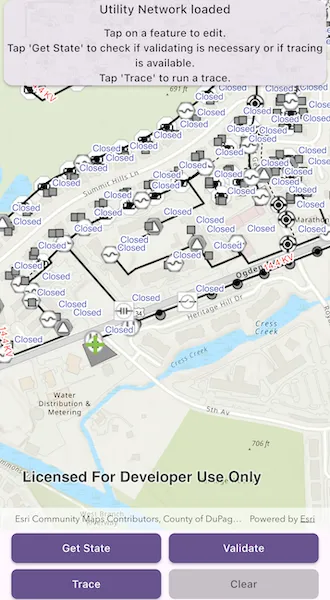
Demonstrates the workflow of getting the network state and validating the topology of a utility network.
Use case
Dirty areas are generated where edits to utility network features have not been evaluated against the network rules. Tracing across this area could result in an error or return inaccurate results. Validating the utility network updates the network topology with the edited feature data, maintaining consistency between the features and topology. Querying the network state allows you to determine if there are dirty areas or errors in a utility network, and if it supports network topology.
How to use the sample
Select features to make edits and then tap ‘Apply’ to send edits to the server.
- Tap ‘Get State’ to check if validate is required or if tracing is available.
- Tap ‘Validate’ to validate network topology and clear dirty areas.
- Tap ‘Trace’ to run a trace.
How it works
- Create and load an
ArcGISMapwith a portal item for a web map. - Load the
UtilityNetworkfrom the web map and switch itsServiceGeodatabaseto a new branch version. - Add
LabelDefinitions for the fields that will be updated on a feature edit. - Add the
UtilityNetwork.dirtyAreaTableto the map to visualize dirty areas or errors. - Set a default starting location and trace parameters to stop traversability on an open device.
- Get the
UtilityNetworkCapabilitiesfrom theUtilityNetworkDefinitionand use these values to enable or disable the ‘Get State’, ‘Validate’, and ‘Trace’ buttons. - When an
ArcGISFeatureis selected for editing, populate the choice list for the field value using the field’sCodedValueDomain.codedValues. - When ‘Apply’ is tapped, update the value of the selected feature’s attribute value with the selected
CodedValue.codeand callServiceGeodatabase.applyEdits(). - When ‘Get State’ is tapped, call
UtilityNetwork.getState()and print the results. - When ‘Validate’ is tapped, get the current map extent and call
UtilityNetwork.validateNetworkTopology(extent). - When ‘Trace’ is tapped, call
UtilityNetwork.trace(parameters)with the predefined parameters and select all features returned. - When ‘Clear’ or ‘Cancel’ are tapped, clear all selected features on each layer in the map and close the attribute picker.
Relevant API
- UtilityElement
- UtilityElementTraceResult
- UtilityNetwork
- UtilityNetworkCapabilities
- UtilityNetworkState
- UtilityNetworkValidationJob
- UtilityTraceConfiguration
- UtilityTraceParameters
- UtilityTraceResult
About the data
The Naperville electric feature service contains a utility network that can be used to query the network state and validate network topology before tracing. The Naperville electric webmap uses the same feature service endpoint and is shown in this sample. Authentication is required and handled within the sample code.
Additional information
Starting from 200.4, Advanced Editing extension is required for editing a utility network in following cases:
- Stand-alone mobile geodatabase that is exported from ArcGIS Pro 2.7 or higher
- Sync-enabled mobile geodatabase that is generated from an ArcGIS Enterprise Feature Service 11.2 or higher
- Webmap or service geodatabase that points to an ArcGIS Enterprise Feature Service 11.2 or higher
Please refer to the “Advanced Editing” section in the extension license table in License and deployment for details.
Tags
dirty areas, edit, network topology, online, state, trace, utility network, validate
Sample code
// Copyright 2025 Esri//// Licensed under the Apache License, Version 2.0 (the "License");// you may not use this file except in compliance with the License.// You may obtain a copy of the License at////   https://www.apache.org/licenses/LICENSE-2.0//// Unless required by applicable law or agreed to in writing, software// distributed under the License is distributed on an "AS IS" BASIS,// WITHOUT WARRANTIES OR CONDITIONS OF ANY KIND, either express or implied.// See the License for the specific language governing permissions and// limitations under the License.//
import 'dart:math';
import 'package:arcgis_maps/arcgis_maps.dart';import 'package:arcgis_maps_sdk_flutter_samples/common/common.dart';import 'package:arcgis_maps_sdk_flutter_samples/common/token_challenger_handler.dart';import 'package:flutter/material.dart';
class ValidateUtilityNetworkTopology extends StatefulWidget {  const ValidateUtilityNetworkTopology({super.key});
  @override  State<ValidateUtilityNetworkTopology> createState() =>      _ValidateUtilityNetworkTopologyState();}
class _ValidateUtilityNetworkTopologyState    extends State<ValidateUtilityNetworkTopology>    with SampleStateSupport {  // Create a controller for the map view.  final _mapViewController = ArcGISMapView.createController();
  // The web map used in the sample.  late ArcGISMap _map;
  // The utility network used in the sample.  late UtilityNetwork _utilityNetwork;
  // The trace parameters to be used for performing traces.  late UtilityTraceParameters _traceParameters;
  // Variables used for editing.  // The name of the 'Electric Distribution Line' feature table.  final _lineTableName = 'Electric Distribution Line';
  // The name of the 'Electric Distribution Device' feature table.  final _deviceTableName = 'Electric Distribution Device';
  // The name of the device status field in the 'Electric Distribution Device' feature table.  final _deviceStatusField = 'devicestatus';
  // The name of the nominal voltage field in the 'Electric Distribution Line' feature table.  final _nominalVoltageField = 'nominalvoltage';
  // Capabilities of the utility network.  var _utilityNetworkCanTrace = false;  var _utilityNetworkCanGetState = false;  var _utilityNetworkCanValidate = false;
  // The selected feature currently being edited.  ArcGISFeature? _selectedFeature;
  // The feature's field currently being edited.  Field? _currentField;
  // The coded values from the field's domain.  var _codedValues = <CodedValue>[];
  // The selected field's coded value.  CodedValue? _selectedCodedValue;
  // Text describing the current status of the utility network.  var _statusTitle = 'Loading webmap...';  var _statusDetail = '';
  // Flags to toggle when UI controls can be used.  var _clearEnabled = false;  var _attributePickerVisible = false;  var _ready = false;
  @override  void initState() {    // Set up authentication for the sample server.    // Note: Never hardcode login information in a production application.    // This is done solely for the sake of the sample.    ArcGISEnvironment        .authenticationManager        .arcGISAuthenticationChallengeHandler = TokenChallengeHandler(      'editor01',      'S7#i2LWmYH75',    );    super.initState();  }
  @override  void dispose() {    // Remove the TokenChallengeHandler and erase any credentials that were generated.    ArcGISEnvironment            .authenticationManager            .arcGISAuthenticationChallengeHandler =        null;    ArcGISEnvironment.authenticationManager.arcGISCredentialStore.removeAll();    super.dispose();  }
  @override  Widget build(BuildContext context) {    return Scaffold(      body: SafeArea(        top: false,        left: false,        right: false,        child: Stack(          children: [            Column(              children: [                Expanded(                  // Add a map view to the widget tree and set a controller.                  child: ArcGISMapView(                    controllerProvider: () => _mapViewController,                    onMapViewReady: onMapViewReady,                    onTap: onTap,                  ),                ),                // Configure buttons to perform the actions of the sample.                Padding(                  padding: const EdgeInsets.symmetric(horizontal: 5),                  child: Wrap(                    spacing: 10,                    children: [                      SizedBox(                        width: 200,                        child: ElevatedButton(                          onPressed: _utilityNetworkCanGetState                              ? getState                              : null,                          child: const Text('Get State'),                        ),                      ),                      SizedBox(                        width: 200,                        child: ElevatedButton(                          onPressed: _utilityNetworkCanValidate                              ? validate                              : null,                          child: const Text('Validate'),                        ),                      ),                      SizedBox(                        width: 200,                        child: ElevatedButton(                          onPressed: _utilityNetworkCanTrace                              ? performTrace                              : null,                          child: const Text('Trace'),                        ),                      ),                      SizedBox(                        width: 200,                        child: ElevatedButton(                          onPressed: _clearEnabled ? clearAndReset : null,                          child: const Text('Clear'),                        ),                      ),                    ],                  ),                ),              ],            ),            // Display the status information from the sample actions in the UI.            Card(              margin: const EdgeInsets.fromLTRB(5, 0, 5, 0),              color: Theme.of(context).cardTheme.color?.withValues(alpha: 0.95),              child: Column(                spacing: 10,                mainAxisSize: MainAxisSize.min,                children: [                  Row(                    children: [                      Expanded(                        child: Text(                          _statusTitle,                          textAlign: TextAlign.center,                          style: Theme.of(context).textTheme.titleMedium,                        ),                      ),                    ],                  ),                  Row(                    children: [                      Expanded(                        child: Text(                          _statusDetail,                          textAlign: TextAlign.center,                          style: Theme.of(context).textTheme.labelLarge,                        ),                      ),                    ],                  ),                ],              ),            ),            // Display a progress indicator and prevent interaction until state is ready.            LoadingIndicator(visible: !_ready),          ],        ),      ),      // Configure the bottom sheet the display an attribute picker when required.      bottomSheet: _attributePickerVisible ? buildAttributePicker() : null,    );  }
  Future<void> onMapViewReady() async {    // Create a map using the portal item of a web map containing a utility network.    final portal = Portal(      Uri.parse('https://sampleserver7.arcgisonline.com/portal/sharing/rest'),    );    final portalItem = PortalItem.withPortalAndItemId(      portal: portal,      itemId: '6e3fc6db3d0b4e6589eb4097eb3e5b9b',    );    _map = ArcGISMap.withItem(portalItem);
    // Set an initial viewpoint on the map.    _map.initialViewpoint = Viewpoint.fromTargetExtent(      Envelope.fromXY(        xMin: -9815489.0660101417,        yMin: 5128463.4221229386,        xMax: -9814625.2768726498,        yMax: 5128968.4911854975,        spatialReference: SpatialReference.webMercator,      ),    );
    // Load in persistent session mode (workaround for server caching issue):    // https://support.esri.com/en-us/bug/asynchronous-validate-request-for-utility-network-servi-bug-000160443    _map.loadSettings = LoadSettings()      ..featureServiceSessionType = FeatureServiceSessionType.persistent;
    // Load the map.    await _map.load();
    // Define labels on the map for visualizing attribute editing.    defineLabelsForLayer(_deviceTableName, _deviceStatusField, Colors.indigo);    defineLabelsForLayer(_lineTableName, _nominalVoltageField, Colors.red);
    // Configure the utility network and trace parameters.    try {      await configureUtilityNetwork();    } on ArcGISException catch (e) {      setState(() {        _ready = true;        _statusTitle = 'Failed to configure utility network.';        _statusDetail = e.message;      });      return;    }
    // Add the map to the map view.    _mapViewController.arcGISMap = _map;
    // Set the ready state variable to true to enable the sample UI.    setState(() {      _ready = true;      _statusTitle = 'Utility Network loaded';      _statusDetail =          "Tap on a feature to edit.\nTap 'Get State' to check if validating is necessary or if tracing is available.\nTap 'Trace' to run a trace.";    });  }
  Future<void> configureUtilityNetwork() async {    setState(() => _statusTitle = 'Loading utility network...');
    // Get the utility network from the map and load.    _utilityNetwork = _map.utilityNetworks.first;    await _utilityNetwork.load();
    // Get the service geodatabase.    final serviceGeodatabase = _utilityNetwork.serviceGeodatabase!;    // Restrict editing and tracing to a unique branch.    final parameters = ServiceVersionParameters()      ..name = 'ValidateNetworkTopology_${Guid()}'      ..access = VersionAccess.private      ..description = 'Validate network topology with ArcGIS Maps SDK';    final serviceVersionInfo = await serviceGeodatabase.createVersion(      newVersion: parameters,    );    await serviceGeodatabase.switchVersion(      versionName: serviceVersionInfo.name,    );
    // Add the dirty area table to the map to visualize it.    final dirtyAreaTable = _utilityNetwork.dirtyAreaTable;    if (dirtyAreaTable != null) {      final featureLayer = FeatureLayer.withFeatureTable(dirtyAreaTable);      _map.operationalLayers.add(featureLayer);    }
    // Get the initial capabilities of the utility network.    setState(() {      _utilityNetworkCanTrace =          _utilityNetwork.definition!.capabilities.supportsTrace;      _utilityNetworkCanGetState =          _utilityNetwork.definition!.capabilities.supportsNetworkState;      _utilityNetworkCanValidate = _utilityNetwork          .definition!          .capabilities          .supportsValidateNetworkTopology;    });
    // Trace with a subnetwork controller as the default starting location.    final networkSource = _utilityNetwork.definition!.getNetworkSource(      _deviceTableName,    );    final assetGroup = networkSource!.getAssetGroup('Circuit Breaker');    final assetType = assetGroup!.getAssetType('Three Phase');    final startingLocation = _utilityNetwork.createElementWithAssetType(      assetType!,      globalId: Guid.fromString('{1CAF7740-0BF4-4113-8DB2-654E18800028}')!,    );    // Set the terminal for the location, in our case, the 'Load' terminal.    final terminal = startingLocation.assetType.terminalConfiguration?.terminals        .firstWhere((terminal) => terminal.name == 'Load');    startingLocation.terminal = terminal;
    // Add a graphic to indicate the starting location on the map.    final features = await _utilityNetwork.getFeaturesForElements([      startingLocation,    ]);    final feature = features.first;    await feature.load();    final graphic = Graphic(      geometry: feature.geometry,      symbol: SimpleMarkerSymbol(        style: SimpleMarkerSymbolStyle.cross,        color: Colors.lightGreen,        size: 25,      ),    );    final graphicsOverlay = GraphicsOverlay()..graphics.add(graphic);    _mapViewController.graphicsOverlays.add(graphicsOverlay);
    // Set the configuration to stop traversing on an open device.    final sourceTier = _utilityNetwork.definition!        .getDomainNetwork('ElectricDistribution')!        .getTier('Medium Voltage Radial')!;    _traceParameters = UtilityTraceParameters(      UtilityTraceType.downstream,      startingLocations: [startingLocation],    )..traceConfiguration = sourceTier.getDefaultTraceConfiguration();  }
  Future<void> onTap(Offset tappedLocation) async {    setState(() {      _ready = false;      _statusTitle = 'Identifying feature to edit...';      _statusDetail = '';    });
    // Clear previous selection.    clearSelectionsFromAllLayers();
    // Perform an identify to determine if a user tapped on a feature.    final identifyResults = await _mapViewController.identifyLayers(      screenPoint: tappedLocation,      tolerance: 5,    );
    if (identifyResults.isEmpty) {      setNoFeatureIdentifiedStatus();      return;    }
    // Check for a result in the specified tables.    final identifyLayerResult = identifyResults        .where(          (result) =>              result.layerContent.name == _deviceTableName ||              result.layerContent.name == _lineTableName,        )        .firstOrNull;
    if (identifyLayerResult == null ||        identifyLayerResult.geoElements.isEmpty) {      setNoFeatureIdentifiedStatus();      return;    }
    // Get the first feature from the results.    final feature = identifyLayerResult.geoElements.first as ArcGISFeature;    await feature.load();    // Get the coded values from the feature's field.    final fieldName = feature.featureTable!.tableName == _deviceTableName        ? _deviceStatusField        : _nominalVoltageField;    final field = feature.featureTable!.getField(fieldName: fieldName);    final codedValues = (field!.domain! as CodedValueDomain).codedValues;    // If there are valid coded values, set them to the attribute picker values.    if (codedValues.isEmpty) {      setNoFeatureIdentifiedStatus();      return;    }    // Select the feature on the map.    if (feature.featureTable!.layer is FeatureLayer) {      final featureLayer = feature.featureTable!.layer! as FeatureLayer;      featureLayer.selectFeature(feature);    }    // Get the current field value and convert to coded value.    final currentFieldValue = feature.attributes[field.name];    final selectedCodedValue = codedValues.firstWhere(      (value) => value.code == currentFieldValue,    );    // Configure the UI ready for feature editing.    setState(() {      _codedValues = codedValues;      _selectedCodedValue = selectedCodedValue;      _currentField = field;      _selectedFeature = feature;      _statusTitle = "Select a new '${field.alias}'.";      _statusDetail = '';      _clearEnabled = true;      _attributePickerVisible = true;      _ready = true;    });  }
  Future<void> getState() async {    setState(() {      _ready = false;      _statusTitle = 'Getting utility network state...';      _statusDetail = '';    });
    // Get the current state from the utility network.    final state = await _utilityNetwork.getState();    var status =        'Has Dirty Areas: ${state.hasDirtyAreas}\nHas Errors: ${state.hasErrors}\nIs Network Topology Enabled: ${state.isNetworkTopologyEnabled}';    if (state.hasDirtyAreas || state.hasErrors) {      status = "$status\nTap 'Validate' before trace or expect a trace error.";    } else {      status =          "$status\nTap on a feature to edit or tap 'Trace' to run a trace.";    }
    // Update the UI with the outcomes of the state check.    setState(() {      _utilityNetworkCanValidate = state.hasDirtyAreas || state.hasErrors;      _utilityNetworkCanTrace = state.isNetworkTopologyEnabled;      _statusTitle = 'Utility Network State:';      _statusDetail = status;      _ready = true;    });  }
  Future<void> validate() async {    setState(() {      _ready = false;      _statusTitle = 'Validating utility network topology...';      _statusDetail = '';    });    // Get the current extent of the map view.    final extent = _mapViewController        .getCurrentViewpoint(ViewpointType.boundingGeometry)!        .targetGeometry        .extent;
    // Validate the network topology at the current extent and get the result.    final job = _utilityNetwork.validateNetworkTopology(extent: extent);    final result = await job.run();
    // Update the UI with the validation result.    setState(() {      _statusTitle = 'Utility Validation Result:';      _statusDetail =          "Has Dirty Areas: ${result.hasDirtyAreas}\nHas Errors: ${result.hasErrors}\nTap 'Get State' to check the updated network state.";      _utilityNetworkCanValidate = result.hasDirtyAreas;      _ready = true;    });  }
  Future<void> performTrace() async {    setState(() {      _ready = false;      _statusTitle = 'Running a downstream trace...';      _statusDetail = '';    });
    // Clear previous selection from the layers.    clearSelectionsFromAllLayers();
    // Get the trace result from the utility network.    try {      final traceResult = await _utilityNetwork.trace(_traceParameters);      final elementTraceResult = traceResult          .whereType<UtilityElementTraceResult>()          .firstOrNull;      final elementsCount = elementTraceResult?.elements.length ?? 0;
      // Select any identified elements in the map.      if (elementTraceResult != null) {        for (final layer            in _mapViewController.arcGISMap!.operationalLayers                .whereType<FeatureLayer>()) {          final elements = elementTraceResult.elements              .where(                (element) =>                    element.networkSource.featureTable == layer.featureTable,              )              .toList();          final features = await _utilityNetwork.getFeaturesForElements(            elements,          );          layer.selectFeatures(features);        }      }      // Update the state with the trace results.      setState(() {        _statusTitle = 'Trace completed:';        _statusDetail = '$elementsCount elements found';        _clearEnabled = true;        _ready = true;      });    } on ArcGISException catch (e) {      // If the trace fails update the status.      showMessageDialog(e.additionalMessage, title: e.message, showOK: true);      setState(() {        _statusTitle = 'Trace failed:';        _statusDetail = "Tap 'Get State' to check the updated network state.";        _clearEnabled = false;        _ready = true;      });    }  }
  Future<void> applyEdits() async {    if (_selectedFeature == null || _selectedCodedValue == null) return;    // Get the service geodatabase and field name of the feature being edited.    final table = _selectedFeature!.featureTable as ServiceFeatureTable?;    if (table == null || table.serviceGeodatabase == null) return;    final serviceGeodatabase = table.serviceGeodatabase!;    final fieldName = _currentField?.name;    if (fieldName == null) return;    setState(() {      _statusTitle = 'Updating feature...';      _statusDetail = '';      _ready = false;    });    // Set the selected value to the feature.    _selectedFeature!.attributes[fieldName] = _selectedCodedValue!.code;    await table.updateFeature(_selectedFeature!);    setState(() {      _statusTitle = 'Applying edits...';      _statusDetail = '';    });    // Apply the edits to the service geodatabase.    final editResult = await serviceGeodatabase.applyEdits();
    // Determine if the attempt to edit resulted in any errors.    final hasErrors = editResult.any(      (result) => result.editResults.any(        (editResult) => editResult.completedWithErrors,      ),    );    // Update the status with the results.    var updatedStatusTitle = '';    var updatedStatusDetail = '';    if (!hasErrors) {      updatedStatusTitle = 'Edits applied successfully.';      updatedStatusDetail =          "Tap 'Get State' to check the updated network state";    } else {      updatedStatusTitle = 'Edits completed with error.';      updatedStatusDetail = '';    }    clearSelectionsFromAllLayers();    setState(() {      _utilityNetworkCanValidate = true;      _statusTitle = updatedStatusTitle;      _statusDetail = updatedStatusDetail;      _attributePickerVisible = false;      _clearEnabled = false;      _ready = true;    });  }
  void clearSelectionsFromAllLayers() {    _mapViewController.arcGISMap!.operationalLayers        .whereType<FeatureLayer>()        .forEach((layer) => layer.clearSelection());  }
  void clearAndReset() {    // Clear the selection.    clearSelectionsFromAllLayers();    // Make relevant UI updates.    setState(() {      _statusTitle = 'Selection cleared';      _statusDetail = '';      _attributePickerVisible = false;      _selectedFeature = null;      _clearEnabled = false;    });  }
  void setNoFeatureIdentifiedStatus() {    setState(() {      _statusTitle = 'No feature identified. Tap on a feature to edit.';      _statusDetail = '';      _attributePickerVisible = false;      _clearEnabled = false;      _ready = true;    });  }
  void defineLabelsForLayer(    String layerName,    String fieldName,    MaterialColor color,  ) {    // Define a label definition based on the provided field name.    final labelDefinition = LabelDefinition(      labelExpression: SimpleLabelExpression(simpleExpression: '[$fieldName]'),      textSymbol: TextSymbol(color: color, size: 12)        ..haloColor = Colors.white        ..haloWidth = 2,    )..useCodedValues = true;
    // Add the label definition to the provided layer.    final featureLayer = _map.operationalLayers        .whereType<FeatureLayer>()        .firstWhere((layer) => layer.name == layerName);    featureLayer.labelDefinitions.add(labelDefinition);    // Enable labels on the layer.    featureLayer.labelsEnabled = true;  }
  // The build method for the attribute picker bottom sheet.  Widget buildAttributePicker() {    return Container(      padding: EdgeInsets.fromLTRB(        20,        20,        20,        max(          20,          View.of(context).viewPadding.bottom /              View.of(context).devicePixelRatio,        ),      ),      child: Column(        spacing: 10,        mainAxisSize: MainAxisSize.min,        children: [          Row(            spacing: 10,            children: [              Text(                'Edit Feature',                style: Theme.of(context).textTheme.titleLarge,              ),              const Spacer(),              // Add a button to apply the edits.              ElevatedButton(onPressed: applyEdits, child: const Text('Apply')),              // Add a button to cancel edits.              TextButton(                child: const Text('Cancel'),                onPressed: () {                  setState(() => _attributePickerVisible = false);                  clearAndReset();                },              ),            ],          ),          Row(            children: [              // Display the current field alias.              Text(                _currentField?.alias ?? 'Unknown field',                style: Theme.of(context).textTheme.labelLarge,              ),            ],          ),          SizedBox(            height: 200,            // Display a list of coded values for the seleced feature.            child: ListView.builder(              itemCount: _codedValues.length,              itemBuilder: (context, index) {                final value = _codedValues[index];                return ListTile(                  // Update the selected value when an item is selected.                  onTap: () => setState(() => _selectedCodedValue = value),                  // Display the value's name.                  title: Text(value.name),                  // Display a check if the item is the currently selected coded value.                  trailing: value == _selectedCodedValue                      ? const Icon(Icons.check)                      : null,                );              },            ),          ),        ],      ),    );  }}