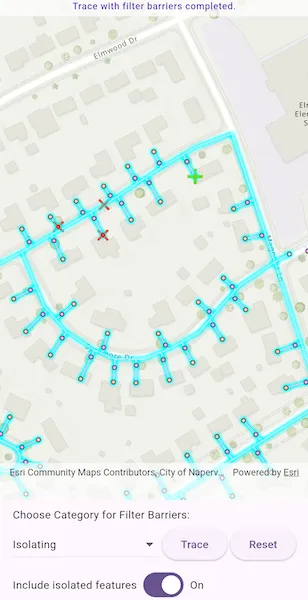
Run a filtered trace to locate operable features that will isolate an area from the flow of network resources.
Use case
Determine the set of operable features required to stop a network’s resource, effectively isolating an area of the network. For example, you can choose to return only accessible and operable valves: ones that are not paved over or rusted shut.
How to use the sample
Tap on one or more features to use as filter barriers or create and set the configuration’s filter barriers by selecting a category. Check or uncheck ‘Include Isolated Features’. Tap ‘Trace’ to run a subnetwork-based isolation trace. Tap ‘Reset’ to clear filter barriers.
How it works
-
Create a new
ArcGISMapViewand subscribe to itsonTapevent. -
Create and load a
ArcGISMapwith a web map portal item that contains aUtilityNetwork. -
Load the
UtilityNetworkfrom theArcGISMap. -
Create
UtilityTraceParameterswithUtilityTraceType.isolationand a starting location from a given asset type and global ID. -
Get a default
UtilityTraceConfigurationfrom a given tier in a domain network to setUtilityTraceParameters.traceConfiguration. -
Add a
GraphicsOverlaywith aGraphicthat represents this starting location; and anotherGraphicsOverlayfor filter barriers. -
Populate the choice list for the ‘Filter Barrier: Category exists’ from
UtilityNetworkDefinition.categories. -
When the MapView is tapped, identify which features are at the tap location and add a
Graphicthat represents a filter barrier. -
Create a
UtilityElementfor the identified feature and add thisUtilityElementto a collection of filter barriers.- If the element is a junction with more than one terminal, display a terminal picker. Then set the junction’s
Terminalproperty with the selected terminal. - If an edge, set its
fractionAlongLineproperty usingGeometryEngine.fractionAlong.
- If the element is a junction with more than one terminal, display a terminal picker. Then set the junction’s
-
If
Traceis tapped without filter barriers:- Create a new
UtilityCategoryComparisonwith the selected category andUtilityCategoryComparisonOperator.exists. - Create a new
UtilityTraceFilterwith this condition asBarriersto setFilterand updateincludeIsolatedFeaturesproperties of the default configuration from step 5. - Run a
UtilityNetwork.trace(parameters).
If
Traceis tapped with filter barriers:- Update
includeIsolatedFeaturesproperty of the default configuration from step 5. - Run a
UtilityNetwork.trace(parameters).
- Create a new
-
For every
FeatureLayerin the map, select the features returned withgetFeaturesForElements(elements)from the elements matching theirNetworkSource.featureTablewith the layer’sFeatureTable.
Relevant API
- GeometryEngine.fractionAlong
- ServiceGeodatabase
- UtilityCategory
- UtilityCategoryComparison
- UtilityCategoryComparisonOperator
- UtilityDomainNetwork
- UtilityElement
- UtilityElementTraceResult
- UtilityNetwork
- UtilityNetworkDefinition
- UtilityTerminal
- UtilityTier
- UtilityTraceFilter
- UtilityTraceParameters
- UtilityTraceResult
- UtilityTraceType
About the data
The Naperville gas network feature service contains a utility network used to run the isolation trace shown in this sample. Authentication is required and handled within the sample code.
Additional information
Using utility network on ArcGIS Enterprise 10.8 requires an ArcGIS Enterprise member account licensed with the Utility Network user type extension. Please refer to the utility network services documentation.
Tags
category comparison, condition barriers, filter barriers, isolated features, network analysis, subnetwork trace, trace configuration, trace filter, utility network
Sample code
// Copyright 2025 Esri//// Licensed under the Apache License, Version 2.0 (the "License");// you may not use this file except in compliance with the License.// You may obtain a copy of the License at////   https://www.apache.org/licenses/LICENSE-2.0//// Unless required by applicable law or agreed to in writing, software// distributed under the License is distributed on an "AS IS" BASIS,// WITHOUT WARRANTIES OR CONDITIONS OF ANY KIND, either express or implied.// See the License for the specific language governing permissions and// limitations under the License.//
import 'package:arcgis_maps/arcgis_maps.dart';import 'package:arcgis_maps_sdk_flutter_samples/common/common.dart';import 'package:arcgis_maps_sdk_flutter_samples/common/token_challenger_handler.dart';import 'package:flutter/material.dart';
class RunValveIsolationTrace extends StatefulWidget {  const RunValveIsolationTrace({super.key});
  @override  State<RunValveIsolationTrace> createState() => _RunValveIsolationTraceState();}
class _RunValveIsolationTraceState extends State<RunValveIsolationTrace>    with SampleStateSupport {  // Map view controller for displaying the map.  final _mapViewController = ArcGISMapView.createController();
  // Feature service for an electric utility network in Naperville, Illinois.  late UtilityNetwork _utilityNetwork;
  // The trace configuration for the utility network.  UtilityTraceConfiguration? _configuration;
  /// The starting location for the trace.  late UtilityElement _startingLocationElement;
  // The parameters for the trace.  late UtilityTraceParameters _traceParameters;
  // Graphics overlay for displaying filter barriers.  final _graphicsOverlayBarriers = GraphicsOverlay();
  // Symbols for displaying starting location.  final _startingPointSymbols = SimpleMarkerSymbol(    style: SimpleMarkerSymbolStyle.cross,    size: 20,    color: const Color.fromARGB(255, 117, 216, 4), // Bright green  );
  // Symbol for displaying filter barriers.  final _barrierPointSymbol = SimpleMarkerSymbol(    style: SimpleMarkerSymbolStyle.x,    color: Colors.red,    size: 15,  );
  // Indicator for loading state.  var _loading = true;
  // Set to enable/disable trace button.  var _traceEnabled = false;
  /// Set to enable/disable reset button.  var _resetEnabled = false;
  // Status message for the banner.  String? _statusMessage;
  // Categories (for filter barrier selection).  var _categories = <UtilityCategory>[];
  // The selected category for filter barriers.  UtilityCategory? _selectedCategory;
  // Set to include/exclude isolated features in the trace.  var _isIncludeIsolatedFeatures = true;
  // The Message to display on the banner.  final String _message =      'Tap on the map to add filter barriers, or run the trace directly without filter barriers.';
  @override  void initState() {    super.initState();    // Set up authentication for the sample server.    // Note: Never hardcode login information in a production application.    // This is done solely for the sake of the sample.    ArcGISEnvironment        .authenticationManager        .arcGISAuthenticationChallengeHandler = TokenChallengeHandler(      'viewer01',      'I68VGU^nMurF',    );  }
  @override  void dispose() {    ArcGISEnvironment            .authenticationManager            .arcGISAuthenticationChallengeHandler =        null;    super.dispose();  }
  @override  Widget build(BuildContext context) {    return Scaffold(      body: SafeArea(        left: false,        right: false,        child: Stack(          children: [            Column(              children: [                Expanded(                  // Add a map view to the widget tree and set a controller.                  child: ArcGISMapView(                    controllerProvider: () => _mapViewController,                    onMapViewReady: _onMapViewReady,                    onTap: _onTap,                  ),                ),                // Add the settings widget below the map view.                _settingWidget(context),              ],            ),            // Add a loading indicator while the map and utility network are loading.            LoadingIndicator(              visible: _loading,              text: _loading ? _statusMessage : '',            ),            // Display a banner with instructions at the top.            MapBanner(text: _statusMessage ?? ''),          ],        ),      ),    );  }
  // Configurations for utility network tracing.  Widget _settingWidget(BuildContext context) {    return Padding(      padding: const EdgeInsets.fromLTRB(10, 10, 10, 0),      child: Column(        crossAxisAlignment: CrossAxisAlignment.start,        spacing: 4,        children: [          const Text('Choose Category for Filter Barriers:'),          Row(            mainAxisAlignment: MainAxisAlignment.spaceEvenly,            spacing: 4,            children: [              // The dropdown for categories.              Expanded(                child: DropdownButton(                  isExpanded: true,                  value: _selectedCategory,                  hint: const Text('Select category'),                  items: _categories.map((category) {                    return DropdownMenuItem(                      value: category,                      child: Text(                        category.name,                        style: Theme.of(context).textTheme.bodyMedium,                      ),                    );                  }).toList(),                  onChanged: (value) {                    setState(() {                      _selectedCategory = value;                    });                  },                ),              ),              // The button to start tracing.              ElevatedButton(                onPressed: _traceEnabled ? _onTrace : null,                child: const Text('Trace'),              ),              // The button to reset the trace.              ElevatedButton(                onPressed: _resetEnabled ? _clear : null,                child: const Text('Reset'),              ),            ],          ),          // The Switch for including isolated features.          Row(            spacing: 4,            children: [              Text(                'Include isolated features',                style: TextStyle(                  color: (_selectedCategory == null)                      ? Colors.grey                      : Theme.of(context).textTheme.bodyMedium?.color,                ),              ),              Switch(                value: _isIncludeIsolatedFeatures,                onChanged: (v) =>                    setState(() => _isIncludeIsolatedFeatures = v),              ),              if (_isIncludeIsolatedFeatures)                const Text('On')              else                const Text('Off'),            ],          ),        ],      ),    );  }
  /// Called when the map view is ready.  Future<void> _onMapViewReady() async {    setState(() {      _loading = true;      _statusMessage = 'Loading map...';    });
    final map = ArcGISMap.withUri(      Uri.parse(        'https://sampleserver7.arcgisonline.com/portal/home/item.html?id=f439b4724bb54ac088a2c21eaf70da7b',      ),    );    await map!.load();    _mapViewController.arcGISMap = map;
    // Load the utility network.    try {      await _loadUtilityNetwork(map);    } on Exception catch (e) {      setState(() {        _statusMessage = 'Error loading Utility Network: $e';      });    }    setState(() => _loading = false);  }
  /// Load the utility network from the service geodatabase.  Future<void> _loadUtilityNetwork(ArcGISMap map) async {    setState(() => _statusMessage = 'Loading Utility Network...');
    // Get and load the utility network from the map.    _utilityNetwork = map.utilityNetworks.first;    await _utilityNetwork.load();
    // Get the domain network and tier.    final domainNetwork = _utilityNetwork.definition?.getDomainNetwork(      'Pipeline',    );    final tier = domainNetwork?.getTier('Pipe Distribution System');    // Get a trace configuration from the tier.    _configuration = tier!.getDefaultTraceConfiguration();    // Create a trace filter and set it on the configuration.    _configuration!.filter = UtilityTraceFilter();
    // Get a default starting location.    _startingLocationElement = _getStartingLocationElement();
    // Display starting locations.    final graphicsOverlayStarting = GraphicsOverlay();    _mapViewController.graphicsOverlays.add(graphicsOverlayStarting);    final elementFeatures = await _utilityNetwork.getFeaturesForElements([      _startingLocationElement,    ]);    final startingGeometry = elementFeatures.first.geometry! as ArcGISPoint;    graphicsOverlayStarting.graphics.add(      Graphic(geometry: startingGeometry, symbol: _startingPointSymbols),    );
    // Add the graphics overlay for barriers.    _mapViewController.graphicsOverlays.add(_graphicsOverlayBarriers);
    // Create the utility trace parameters.    _traceParameters = UtilityTraceParameters(      UtilityTraceType.isolation,      startingLocations: [_startingLocationElement],    );
    // Set viewpoint to starting location.    _mapViewController.setViewpoint(      Viewpoint.fromCenter(startingGeometry, scale: 3000),    );
    // Load categories after network definition is available.    _loadCategories();
    setState(() {      _statusMessage = _message;      _traceEnabled = true;    });  }
  // Get a default starting location for the trace.  UtilityElement _getStartingLocationElement() {    // Get a default starting location.    final networkSource = _utilityNetwork.definition?.getNetworkSource(      'Gas Device',    );    final assetGroup = networkSource?.getAssetGroup('Meter');    final assetType = assetGroup?.getAssetType('Customer');    final startingLocationElement = _utilityNetwork.createElementWithAssetType(      assetType!,      globalId: Guid.fromString('{98A06E95-70BE-43E7-91B7-E34C9D3CB9FF}')!,    );    return startingLocationElement;  }
  /// Load the categories for the utility network.  void _loadCategories() {    final definition = _utilityNetwork.definition;    final categoryList = definition?.categories;    if (categoryList != null && categoryList.isNotEmpty) {      setState(() {        _categories = categoryList;        _selectedCategory = _categories.first;      });    }  }
  /// Handle tap events on the map.  Future<void> _onTap(Offset screenPoint) async {    if (_loading) return;    final mapPoint = _mapViewController.screenToLocation(screen: screenPoint);
    // Identify a feature near the tap to create a starting element.    final identifyResults = await _mapViewController.identifyLayers(      screenPoint: screenPoint,      tolerance: 10,    );
    if (identifyResults.isEmpty || identifyResults.first.geoElements.isEmpty) {      setState(() {        _statusMessage =            'No identified results/geoElements at the tapped location.';      });      return;    }
    // Take first GeoElement.    final geoElement = identifyResults.first.geoElements.first;    // Create element from the identified feature.    final utilityElement = _utilityNetwork.createElement(      arcGISFeature: geoElement as ArcGISFeature,    );
    // If the asset has terminals and we need a specific terminal, configure it here.    if (utilityElement.networkSource.sourceType ==        UtilityNetworkSourceType.junction) {      // Select terminal for junction feature.      final terminals =          utilityElement.assetType.terminalConfiguration?.terminals;      if (terminals != null && terminals.isNotEmpty) {        if (terminals.length == 1) {          utilityElement.terminal = terminals.first;        } else {          final selectedTerminal = await _showTerminalPicker(terminals);          if (selectedTerminal != null) {            utilityElement.terminal = selectedTerminal;          } else {            setState(() => _statusMessage = 'Terminal selection canceled.');            return; // Abort adding barrier if no terminal chosen.          }        }      }    } else if (utilityElement.networkSource.sourceType ==        UtilityNetworkSourceType.edge) {      final line = GeometryEngine.removeZ(geoElement.geometry!) as Polyline;
      final fraction = GeometryEngine.fractionAlong(        line: line,        point: mapPoint!,        tolerance: -1,      );      if (!fraction.isNaN) {        utilityElement.fractionAlongEdge = fraction;        setState(() {          _statusMessage =              'Edge element at distance ${fraction.toStringAsFixed(3)} along edge added to the filter barriers.';        });      }    }
    // Add the utility element to the filter barriers of the trace parameters.    _traceParameters.filterBarriers.add(utilityElement);
    // Add a graphic for the new utility element.    final point = geoElement.geometry is ArcGISPoint        ? geoElement.geometry! as ArcGISPoint        : GeometryEngine.nearestCoordinate(            geometry: geoElement.geometry!,            point: mapPoint!,          )?.coordinate;    _graphicsOverlayBarriers.graphics.add(      Graphic(        geometry: point,        symbol: _barrierPointSymbol,        attributes: {          'type': 'barrier',          'index': _graphicsOverlayBarriers.graphics.length,        },      ),    );
    setState(() {      _statusMessage = _message;      _resetEnabled = true;    });  }
  // Show a dialog for user to select one terminal when multiple are available.  Future<UtilityTerminal?> _showTerminalPicker(    List<UtilityTerminal> terminals,  ) {    return showDialog<UtilityTerminal>(      context: context,      builder: (context) => SimpleDialog(        title: const Text('Select Terminal'),        children:            terminals                .map(                  (terminal) => SimpleDialogOption(                    onPressed: () => Navigator.of(context).pop(terminal),                    child: Text(terminal.name),                  ),                )                .toList()              ..add(                SimpleDialogOption(                  onPressed: () => Navigator.of(context).pop(),                  child: const Text(                    'Cancel',                    style: TextStyle(color: Colors.redAccent),                  ),                ),              ),      ),    );  }
  // Perform the trace with the configured parameters.  Future<void> _onTrace() async {    final map = _mapViewController.arcGISMap;    // Clear previous selection from the layers.    map?.operationalLayers.whereType<FeatureLayer>().forEach(      (layer) => layer.clearSelection(),    );
    setState(() {      _statusMessage = 'Tracing Utility Network';      _traceEnabled = false;    });
    // if no barriers are defined, use the category comparison.    if (_traceParameters.barriers.isEmpty) {      // Note: `UtilityNetworkAttributeComparison` or `UtilityCategoryComparison`      // with `UtilityCategoryComparisonOperator.doesNotExist` can also be used.      // These conditions can be joined with either `UtilityTraceOrCondition`      // or `UtilityTraceAndCondition`.      final utilityCategoryComparison = UtilityCategoryComparison.withCategory(        _selectedCategory!,        comparisonOperator: UtilityCategoryComparisonOperator.exists,      );      final filter = UtilityTraceFilter()..barriers = utilityCategoryComparison;      // Add the filter barrier.      _configuration!.filter = filter;    }
    // Set the include isolated features property.    _configuration!.includeIsolatedFeatures = _isIncludeIsolatedFeatures;
    // Build parameters for isolation trace    _traceParameters.traceConfiguration = _configuration;
    // Get the trace result from trace.    try {      _statusMessage = '';      final traceResults = await _utilityNetwork.trace(_traceParameters);
      final traceResult = traceResults.firstOrNull;      if (traceResult != null && traceResult is UtilityElementTraceResult) {        await _showTraceResult(traceResult);      } else {        _statusMessage = 'Trace completed with no output.';      }    } on Exception catch (e) {      _statusMessage = 'Trace failed: $e.';    }    final statusMessage = _graphicsOverlayBarriers.graphics.isNotEmpty        ? 'Trace with filter barriers completed.'        : 'Trace with ${_selectedCategory?.name} category completed.';
    setState(() {      _resetEnabled = true;      _traceEnabled = true;      _statusMessage = _statusMessage!.isNotEmpty          ? _statusMessage          : statusMessage;    });  }
  // Select and display all the features from the result.  Future<void> _showTraceResult(UtilityElementTraceResult traceResult) async {    final featureLayers =        _mapViewController.arcGISMap?.operationalLayers            .whereType<FeatureLayer>() ??        [];
    if (traceResult.elements.isNotEmpty) {      // Handle each element in the trace result.      for (final featureLayer in featureLayers) {        final elements = traceResult.elements.where(          (element) =>              element.networkSource.name ==              featureLayer.featureTable?.tableName,        );        final features = await _utilityNetwork.getFeaturesForElements(          List<UtilityElement>.from(elements),        );        featureLayer.selectFeatures(features);      }    } else {      setState(() {        _statusMessage = 'Trace completed with no output.';      });    }  }
  void _clear() {    _mapViewController.arcGISMap?.operationalLayers        .whereType<FeatureLayer>()        .forEach((layer) => layer.clearSelection());    _traceParameters.filterBarriers.clear();    _graphicsOverlayBarriers.graphics.clear();    setState(() {      _statusMessage =          'Tap on the map to add filter barriers, or run the trace directly without filter barriers.';      _resetEnabled = false;    });  }}