A utility network container allows a dense collection of features to be represented by a single feature, which can be used to reduce map clutter.
Use case
Offering a container view for features aids in the review for valid structural attachment and containment relationships and helps determine if a dataset has an association role set. Container views often model a cluster of electrical devices on a pole top or inside a cabinet or vault.
How to use the sample
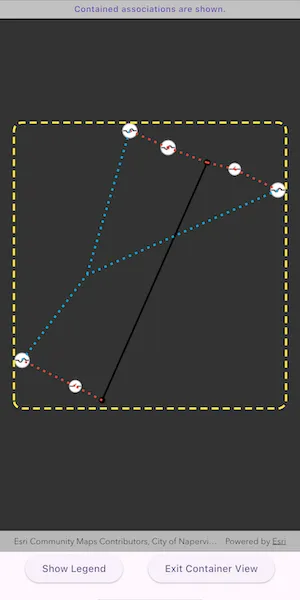
Tap on a container feature to show all features inside the container. The container is shown as a polygon graphic with the content features contained within. The viewpoint and scale of the map are also changed to the container’s extent. Connectivity and attachment associations inside the container are shown as red and blue dotted lines respectively.
How it works
- Create and load a web map that includes ArcGIS Pro Subtype Group Layers with only container features visible (i.e. fuse bank, switch bank, transformer bank, hand hole and junction box).
- Get and load the first
UtilityNetworkfrom the web map. - Add a
GraphicsOverlayfor displaying a container view. - Add a handler for the
onTapcallback of theArcGISMapView. - Identify a feature and create a
UtilityElementfrom it. - Get the associations for this element using
UtilityNetwork.getAssociations()with typeUtilityAssociationType.containment. - Turn-off the visibility of all
operationalLayers. - Get the features for the
UtilityElement(s) from the associations usingUtilityNetwork.getFeaturesForElements(). - Add a
Graphicwith the same geometry and symbol as these features. - Add another
Graphicthat represents this extent and zoom to this extent with some buffer. - Get associations for this extent using
UtilityNetwork.getAssociationsWithEnvelope(). - Add a
Graphicto represent the association geometry between them using a symbol that distinguishes betweenattachmentandconnectivityassociation type. - Turn-on the visibility of all
operationalLayers, clear theGraphicsand zoom out to the previous extent to exit the container view.
Relevant API
- SubtypeFeatureLayer
- UtilityAssociation
- UtilityAssociationType
- UtilityElement
- UtilityNetwork
- UtilityNetworkDefinition
About the data
The Naperville Electric SubtypeGroupLayers with Containers web map contains a utility network used to find associations shown in this sample. Authentication is required and handled within the sample code.
Additional information
Using utility network on ArcGIS Enterprise 10.8 requires an ArcGIS Enterprise member account licensed with the Utility Network user type extension. Please refer to the utility network services documentation.
Tags
associations, connectivity association, containment association, structural attachment associations, utility network
Sample code
// Copyright 2025 Esri//// Licensed under the Apache License, Version 2.0 (the "License");// you may not use this file except in compliance with the License.// You may obtain a copy of the License at////   https://www.apache.org/licenses/LICENSE-2.0//// Unless required by applicable law or agreed to in writing, software// distributed under the License is distributed on an "AS IS" BASIS,// WITHOUT WARRANTIES OR CONDITIONS OF ANY KIND, either express or implied.// See the License for the specific language governing permissions and// limitations under the License.//
import 'package:arcgis_maps/arcgis_maps.dart';import 'package:arcgis_maps_sdk_flutter_samples/common/common.dart';import 'package:arcgis_maps_sdk_flutter_samples/common/token_challenger_handler.dart';import 'package:flutter/material.dart';
class DisplayContentOfUtilityNetworkContainer extends StatefulWidget {  const DisplayContentOfUtilityNetworkContainer({super.key});
  @override  State<DisplayContentOfUtilityNetworkContainer> createState() =>      _DisplayContentOfUtilityNetworkContainerState();}
class _DisplayContentOfUtilityNetworkContainerState    extends State<DisplayContentOfUtilityNetworkContainer>    with SampleStateSupport {  // Create a controller for the map view.  final _mapViewController = ArcGISMapView.createController();  // The utility network used in the sample.  late UtilityNetwork _utilityNetwork;  // The graphics overlay to display the container contents.  final _graphicsOverlay = GraphicsOverlay();  // The symbol used to highlight the container boundary.  final _boundarySymbol = SimpleLineSymbol(    style: SimpleLineSymbolStyle.dash,    color: Colors.yellow,    width: 3,  );  // The symbol used to show an attachment association.  final _attachmentSymbol = SimpleLineSymbol(    style: SimpleLineSymbolStyle.dot,    color: Colors.lightBlue,    width: 3,  );  // The symbol used to show a connectivity association.  final _connectivitySymbol = SimpleLineSymbol(    style: SimpleLineSymbolStyle.dot,    color: Colors.red,    width: 3,  );  // A flag for when the map view is ready and controls can be used.  var _ready = false;  // A flag to show the symbol legend.  var _showLegend = false;  // The message to display in the banner.  var _message = '';  // To store the previous viewpoint before entering container view.  Viewpoint? _previousViewpoint;  // A flag to prevent multiple taps while an operation is in progress.  var _tapInProgress = false;
  @override  void initState() {    super.initState();
    // Set up authentication for the sample server.    // Note: Never hardcode login information in a production application.    // This is done solely for the sake of the sample.    ArcGISEnvironment        .authenticationManager        .arcGISAuthenticationChallengeHandler = TokenChallengeHandler(      'editor01',      'S7#i2LWmYH75',    );  }
  @override  void dispose() {    // Remove the TokenChallengeHandler and erase any credentials that were generated.    ArcGISEnvironment            .authenticationManager            .arcGISAuthenticationChallengeHandler =        null;    ArcGISEnvironment.authenticationManager.arcGISCredentialStore.removeAll();    super.dispose();  }
  @override  Widget build(BuildContext context) {    return Scaffold(      body: SafeArea(        left: false,        right: false,        child: Stack(          children: [            Column(              children: [                // Add a banner to show the results of the identify operation.                Visibility(                  visible: _message.isNotEmpty,                  child: MapBanner(text: _message),                ),                Expanded(                  // Add a map view to the widget tree and set a controller.                  child: ArcGISMapView(                    controllerProvider: () => _mapViewController,                    onMapViewReady: onMapViewReady,                    onTap: onTap,                  ),                ),                Row(                  mainAxisAlignment: MainAxisAlignment.spaceEvenly,                  children: [                    // A button to show the symbol legend.                    ElevatedButton(                      onPressed: () => setState(() => _showLegend = true),                      child: const Text('Show Legend'),                    ),                    // A button to exit container view.                    ElevatedButton(                      onPressed: _previousViewpoint != null ? reset : null,                      child: const Text('Exit Container View'),                    ),                  ],                ),              ],            ),            // Display a progress indicator and prevent interaction until state is ready.            LoadingIndicator(visible: !_ready),          ],        ),      ),      // Show the legend bottom sheet if the flag is set.      bottomSheet: _showLegend ? buildLegend(context) : null,    );  }
  Widget buildLegend(BuildContext context) {    // Build a non-modal bottom sheet to show the symbol legend.    return BottomSheetSettings(      title: 'Utility Association Types',      onCloseIconPressed: () => setState(() => _showLegend = false),      settingsWidgets: (context) => [        Column(          spacing: 5,          children: [            // Attachment symbol.            Row(              spacing: 10,              children: [                SwatchImage(                  symbol: _attachmentSymbol,                  backgroundColor: Colors.grey,                  width: 15,                  height: 15,                ),                const Text('Attachment'),              ],            ),            // Connectivity symbol.            Row(              spacing: 10,              children: [                SwatchImage(                  symbol: _connectivitySymbol,                  backgroundColor: Colors.grey,                  width: 15,                  height: 15,                ),                const Text('Connectivity'),              ],            ),            // Containment symbol.            Row(              spacing: 10,              children: [                SwatchImage(                  symbol: _boundarySymbol,                  backgroundColor: Colors.grey,                  width: 15,                  height: 15,                ),                const Text('Containment'),              ],            ),          ],        ),      ],    );  }
  Future<void> onMapViewReady() async {    // Create a map using the portal item of a web map containing a utility network.    final portal = Portal(      Uri.parse('https://sampleserver7.arcgisonline.com/portal/sharing/rest'),    );    final portalItem = PortalItem.withPortalAndItemId(      portal: portal,      itemId: '0e38e82729f942a19e937b31bfac1b8d',    );    final map = ArcGISMap.withItem(portalItem);
    // Load the map and the utility network.    setState(() => _message = 'Loading utility network ...');    await map.load();    _utilityNetwork = map.utilityNetworks.first;    await _utilityNetwork.load();
    // Set an initial viewpoint on the map.    map.initialViewpoint = Viewpoint.withLatLongScale(      latitude: 41.8,      longitude: -88.16,      scale: 4000,    );
    // Add the map to the map view.    _mapViewController.arcGISMap = map;
    // Add the graphics overlay to the map view.    _mapViewController.graphicsOverlays.add(_graphicsOverlay);
    // Set the state to be ready for a selection.    reset();
    // Set the ready state variable to true to enable the sample UI.    setState(() => _ready = true);  }
  Future<void> onTap(Offset localPosition) async {    // Ensure only one tap is processed at a time.    if (_tapInProgress) return;    _tapInProgress = true;
    // Perform an identify to determine if a user tapped on a feature.    final identifyResults = await _mapViewController.identifyLayers(      screenPoint: localPosition,      tolerance: 10,    );    await displayContainerContent(identifyResults);    _tapInProgress = false;  }
  Future<void> displayContainerContent(    List<IdentifyLayerResult> identifyResults,  ) async {    // Find the first result that is from a subtype feature layer.    final result = identifyResults        .where((result) => result.layerContent is SubtypeFeatureLayer)        .firstOrNull;    if (result == null) {      return;    }
    // Find the first feature. This will be the selected container feature.    final containerFeature = result.sublayerResults        .expand((result) => result.geoElements)        .whereType<ArcGISFeature>()        .firstOrNull;    if (containerFeature == null) {      return;    }
    // Create a utility network element from the container feature.    final containerElement = _utilityNetwork.createElement(      arcGISFeature: containerFeature,    );
    // Get the associations for the container element to find contained elements.    final associations = await _utilityNetwork.getAssociations(      element: containerElement,      type: UtilityAssociationType.containment,    );    final containedElements = associations        .map(          (association) =>              association.fromElement.objectId == containerElement.objectId              ? association.toElement              : association.fromElement,        )        .toList();
    // Get the features for the contained elements.    final containedFeatures = await _utilityNetwork.getFeaturesForElements(      containedElements,    );
    // Add a graphic for each of the contained features.    for (final feature in containedFeatures) {      final featureTable = feature.featureTable;      if (featureTable == null || featureTable is! ServiceFeatureTable) {        continue;      }      final symbol = featureTable.layerInfo?.drawingInfo?.renderer          ?.symbolForFeature(feature: feature);      _graphicsOverlay.graphics.add(        Graphic(geometry: feature.geometry, symbol: symbol),      );    }
    // Determine the extent of all the contained features.    final extent = _graphicsOverlay.extent;    if (extent == null) {      return;    }
    // Add a graphic to highlight the container boundary.    final containerGraphic = Graphic(      geometry: GeometryEngine.buffer(geometry: extent, distance: 0.05),      symbol: _boundarySymbol,    );    _graphicsOverlay.graphics.add(containerGraphic);
    // Add an association graphic for each of the contained elements.    final containedAssociations = await _utilityNetwork        .getAssociationsWithEnvelope(extent);    for (final association in containedAssociations) {      final symbol =          association.associationType == UtilityAssociationType.attachment          ? _attachmentSymbol          : _connectivitySymbol;      _graphicsOverlay.graphics.add(        Graphic(geometry: association.geometry, symbol: symbol),      );    }
    // Hide operational layers.    for (final layer in _mapViewController.arcGISMap!.operationalLayers) {      layer.isVisible = false;    }
    // Disable interaction.    _mapViewController.interactionOptions.enabled = false;
    // Get the current viewpoint before animating.    final viewpoint = _mapViewController.getCurrentViewpoint(      ViewpointType.centerAndScale,    );
    // Animate to the container.    _mapViewController        .setViewpointGeometry(containerGraphic.geometry!, paddingInDiPs: 20)        .ignore();
    // Remember the previous viewpoint and update the message banner.    setState(() {      _previousViewpoint = viewpoint;      _message = containedAssociations.isEmpty          ? 'This feature contains no associations.'          : 'Contained associations are shown.';    });  }
  void reset() {    // Clear any state that gets set when entering container view.    _graphicsOverlay.graphics.clear();    for (final layer in _mapViewController.arcGISMap!.operationalLayers) {      layer.isVisible = true;    }    _mapViewController.interactionOptions.enabled = true;    if (_previousViewpoint != null) {      _mapViewController.setViewpointAnimated(_previousViewpoint!);    }    setState(() {      _previousViewpoint = null;      _message = 'Tap on a container to see its content.';    });  }}